Redwood: Update Blanket Purchase Agreement from Award
In Redwood, when a sourcing event is completed, instead of creating a new agreement every time, you can now update an ongoing agreement. You can select an agreement to update, and then choose if you want to update any matching lines or expire the previous lines and add new.
This Redwood feature behaves the same as the classic application. Refer to key resources section for more details.
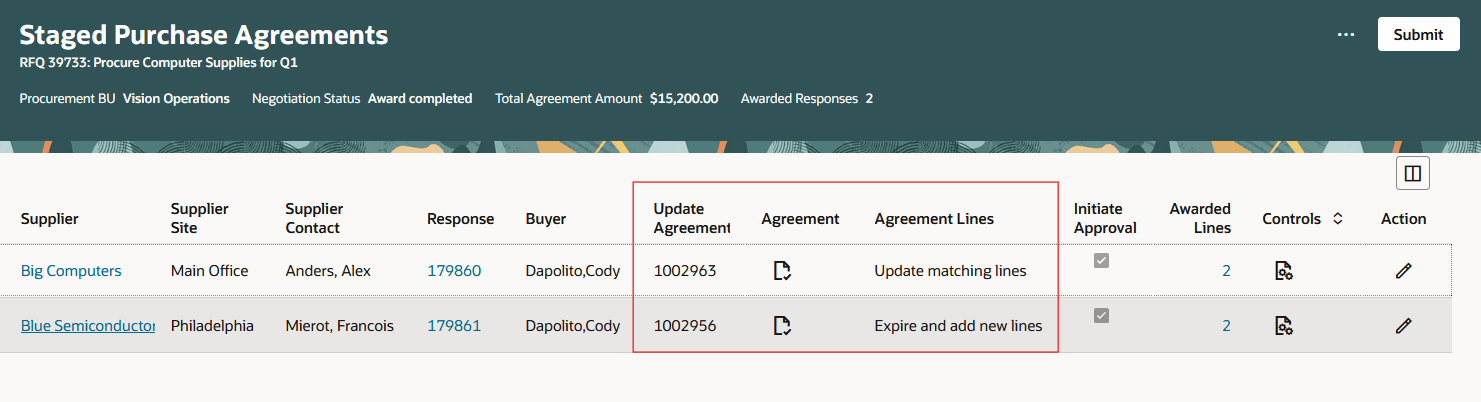
Update Existing Agreement
Updating existing agreements from a sourcing award allows you to apply the renegotiated pricing to open purchase orders retroactively, reducing the overhead from maintaining several documents. You can automatically track the changes to existing agreements from the negotiation saving significant time and effort.
Steps to enable and configure
To use this feature, you must enable these profile options if you haven't already.
- Redwood Pages for Sourcing Enabled (ORA_PON_SOURCING_REDWOOD_ENABLED).
- Redwood Page to Create Negotiation Enabled (ORA_PON_CREATE_NEGOTIATION_REDWOOD_ENABLED)
- Redwood Page to Award Negotiation Enabled (ORA_PON_AWARD_NEGOTIATION_REDWOOD_ENABLED)
For instructions on enabling a profile option, refer to the Set Profile Option Values topic.
Key resources
- Update Blanket Purchase Agreement from Negotiated Award.
- For information about using Oracle Visual Builder Studio to extend your Redwood application pages, see Oracle Fusion Cloud HCM and SCM: Extending Redwood Applications for HCM and SCM Using Visual Builder Studio.
Access requirements
Users who have been assigned a job role that contains these existing privileges can access this feature:
- Complete Supplier Negotiation Award (ORA_PON_COMPLETE_SUPPLIER_NEGOTIATION_AWARD_PRIV)
- Create Purchase Order (ORA_PO_CREATE_PURCHASE_ORDER_PRIV)
- Create Purchase Agreement (ORA_PO_CREATE_PURCHASE_AGREEMENT_PRIV)