Schedule and Execute Parallel Operations
Work order operations may now be scheduled in parallel and in overlapping fashion, if the respective work definition has operation dependencies defined in such manner. This reduces the overall make span of a work order and results in a more efficient production schedule.
If you define a work definition in SCM Execution with the Enable Parallel Operations option selected, you can specify Start-to-Start and Finish-to-Start operation dependencies. These dependencies let you create multiple parallel operation streams. Any work order created from this work definition inherits these operation dependencies.
All operation-resource sequences within an operation sequence continue to be scheduled sequentially in linear fashion. Consider two operations A and B that have several operation-resource sequences. Such operations are defined in SCM Execution with operation dependencies where A is the previous operation and B is the next operation, then this translates into following constraints, depending on dependency type:
- Dependency type = Start to Start:
Operation A’s first operation resource sequence must start before the start of operation B’s first operation resource sequence - Dependency type = Finish to Start:
Operation A’s last operation resource sequence must end before the start of operation B’s first operation resource sequence
Let’s consider an example with a work definition containing four operations and dependency types between these four operations as follows:
Operation Dependencies
| Previous Operation Sequence | Next Operation Sequence | Dependency Type |
|---|---|---|
| 10 | 20 | Finish to Start |
| 10 | 30 | Finish to Start |
| 20 | 30 | Start to Start |
| 20 | 40 | Finish to Start |
| 30 | 40 | Finish to Start |
This is visualized in the given figure, where the red, curved line indicates a Start to Start dependency, while all others indicate Finish to Start dependencies:
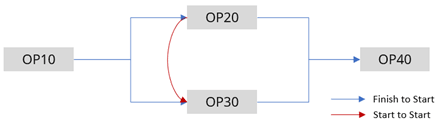
Visualizing Operation Dependencies
As Production Scheduling schedules operation-resource sequences (and not just operation sequences), let’s expand the example and assume that above operation sequences contain operation-resource sequences like this:
Operation Resource Sequences
| Operation Sequence | Operation Resource Sequence |
|---|---|
| 10 | 10, 20 |
| 20 | 10, 20, 30 |
| 30 | 10, 20 |
| 40 | 10, 20 |
This results in dependencies between operation-resource sequences as illustrated in the figure, where the red, curved line indicates once again a Start to Start dependency, while all others indicate Finish to Start dependencies:
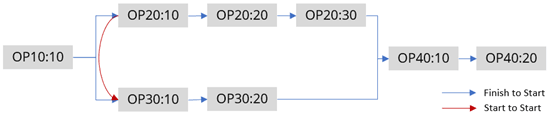
Visualizing Operation Dependencies
In this example, the following operation resource sequence dependencies and precedence constraints are respected when calculating a schedule:
- OP10:10 must be scheduled to finish before both OP20:10 and OP30:10 are scheduled to start.
- OP30:10 must be scheduled to start after OP20:10 is scheduled to start.
- OP20:10 must be scheduled to finish before OP20:20 is scheduled to start.
- OP20:20 must be scheduled to finish before OP20:30 is scheduled to start.
- OP30:10 must be scheduled to finish before OP30:20 is scheduled to start.
- OP40:10 must be scheduled to start after both OP20:30 and OP30:20 are scheduled to finish.
- OP40:10 must be scheduled to finish before OP40:20 is scheduled to start.
Note that Production Scheduling respects these precedence constraints in addition to other constraints, such as resource capacity and availability, and material availability constraints. Further, resource parameters, for example, Constraint Mode, and advanced schedule options such as Prebuild relaxed upstream resources also influence how operations are scheduled on specific resources.
Consequently, operation resources might not be scheduled adjacently (in Finish to Start case) or not be scheduled to start at the same time (in Start to Start case), but may have some separation time in between. But in all the cases the actual constraint derived from the dependency is respected.
Steps to enable and configure
Use the Opt In UI to enable this feature. For instructions, refer to the Optional Uptake of New Features section of this document.
Offering: Supply Chain Planning
Tips and considerations
If you want to use the Schedule and Execute Parallel Operations feature, then you must opt in to its parent feature: Production Scheduling. If you’ve already opted in to this parent feature, then you don’t have to opt in again.
Note that the operations belonging to planned orders from Supply Planning continue to be scheduled in linear, sequential fashion, since Supply Planning doesn’t consider the work definition operation dependencies in the current update yet.
Refer to the “Plan, Schedule, and Execute Parallel Operations in a Manufacturing Work Order” What’s New section for details about the associated setups in SCM Work Definition.
Access requirements
Users who are assigned a configured job role that contains this privilege can access this feature:
- Edit Production Schedule (MSC_EDIT_PRODUCTION_SCHEDULE_PRIV)
This privilege was available prior to this update.