Create Rule-Based Work Definition for Work Orders
In process industries, the production recipe that is used may depend on the size of the batch. For example, a large batch may be processed on different equipment. The input ingredients and the output products proportions may be different. Previously, these nuances could be defined in Oracle Manufacturing. Oracle Fusion Cloud Supply Planning now honors these work definitions. It automatically selects the right work definition for the given batch quantity and ensure proper ingredient scaling and output calculations.
In Oracle Manufacturing, you can define multiple work definitions to make the same product based on different batch size ranges. With these rules, you can enforce the optimal work definition to drive the execution system using process manufacturing work orders.
You can select the eligible process work definitions to create planned orders based on the planned order batch quantity and the batch size ranges. For example, minimum batch quantity and maximum batch quantity, on the process work definitions. If there are multiple work definitions qualifying based on the minimum and maximum quantity range, then Supply Planning selects the work definition with highest production priority (lowest numeric priority number).
Important:
-
This feature is supported for Process Manufacturing work definitions only.
-
The process manufacturing work definition can be defined without an item structure, with an item structure, or with a formula.
-
This feature is supported only for notional batch quantities. Physical batch quantities aren’t supported.
-
This feature is supported only for constrained supply plans.
-
If minimum and maximum batch quantity range isn’t defined in the work definition, then Supply Planning continues to plan as prior to this update.
Use Case 1
Consider an output item RA_CHEESE. Following are the process work definitions defined for this item:
Work Definitions of Item RA_CHEESE
| Work Definition Name | Production Priority | Minimum Batch Quantity | Maximum Batch Quantity |
|---|---|---|---|
| RA_PRWD1 | 1 | 100 | 500 |
| RA_PRWD2 | 2 | 300 | 1000 |
| RA_PRWD3 | 3 |
The output quantity and batch quantity ratio is 1. This means that if there is a demand for 100 units, supply plan will suggest a planned order of 100 and a batch quantity of 100.
In this use case, if there is a demand of 10 units on Day 1, then Supply Planning creates an order of quantity 10 and planned batch quantity as 10. The work definitions with production priority 1 and 2 doesn't qualify to fulfill this order, as their min-max range is 100-500 and 300-1000 respectively. In this case, work definition RA_PRWD3 with production priority 3 is selected for the planned order creation as there is no minimum and maximum batch quantity range defined.
Now suppose on Day 5, there is another sales order of quantity 200. To fulfill this demand, Supply Planning has selected work definition RA_PRWD1 as the batch quantity of 200 falls within the min-max range and it’s of higher priority and can fulfill the demand on time.
If on Day 7, there is another sales order of quantity 400. There are three eligible work definitions: RA_PRWD1, RA_PRWD2 and RA_PRWD3 for planned batch quantity of 400.
- Supply plan will select the work definition RA_PRWD1, if it can meet the demand on time as it’s of highest priority.
- If there are resource or material constraints in using work definition RA_PRWD1, and it can’t satisfy the demand on Day 7, then plan will look for next higher priority work definition, that is, RA_PRWD2, if it can satisfy the demand on time.
Use Case 2
Consider the process work definitions with minimum and maximum quantity defined at version level for item RA_CHEESE. In this use case, the work definition RA_WD1 (production priority 1) has two versions. Version 1 is active from 01-Jan-2025 till 31-Aug-2025, and version 2 is active from 01-Sep-2025 onwards.
Work Definition RA_WD1
| Work Definition Name | Production Priority | Version | Start Date | End Date | Minimum Batch Quantity | Maximum Batch Quantity |
|---|---|---|---|---|---|---|
| RA_WD1 | 1 | 1 | 01-Jan-2025 | 31-Aug-2025 | 100 | 250 |
| RA_WD1 | 1 | 2 | 01-Sep-2025 | 250 | 700 |
The work definition RA_WD2 (production priority 2) has two versions for same item RA_CHEESE. Version 1 is active from 01-Jan-2025 till 31-Dec-2025, and version 2 is active from 01-Jan-2026 onwards.
Work Definition RA_WD2
| Work Definition Name | Production Priority | Version | Start Date | End Date | Minimum Batch Quantity | Maximum Batch Quantity |
|---|---|---|---|---|---|---|
| RA_WD2 | 2 | 1 | 01-Jan-2025 | 31-Dec-2025 | 100 | 300 |
| RA_WD2 | 2 | 2 | 01-Jan-2026 | 300 | 700 |
There is a sales order of 200 units on 15-Sep-2025 for item RA_CHEESE. Supply plan creates a planned order of 200 units assuming no constraints (batch quantity=200) on 15-Sep-2025.
For this planned order, the eligible work definition is RA_WD2 (production priority 2) because on 15-Sep-2025, the min-max batch quantity range for RA_WD1 (production priority 1) is 250-700 and for batch quantity of 200 it is out of range. Supply planning will select the work definition RA_WD2 to further progress this planned order as its version 1 satisfies the effectivity and min-max batch quantity criteria.
Use Case 3
Consider the following setup:
- Item: RA_ASSY
- Minimum Order Quantity: 60
- Maximum Order Quantity: 150
Following are the work definitions:
Work Definitions for Item RA_ASSY
| Work Definition Name | Production Priority | Batch Quantity | Output Quantity | Minimum Batch Quantity | Maximum Batch Quantity |
|---|---|---|---|---|---|
| WD1 | 1 | 400 | 200 | 200 | |
| WD2 | 2 | 200 | 100 | 1 | 200 |
Work definition WD1 uses resource R1 whose usage is 1 unit/hour, and daily availability is 30 hours.
Work definition WD2 uses resource R2 whose usage is 1 unit/hour, and daily availability is 30 hours.
Following are the supplies and demands, and resource requirements picture after running an ECC plan with enforce resource capacity constraints.
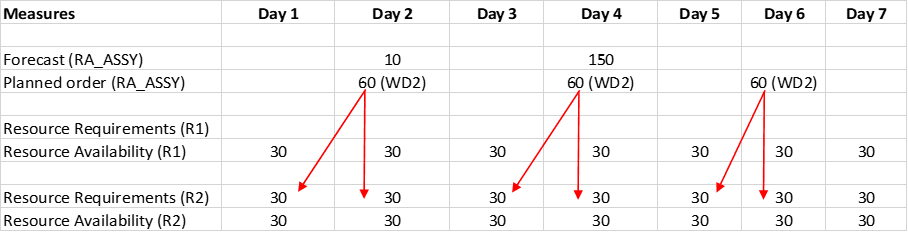
Material and Resource Plan
In this use case, the minimum order quantity is 60 and resource availability is 30 units/day, hence supply planning has calculated the lead time as 2 days through internal roll-up program. Supply planning creates planned orders of 60 units in its lead time.
The proportion of batch quantity to output quantity is 2:1. There is a demand of quantity 10 on day 2, since the lead time is 2 days, the planned order of 60 is created with batch quantity of 120. This batch quantity is in the range of work definition WD2, hence WD2 is selected for this planned order and resource requirements on resource R2 is generated.
There is another demand on day 4 for quantity 150. Since the lead time is 2 days, supply planning generates multiple planned orders of 60 units. The resource R2 is constraint and enforce resource capacity is enforced, hence this demand is satisfied late. The resource availability on resource R1 can’t be used due to work definition selection rules.
Work Definition
A new visualization Work Definition is introduced as part of this feature to view the version details of process work definitions. In this visualization, you can view the work definition, production priorities of the work definition, the start and end dates of its versions, along with minimum and maximum batch quantities defined for each version.
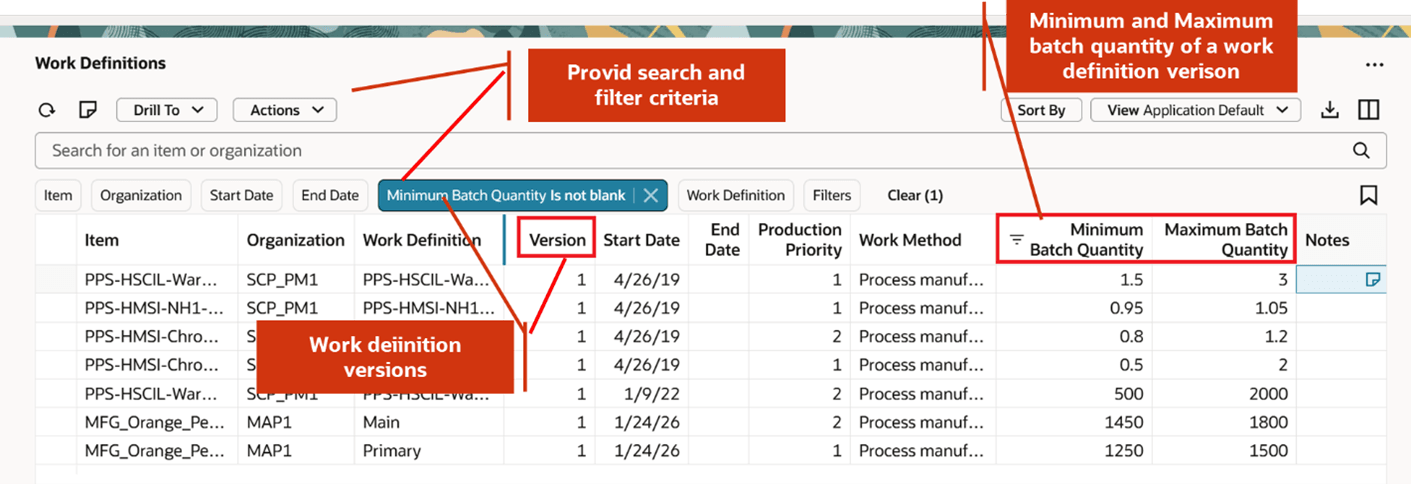
Work Definition Visualization
The values in this visualization are non-editable. You can't edit this visualization to alter the minimum and maximum batch quantities.
Uploading Work Definition Versions for External Systems
A new tab RoutingVersions has been added to the existing template ScpRoutingsImportTemplate.xlsm, to upload the version details of a process work definition.
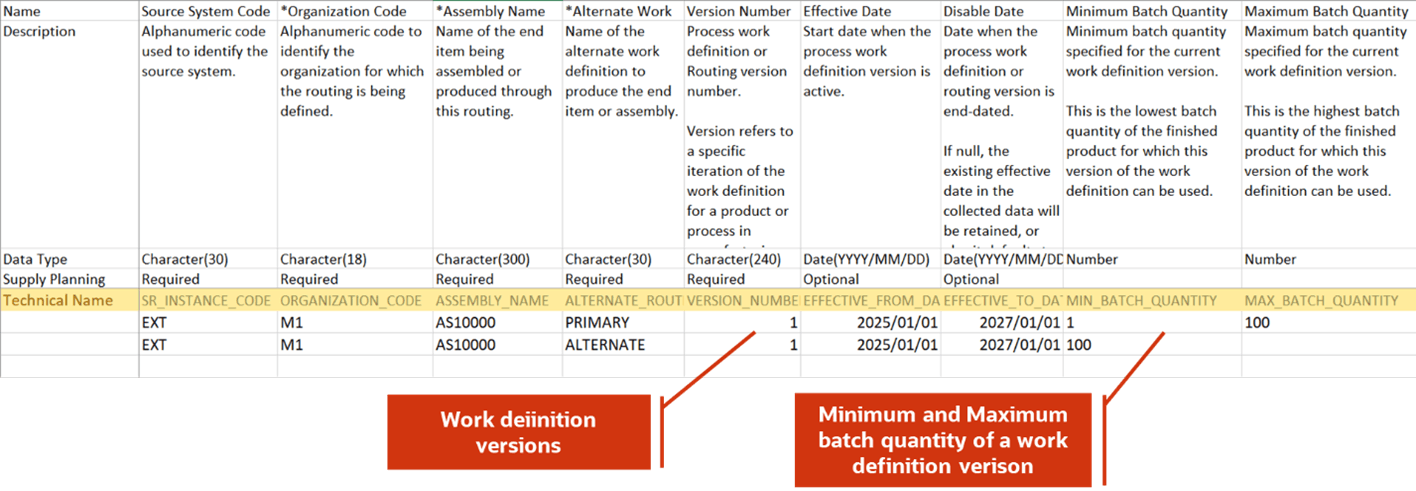
RoutingVersions FBDI
Steps to enable and configure
You don't need to do anything to enable this feature.
Tips and considerations
- This feature is supported for both Supply plans and Demand and Supply plans.
- If there are no work definitions eligible to create a planned order due to incorrect setup of minimum and maximum batch quantity ranges, supply planning picks the closest batch quantity with highest production priority from the minimum batch quantity and maximum batch quantity range across work definitions for the output product.
- The new visualization Work Definition also contains the header information for Discrete and Flow work definitions without their version details.
Access requirements
Users who are assigned a configured job role that contains these privileges can access this feature:
- Monitor Supply Planning Work Area (MSC_MONITOR_SUPPLY_PLANNING_WORK_AREA_PRIV)
- Run Plan with Snapshot (MSC_RUN_PLAN_WITH_SNAPSHOT_PRIV)
- Edit Plans (MSC_EDIT_PLANS_PRIV)
These privileges were available prior to this update.