Plan Considering Manufacturing Production Line Calendars
Manufacturing plants with multiple production lines may have situations where they scale production up and down to meet shifting demand by changing the shift schedules by production line. You can now assign a different calendar to a production line in Oracle Manufacturing and Oracle Supply Planning calculates the production plan appropriately by considering the specific calendar constraints and schedules associated with each production line.
Production lines have a defined capacity for manufacturing products. The product mix is influenced by demand and production constraints. Planners want to schedule daily production based on customer demand signals and gain insights into material requirements for components and subassemblies, supporting long-term supplier negotiations and other business needs. This is needed even if day-to-day replenishment uses kanban techniques. Planners also aim to anticipate overcapacity situations, indicating potential production line issues.
Planning with respect to a production line-specific calendar enables planners to plan according to production line availability, which may differ from the organization's manufacturing calendar.
Users can specify one or more calendars with different date ranges within a work center to override the plant-level production calendar. This allows for modeling variations in shifts, resource capacity, and availability in Oracle Fusion Cloud Supply Chain Execution. Planning and scheduling can then consider capacity availability that incorporates these granular variations at the production line level.
Production Line Calendar
A production line calendar is defined on the New Production Line page in the Manufacturing module.
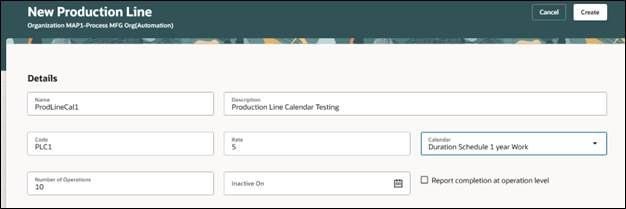
New Production Line Page
Production Line Calendar in Supply Planning
There’s a new column named Line Calendar on the Resources page.
- The Line Calendar column is available in plans and Plan Inputs, and it’s not editable.
- The production line is a resource with a Resource Type of Line.
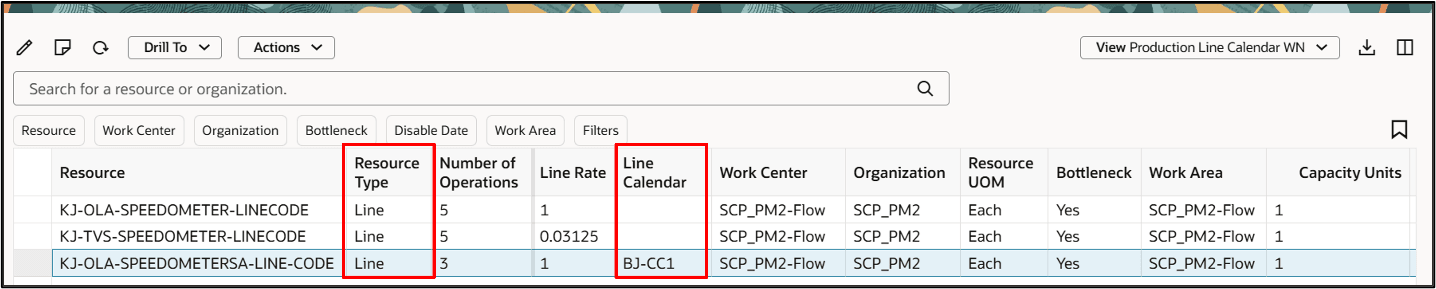
Line Calendar Column on Resources Page
Note: The planning process behavior with respect to a production line-specific calendar is the same as a resource-specific calendar.
Example 1
In this example, Tuesday is a nonworking day for the manufacturing organization calendar, but the work center containing the resource has a work center-specific calendar with a 4-hour half shift scheduled on Tuesday.
The capacity remains on Tuesday. The planning engine consumes the available capacity of Wednesday and then, if needed, goes backward and consumes the available capacity of Tuesday.
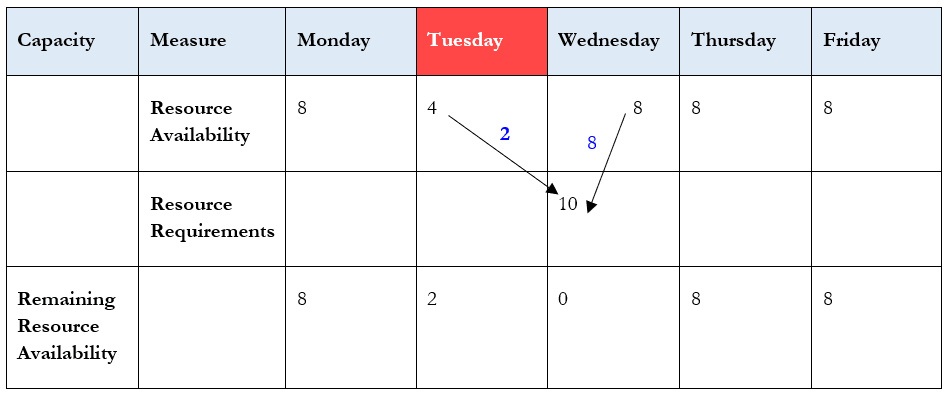
Effect of Resource Calendar on Resource Availability
The 10 hours of resource requirements on Wednesday are satisfied by the resource availability on the following days:
- Wednesday: 8 Hours
- Tuesday: 2 Hours
Note: In all cases, the planned order start date will be the first working day before the nonworking day.
In this example, the planned order start date will be on Monday at 23:59, and the planned order end date will be on Wednesday at 23:59.
Example 2 – Unconstrained Supply Planning
This example is similar to the prior example, but it uses unconstrained supply planning (USP).
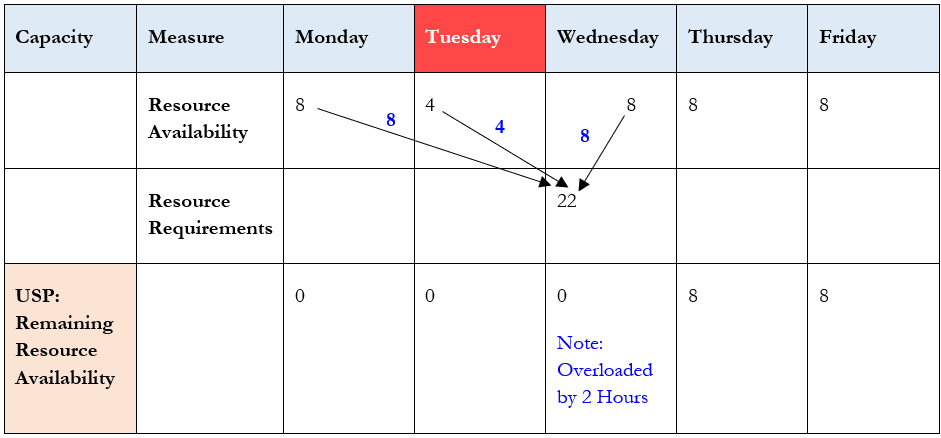
Effect of Resource Calendar on Resource Availability in Unconstrained Supply Planning
The 22 hours of resource requirements on Wednesday are satisfied by the resource availability on the following days:
- Monday: 8 Hours
- Tuesday: 4 Hours
- Wednesday: 8 Hours
Note: Wednesday is overloaded by 2 hours.
In this example, the planned order start date will be on Monday at 23:59, and the planned order end date will be on Wednesday at 23:59.
Example 3 – Constrained Supply Planning
This example is similar to the prior one, but it uses constrained supply planning (CSP).
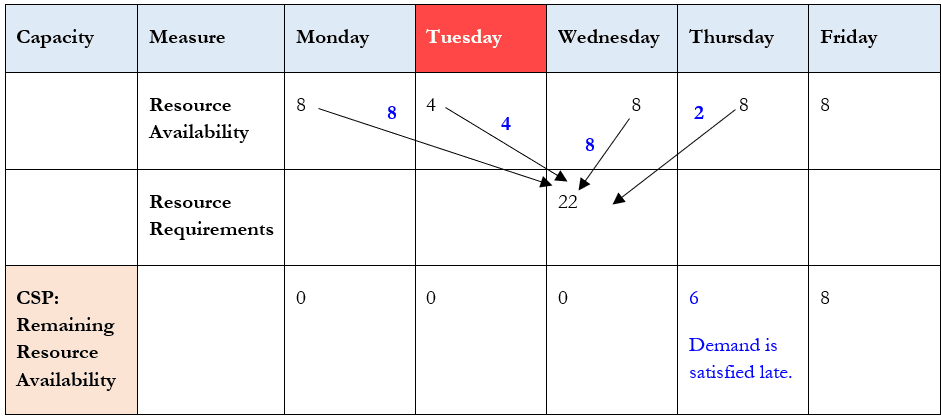
Effect of Resource Calendar on Resource Availability in Constrained Supply Planning
The 22 hours of resource requirements on Wednesday are satisfied by the resource availability on the following days:
- Monday: 8 Hours
- Tuesday: 4 Hours
- Wednesday: 8 Hours
- Thursday: 2 Hours
Note: The demand is satisfied late, on Thursday.
In this example, the planned order start date will be on Monday at 23:59, and the planned order end date will be on Thursday at 23:59.
Example 4 – Unconstrained Supply Planning
In this example, the organization manufacturing calendar has resource availability Monday through Friday, 8 hours daily. The production line calendar overrides this: 10 hours on Monday, Wednesday, and Friday, with no availability on Tuesday and Thursday.
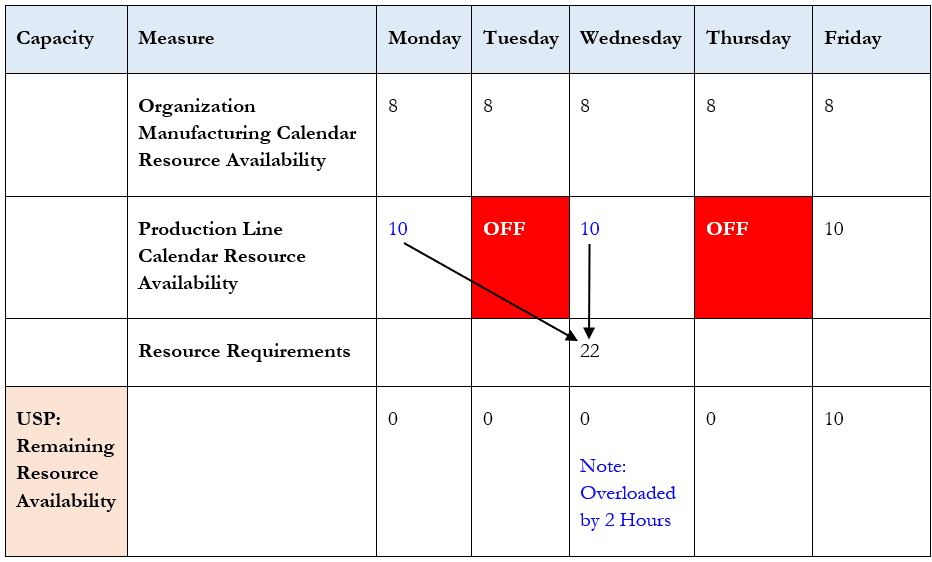
Effect of Resource Calendar on Resource Availability in Unconstrained Supply Planning
The 22 hours of resource requirements on Wednesday are satisfied by the resource availability on the following days:
- Monday: 10 Hours
- Wednesday: 10 Hours plus 2 hours of overtime
Note: Wednesday is overloaded by 2 hours.
In this example, the planned order start date will be on Monday at 23:59, and the planned order end date will be on Wednesday at 23:59.
Example 5 – Constrained Supply Planning
This example is similar to the previous one. The organization manufacturing calendar has resource availability Monday through Friday, 8 hours daily. The production line calendar overrides this: 10 hours on Monday, Wednesday, and Friday, with no availability on Tuesday and Thursday.
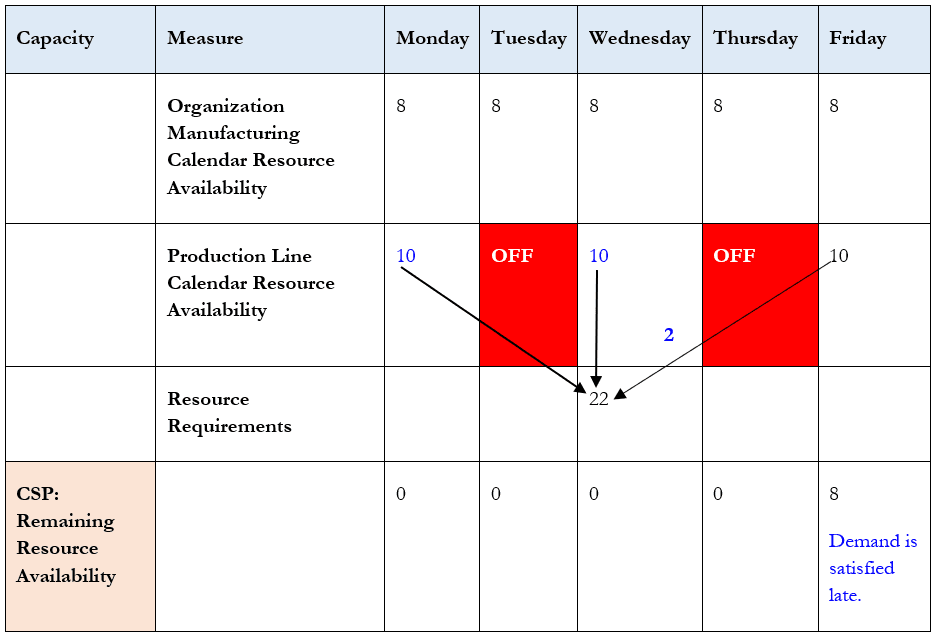
Effect of Resource Calendar on Resource Availability in Constrained Supply Planning
The 22 hours of resource requirements on Wednesday are satisfied by the resource availability on the following days:
- Monday: 10 Hours
- Wednesday: 10 Hours
- Friday: 2 Hours
Note: The demand is satisfied late, on Friday.
In this example, the planned order start date will be on Monday at 23:59, and the planned order end date will be on Wednesday at 23:59.
Steps to enable and configure
You don't need to do anything to enable this feature.
Tips and considerations
The supply start date and end date are scheduled on working days of the Organization Manufacturing Calendar.
Key resources
- For more information see: Plan Respecting Calendars Specific to Work Centers.
- For more information see: Plan Respecting Resource Availability on Nonworking Days.
Access requirements
Users who are assigned a configured job role that contains these privileges can access this feature:
- View Plan Options (MSC_VIEW_PLAN_OPTIONS_PRIV)
- Edit Plan Options (MSC_EDIT_PLAN_OPTIONS_PRIV)
These privileges were available prior to this update.