Repeat Components in the Same Operation
Process manufacturers often require the same ingredient multiple times within a single operation to support different substeps in a batch. With this update, Oracle Supply Planning honors the definitions in Oracle Manufacturing and calculates the ingredient requirements accurately, helping to ensure timely procurement or manufacturing of the ingredient.
This is achieved by allowing customers to add the same item multiple times using unique sequence numbers within a formula or item structure. These granular definitions are now carried forward into the Manufacturing work definition and retained throughout the work order creation process. By respecting these individual material sequences, the system ensures that specific ingredient lines remain distinct rather than being consolidated, directly supporting these complex substeps.
This functionality applies to both constrained and unconstrained supply planning.
Related Columns and Attributes
Attributes and columns that support this functionality are Find Number and Material Sequence.
- The Find Number and Material Sequence columns are available in Plan Inputs and plan modes.
- These columns are available in supply plans and in demand and supply plans.
- These attributes aren't editable.
- These columns aren't available in the simulation set.
- The Material Sequence attribute combined with the Find Number attribute distinguishes between repeating materials in the same operation.
- The Find Number is carried over from the item structure as defined in Product Information Management.
- A Material Sequence Number is generated when a user sets up operations in a Manufacturing work definition.
- The Material Sequence attribute in the Manufacturing work order is unique.
- Both Find Number and Material Sequence are required.
- There are no find numbers for ad hoc components.
- In process manufacturing, the find number isn't carried over to the work order, whereas in discrete manufacturing, it is carried over.
Item Structures with Material Sequence Number
The Item Sequence column header on the Item Structures page has been renamed to Material Sequence, which displays the Material Sequence Number.
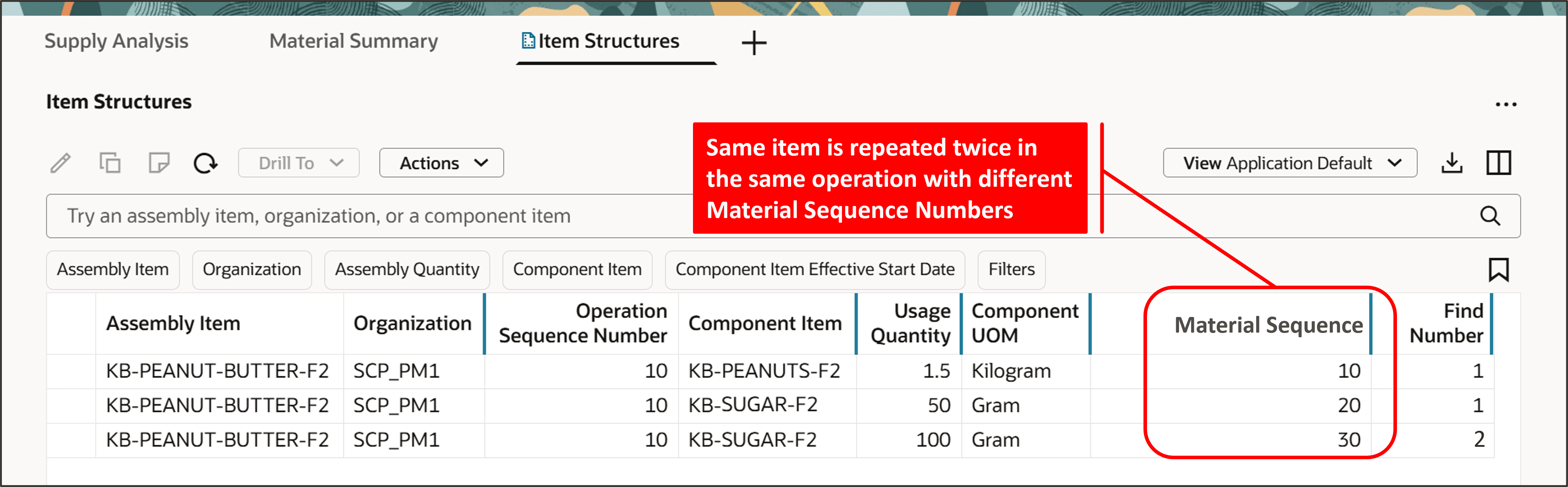
Material Sequence Column on Item Structures Page
Supplies and Demands with Material Sequence Number and Find Number
The Material Sequence and Find Number columns have been added to the Supplies and Demands page.
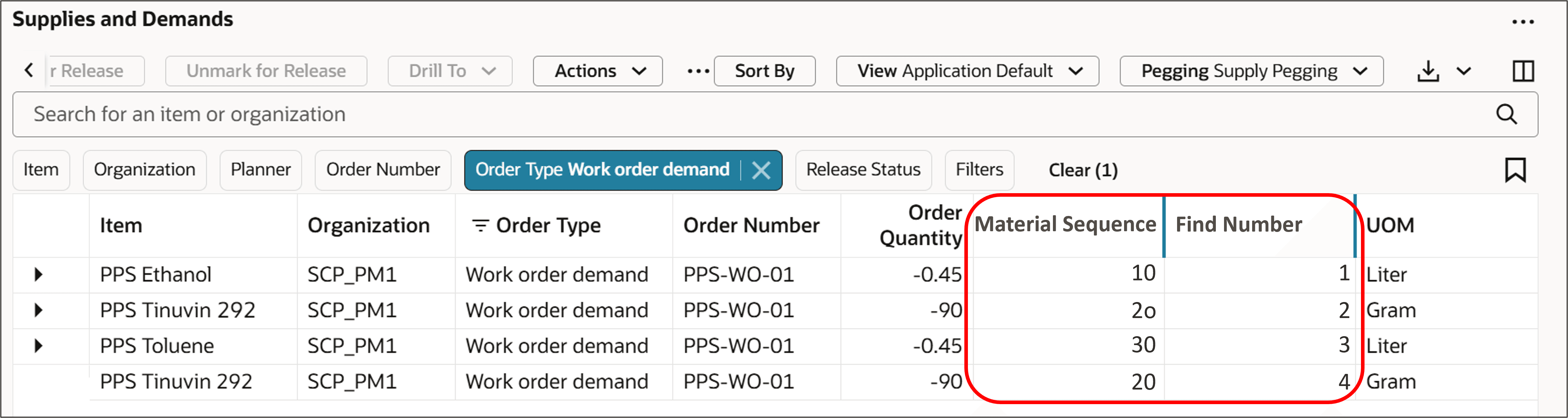
Material Sequence and Find Number Columns on Supplies and Demands Page
Example 1 – Process Manufacturing Without Component Substitution
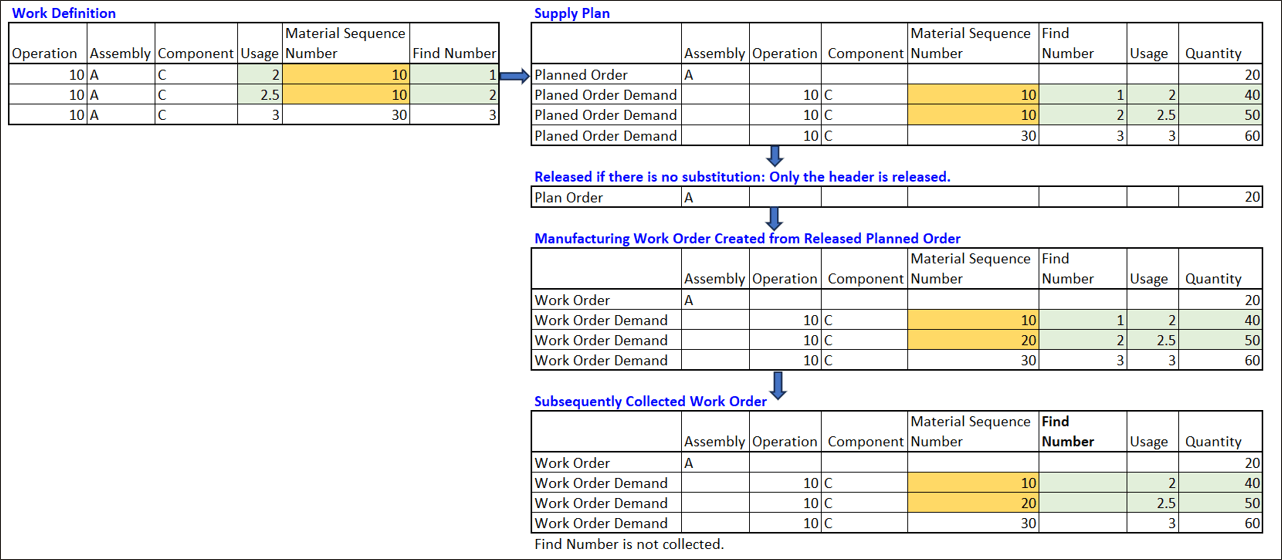
In process manufacturing, work order lines are consolidated if the material sequence numbers are the same for the same component, as shown by the green highlights in the following image.
Also, note that the find number isn't carried over to the work order in process manufacturing, unlike in discrete manufacturing where it is carried over.
- In this example, the first two instances of component C with the same material sequence number in the supply plan are consolidated into one work order demand, adding the component quantities: 40 + 50.
- The resulting work order demand component quantity is 90 (40 + 50).
The following image shows the flow of data from Manufacturing to Planning and then back to Manufacturing, and finally back to Planning.
Assembly: A Component: C Usage = 2

Example of Process Manufacturing Without Component Substitution
Example 2 - Discrete Manufacturing
In discrete manufacturing, multiple instances of the same component with the same material sequence number aren't consolidated due to different find numbers carried over from the work definition. Instead, material sequence numbers are adjusted to make them unique, as shown by the orange highlights in the following image.
In this example, the material sequence number of the second instance of component C's work order demand is changed from 10 to 20.
Example of Discrete Manufacturing
Example 3 – Process Manufacturing with Component Substitution
In this example:
- Assembly: A
- Component: C
- Usage = 2
- Substitute Components: C1 and C2
- Substitution Usage = 2
This substitution usage means 1 unit of C can be replaced by 2 units of C1 or C2.
For component substitution, the planned order header and details are released to Manufacturing.
- Material sequence numbers are adjusted to create unique numbers for different components, as shown by the orange highlights in the following image.
- Substitute components have the same find number as the parent. The material sequence number of substitute component C2's work order demand is changed from 10 to 20.
The following image shows the flow of data from Manufacturing to Planning and then back to Manufacturing, and finally back to Planning.
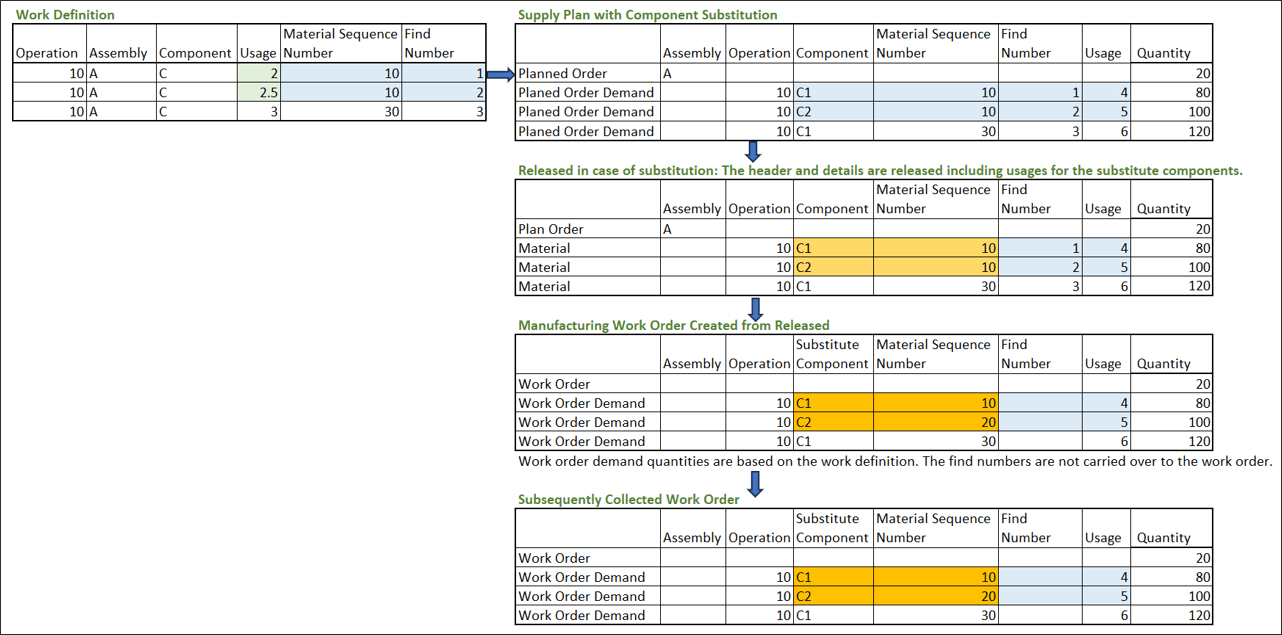
Example of Process Manufacturing with Component Substitution
Steps to enable and configure
You don't need to do anything to enable this feature.
Tips and considerations
The release process doesn't currently release the find number to Manufacturing for component substitution.
Key resources
For more information see: Plan Considering Requirements for Same Component at Different Stages of Manufacturing Process.
Access requirements
Users who are assigned a configured job role that contains these privileges can access this feature:
- View Plan Options (MSC_VIEW_PLAN_OPTIONS_PRIV)
- Edit Plan Options (MSC_EDIT_PLAN_OPTIONS_PRIV)
These privileges were available prior to this update.