Redwood: Display Alternate UOM Quantities for On-Hand Lots Using Lot-Specific UOM Conversion Rates
You can now collect secondary unit of measure (UOM) and secondary-quantity data from Oracle Inventory Management for dual-UOM items and display the converted Alternate UOM and Order Quantity in Alternate UOM for on-hand lots in both plan inputs and plan outputs. This capability honors lot-specific UOM conversions, giving you precise visibility when potency, concentration, density, or size varies by lot. This reduces potential errors caused by applying a single conversion across all lots and helps improve inventory accuracy, costing, compliance, and fulfillment decisions.
This feature enhances the Release 25D feature “Use Alternate UOM to Display and Release Order Quantities” for on-hand supplies.
This feature enables you to:
- Collect Alternate UOM on-hand quantities based on lot-specific UOM conversions derived in Oracle Fusion Cloud SCM
- Display these Alternate UOM on-hand quantities in a plan
It applies to supply plans and replenishment plans.
This feature applies in the following scenarios:
- All items enabled with secondary UOM in Oracle Cloud SCM will have on-hand supplies populated with the secondary UOM and secondary UOM quantities. With this update, secondary UOM and secondary UOM quantities are collected and displayed in Plan Inputs and in the plan outputs of supply plans and replenishment plans.
- For items that aren’t enabled with secondary UOM in Oracle Cloud SCM, you can assign an alternate UOM in a simulation set and then compute and display alternate UOM and alternate UOM quantities in plan output.
- For items that are lot controlled, enabled with secondary UOM, and with a lot-specific UOM conversion defined, Oracle Cloud SCM derives secondary UOM quantities for on-hand supplies based on lot-specific UOM conversions. With this update, secondary UOM and secondary UOM quantities are collected and displayed in Plan Inputs and in the plan outputs of supply plans and replenishment plans.
To use this feature:
- Define an Item enabled with secondary UOM in Oracle Product Hub.
- Turn on the Enable lot-specific conversions for items inventory organization parameter.
- Optionally, turn on the Auto-create UOM conversions for new lots inventory organization parameter.
- Set up items with dual UOM control and ensure the items are only Lot controlled with Full Control enabled.
- Create item interclass conversions based on the secondary UOM in Product Hub.
- Set up lot-specific UOM conversions in Oracle Inventory Management.
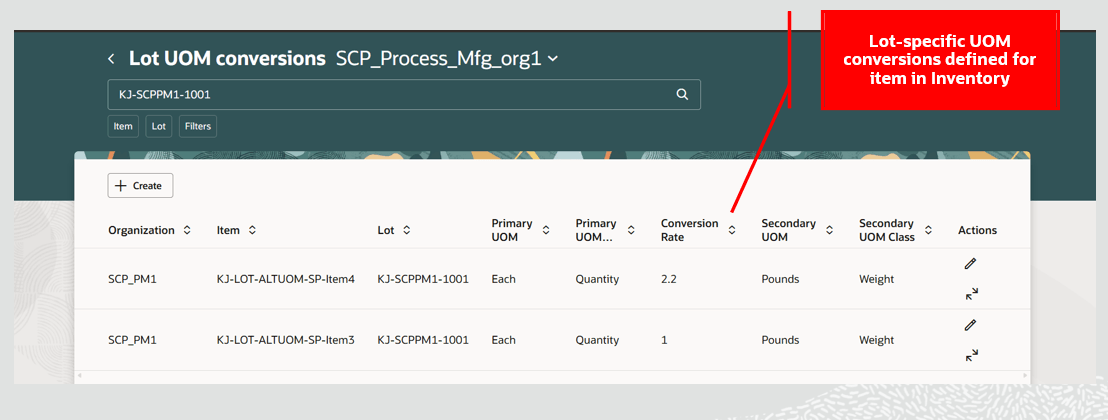
Lot-Specific UOM Conversion Defined for Item and On-Hand Lot in Inventory
- Create on-hand supplies in Inventory Management.
- Collect on-hand supplies.
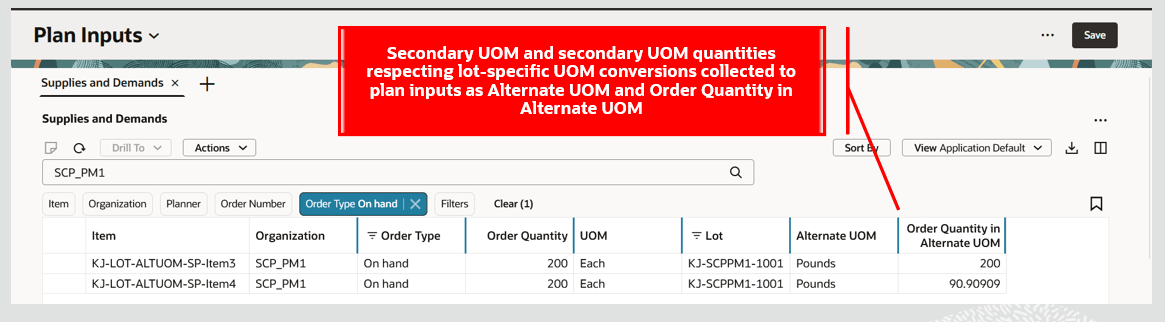
Alternate UOM Details Displayed for On-Hand Lot with Lot-Specific UOM Conversion in Plan Inputs
- Run the plan with the plan option Use Alternate UOM for Orders set to either Display and release or Display only.
- Review the on-hand quantities with alternate UOM and alternate UOM quantities in a plan.
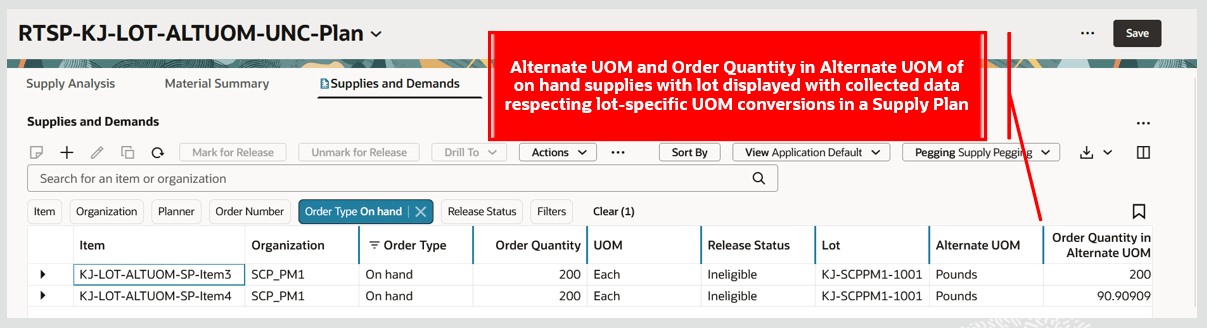
Alternate UOM Details Displayed for On-Hand Lot with Lot-Specific UOM Conversion in Plan Output
The following table summarizes additional capabilities supported for on-hand supplies with alternate UOM:
| Alternate UOM in collected data | Order Quantity in Alternate UOM in collected data | Item Alternate UOM enabled in Product Hub | Alternate UOM specified in simulation set in Supply Chain Planning | On-hand orders created in simulation set | Plan output |
|---|---|---|---|---|---|
| Yes | Yes | Yes | Can't be specified | Displays alternate UOM and Order Quantity in Alternate UOM from collected data | |
| No | No | Yes | Yes | Applies the behavior from release 25D feature "Use Alternate UOM to Display and Release Order Quantities" for displaying Alternate UOM and Order Quantity in Alternate UOM for on-hand supplies | |
| No | No | No | Yes | ||
| No | No | No | Yes | Yes |
Steps to enable and configure
You don't need to do anything to enable this feature.
Tips and considerations
- This feature isn’t applicable for external source systems.
- Alternate UOM and Order Quantity in Alternate UOM for other supply types are derived and displayed based on the 25D feature “Use Alternate UOM to Display and Release Order Quantities.”
- If an on-hand supply with an order quantity in alternate UOM is added to a simulation set and the firm quantity is updated, then the simulation set information will be the source of truth. In such a case, the order quantity in the primary UOM will be updated, and the planning process will recompute the order quantity in the Alternate UOM for on-hand supply based on the planned item’s interclass or intraclass UOM conversions. This means lot-specific UOM conversions won’t be valid in plan output if the on-hand supply is added to a simulation set and the firm quantity is updated.
- If you override the firm quantity for on-hand supply with alternate UOM and Order Quantity in Alternate UOM based on lot-specific UOM conversions within a plan, then during the simulation plan run the Order Quantity in Alternate UOM will be recomputed based on the planned item alternate UOM interclass or intraclass conversions.
Key resources
Refer to the 25D release feature “Use Alternate UOM to Display and Release Order Quantities” for additional details on alternate unit of measure support in Supply Chain Planning.
Access requirements
Users who are assigned a configured job role that contains these privileges can access this feature:
- Monitor Supply Planning Work Area (MSC_MONITOR_SUPPLY_PLANNING_WORK_AREA_PRIV)
- Monitor Demand and Supply Planning Work Area (MSC_MONITOR_DEMAND_AND_SUPPLY_PLANNING_WORK_AREA_PRIV)
- Manage Replenishment Planning (MSC_MONITOR_REPLENISHMENT_PLANNING_WORK_AREA_PRIV)
These privileges were available prior to this update.