Identify Attachments and Notes on Requisition Lines
You can now identify notes and attachments on a requisition line. An icon is displayed next to the line, indicating that it contains an attachment or a note.
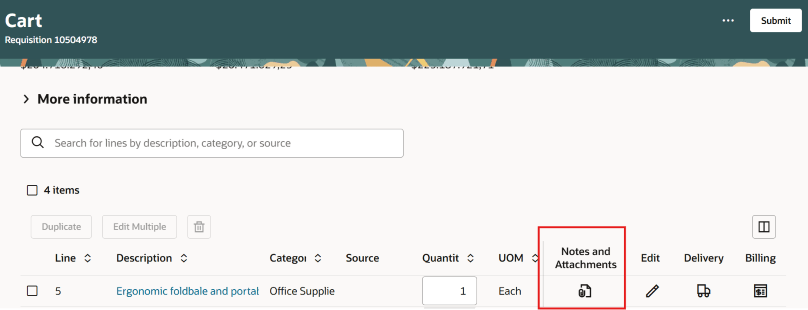
Notes and Attachments on the Shopping Cart
View the notes and attachments in a drawer using the icon.
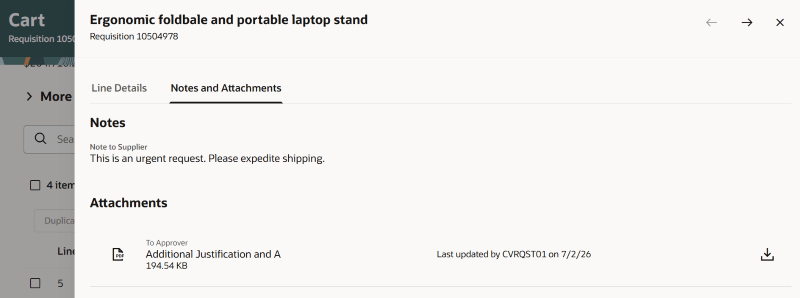
Notes and Attachments Drawer
This feature is also available when viewing requisition details. Each line that contains a note or an attachment will display this icon. Details of the notes and attachments will display in a drawer.
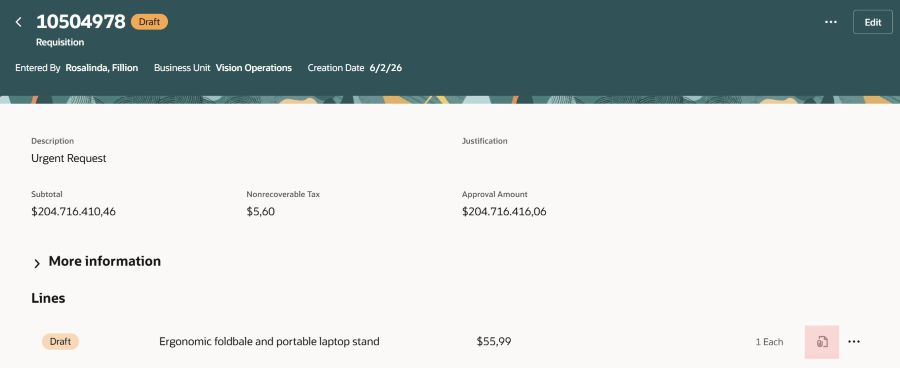
Notes and Attachments on Requisition Details
Steps to enable and configure
You don't need to do anything to enable this feature.
Tips and considerations
- Extensibility:
- You can hide or show the icon using Extensibility on these pages:
- List view of the shopping cart.
- Requisition Details.
- You can hide or show the icon using Extensibility on these pages:
Key resources
- To know how to provide the required privileges to your requesters to use your own configured role instead of the Requisition Self Service User role, refer to the Privileges Required for a Predefined Role for a Requisition Self Service User topic.
- For more information on how to enable a guided journey for Redwood pages, refer to the Enable a Guided Journey for Redwood Pages topic.
- For information about using Oracle Visual Builder Studio to extend your Redwood application pages, see Oracle Fusion Cloud HCM and SCM: Extending Redwood Applications for HCM and SCM Using Visual Builder Studio.