Edit Requisition Details Directly on the Shopping Cart
You can now directly edit the Description and Justification fields on both the list view and the table view of the cart. Previously, you had to navigate to the Requisition Summary page to edit these details.
Any values you enter are automatically saved when you navigate to any other page in the application.
You can view and edit the data from both the Cart and the Requisition Summary pages seamlessly.

Description and Justification Editable on the Cart
Use the Edit icon on the top of the cart to navigate to requisition summary.
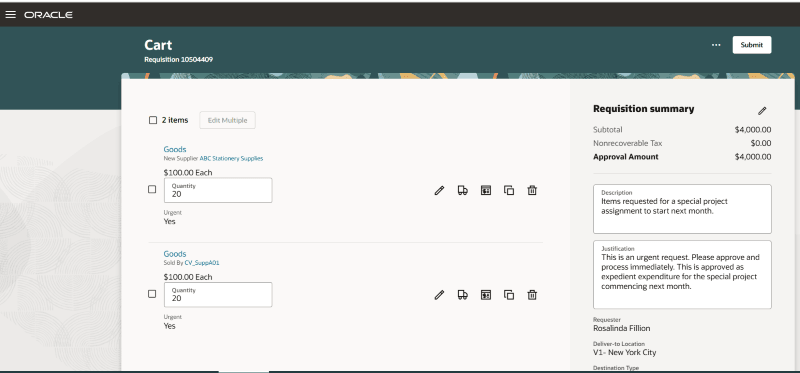
Edit Description and Justification in the List View of the Shopping Cart
Directly editing these fields on the cart improves usability by reducing the additional navigation and clicks to get to the requisition summary.
Steps to enable and configure
You don't need to do anything to enable this feature.
Tips and considerations
- The maximum character limit is unchanged at 240 and 1000 respectively for the Description and Justification fields.
- Extensibility capabilities:
- Show, hide, or make as read-only.
- Mark as required or optional. Note that the description field will always be marked 'Required' on the cart if you have opted into the 'Enforce Requester-Provided Description for Requisitions' feature.
Key resources
For information about using Oracle Visual Builder Studio to extend your Redwood application pages, see Oracle Fusion Cloud HCM and SCM: Extending Redwood Applications for HCM and SCM Using Visual Builder Studio.