Redwood: View and Capture Additional Lot Attributes
In industries where lot-controlled goods are widely used, timely and accurate entry of lot-level information is critical for maintaining product quality, ensuring compliance, and supporting informed decision-making. If you're unable to capture key lot attributes, such as expiration date, material status, or maturity date at the time of the transaction, this slows down operations and increases the risk of errors, inconsistent data entry, and fragmented information. Now, you have the ability to view and update lot attributes directly within the context of day-to-day transactions.
These editable lot attributes have been added to the Inventory and Receiving transactional pages:
Inventory
|
Page |
Navigation |
Additional Lot Attributes |
|---|---|---|
| Pending Transactions | Inventory Transactions > Pending Transactions > Record Lots |
|
| Miscellaneous Transactions | Item Quantities > Create Miscellaneous Transactions > Record Lots |
Miscellaneous Receipt:
Miscellaneous Issue:
|
| Interorganization Transfer | Item Quantities > More Actions > Create Interorganization Transfer > Record Lots |
|
| Project Transfer | Item Quantities > More Actions > Create Project Transfer > Record Lots |
|
| Consigned Inventory |
Transfer to Owned > Record Lots Transfer to Consigned > Record Lots |
|
| Picks | Picks > Pick Details > Record Lots |
|
| Confirm Pick Slips | Open Pick Slips > Pick Slip > Record Lots |
|
Receiving
|
Page |
Navigation |
Additional Lot Attributes |
|---|---|---|
| Expected Shipment Lines | Expected Shipment Lines > Record Lots |
When adding new lots:
When selecting existing lots:
|
| Awaiting Inspection | Received Lines > Awaiting Inspection > Record Lots |
|
| Awaiting Put Away | Received Lines > Awaiting Put Away > Record Lots |
When adding new lots:
When selecting existing lots:
|
| Corrections | Received Lines > Corrections > Record Lots |
When selecting existing lots:
|
The Generate Lot, Generate Parent Lot, and Generate Multiple Lots action buttons have been added to these transactional pages where applicable:
Inventory
| Page | Navigation | Additional Action Buttons |
|---|---|---|
| Miscellaneous Transactions | Item Quantities > Create Miscellaneous Transactions > Record Lots |
|
| Miscellaneous Transactions | Item Quantities > Create Miscellaneous Transactions |
|
| Lots | Lots and Serial Numbers > Lots > New Lot |
|
Receiving
| Page | Navigation | Additional Action Buttons |
|---|---|---|
| Receive Lines | Expected Shipment Lines > Receive > Record Lots |
|
| Awaiting Put Away | Received Lines > Awaiting Put Away > Record Lots | |
| Corrections | Received Lines > Corrections > Record Lots |
You can now generate multiple lots with or without serial numbers. System-generated serial numbers are created in ranges. After generating the lots, you can choose to manually enter or scan the serial numbers.
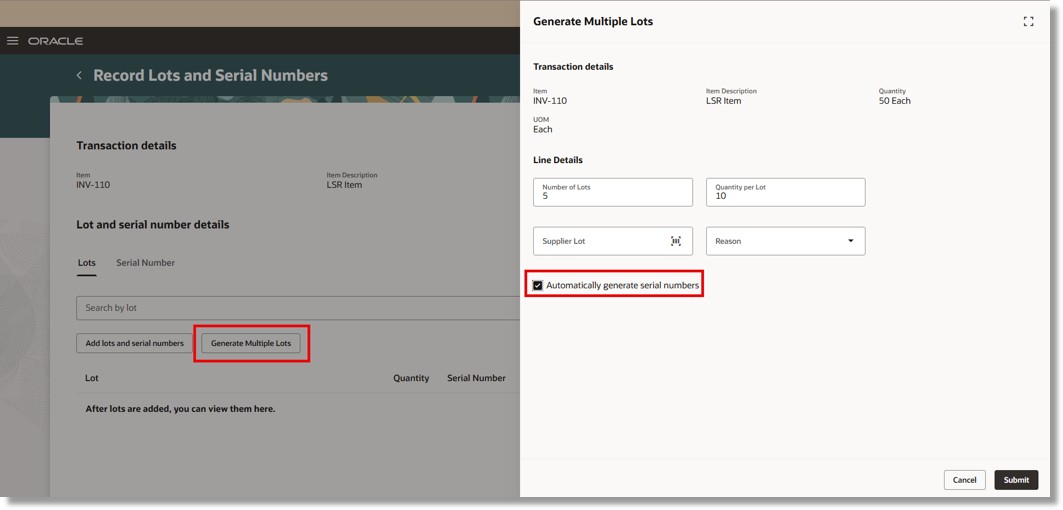
Generate Multiple Lots
Lots and serial numbers are displayed in a tabbed structure, with serial numbers accessible through links.
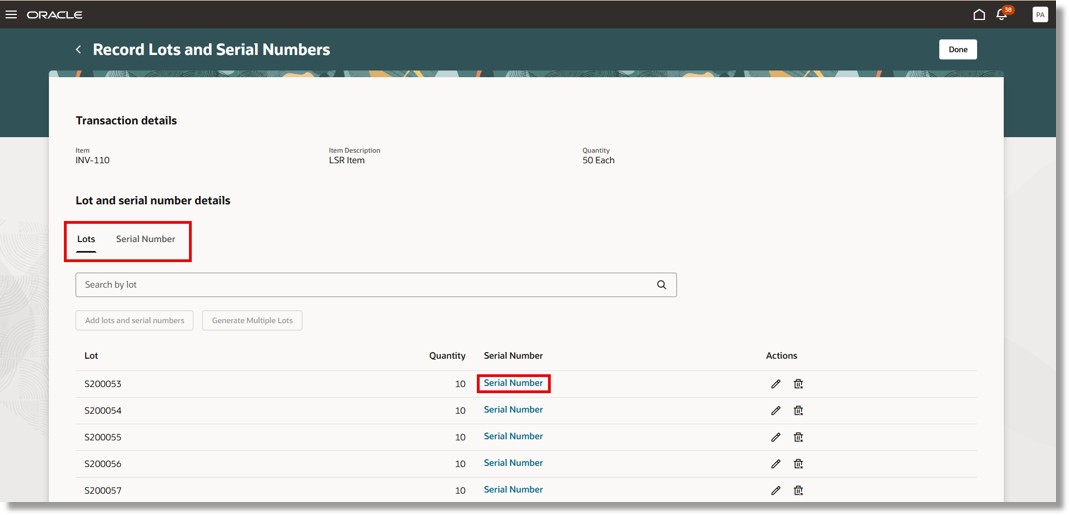
Record Lots
This feature allows you to make necessary updates in real time, without disrupting your workflow, resulting in improved efficiency, more consistent data capture, and stronger support for traceability and regulatory compliance.
Steps to enable and configure
You don't need to do anything to enable this feature.
Tips and considerations
- The Parent Lot field and the Generate Parent Lot action button will be displayed only for child lot-controlled items.
Key resources
- Oracle Fusion Cloud SCM: Using Inventory Management guide, available on the Oracle Help Center.
- Oracle Fusion Cloud SCM: Implementing Manufacturing and Supply Chain Materials Management guide, available on the Oracle Help Center.
- Oracle Fusion Cloud SCM: Security Reference for Manufacturing and Supply Chain Materials Management guide, available on the Oracle Help Center.
Access requirements
No additional access is required. Users with existing access to the Redwood Inventory and Receiving transactional pages can access this feature.