Redwood: Scan a Barcode with Item Number, GTIN, MPN, or SPN Without a Barcode Format to Find Items
In many supply chain operations, goods arrive from suppliers and manufacturers with simple numeric-value barcodes identifying the manufacturer part number (MPN), supplier part number (SPN), or global trade item number (GTIN). This creates challenges at the point of scanning, where systems traditionally rely on specific barcode formats or barcode identifiers to accurately recognize field values. As a result, warehouse and inventory teams must rely on manual lookups or relabeling processes, slowing down operations and increasing the risk of errors.
Previously, users could scan and search for items only when the barcode matched a configured format and by using limited identifiers such as item number, GTIN, or MPN. This created a dependency on barcode configuration and restricted the ability to use other identifiers, such as SPN or cross-references, during transactions.
With this enhancement, the system continues to validate scanned barcodes against configured barcode formats first. If no barcode format match is found, the system automatically searches the scanned value against item number, GTIN, MPN, SPN, and item cross-reference values to identify the correct item.
This enhancement allows users to scan or enter identifiers such as item number, GTIN, MPN, SPN, or item cross-references during Redwood mobile inventory and receiving transactions without requiring a predefined barcode format. The system intelligently resolves the scanned or entered value to the corresponding internal Oracle item number, allowing users to perform transactions using identifiers available on product or supplier labels.
If a unique match is found, the item is automatically populated. If multiple matches are found, the system searches across all supported identifiers and displays all matching items in a panel drawer for the user to review and select the correct item while remaining in the scanning flow. This ensures both flexibility and accuracy during transactions.
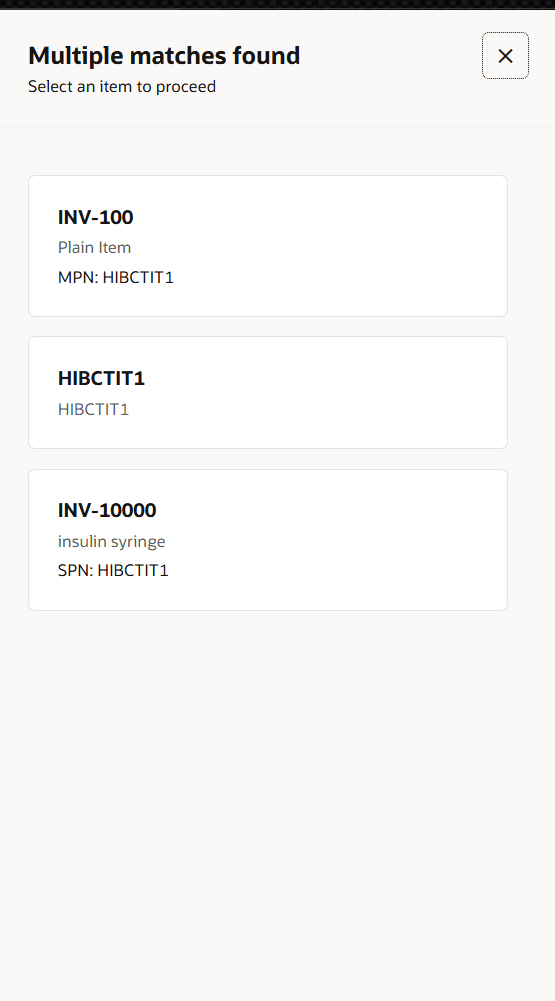
Multiple Matches Found Panel Drawer
This capability reduces dependency on barcode configuration, simplifies user operations, and supports real-world labeling practices where internal item numbers may not be known to end users.
Here are the applicable mobile transactions:
- Receive Goods
- Inspect Goods
- Put Away Goods
- Miscellaneous Transactions
- Subinventory Transfers
- Interorganization Transfers
- Cycle Counts
- PAR Counting
- Physical Inventory
- Pick Confirm (defaults only item)
This enhancement ensures alignment with industry standards, reduces user error, and improves inventory accuracy in mobile-enabled supply chain operations.
This feature streamlines operational scanning processes, reduces dependency on standardized label formats, and allows you to work seamlessly with supplier and manufacturer barcodes across your ecosystem.
Steps to enable and configure
To enable scanning of barcodes using item number, GTIN, MPN, or SPN without a predefined barcode format, configure the inventory organization parameters as follows:
- Go to the Setup and Maintenance work area.
- In the Search Tasks field, search for and select Manage Inventory Organization.
- Search for and select the required inventory organization.
- Once the organization is selected, click Manage Organization Parameters.
- On the Organization Parameters page, go to the General tab.
- Locate the checkbox labelled: Enable scanning of items without a barcode format or SPN
- Select this checkbox to enable the feature.
- Click Save and Close to apply the changes.
Tips and considerations
- This feature is supported only in Redwood mobile inventory and receiving transactions.
- Desktop transactions aren't impacted and continue to use manual item entry and search.
- This feature is disabled by default and must be enabled through the inventory organization parameters. Refer to the Steps to Enable section for configuration details.
- Users can scan barcodes containing the item number, GTIN, MPN, SPN, or item cross-reference values without requiring a configured barcode format.
- Maintain accurate GTIN, MPN, SPN, and item cross-reference mappings in Product Information Management to use this feature effectively.
- The system first validates the scanned barcode against configured barcode formats. If no match is found, it then searches using the item number, GTIN, MPN, SPN, and item cross-reference values.
- If the scanned value matches a single item, the item is automatically populated.
- If multiple matches are found across supported identifiers, the system displays the matching items in a panel drawer for the user to select the correct item.
- If the scanned value doesn't match any item across all supported identifiers, the system displays an error message, consistent with existing behavior. Users can then manually enter or search for the item to continue the transaction.
- For the Pick Confirm transaction, this functionality only defaults the item number. The UOM is derived from the transfer order.
Key resources
- Oracle Fusion Cloud SCM: Using Inventory Management, available on the Oracle Help Center.
Access requirements
Users who are assigned a job role that includes any of the following duty roles or privileges can access this feature:
- Create Miscellaneous Transaction Using Responsive Inventory Duty (ORA_INV_CREATE_MISCELLANEOUS_ISSUE_PWA_DUTY)
- Create Subinventory Transfer Using Responsive Inventory Duty (ORA_INV_CREATE_SUBINVENTORY_TRANSFER_PWA_DUTY)
- Create Interorganization Transfer Using Responsive Inventory Duty (ORA_INV_CREATE_INTERORG_TRANSFER_PWA_DUTY)
- Receive Goods Using Responsive Receiving (ORA_RCV_RECEIVE_GOODS_PWA_DUTY)
- Inspect Goods Using the Responsive Receiving Application (ORA_RCV_INSPECT_GOODS_PWA_DUTY)
- Put Away Goods Using Responsive Receiving (ORA_RCV_PUT_AWAY_GOODS_PWA_DUTY)
- Ship Goods Using Responsive Shipping (ORA_WSH_SHIP_GOODS_PWA_DUTY)
- Confirm Pick Using Responsive Inventory (ORA_INV_CONFIRM_PICK_PWA_DUTY)
- Record Cycle Count Sequence Using Responsive Inventory (ORA_INV_RECORD_CYCLE_COUNT_SEQUENCE_PWA_DUTY)
- Record Physical Inventory Using Responsive Inventory Duty (ORA_INV_RECORD_PHYSICAL_INVENTORY_PWA_DUTY)
- Record PAR Count Using Responsive Inventory (INV_RECORD_PAR_COUNT_PWA_PRIV)
These duty roles and privileges were available prior to this update.