Publish Inventory On-Hand Balances to an External Execution System Using a File-Based Integration for Reconciliation
When using an external execution system, such as a warehouse management system (WMS) or third-party logistics provider (3PL), maintaining accurate and synchronized inventory data across platforms is essential. As Oracle Fusion Cloud Inventory Management serves as the central hub for these integrations, discrepancies in on-hand balances can occasionally arise due to timing differences, transaction failures, or system misalignment. These inconsistencies can impact planning, fulfillment, and financial accuracy, often requiring time-consuming reconciliation efforts. To make on-hand balance reconciliations faster and easier, you can now export and share current on-hand inventory balances in a standardized flat file format.
A file-based integration approach is introduced to enable efficient reconciliation of on-hand balances, including serial numbers, between Oracle Inventory Management and external systems. This helps keep both systems synchronized and supports accurate demand fulfillment and supply planning.
A snapshot publishing mechanism based on a scheduled process has been introduced that allows the generation of inventory on-hand data, which can then be shared with external systems for reconciliation. Key capabilities for this feature include:
- Generates periodic inventory on-hand snapshot files (CSV) from Oracle Inventory organizations for consumption by external systems.
- Supports reconciliation for items that are serial-controlled and not serial-controlled.
Process Flow
- The user submits the scheduled process job.
- Inventory on-hand data is retrieved based on the selected input parameters.
- The data is written to a CSV (.psv) file and then compressed into a ZIP file.
- The ZIP file is uploaded to the Universal Content Management (UCM server) for external system consumption.
Scheduled Process Job Details
Job Name: Publish Inventory On-Hand Balances to an External System
Job Parameters:
The following table provides the scheduled process job parameters.
| Parameter | Definition |
|---|---|
| External System | Select the external system to which the on-hand balances will be sent. |
| Organization | Select the organization for which the on-hand balance snapshot needs to be generated. |
| Publish from Date | Specifies the date from which on-hand balances will be considered. Use this field to include data from a period prior to the last successful publication date. |
| Items to Publish |
Select the type of inventory items to include:
|
| Full Publish |
|
Submit the scheduled process job with the required parameters to generate and publish the on-hand balance snapshot.
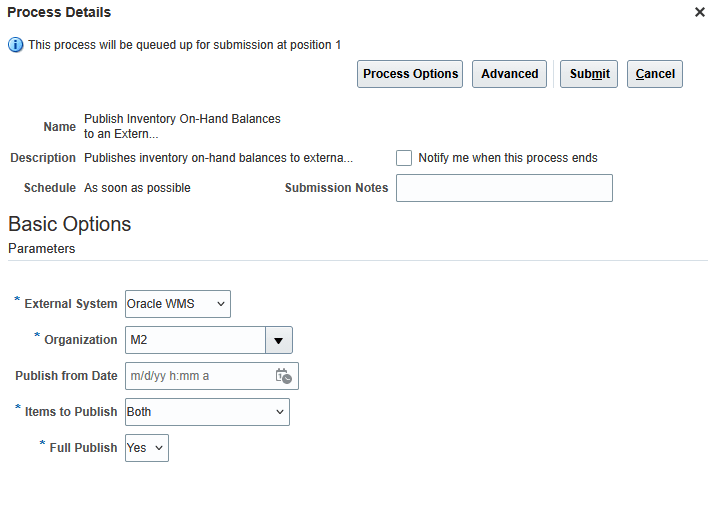
Publish Inventory On-Hand Balances to an External System
Once the scheduled process job completes successfully, the generated ZIP file is available on the UCM server for integration with external systems.
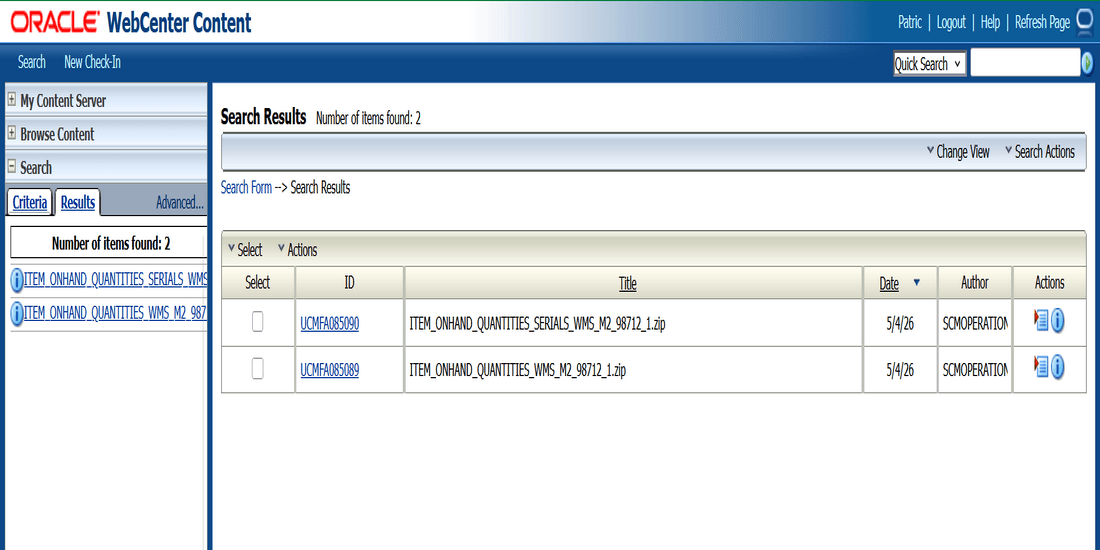
Oracle UCM Server View
Here's a snapshot of a CSV (.psv) file:
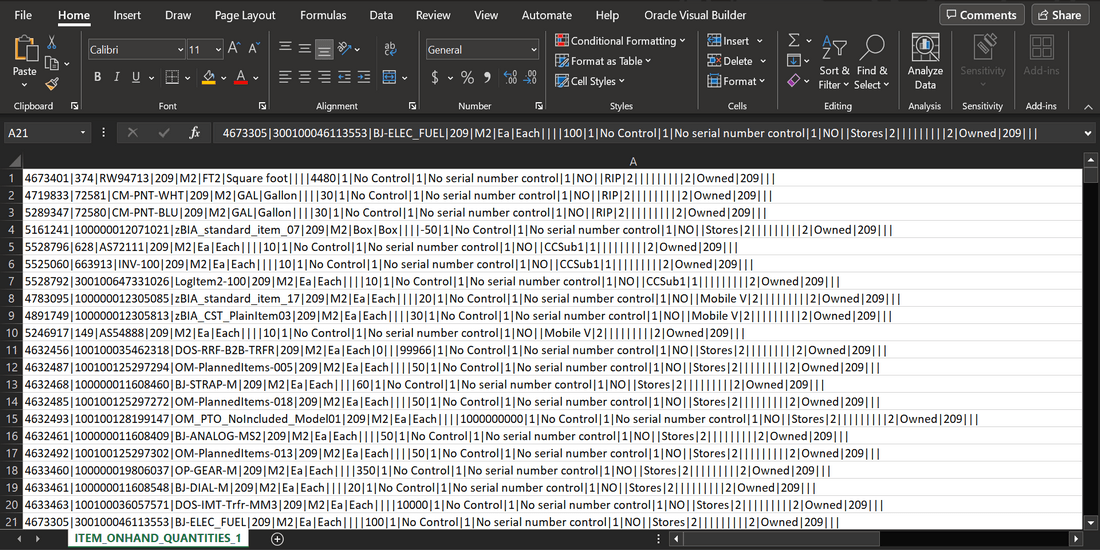
Pipe-Separated Values (PSV) File
Lookup Configuration
Use the ORA_INV_BALANCES_INV_EXTERNAL lookup to define external system details. Once configured, the external systems will appear in the External System parameter list within the scheduled process job.
- Lookup Name: ORA_INV_BALANCES_INV_EXTERNAL
- Oracle WMS is provided as a default (seeded) external system
When adding a new external system: Use numeric values only (for example, 1, 2) as the lookup code. Ensure the value is greater than zero (0), as zero (0) is reserved for Oracle WMS.
This feature simplifies the reconciliation process by providing a clear, consumable snapshot of inventory data that can be quickly imported to your external execution system for comparison.
Steps to enable and configure
You don't need to do anything to enable this feature.
Key resources
- Oracle Fusion Cloud SCM: Using Inventory Management guide, available on the Oracle Help Center.
- Oracle Fusion Cloud SCM: Implementing Manufacturing and Supply Chain Materials Management guide, available on the Oracle Help Center.
Access requirements
Users who are assigned a configured job role that contains this duty role can access this feature:
- Inventory Transaction Management (ORA_INV_INVENTORY_TRANSACTION_MANAGEMENT_DUTY)
This duty role was available prior to this update.
Users who are assigned a configured job role that contains this privilege can access this feature:
- Publish Inventory On-Hand Balances to External Systems (INV_PUBLISH_ONHAND_TO_EXT_SYSTEMS_PRIV)
This privilege is new in this update.