Redwood: Use HCM Rules for Movement Request Approval Rules
For organizations using movement requests to support internal requests to transfer or issue goods, some situations require clear and efficient approval processes to maintain control and accuracy. For instance, a very valuable and highly controlled item can only be moved within the warehouse under strict circumstances by specific personnel. However, setting up and managing approval rules for these routine transactions can be unnecessarily complex and time-consuming when using less intuitive configuration frameworks, making it harder for business users to adapt to changing operational needs. To make this process easier, you can now define and manage approval rules for these internal material movements within the HCM rules framework.
Current State
Movement request approvals are currently managed through the Manage Movement Request Approvals page, where users can configure, edit and enable approval rules. This functionality is now being transitioned to the HCM Rules framework (HCM Movement Request Approvals) for enhanced flexibility and standardization.
Migration
The migration to HCM Movement Request Approvals is seamless and requires no action from your end.
- Existing rules from the Manage Movement Request Approvals page are automatically migrated to HCM Movement Request Approvals.
- You can immediately start creating new rules or modifying the migrated rules.
- There's no change in approval behavior for existing customers.
The rule definition conditions, including attributes, operators, and other parameters, remain unchanged.
Behavior of Rules Post-Migration
- Rules created or updated in Manage Movement Request Approvals are visible on the HCM Movement Request Approvals page.
- Rules created or updated using HCM Movement Request Approvals aren't reflected on the Manage Movement Request Approvals page.
Once you start using HCM Movement Request Approval Rules, don't switch back to the Manage Movement Request Approvals page. Rules configured in HCM won't be visible there, which may lead to inconsistencies.
Here's a view of rules configured on the Manage Movement Request Rules ADF page before migration to HCM Rules:
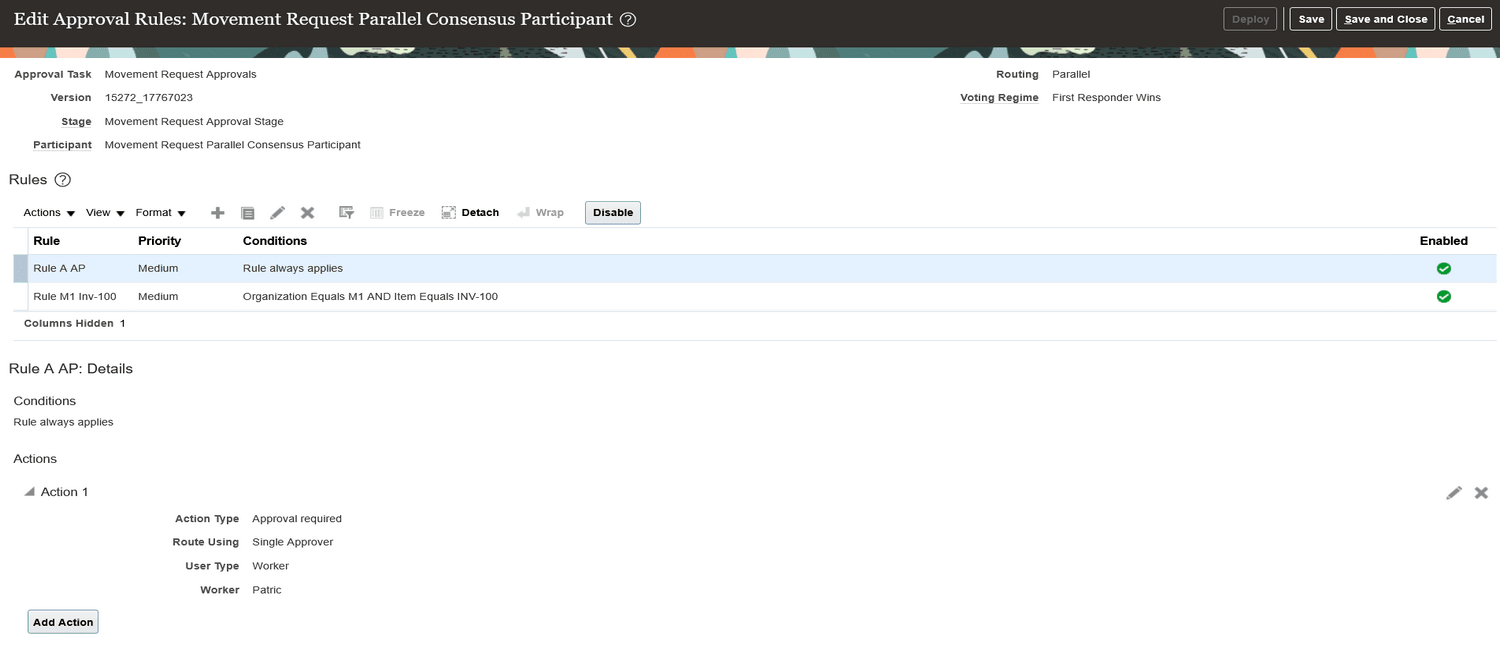
Rules from Manage Movement Request Rules ADF Page
Here's a view of rules that are automatically migrated to HCM Movement Request Approval Rules:
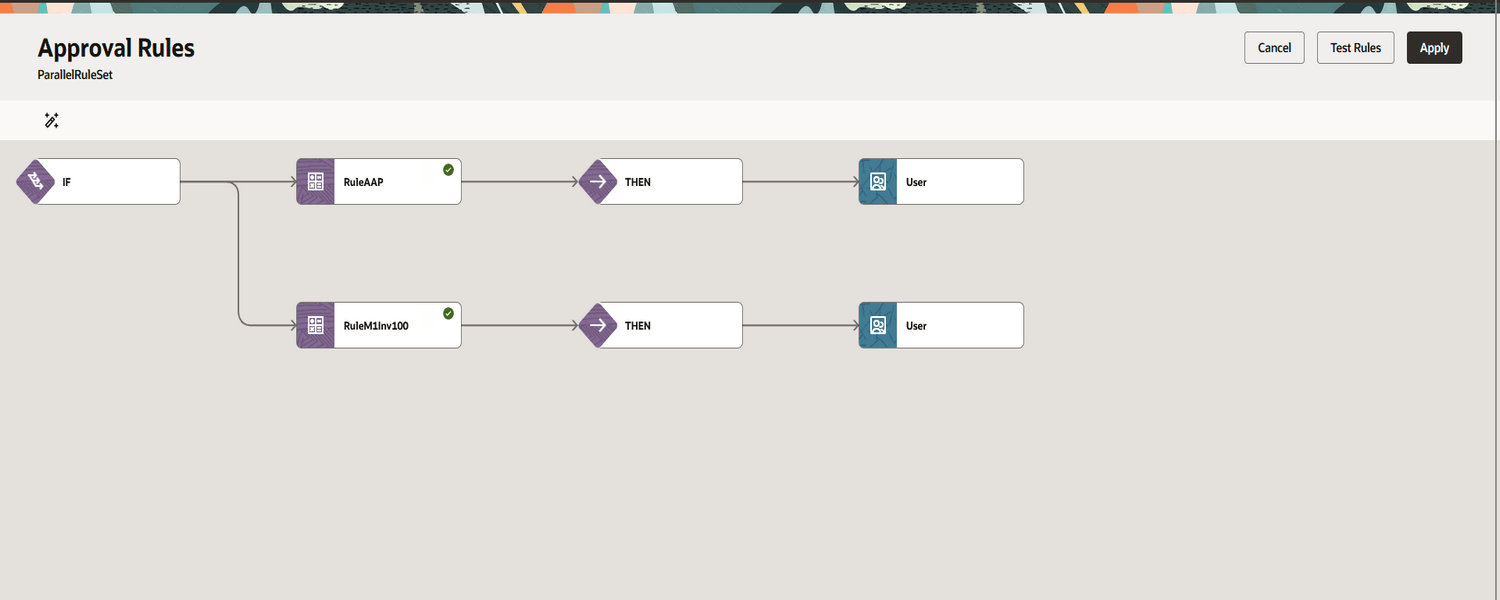
Migrated HCM Movement Request Approval Rules
By leveraging a more streamlined and user-friendly configuration model, organizations can quickly set up and adjust approval rules, improving operational efficiency, maintaining proper controls, and ensuring smooth execution of everyday inventory transactions.
Here's the demo of these capabilities:
Steps to enable and configure
Use the Opt In UI to enable this feature. For instructions, refer to the Optional Uptake of New Features section of this document.
Offering: Manufacturing and Supply Chain Materials Management
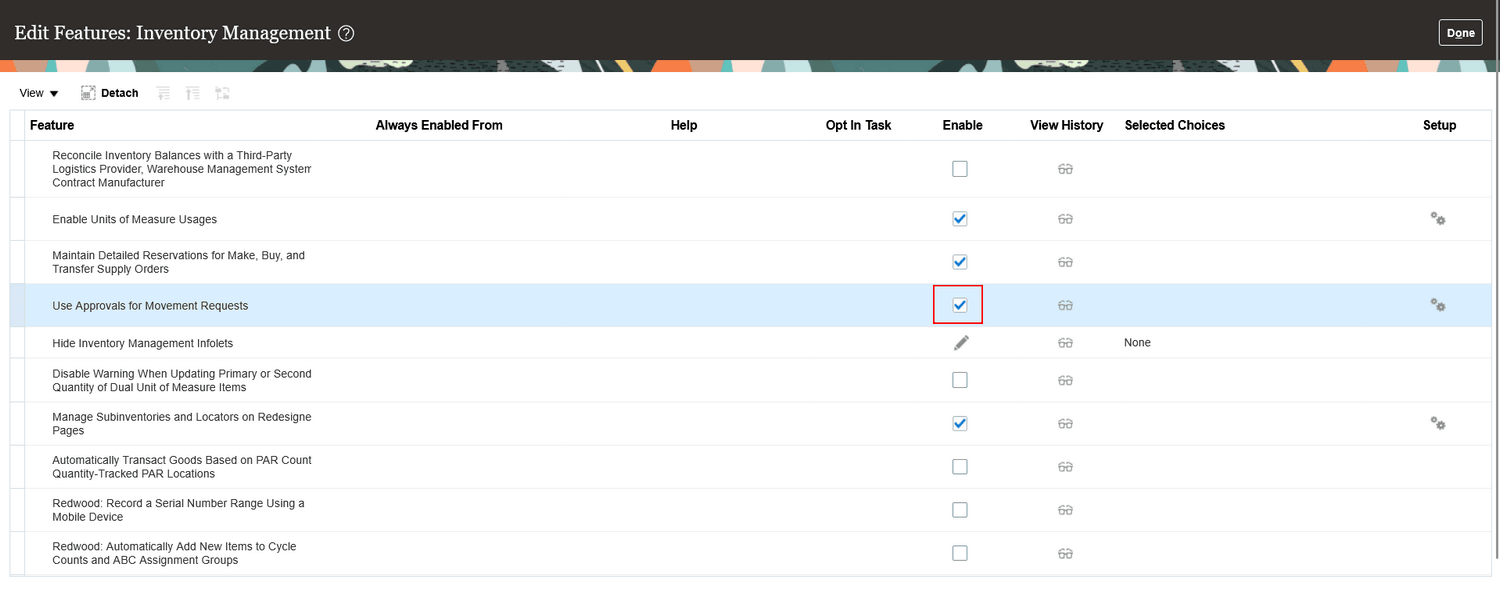
Movement Request Rules Opt-in
Steps to Enable Movement Request Approvals
Use these steps to enable and configure movement request approvals. Users have two configuration options that control the approval behavior.
- Enable the Use Approvals for Movement Request opt-in.
- From the Home page, go to Tools and select the Transaction Console task.
- On the Transaction Console Summary page, open the Approval Rules tab.
- Search for the Movement Request Approval process.
- Click the Configure Rules action, and then click Configure in the dialog box.
- Configure the required approval rules on the Manage Participants page, and then click Submit.
- Search for the Movement Request Approval process again and ensure that the Bypass Approvals checkbox is unchecked. This enables movement request approval rules.
To disable approvals, either enable the Bypass Approvals checkbox or disable the opt-in.
Approval Behavior Matrix
|
Opt-In |
Bypass Approvals | Outcome |
|---|---|---|
| Yes | Checked | Movement request approvals are disabled |
| Yes | Unchecked | Movement request approvals are enabled |
| No | Checked | Movement request approvals are disabled |
| No | Unchecked | Movement request approvals are disabled |
Movement Request Approval Using HCM Rules
Using the Transaction Console, you can access the Approval Rules page, search for the Movement Request Approval process, and create new rules or modify existing migrated rules for the process.
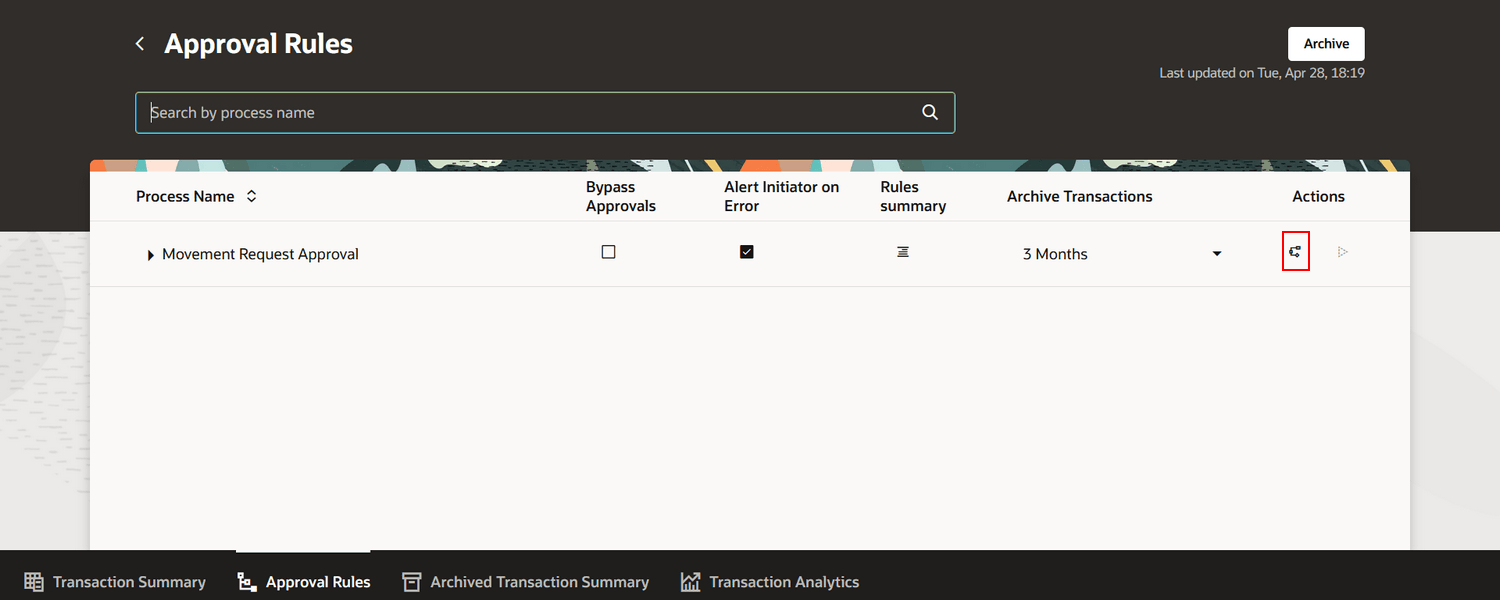
Movement Request Approval
Using the Manage Participants page, you can configure participant rules such as parallel approvals, serial approvals, and other approval routing options. By selecting a participant, you can edit and configure the approval rules for that participant.
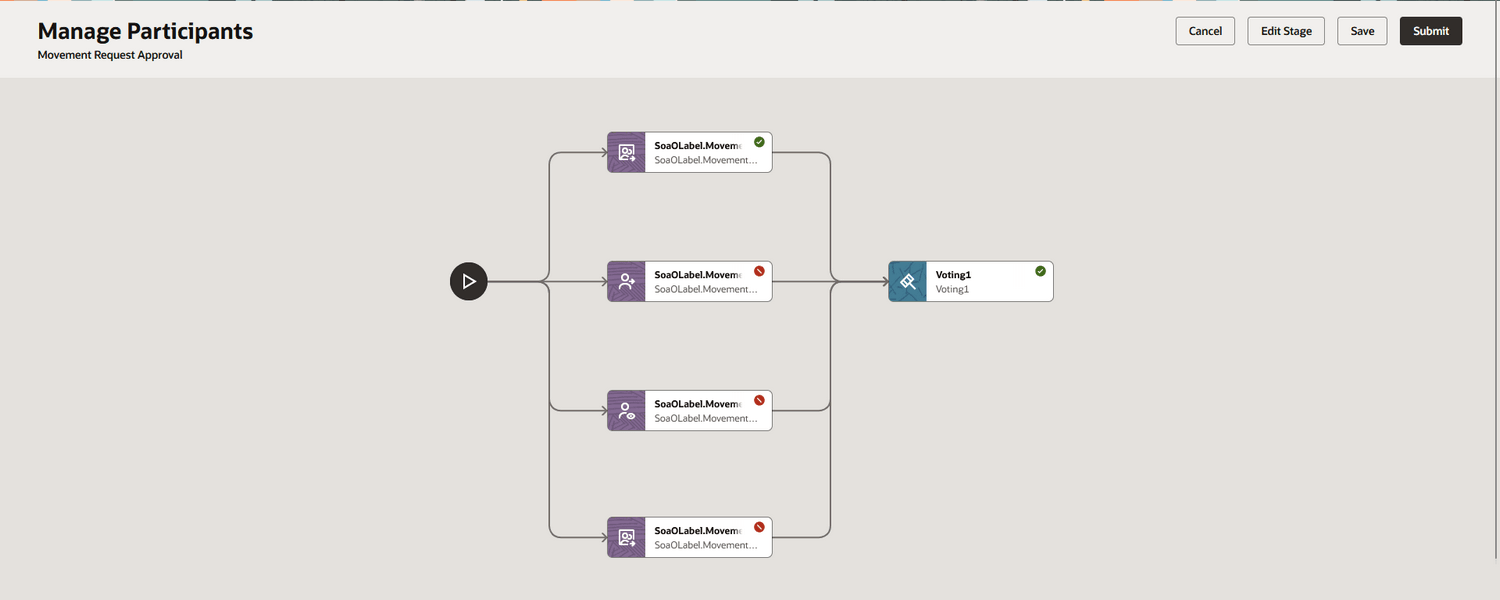
Manage Participants Page
You can create a new rule and define the rule details.
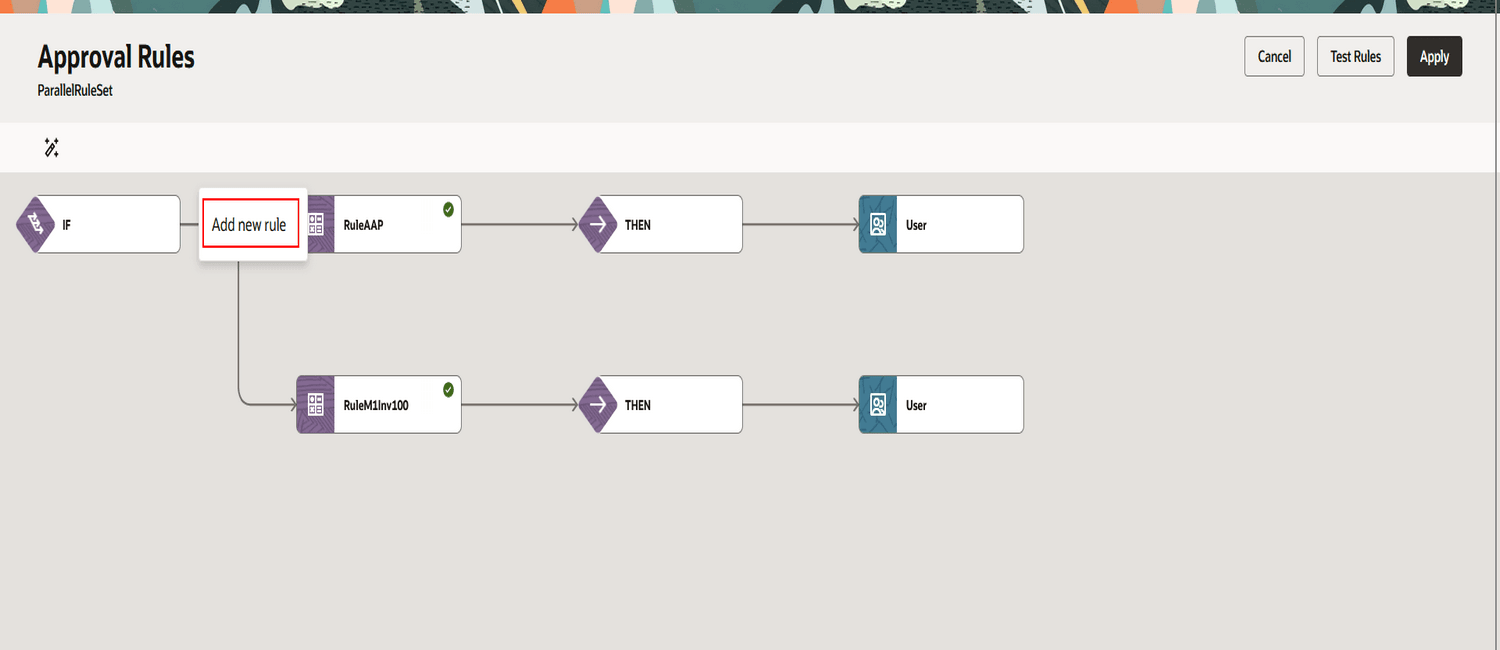
Create New Rule
Once the rule is created, proceed to define the conditions using the Edit Condition Details option.
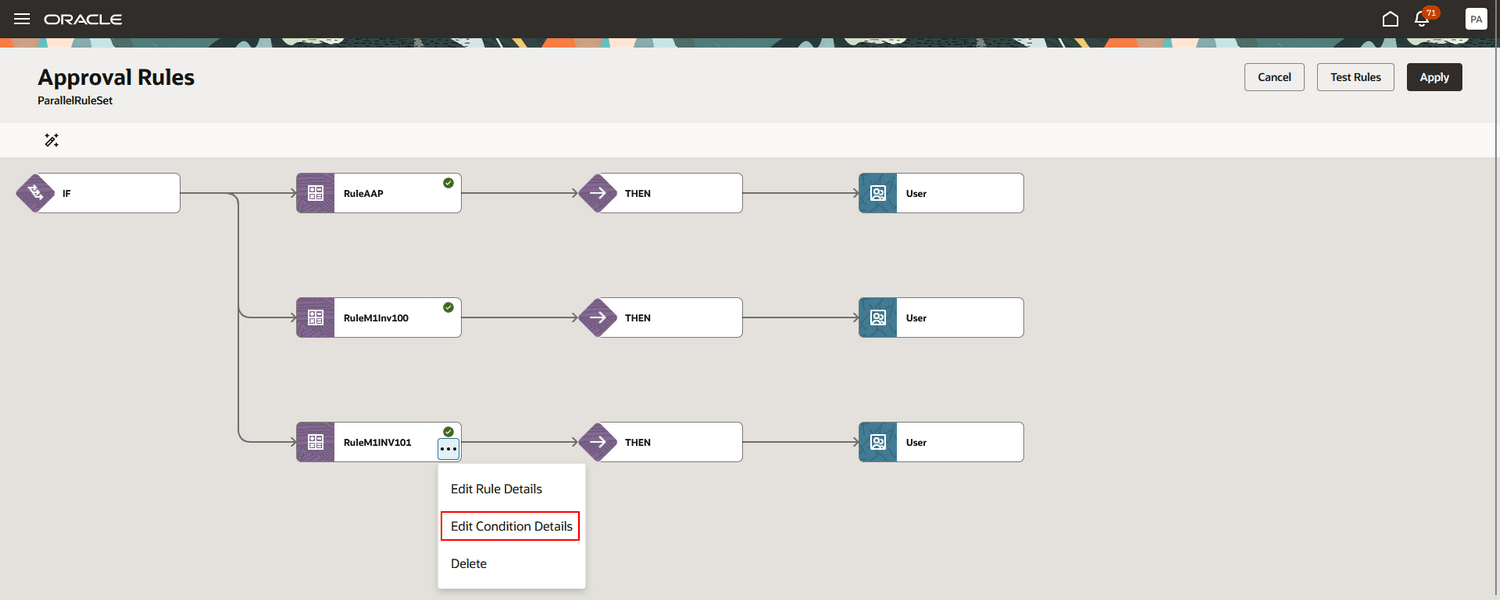
Edit Condition
You can configure conditions using attributes, operators, and other rule parameters.
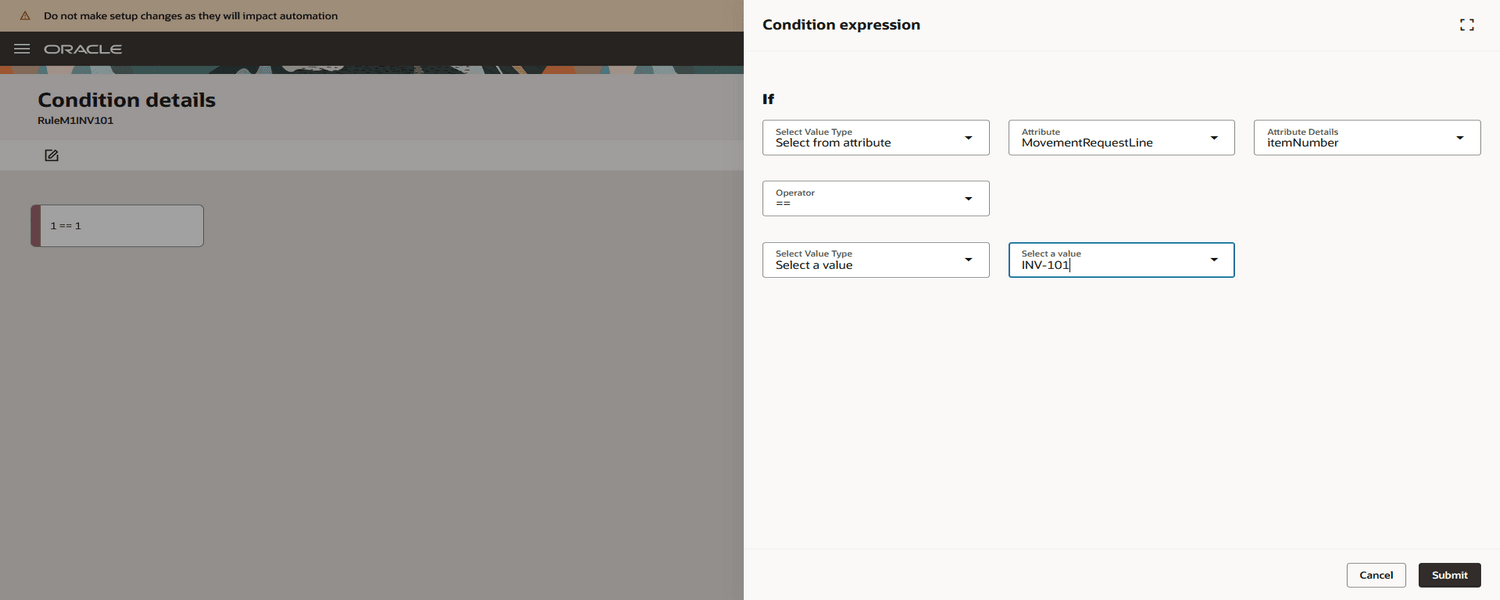
Rule Condition
Finally, add the required users or approvers to complete the approval rule configuration.
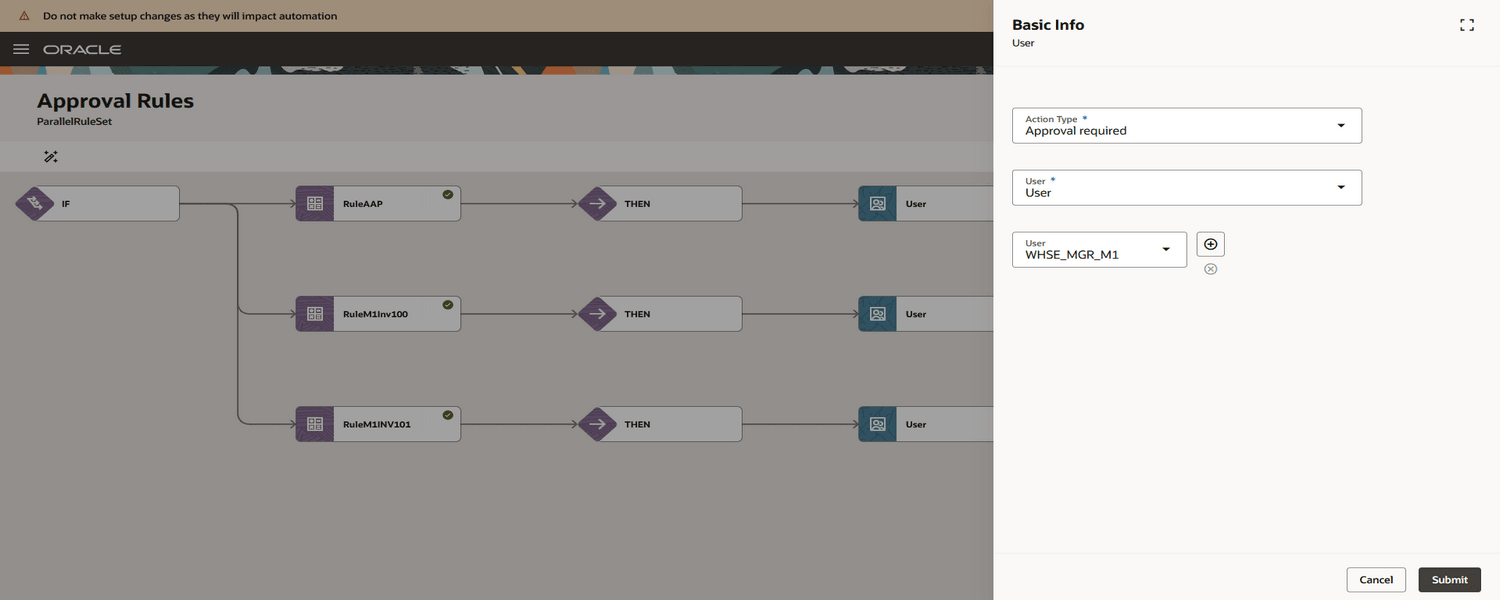
User Details
Tips and considerations
- Once you begin using HCM Movement Request Approval Rules, don't switch back to the Manage Movement Request Approvals page. Rules configured in HCM aren't reflected on the legacy Manage Movement Request Approvals page, which may lead to inconsistencies.
- Existing approval rules are automatically migrated to HCM Movement Request Approval Rules. No manual migration steps are required.
- The rule definition framework remains unchanged. Existing conditions, attributes, operators, and rule parameters continue to work after migration.
- Movement Request approvals are enabled only when both conditions are met:
- The Use Approvals for Movement Request opt-in is enabled
- The Bypass Approvals checkbox is unchecked in the Transaction Console
- Access to configure and manage approval rules requires appropriate Transaction Console privileges and duty roles. Ensure users are assigned the required roles before enabling this feature.
Key resources
- Oracle Fusion Cloud SCM: Using Inventory Management guide, available on the Oracle Help Center.
- Oracle Fusion Cloud SCM: Implementing Manufacturing and Supply Chain Materials Management guide, available on the Oracle Help Center.
- Oracle Fusion Cloud SCM: Use Approvals for Movement Requests, available on the Oracle Fusion Cloud Inventory Management 22D What's New.
- Oracle Fusion Cloud SCM: Redwood: Manage Movement Requests Using a Redwood Page, available on the Oracle Fusion Cloud Inventory Management 25A What's New.
Access requirements
Transaction Console Access
Access to the Transaction Console is controlled through two distinct modes ensuring separation of duties between operational users and administrators.
1. Configure and Review and Approve Transactions: Allows users to configure approval rules, in addition to reviewing and approving pending transactions.
Users who are assigned a configured job role that contains this duty role can access the transaction console to review and approve transactions that are pending approval, as well as to view and configure approval rules:
-
Review HCM Approval Transactions as Administrator (Review HCM Approval Transactions as Administrator)
2. Review and Approve Transactions Only: Allows users to review and approve transactions that are pending approval.
Users who are assigned a configured job role that contain these duty roles can access the transaction console to review and approve transactions that are pending approval:
-
Supply Chain Management Transaction Approval Reviewing (ORA_SCM_REVIEW_APPROVAL_TRANSACTIONS_DUTY and ORA_SCM_REVIEW_APPROVAL_TRANSACTIONS_DUTY_HCM). Both duty role codes are required
These duty roles were available prior to this update.
Privileges that govern the above access:
1. Perform HCM Approval Transaction Actions: Enables users to configure approval rules, as well as review and approve transactions.
Users who are assigned a configured job role that contains these privileges or duty roles can access this feature:
- Perform HCM Approval Transaction Actions (PER_PERFORM_APPROVAL_TRANSACTION_ACTIONS_PRIV)
This privilege was available prior to this update.
2. Review Approval Transactions: Enables users to review and approve transactions that are pending approval.
Users who are assigned a configured job role that contains these privileges or duty roles can access this feature:
- Review Approval Transactions (PER_REVIEW_APPROVAL_TRANSACTIONS_PRIV)
This privilege was available prior to this update.
Based on these privileges, users can be granted access to only review and approve transactions, or both configure approval rules and review and approve transactions.
Movement Request Privilege
Users who are assigned a configured job role that contains this privilege can access this feature:
- Manage Inventory Movement Request (INV_MANAGE_INVENTORY_MOVEMENT_REQUEST_PRIV)
This privilege was available prior to this update.