Redwood: Export All Search Results Records on the Item Quantities Page
For organizations managing inventory across multiple warehouses and stockrooms, quickly accessing and analyzing on-hand quantities is essential for effective decision making. While the Item Quantities page provides a centralized view of current inventory levels, you might need to work with this data offline or share it across teams for reporting and reconciliation purposes. You can now export the full set of search results directly from the Item Quantities page.
Use the Export All button to download the complete set of search results from the Item Quantities page. This feature allows you to export all records returned by your search criteria in a single CSV file (compatible with Excel), without requiring you to scroll through the results table to load additional rows.
The export reflects the current page context, including applied filters, organization scope (single or all organizations), and selected unit of measure view (primary or stocking UOM).
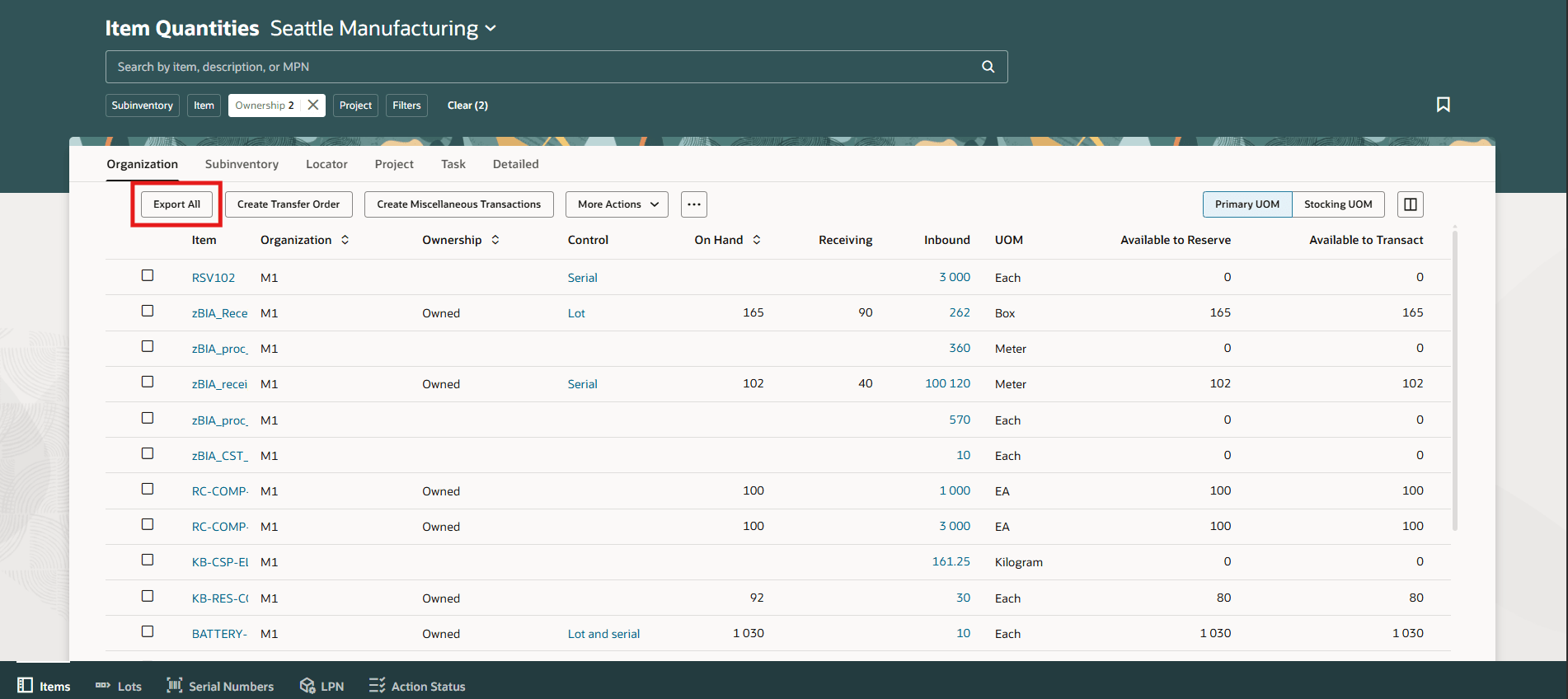
Export All
This feature ensures accurate and complete data extraction aligned with the applied filters, organization scope, and selected UOM view, while providing a more intuitive and consistent user experience. Additionally, it supports audit, reporting, and offline analysis needs by allowing users to quickly access and retain full inventory datasets.
This feature allows you to efficiently analyze, share, and reconcile inventory data outside the system, improving visibility, reducing manual effort, and supporting more informed operational decisions.
Steps to enable and configure
You don't need to do anything to enable this feature.
Tips and considerations
- Exporting large result sets may take additional time. Consider background processing to avoid UI performance impact.
- Ensure the export respects applied filters, organization scope, UOM context, and user access controls to maintain data accuracy and security.
- Define practical limits on file size and volume to prevent performance issues and ensure usability of the downloaded file.
Key resources
- Oracle Fusion Cloud SCM: Using Inventory Management guide, available on the Oracle Help Center.
- Oracle Fusion Cloud SCM: Implementing Manufacturing and Supply Chain Materials Management guide, available on the Oracle Help Center.
Access requirements
Users who are assigned any of these predefined job roles are automatically able to access this feature:
- Warehouse Manager (ORA_INV_WAREHOUSE_MANAGER)
- Inventory Manager (ORA_INV_INVENTORY_MANAGER)
These job roles were available prior to this update.