Redwood: Manage Policy Profile Assignments Using a Redwood Page
You can view, search for, create, edit, and delete policy profile assignments for organizations and subinventories. Policy profiles contain the input policy parameters to calculate PAR levels and min-max quantities. Assigning policy profiles is the final step in setting up PAR replenishment and min-max planning for Oracle Inventory Management. After creating policy profiles, you assign policy profiles to classifications at the organization and subinventory levels.
When associating a policy profile with a classification at the organization and subinventory levels, you can view and edit the parameters of the policy profile. It's recommended that you review the parameters of a policy profile before assigning it. You can also edit the policy parameters before making the assignments.
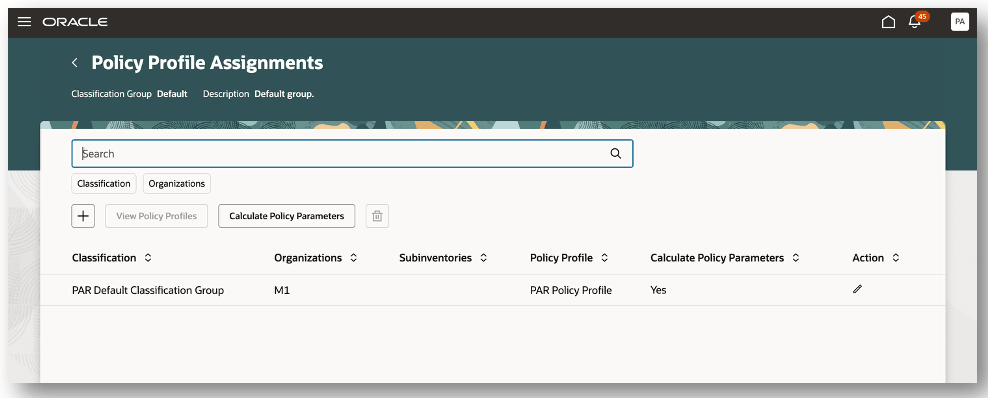
Policy Profile Assignments
This feature allows you to manage policy profile assignments for both PAR replenishment and min-max planning.
Steps to enable and configure
You don't need to do anything to enable this feature.
Key resources
- Oracle Fusion Cloud SCM: Using Inventory Management guide, available on the Oracle Help Center.
- Oracle Fusion Cloud SCM: Implementing Manufacturing and Supply Chain Materials Management guide, available on the Oracle Help Center.
- Oracle Fusion Cloud SCM: Security Reference for Manufacturing and Supply Chain Materials Management guide, available on the Oracle Help Center.
Access requirements
To set up this feature, you'll need a configured job role that contains this existing privilege:
- Manage Min-Max Planning Policies (INV_MANAGE_MIN_MAX_PLANNING_POLICIES)
This privilege was available prior to this update.