Enable Receipt Accounting Periods
In this update, Receipt Accounting introduces periods for its subledgers to control transaction processing and subledger activities independent of the general ledger periods. Receipt accounting periods enable you to monitor the timing of transaction processing and perform validations in preparation for period close.
You can create and manage receipt accounting periods using these new Redwood pages:
- Receipt Accounting Parameters - Configure the parameters for a bill-to business unit and ledger combination, such as accounting calendar, first open period, and so on.
- Receipt Accounting Periods - Run validations and change period statuses.
- Receipt Accounting Exceptions Summary - Analyze and resolve period end validation exceptions.
With this feature, you don't need to depend on the general ledger periods for transaction accounting. Instead, the receipt accounting period boundary and period status will be used to account the transactions in the correct period for these flows:
- Accrue at receipt
- Accrue at period end
- Accrual clearing and reversal
Receipt Accounting Parameters
To start using the receipt accounting periods, you must first set up the receipt accounting parameters. On the Receipt Accounting Parameters page, you can see all your bill-to business units and ledgers, and start period control for these combinations. You can either configure period controls for one bill-to business unit or apply the same configuration to multiple bill-to business units at once (for example, all bill-to business units in a ledger). This is critical for large enterprises that can have dozens or hundreds of bill-to business units because it reduces manual work, improves consistency, and lowers cutover risk.
Some of the key attributes you must define on this page are:
- First open period:
- New bill-to business units: Any transactions that are in or precede the first opened period are accounted in the first opened period.
- Existing bill-to business units using Receipt Accounting: Use this for cutting over to the new receipt accounting periods functionality. Transactions that occurred before the defined first opened period will be accounted using the general ledger period as it was done prior to this update.
- Maximum open periods: Specifies the maximum number of concurrent periods that can be open. If the number of periods is maximized, then no additional period can be opened until one of the open periods changes to the Closed, Permanently Closed, or Pending Close status.
- Cutoff date: When the cutoff date option is automatic, the cutoff date is derived as the last day of the earliest open receipt accounting period after the last closed period during the Create Receipt Accounting Distributions process. You can optionally configure the cutoff date manually.
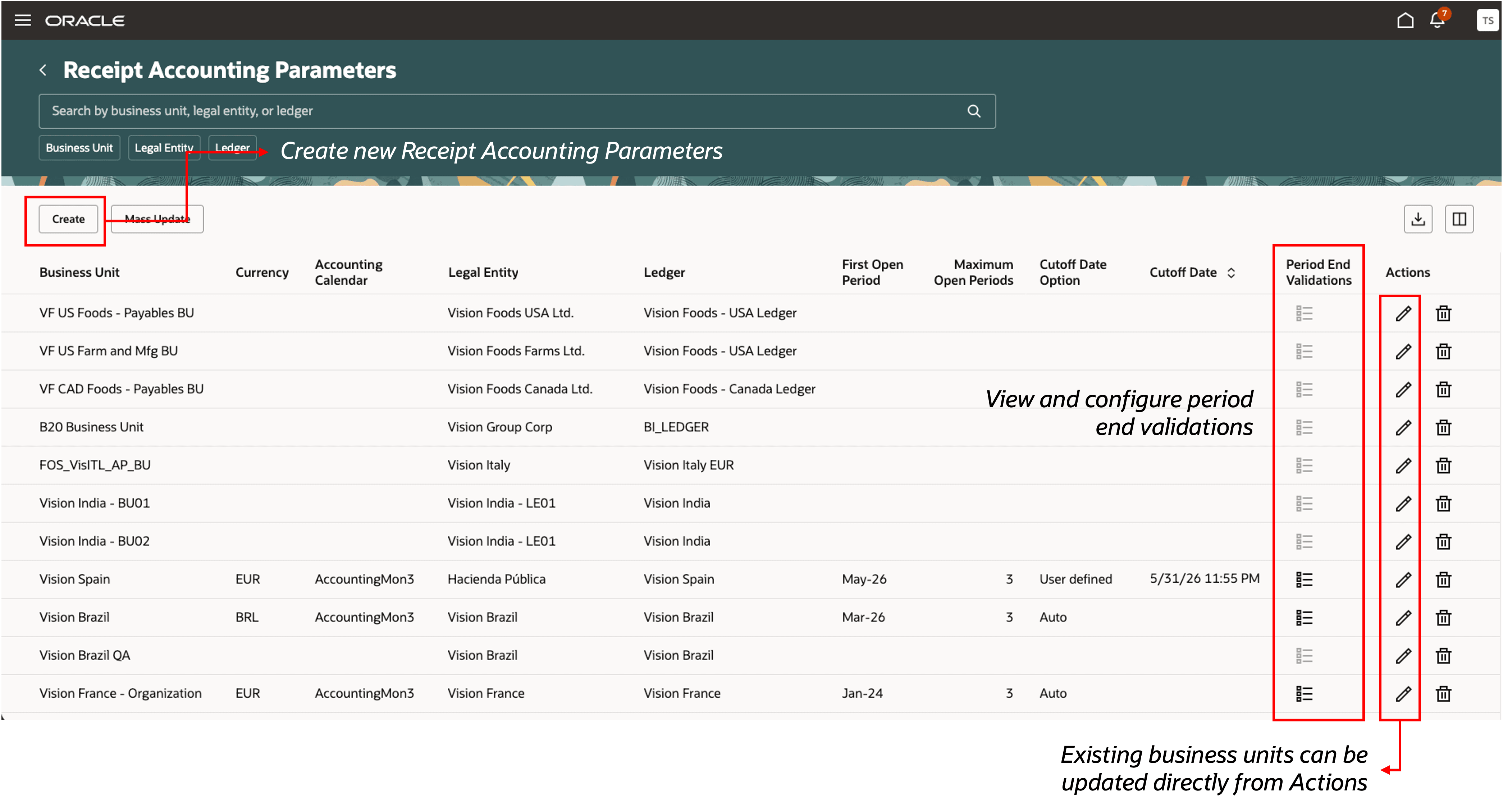
New Receipt Accounting Parameters Redwood Page
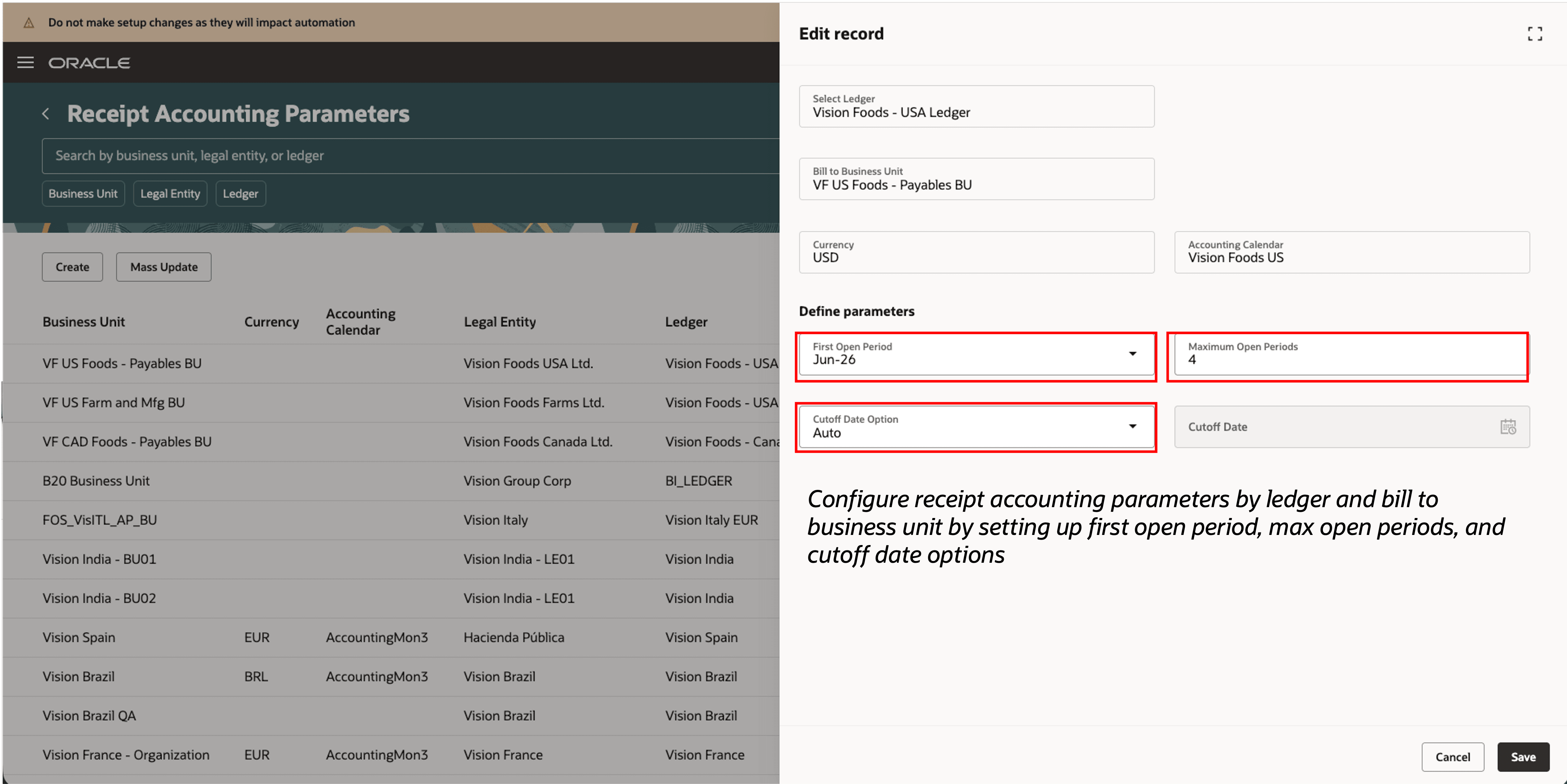
Create or Update a Receipt Accounting Parameter
Receipt Accounting Periods
After configuring the receipt accounting parameters, periods are automatically created based on the setup and will be displayed in the Never Opened status on the Receipt Accounting Periods page.
You can now efficiently manage and monitor the receipt accounting periods with the following capabilities:
- Update period statuses to Open, Close, Pending Close, and Permanently Closed as the accounting period activities progress.
- Enforce gapless period opening to maintain accounting integrity.
- Run period end validations for each period.
- Drill down to the Receipt Accounting Exceptions Summary page to review validation results.
- View associated general ledger period status and related subledger period statuses at a glance.
- Copy periods from General Ledger to synchronize accounting calendars across ledgers and subledgers.
These enhancements provide greater visibility and control over period management, helping ensure alignment between the Receipt Accounting and General Ledger processes.
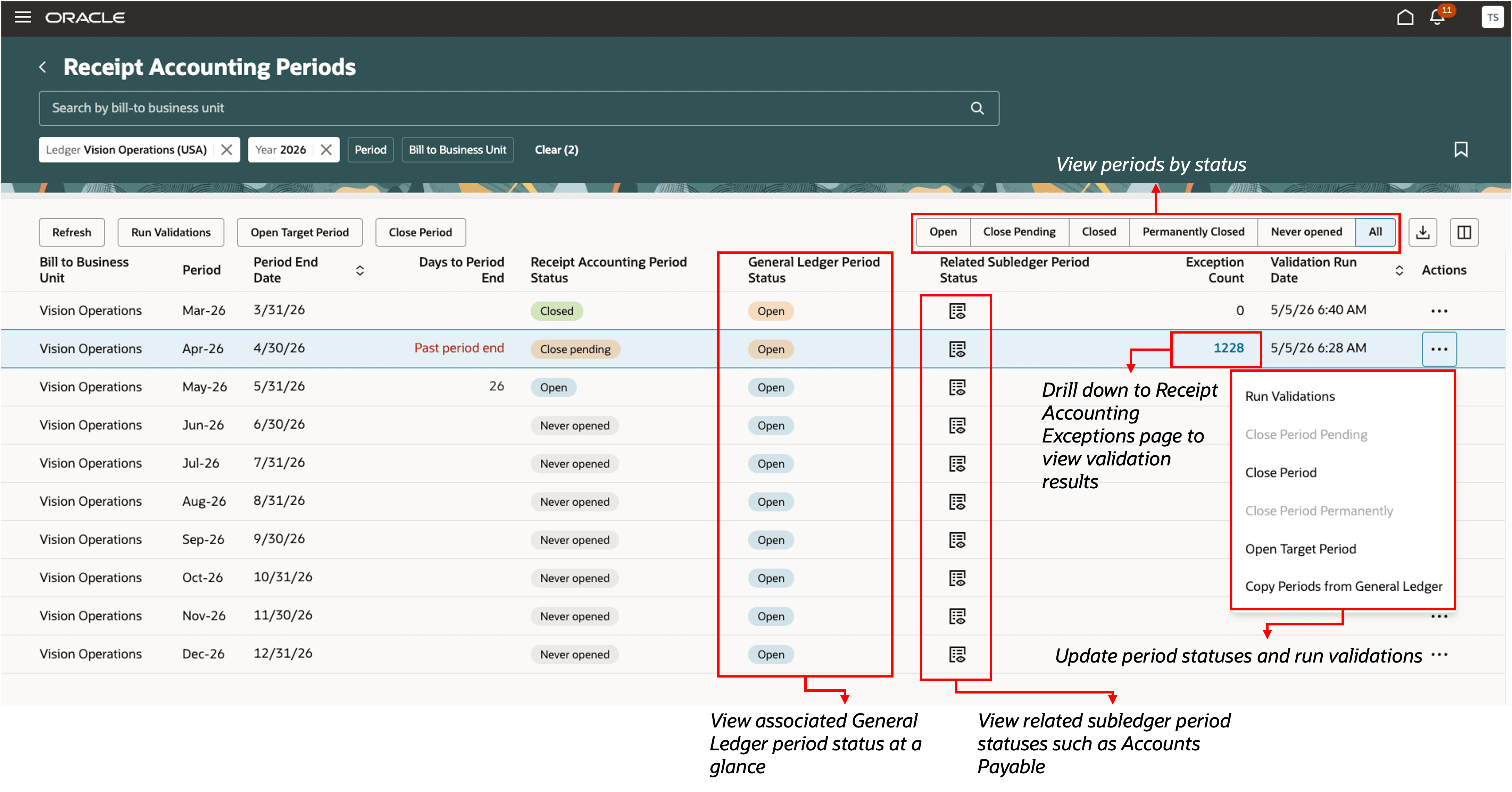
New Receipt Accounting Periods Redwood Page
Transaction Processing with Receipt Accounting Periods
Processing of transactions that accrue at receipt will now be based on the receipt accounting period status and the general ledger period status as shown in this table:
| Receipt Accounting Period | General Ledger Period | Transaction Processing | Action |
|---|---|---|---|
| Never Opened | Never Opened | Transactions aren't processed | Open the receipt accounting and GL periods |
| Open or Pending Close | Never Opened | Transactions aren't processed | Open the GL period |
| Open or Pending Close | Future Enterable | Transactions are processed but not final accounted in GL | To final account, open the general ledger period |
| Open or Pending Close | Open | Transactions are processed | View distributions on the Receipt Accounting Distributions page |
| Close or Permanently Closed | Open | Transactions are rolled over if the next set of periods are open | View distributions on the Receipt Accounting Distributions page |
| Close or Permanently Closed | Close or Permanently Closed | Transactions are rolled over if the next set of periods are open | View distributions on the Receipt Accounting Distributions page |
| Open or Pending Close | Close or Permanently Closed | Transactions aren't processed | Close receipt accounting period and open the next periods |
Transactions are processed only when the receipt accounting period is in the Open or Pending Close status and the corresponding General Ledger period is in the Open or Future Enterable status. Any other status combination results in processing errors or causes transactions to roll over to the next available period. If transactions fall in a closed period and can't be rolled over to the next period, distributions will no longer be created. You can view these transactions on the Receipt Accounting Exceptions Summary page under the appropriate message.
Receipt Accounting Exceptions Summary
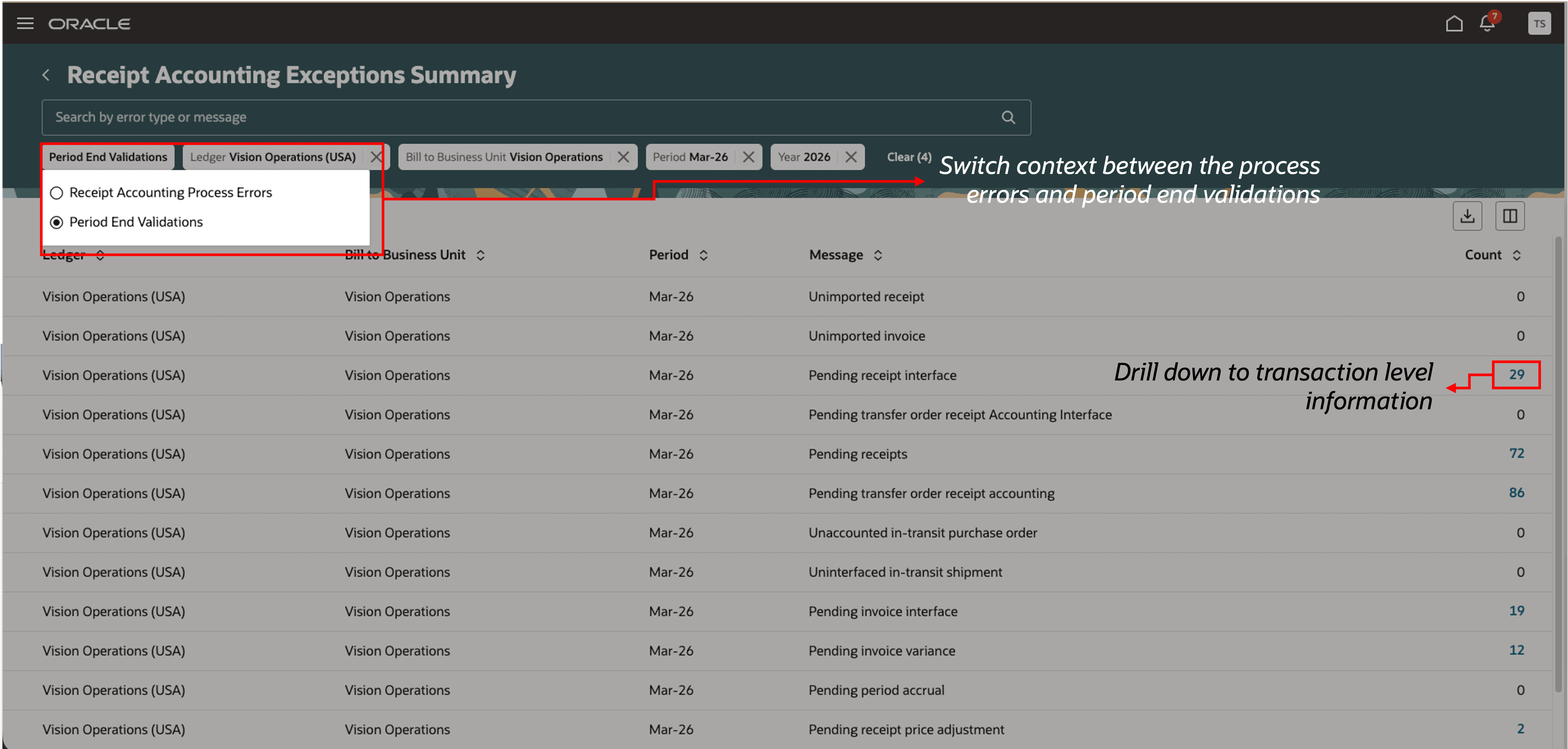
Receipt Accounting Exceptions Summary Redwood Page with Period End Validations
You can now review period-end validation results directly on the Receipt Accounting Exceptions Summary page. You can open this page from the landing page or drill down from the Receipt Accounting Periods page using the exception count. From the summary page, you can drill down further to transaction-level details for each validation exception.
In addition, the Receipt Accounting Process Errors page now includes new messages for errors related to receipt accounting period statuses. These enhancements provide a centralized and intuitive exception review experience, helping you identify and resolve issues more quickly.
Accrue at Period End
The Create Uninvoiced Receipt Accruals scheduled process now considers receipt accounting period status along with the general ledger period status to create uninvoiced receipt accruals. If either the receipt accounting period or the general ledger period is closed, then the uninvoiced receipt accruals won't be created. If receipt accounting parameters aren't set up for the bill-to business unit, then the uninvoiced receipt accruals will be created based on only the general ledger period status, as done in previous updates.
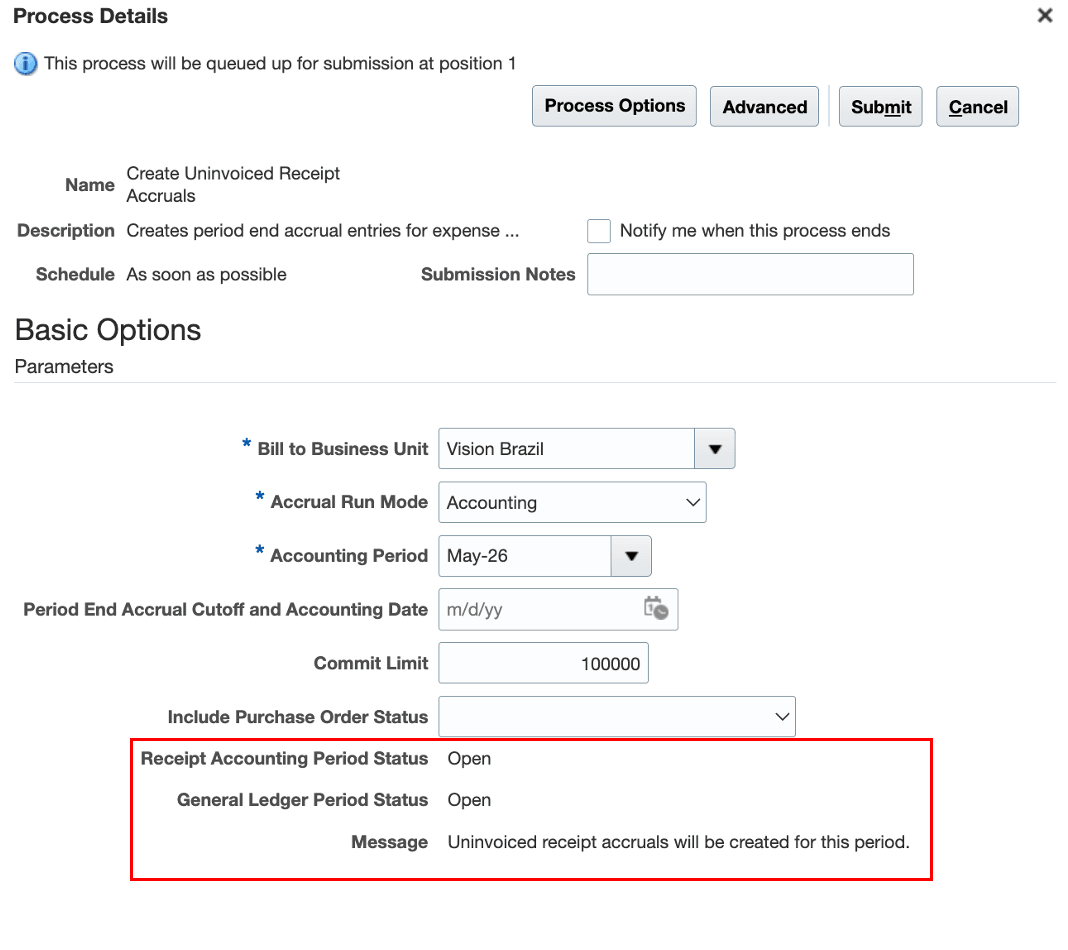
Some of the benefits of this feature include:
- Improves control, accuracy, and efficiency during the financial close process.
- Enables Receipt Accounting to close periods independently with its own transaction cutoff and period end validation process.
- Reduces reconciliation issues across Receipt Accounting, Cost Accounting, and General Ledger.
- Minimizes the need for manual journal entries.
Steps to enable and configure
Use the Opt In UI to enable this feature. For instructions, refer to the Optional Uptake of New Features section of this document.
Offering: Manufacturing and Supply Chain Materials Management
After you opt in, you must set up at least one receipt accounting parameter for a bill-to business unit and ledger combination from the Receipt Accounting Parameters page with the first open period, maximum open periods, and cutoff date options.
Navigate to the Receipt Accounting Periods page, and open the first open period when you're ready to start transaction processing based on receipt accounting periods.
Tips and considerations
- Setup considerations
- Ensure that you set up the Receipt Accounting Parameters for the bill-to business units used for Receipt Accounting after you opt in to the feature.
- Existing Receipt Accounting users can see all their bill-to business units prepopulated on the Receipt Accounting Parameters page with all the associated details. You only need to specify the first open period, depending on when you want to cutover, to start utilizing the receipt accounting periods.
- If you're setting up a new bill-to business unit to be used for Receipt Accounting, you must set up the receipt accounting parameters to start using receipt accounting periods functionality.
- Upgrade considerations:
- Use the Run Receipt Accounting Period End Validations scheduled process to continuously assess your period health.
- Results are now displayed in the Receipt Accounting work area landing page and the Receipt Accounting Exceptions Summary page under the period end validations.
- Avoid closing the general ledger period until transactions prior to the first open receipt accounting period are fully processed to prevent transition issues.
- Period control is applied starting from the defined first open period; earlier distributions and bill-to business units that haven't been configured with the first open period continue to follow the general ledger period-based behavior.
- Receipt accounting parameters:
- Important: For interdependent business units, coordinate the transition to receipt accounting periods together where possible.
- The first open period must be later than the latest accounted receipt accounting distribution date for the selected bill-to business units.
- Ensure a clean transition to the first open receipt accounting period by avoiding pending transactions for an open period at the time of cutover to the new period.
- Receipt accounting periods:
- Important: Align the receipt accounting periods and cost accounting periods during close to reduce reconciliation issues. The recommended practice is to close the cost accounting period before the receipt accounting period, and then closing projects, if applicable.
- Transaction processing:
- Accrue at Receipt
- When the cutoff date option is automatic, the cutoff date is derived as the last day of the earliest open receipt accounting period after the last closed period from the latest run of the Create Receipt Accounting Distributions scheduled process.
- If you have previously defined accrual offset days, this new cutoff date in Receipt Accounting Parameters will be considered for transaction processing from the first open period instead of the accrual offset days.
- The Create Receipt Accounting Distributions process excludes transactions with a transaction date later than the applicable cutoff date for the defined receipt accounting parameters.
- Landed cost adjustments will now take the accounted date of the receipt as the accounted date when they are processed, not the receipt date itself.
- If you run the Clear Receipt Accrual Balances scheduled process in a closed period for a bill-to business unit, the process will get canceled automatically. It can only be run in a period that is open and available for transaction processing.
- When the cutoff date option is automatic, the cutoff date is derived as the last day of the earliest open receipt accounting period after the last closed period from the latest run of the Create Receipt Accounting Distributions scheduled process.
- Accrue at Period End - Validations now consider both the receipt accounting period status and the general ledger period status. The Create Uninvoiced Receipt Accruals scheduled process can be run only if both the receipt accounting and general ledger periods are open.
- Accrue at Receipt
- Adjustment processing and accounting date derivation:
- Landed costs adjustments will be accounted based on the accounting date of the underlying purchase order or transfer order receipt.
- Retro price adjustments will be accounted based on the Change Order date.
- Invoice price adjustments and variances will be accounted based on the invoice accounting date.
Key resources
- Oracle Fusion Cloud SCM: Using Supply Chain Cost Management guide, available on the Oracle Help Center.
- Oracle Fusion Cloud SCM: Implementing Manufacturing and Supply Chain Materials Management guide, available on the Oracle Help Center.
Access requirements
Users who are assigned a configured job role that contains these privileges can access this feature:
- Manage Receipt Accounting Parameters (CMR_MANAGE_RECEIPT_ACCOUNTING_PARAMETERS_PRIV)
- Manage Receipt Accounting Periods (CMR_MANAGE_RECEIPT_ACCOUNTING_PERIODS_PRIV)
- Review Receipt Accounting Parameters using REST (CMR_MANAGE_RECEIPT_ACCOUNTING_PARAMETERS_AUTO_PRIV)
- Review Receipt Accounting Periods using REST (CMR_MANAGE_RECEIPT_ACCOUNTING_PERIODS_AUTO_PRIV)
- Review Receipt Accounting Period End Validations by Web Service (CMR_VALIDATION_EXCEPTIONS_WEB_SERVICE)
- Review Receipt Accounting Distributions by Web Service (CMR_REVIEW_RECEIPT_ACCOUNTING_DISTRIBUTIONS_WEB_SERVICE)
- Create Receipt Accounting Distributions (CMR_CREATE_RECEIPT_ACCOUNTING_DISTRIBUTIONS)
Users who are assigned a configured job role that contains these data security policies can access this feature:
- Manage Receipt Accounting Periods (CMR_RECEIPT_ACCOUNTING_PERIODS_DATA)
- Review Receipt Accounting Periods (CMR_REVIEW_RECEIPT_ACCOUNTING_PERIODS_DATA)