Enable Hold Control While Processing Intercompany Events in the Shipment Flow
You can now control when intercompany trade events in the shipment flow are released to downstream financial systems. With this feature, you can configure your financial flow agreement to hold logical shipment orchestration, logical receipt orchestration, or both, and then release the held event manually when your business is ready to continue processing.
This capability is designed for organizations that need different event-timing controls across countries or business scenarios. For example, one flow may require financial processing to continue at shipment, while another may need to delay orchestration until a later business milestone is reached.
When the feature opt-in is enabled, two new agreement-level controls become available for shipment business flows:
- Hold Logical Shipment Orchestration
- Hold Logical Receipt Orchestration
If either control is set to Yes, the matching event is prepared for processing and placed on hold instead of being sent immediately to downstream products until a user releases the hold. Manual release is supported as part of this feature. Users can review the held event in Monitor Financial Orchestration Events and release it when the required business condition has been met.
Existing fiscal document validation still applies during release for Brazil-enabled BUs. For other BUs, the held event can be released without additional Brazil-specific validation.
Here’s what’s supported as part of this feature:
- Shipment business flow
- Intercompany drop shipments
- Customer drop shipments
- Manual release of held events from Monitor Financial Orchestration Events
- Agreement-level hold control for logical shipment and logical receipt orchestration
Configure Hold for Logical Receipt
Use the agreement setup page to hold logical receipt orchestration when downstream processing must wait.
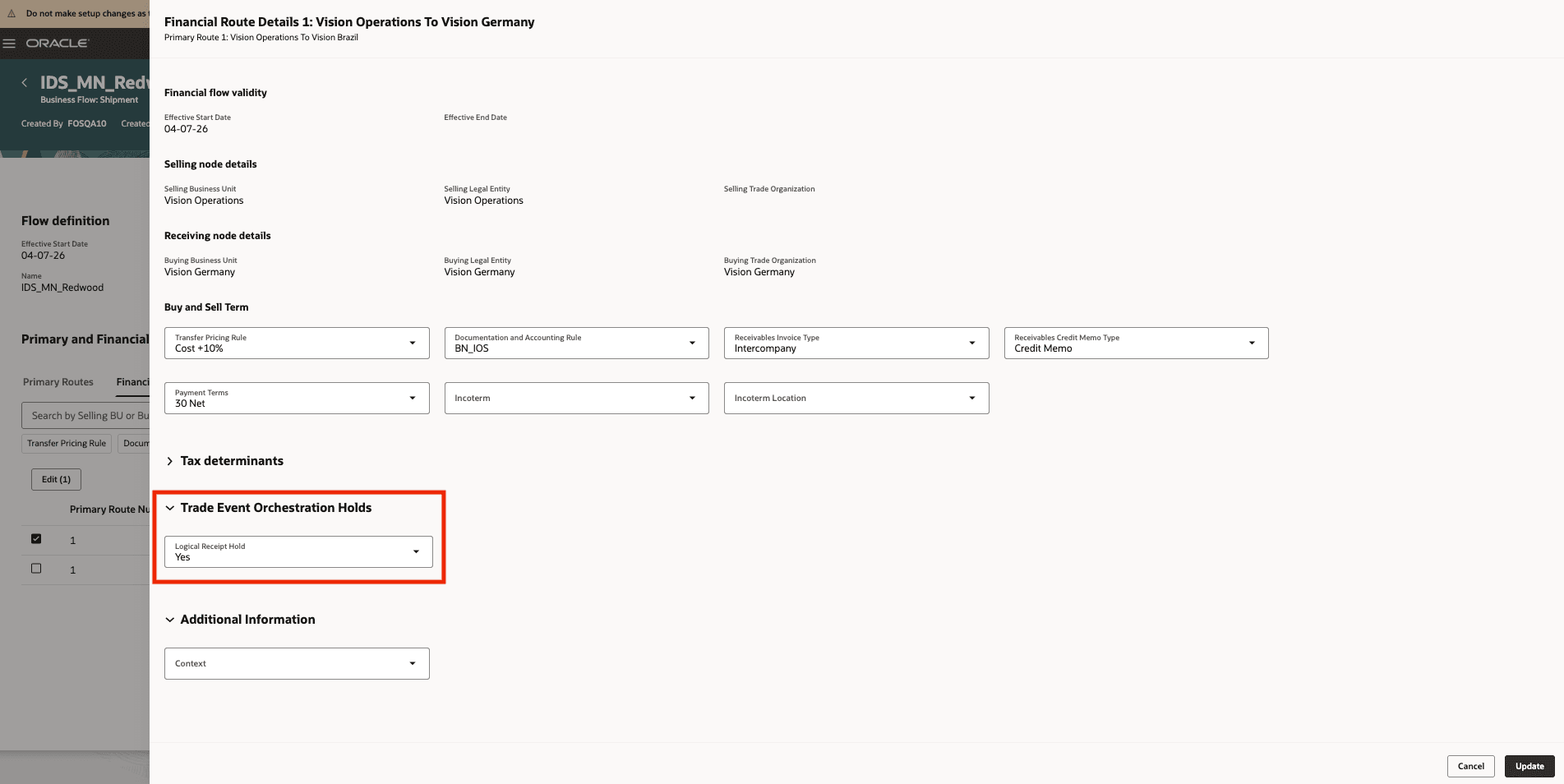
Configure Hold for Logical Receipt
Configure Hold for Logical Shipment and Receipt
You can configure shipment and receipt hold behavior independently on the agreement.
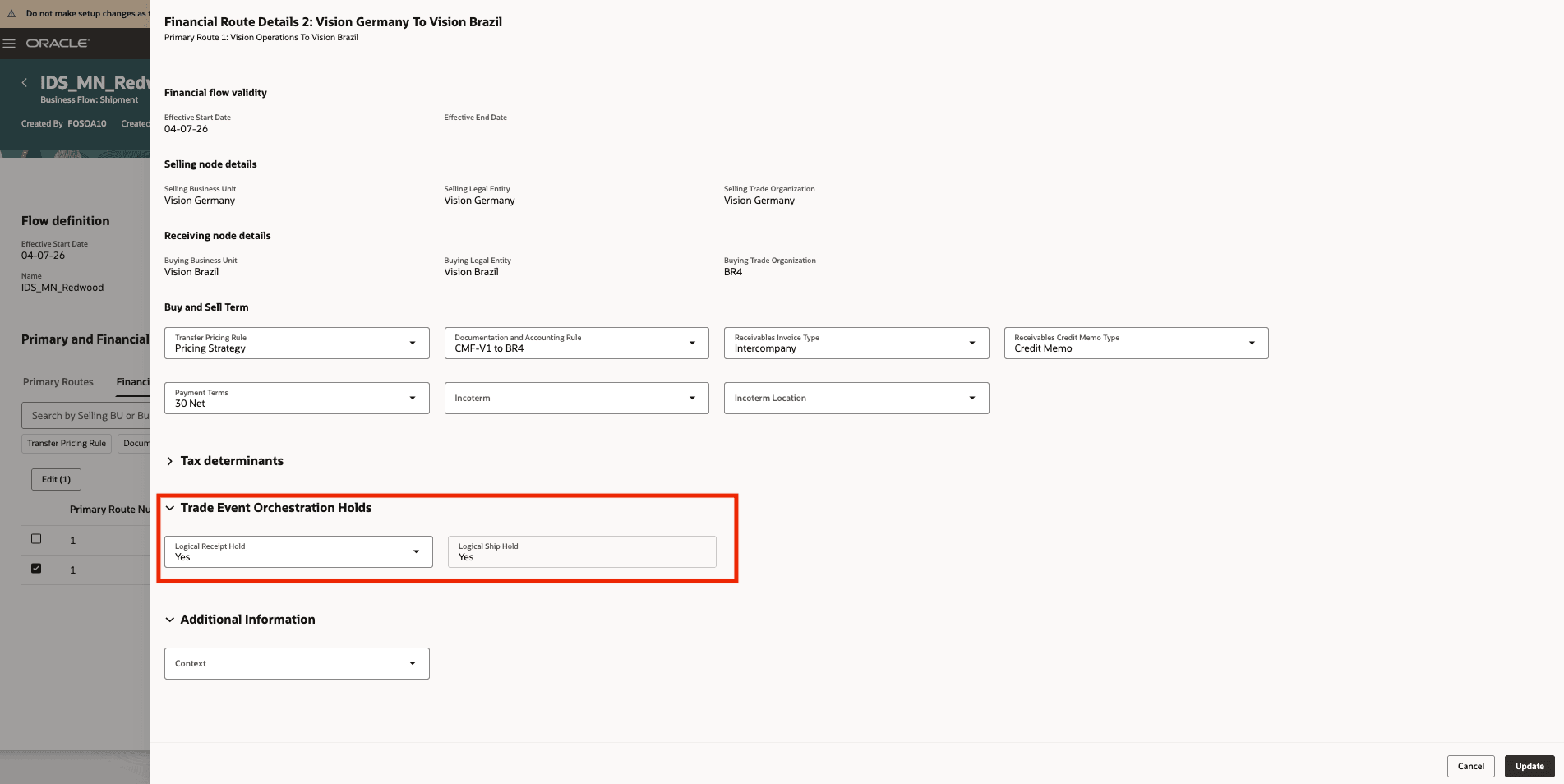
Configure Hold for Logical Shipment and Logical Receipt
Review Hold Settings on the Financial Trade Relationship
The agreement shows the hold configuration that applies to the shipment flow.
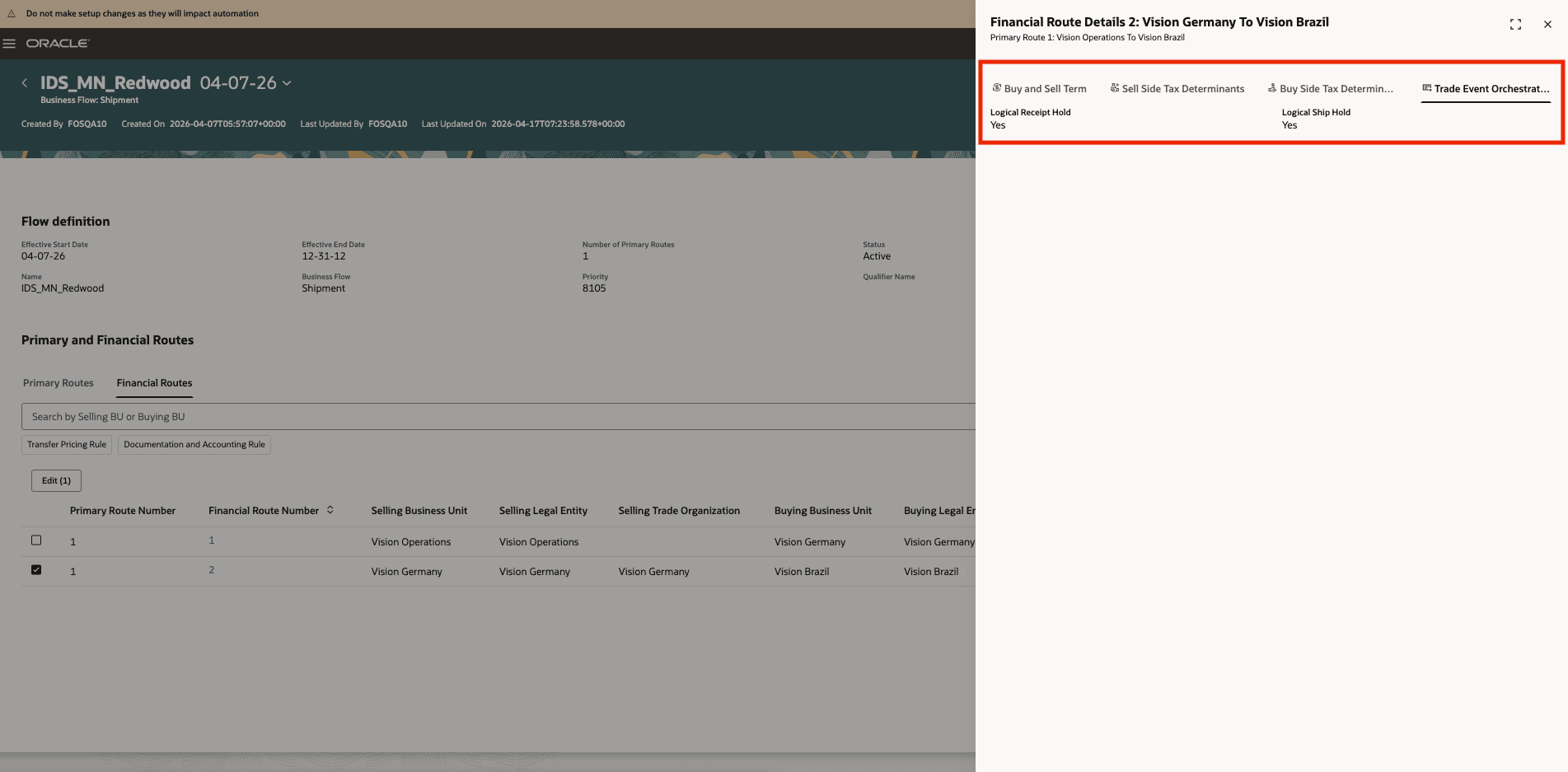
Review Hold Settings on the Financial Trade Relationship
Monitor Held Financial Orchestration Tasks
Operations users can review events that are waiting in hold status before release.
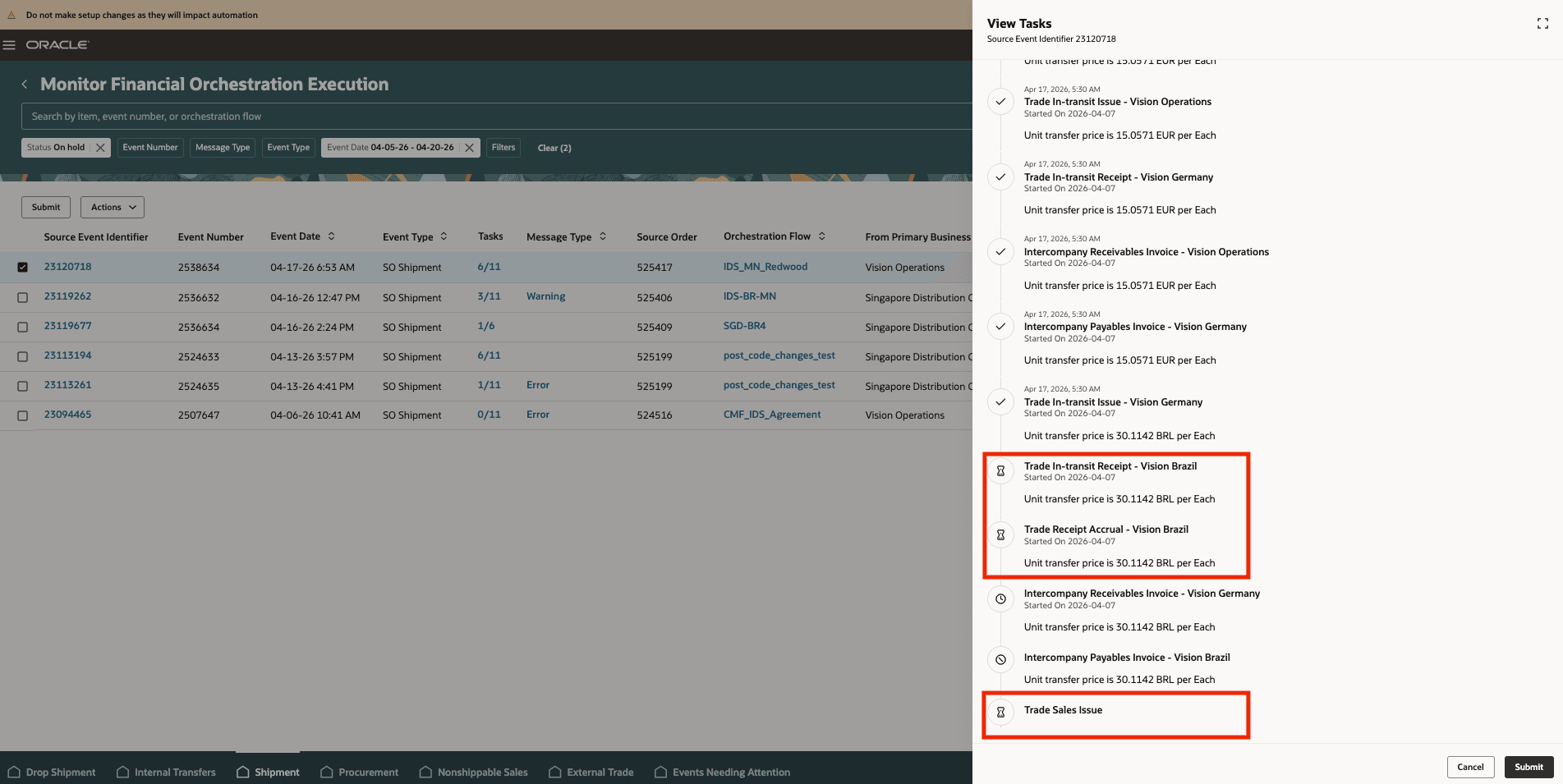
Monitor Held Financial Orchestration Tasks
Release Held Events Manually
Use the Monitor Financial Orchestration Events page to release a held event when it is ready to continue.
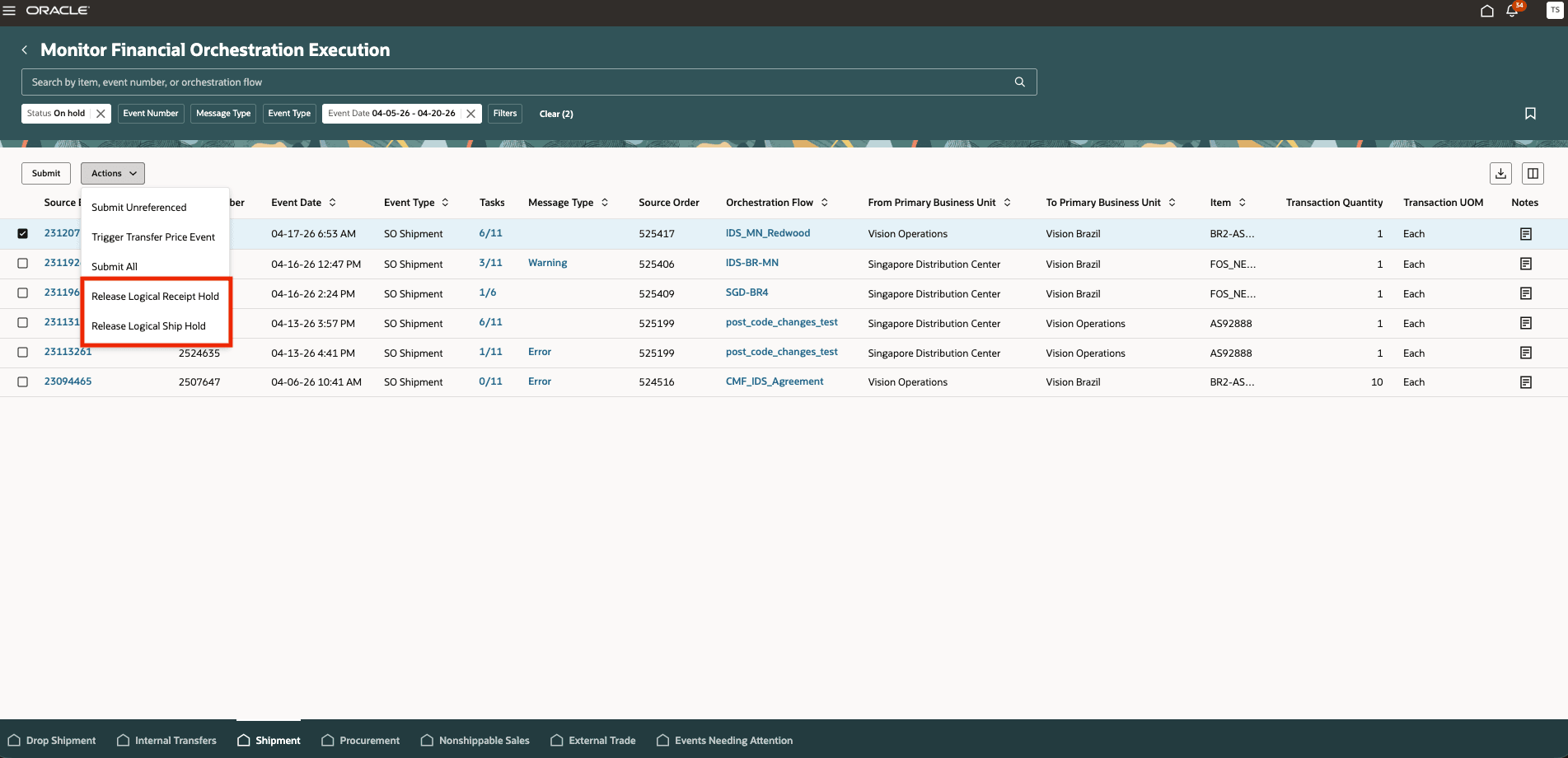
Release Held Events Manually
You have better control over the timing of intercompany financial processing in shipment flows. You can delay downstream orchestration until the required business condition is met, reduce the risk of processing events too early for country-specific requirements, and give operations teams a clear manual release point for held events.
Steps to enable and configure
Use the Opt In UI to enable this feature. For instructions, refer to the Optional Uptake of New Features section of this document.
Offering: Manufacturing and Supply Chain Materials Management No Longer Optional From: Update 27A
1. Enable the feature opt-in for configurable timing of financial orchestration in shipment trade events.
2. Open the applicable financial flow agreement and go to the Financial Trade Relationship setup.
3. Set Hold Logical Shipment Orchestration to Yes if shipment-side trade events must be held.
4. Set Hold Logical Receipt Orchestration to Yes if receipt-side trade events must be held.
5. Save the agreement and process the shipment flow as usual.
6. Review held events in Monitor Financial Orchestration Events and release them manually when the required milestone is satisfied.
Tips and considerations
- If the feature opt-in is not enabled, the new hold controls do not appear and shipment processing continues with existing behavior.
- Automated release based on later milestones is not part of this feature scope.
- A held event is enriched before it is placed on hold, so that it’s ready for downstream processing after release.
- Brazil-enabled BUs continue to use the existing fiscal document validation when a held event is released.
- This feature controls orchestration timing. It does not introduce new downstream products or change the core shipment flow setup outside the hold configuration.
Key resources
- Oracle Fusion Cloud SCM: Implementing Manufacturing and Supply Chain Materials Management Guide, available on the Oracle Help Center.
- Oracle Fusion Cloud SCM: Using Supply Chain Cost Management guide, available on the Oracle Help Center.
Access requirements
Users who are assigned a configured job role that contains these privileges can access this feature:
- Maintain Supply Chain Financial Orchestration Flow by Web Service (FOS_MAINTAIN_SUPPLY_CHAIN_FINANCIAL_TRADE_AGREEMENT_WEB_SERVICE)
- Manage Supply Chain Financial Orchestration Flow by Web Service (FOS_MANAGE_SUPPLY_CHAIN_FINANCIAL_TRADE_AGREEMENT_WEB_SERVICE)
- Manage Financial Orchestration Events by Web Service (FOS_MANAGE_MONITOR_ORCHESTRATION_WEB_SERVICE)
These privileges were available prior to this update.