AI Agent: Service Charges Advisor
The Work Order Charges page in Service Logistics now includes the Service Charges Review Advisor, which helps service administrators identify recommended review actions. The AI advisor analyzes historical trends from completed Service Work Orders and their debrief data, then creates recommendations through a background process scheduled in AI Agent Studio. These recommendations appear for debrief records that are awaiting post-charge action.
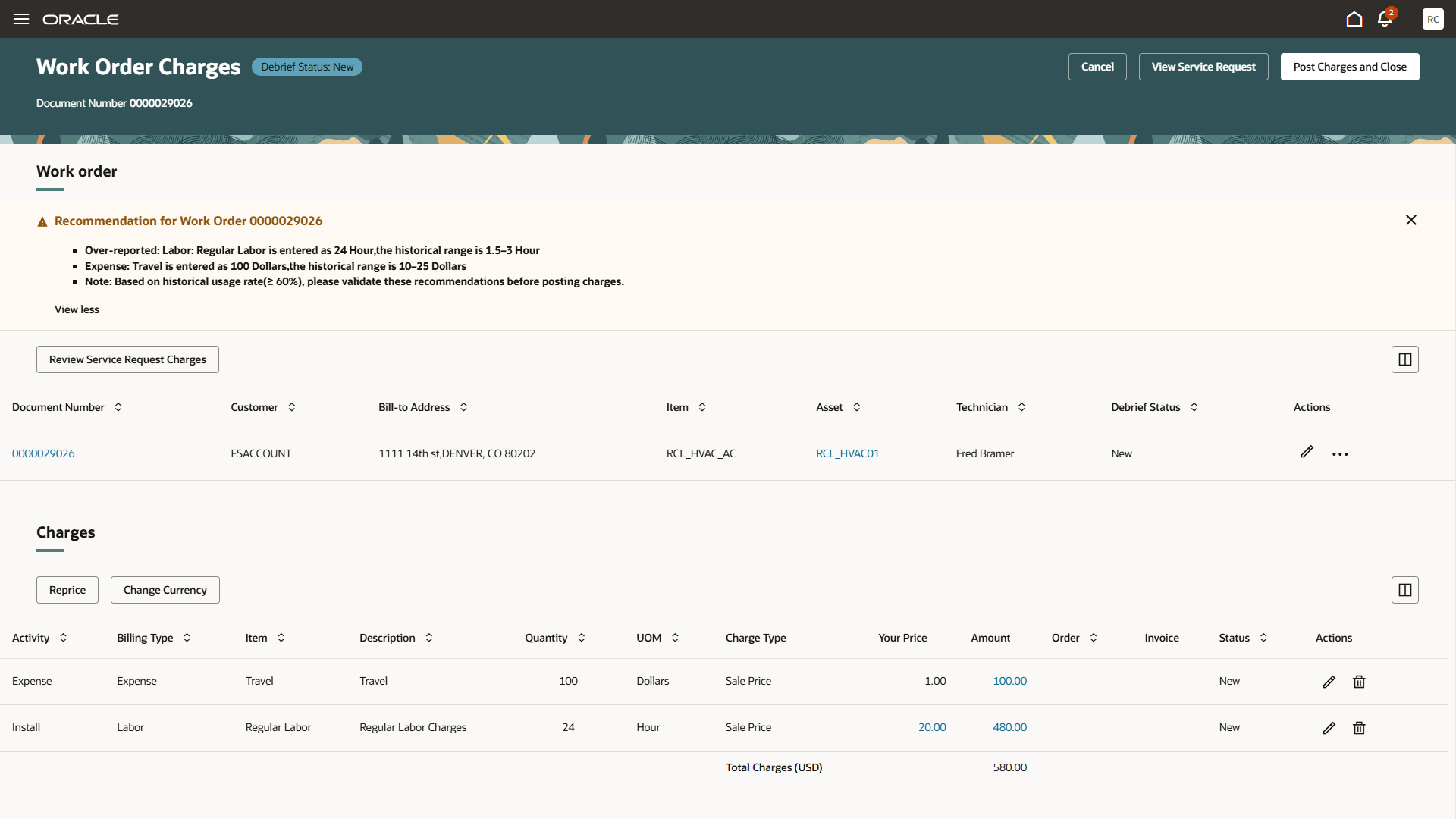
Service Charges Review Advisor
A message banner on the Work Order Charges page displays recommendations for potential charge discrepancies, including:
- Missing debrief lines
- Excess or underreported quantities
- Duplicate charges
- Anomalies
Each potential charge issue is identified using predefined rules that analyze historical debrief data from similar work orders, based on work order type, inventory item, and organization.
The charges recommendations from the advisor help the user to review and correct the debrief lines like: if any debrief lines were missed out or unusual quantity variations reported or multiple charges for the same items were reported or any kind of anomalies in reported charges.
Service Charges Review Advisor improves charge accuracy, helps prevent revenue leakage, and reduces the manual review effort required from service administrators. By making it easier to reference and compare historical debrief data, it helps service administrators identify potential charge issues more effectively.
Steps to enable and configure
In AI Agent Studio, you can use or copy a preconfigured agent template to create agents for business processes.
- To automatically add a suffix to all artifacts in the agent team, select Copy Template. This opens the agent team canvas directly, where the agent team settings, agents, tools, and topics can be edited.
- The Use Template option provides a step-by-step process to configure each artifact in the agent team.
For information on using AI Agent Studio, see How do I use AI Agent Studio?
Tips and considerations
Recommendations from the Service Charges Review Advisor are available until the charges are posted for the work order. After the charges are posted, the recommendations are no longer shown because the review and any required actions are expected to be complete.
Access requirements
To access the Oracle AI Agent Studio for Fusion Applications and manage SCM AI agents, users must be assigned a configured job role that contains these duty roles:
- SSCM Intelligent Agent Management Duty (ORA_RCS_SCM_AI_AGENT_MANAGEMENT_DUTY and ORA_RCS_SCM_AI_AGENT_MANAGEMENT_DUTY_HCM – both duty role codes are required)
- Fai Genai Agent SCM Administrator Duty (ORA_DR_FAI_GENERATIVE_AI_AGENT_SCM_ADMINISTRATOR_DUTY)
In the Security Console, filter by Roles and Privileges to find the SCM Intelligent Agent Management Duty role. Filter by Roles and Permission Groups to find the Fai Genai Agent SCM Administrator Duty role.