Create Automatic Detailed Reservations for Manufacturing Batches
In highly regulated or high-volume production environments, manufacturers often need to reserve the exact inventory that should be consumed for a batch. Material reservations ensure that the right materials are available when they’re needed in the manufacturing process. Today, automatic material reservation is created at the inventory organization level, and detailed reservation is done manually. With this update, you can automate detailed reservations, reduce manual effort, and improve material traceability.
Now you can reserve materials automatically with details for a batch, group of batches, or selected materials in a batch. The process uses pick rules to identify inventory at the detailed level, including subinventory, locator, lot, and serial. This helps manufacturing organizations ensure that materials are available when needed for production execution. The detailed reservation information is honored in downstream execution flows, including movement request creation, picking, and material issue.
Some of the key capabilities of this feature include:
- Automatically create detailed reservations for materials for a batch or group of batches from the Batches UI: Use the Reserve Materials Automatically with Details action on the Batches page to create detailed reservations for materials for a single batch or a selected group of batches. The Reserve Materials for Batches scheduled process is launched to create detailed reservations. The process uses pick rules to identify the appropriate source inventory and creates reservations at the detailed level.
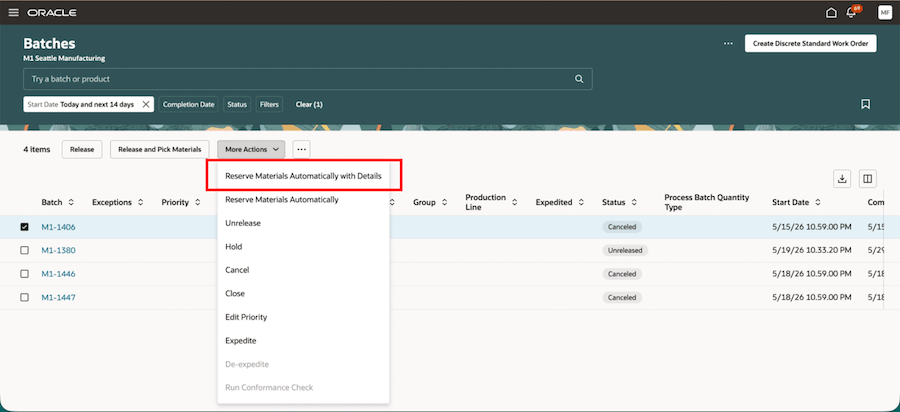
Detailed Reservation from the Batches Page
- Automatically create detailed reservations for materials for a batch or group of batches from Material Availability: Use the Reserve Materials Automatically with Details action from the Material Availability Assignments page to create detailed reservations while reviewing material availability for a batch or group of batches. The Reserve Materials for Batches scheduled process is launched to create detailed reservations. This helps you reserve the required materials earlier in the execution flow and improve readiness for downstream picking and issue transactions.
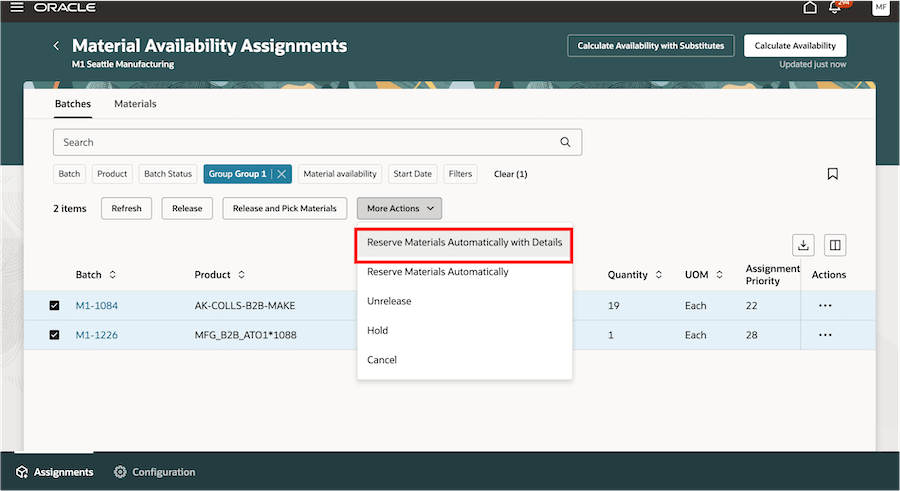
Detailed Reservation from Material Availability Assignments
-
Automatically create detailed reservations for ingredients in a batch: You can also create detailed reservations for one or more ingredients of the batch from the Reservations page in Inventory with the batch demand context using the Reserve Automatically with Details action. A scheduled process is launched to create detailed reservations.
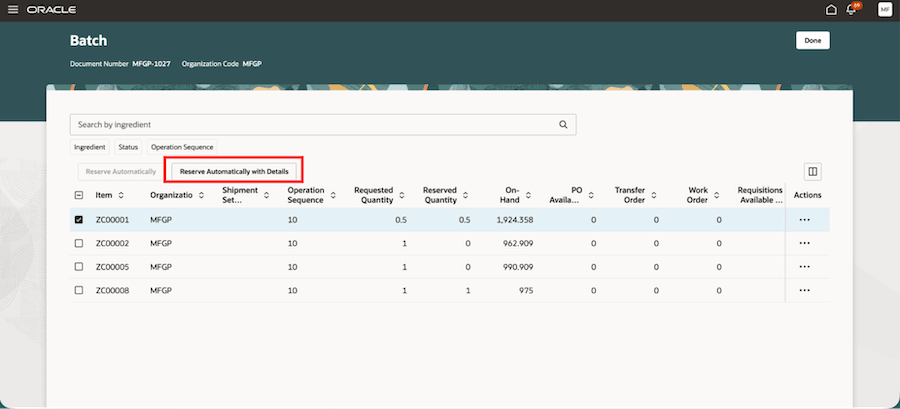
Detailed Reservation for One or More Ingredients of the Batch
- Review reservation results: You can review the output file for the Reserve Materials for Batches scheduled process to see reservation results at the batch material level, including materials that were reserved successfully and materials that couldn’t be reserved due to availability or validation issues. You can also review reservation details, such as subinventory, locator, lot, and serial, in the Inventory Reservations UI.
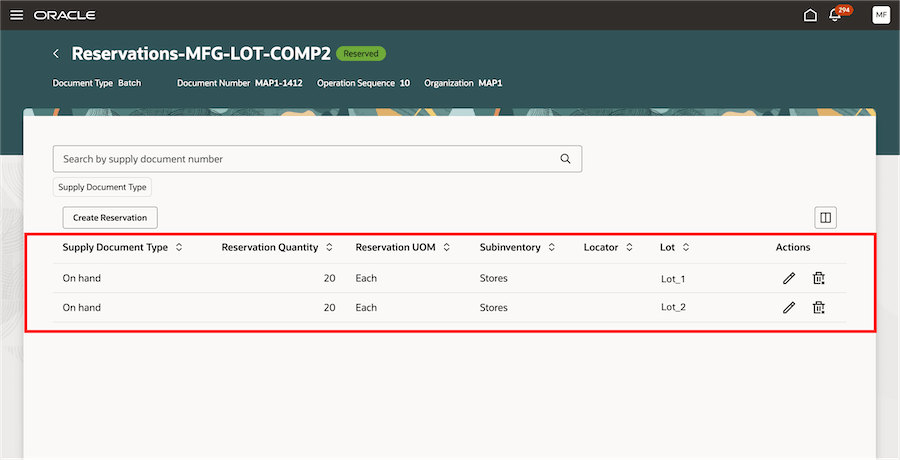
Review Results from the Inventory Reservations UI
- Use detailed reservations during downstream material execution: Detailed reservation information is honored during movement request creation, picking, and material issue, helping ensure that downstream material transactions use the inventory reserved for the batch.
This feature provides the following benefits:
- Improves production readiness by reserving the required inventory earlier in the batch execution flow.
- Minimized risk of data entry errors and stockouts with a manual reservation process.
- Improve production accuracy and compliance by using pick rules to identify exact inventory attributes and ensure material availability.
- Support traceability and reduce manual errors by honoring detailed reservations during picking and material issue.
- Convert high-level reservations to detailed reservations automatically or manually to improve accuracy.
- Support visibility of reserved serial numbers in material transactions for manual issue and verification.
- Default lot numbers from reservation lines during material issue for both push and pull supply types.
Here's the demo of these capabilities:
Steps to enable and configure
Set up the plant parameters to enable this feature:
- In the Setup and Maintenance work area, search for and open the Manage Plant Parameters task.
- Select the required inventory organization.
- In the Work Execution tab, ensure that the flag Allow reservations for batch materials (when process terminology is enabled) or Allow reservations for work order materials (when process terminology is not enabled) is enabled.
- Select the Automatically create detailed material reservations for batches (when process terminology is enabled) or the Automatically create detailed material reservations for work orders (when process terminology is not enabled) checkbox to enable this feature.
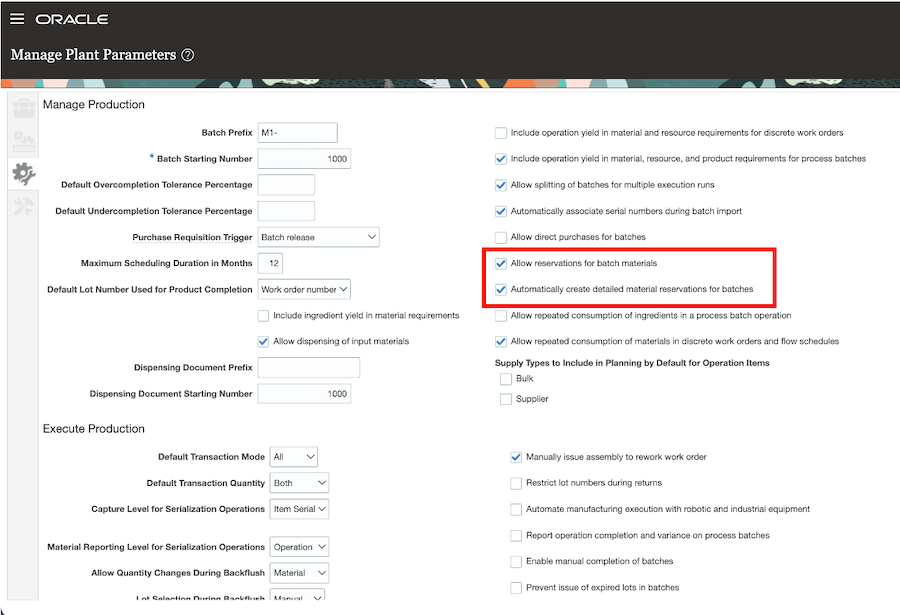
Plant Parameters to Enable Automatic Detailed Reservation
Tips and considerations
Enablement and Setup
- This feature is also applicable for discrete manufacturing.
- The new plant parameter can be enabled only when the existing Allow reservation for batch materials(when process terminology is enabled) or Allow reservations for work order materials (when process terminology is not enabled) parameter is selected.
- Ensure that the applicable pick rules are defined correctly so that the process can identify the appropriate source inventory for detailed reservations.
- The item must be set up as reservable for the process to create detailed reservations for the material.
- You must enable the inventory organization parameter System Selects Serial Numbers = Yes, to create reservations at the serial level for serial-controlled items.
Reservation Processing
- Detailed reservations can include inventory control attributes such as subinventory, locator, lot, serial, project, and task. Grade and country of origin aren’t supported for detailed reservations.
- You can directly create detailed reservations without high level reservations. If a batch material has an existing high-level reservation, the process can create detailed reservations for the required quantity by using pick rules.
- If only part of the required quantity can be reserved at the detailed level, the process reserves the available quantity and reports the remaining quantity as an exception.
- If materials are already partially issued, detailed reservations are created only for the remaining open quantity.
- For lot-indivisible materials, the process creates a detailed reservation only when the full available lot quantity can be reserved and used without splitting the lot.
Material Usage
- When materials are picked after reservation, the detailed reservation is used to identify the inventory control attributes for movement requests.
- Lot defaulting during material issue continues to work based on the existing supported behavior for reservation-based defaulting.
Key resources
- Watch the Create Automatic Detailed Reservations for Manufacturing Batches demo.
- Oracle Fusion Cloud SCM: Refer to the Using Manufacturing guide, available on the Oracle Help Center.
- Oracle Fusion Cloud SCM: Refer to the Implementing Manufacturing and Supply Chain Materials Management guide, available on the Oracle Help Center.
Access requirements
Users who are assigned a configured job role that contains this privilege can access this feature:
- Reserve Materials Automatically for Work Orders (WIP_MANAGE_WORK_ORDER_MATERIAL_RESERVATIONS_PRIV)