Source Multiple Suppliers in a Kanban Pull Sequence
Material planners need the flexibility to allocate demand across multiple suppliers within a single pull sequence to better balance capacity constraints and respond to variability. You can now source materials for a Kanban pull sequence from multiple suppliers using predefined sourcing percentages. With multi-source Kanbans, you can do the following:
- Support multiple suppliers in a pull sequence to improve sourcing flexibility.
- Generate Kanban cards proportionally based on supplier allocation percentages, with Kanban replenishment orders created per supplier and supplier site.
- Maintain Kanban card counts within allocation limits through automatic cancellation during replenishment.
- Allow temporary Kanban cards for suppliers outside the pull sequence to support ad hoc supply needs.
Changes to REST: The kanbanPullSequences REST API can create pull sequences with multiple suppliers and sourcing percentage for each supplier.
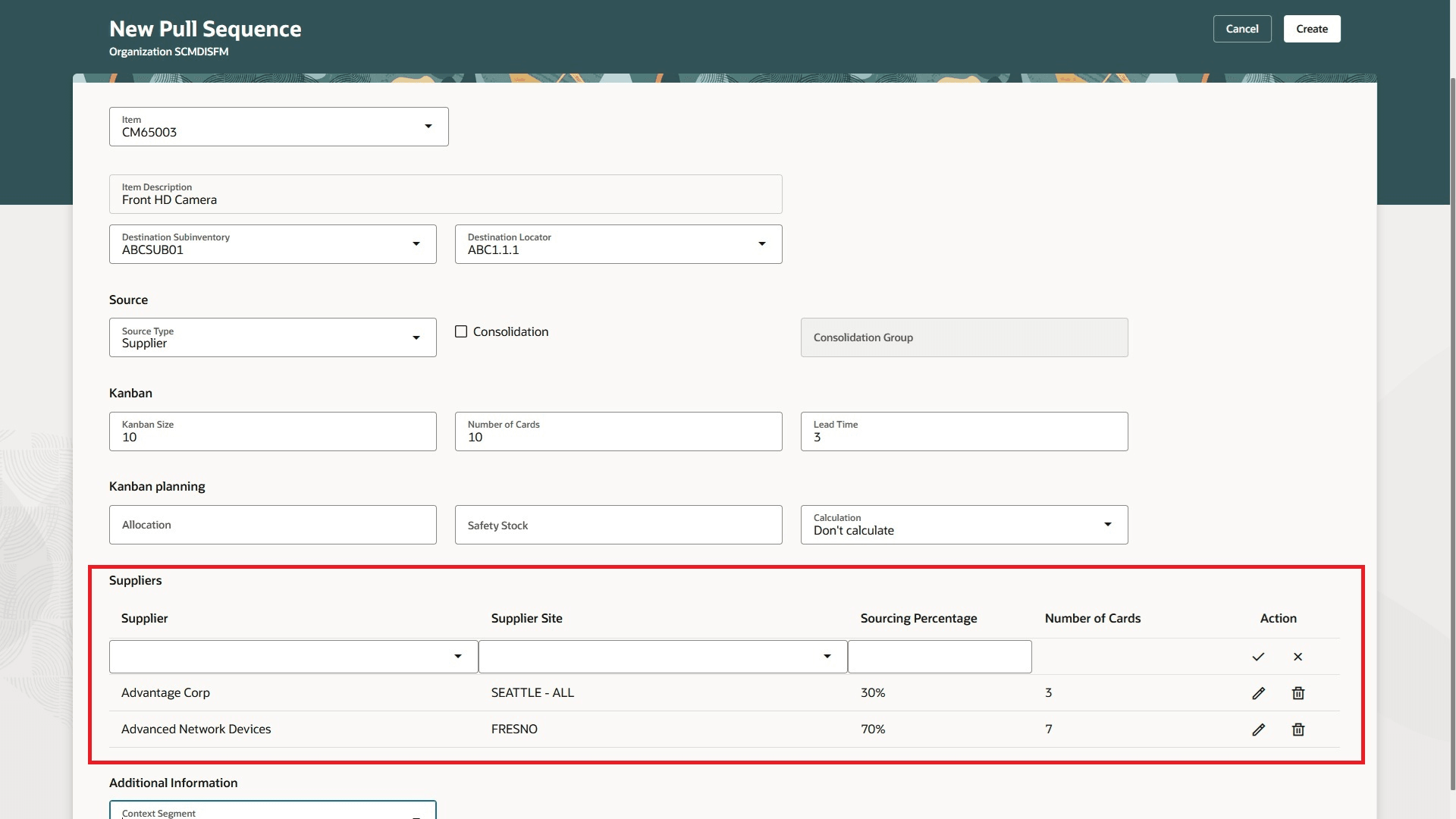
Multiple Supplier Setup in a Kanban Pull Sequence
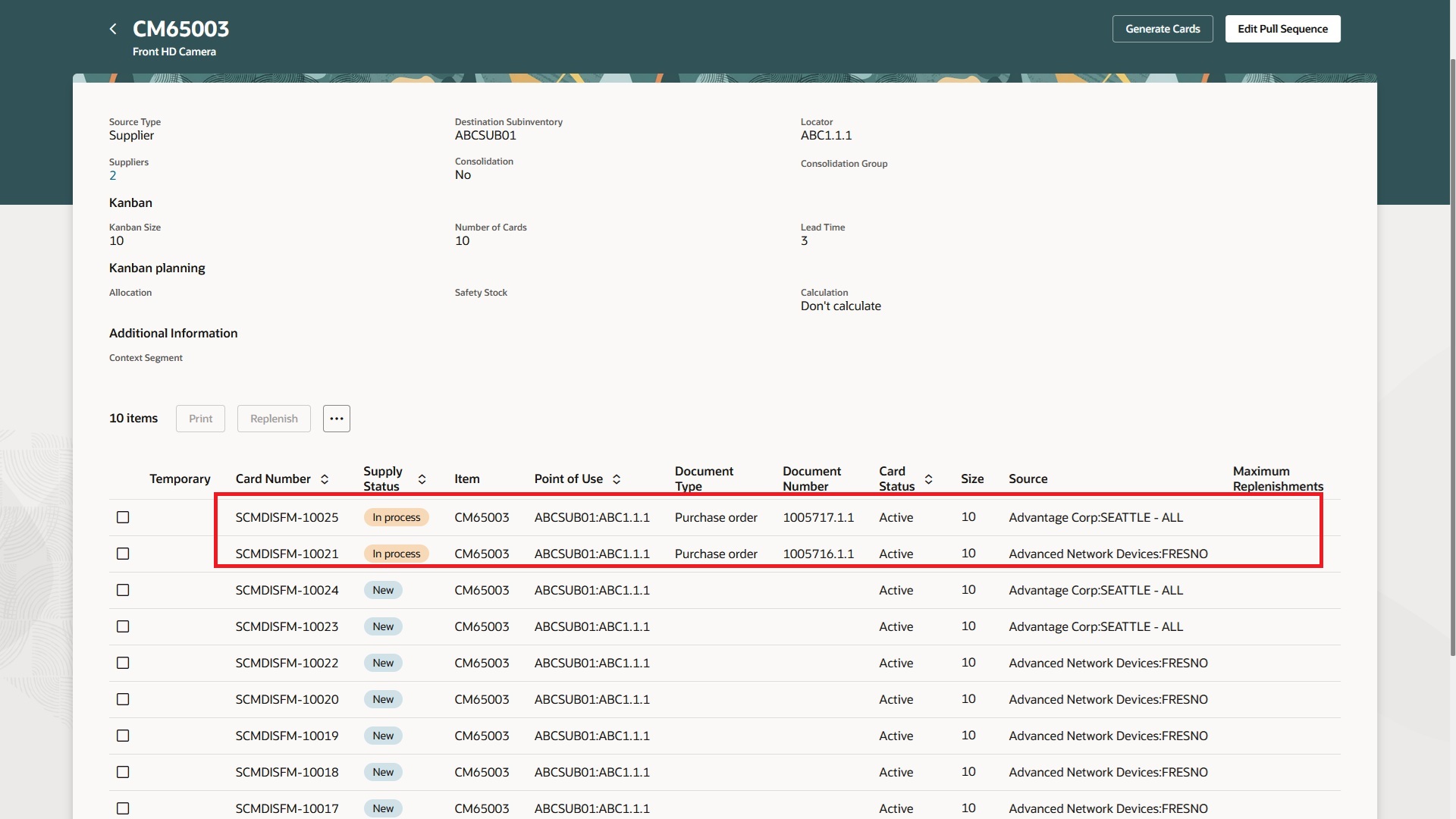
Kanban Cards and Replenishment Documents for Multiple Suppliers
This update provides the following benefits:
- Improves sourcing flexibility by supporting multiple suppliers with proportional Kanban card allocation and replenishment.
- Reduces supply disruptions by creating replenishment orders accurately per supplier and site.
- Simplifies ad hoc supply management with temporary kanban cards for suppliers outside the pull sequence.
Here's the demo of these capabilities:
Steps to enable and configure
You don't need to do anything to enable this feature.
Tips and considerations
- Supplier and supplier site combinations are treated as separate sources, so multiple sites for one supplier are managed independently.
- Consolidation of replenishment orders occurs only for Kanban cards sharing the same pull sequence and supplier combination.
- The number of Kanban cards per supplier is rounded to the nearest integer, which may temporarily cause total cards to exceed the pull sequence count until replenishment.
- Kanban cards exceeding the allocated percentage for a supplier are automatically ended during replenishment to maintain proportional card counts.
- Permanent Kanban cards require suppliers from the pull sequence while temporary Kanban cards support ad hoc suppliers outside the sequence.
- Temporary Kanban cards can be created for any supplier, but the supplier and site can't be changed after the card is saved.
Key resources
- Watch the Source Multiple Suppliers in a Kanban Pull Sequence demo.
- Oracle Fusion Cloud SCM: Refer to the Using Manufacturing guide, available on the Oracle Help Center.
- Oracle Fusion Cloud SCM: Refer to the Implementing Manufacturing and Supply Chain Materials Management guide, available on the Oracle Help Center.
Access requirements
Users who are assigned a configured job role that contains these privileges and codes can access this feature:
- Privileges :
- Manage Pull Sequences (WIS_MANAGE_PULL_SEQUENCES _PRIV) to define pull sequences
-
Manage Kanban Cards (WIS_MANAGE_KANBAN_CARDS_PRIV) to generate Kanban cards
- Guided Journeys : Role Codes
- Use REST Service - Guided Journeys Read Only (Role Code ORA_PER_REST_SERVICE_ACCESS_GUIDED_JOURNEYS_RO)
- Use REST Service - Guided Journey Responses (Role Code ORA_PER_REST_SERVICE_ACCESS_GUIDED_JOURNEY_RESPONSES)
These roles and privileges were available prior to this update.