Use Kanban Planning to Manage Just-in-Time Material Replenishment
Manufacturing and inventory teams need an accurate, repeatable way to size Kanban replenishment, so point-of-use materials stay available without driving excess inventory. Kanban Planning addresses this need by using demand and pull-sequence parameters to compute the right number of cards or Kanban size, reducing the risk of material shortages and recurring production disruptions.
You can now use Kanban plans to calculate the optimal number of Kanban cards or bin size using external forecast data and pull sequence attributes.
- Set Kanban planning attributes on pull sequences including average daily demand, lead time, safety stock, allocation percentage, and Kanban size.
- Invoke the new action 'Kanban Plans" to navigate to the Kanban plans summary page for defining the Kanban plan.
- Create and run Kanban plans against an external forecast with optional filters for item and date from the Kanban Plans page.
- Calculate and review the average daily demand and the recommended number of cards or Kanban size per pull sequence, then recalculate after changes. The background scheduled process performs demand explosion through the work definition and applies order modifiers to calculate the Kanban size.
- Mass load the average daily demand via the Oracle Visual Builder add-in for Excel and calculate the number of Kanban cards and their size.
- Implement the calculated Kanban recommendations in the corresponding pull sequences using the "Update Pull Sequence" action in Kanban Plans.
Changes to REST: The new REST service kanbanPlans can be used to create Kanban plans.
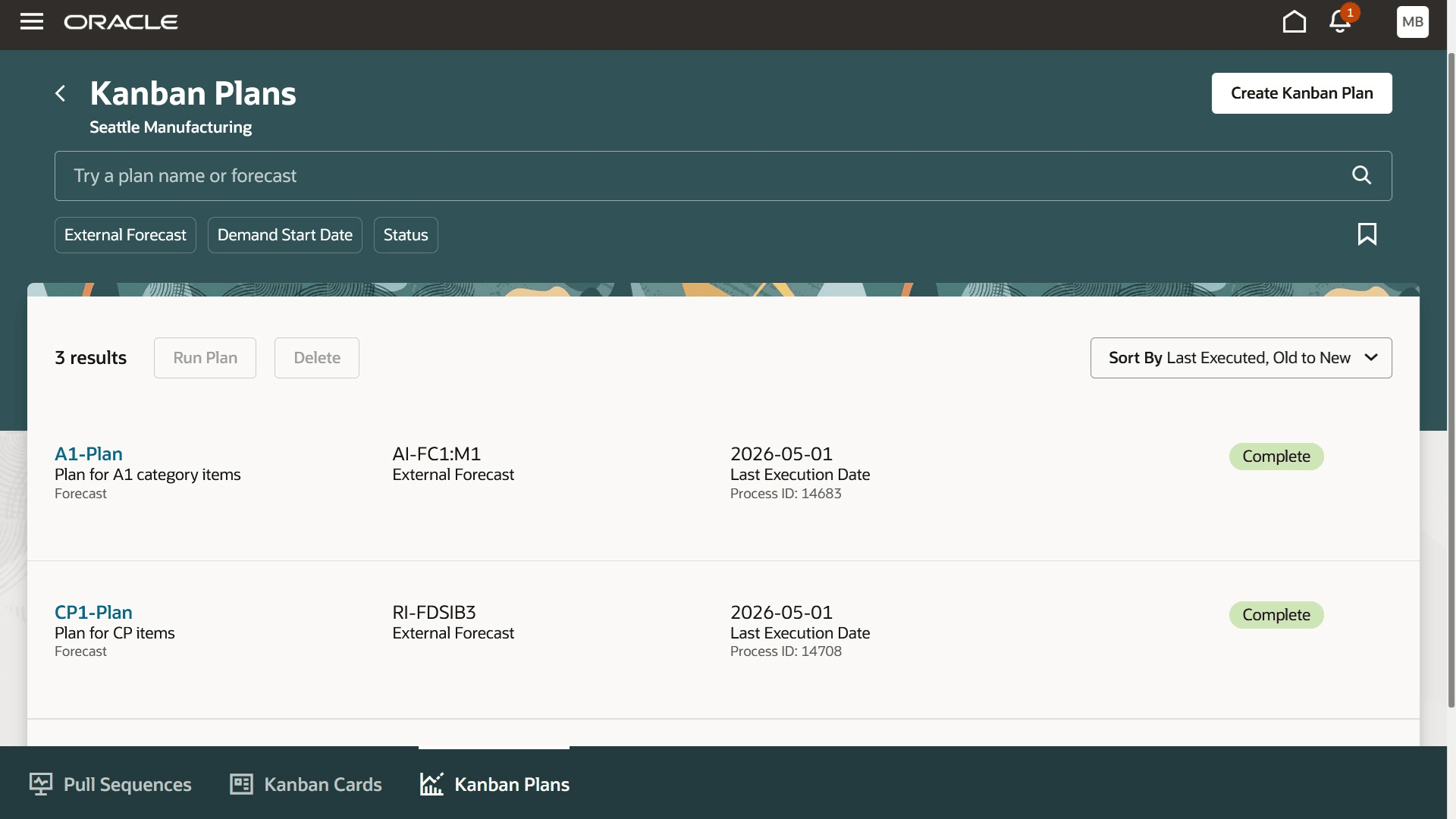
Kanban Plan Summary Page
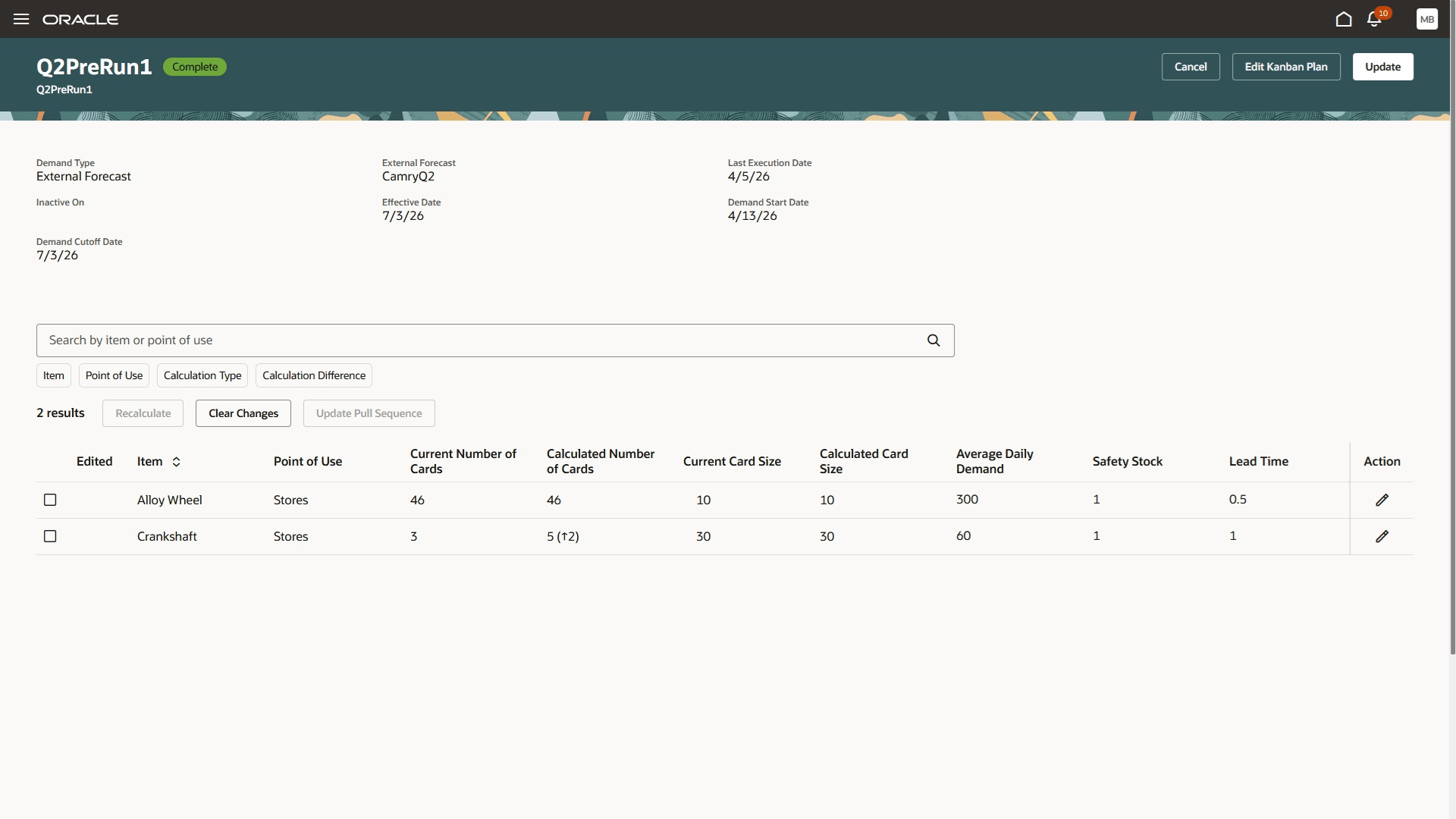
Kanban Plan Definition
This feature provides the following benefits:
- Improves inventory management by ensuring continuous material availability with minimal stock at the point of use.
- Reduces excess inventory and tied up cash by aligning the supply with the actual demand through pull-based Kanban planning.
- Simplifies mass updates and recalculations of Kanban parameters using an Excel plugin for efficient planning.
Here's the demo of these capabilities:
Steps to enable and configure
You don't need to do anything to enable this feature.
Tips and considerations
- External forecast is the source of demand.
- The pull sequences are updated immediately with the planning recommendation on executing the "Update Pull Sequence " action from Kanban planning.
- The Kanban cards are canceled at next replenishment.
- You should manually generate any additional Kanban cards, as recommended by planning.
Key resources
- Watch the Use Kanban Planning to Manage Just-in-Time Material Replenishment demo.
- Oracle Fusion Cloud SCM: Refer to the Using Manufacturing guide, available on the Oracle Help Center.
- Oracle Fusion Cloud SCM: Refer to the Implementing Manufacturing and Supply Chain Materials Management guide, available on the Oracle Help Center.
Access requirements
Users who are assigned a configured job role that contains these privileges and codes can access this feature:
- Privileges :
- Manage Pull Sequences (WIS_MANAGE_PULL_SEQUENCES _PRIV) to define pull sequences
-
Manage Kanban Plans (WIS_MANAGE_KANBAN_PLANS) to create and run Kanban plans
- Guided Journeys : Role Codes
- Use REST Service - Guided Journeys Read Only (Role Code ORA_PER_REST_SERVICE_ACCESS_GUIDED_JOURNEYS_RO)
- Use REST Service - Guided Journey Responses (Role Code ORA_PER_REST_SERVICE_ACCESS_GUIDED_JOURNEY_RESPONSES)
The Manage Kanban Plans (WIS_MANAGE_KANBAN_PLANS) is a new privilege in this release. All other roles and privileges were available prior to this update.