Execute Multiple Work Order Operations Simultaneously at a Workstation
Execute one or more work order operations at a workstation at the same time. You can track the progress for each operation and record transactions in real time.
In manufacturing environments where a single workstation or shared-capacity resource processes work from multiple work orders at the same time, operators need a way to start, execute, track, and report those operations together instead of repeating the same actions for each work order. This feature extends Oracle Manufacturing workstation-based production execution to allow multiple eligible work order operations to run simultaneously in a single workstation.
With this update:
- Operators can select multiple eligible work order operations at a workstation that is enabled for simultaneous execution and start the operations together in one session. Operators can review execution details for multiple operations in one flow and report completed, rejected, and scrapped quantities for the operations.
- Production supervisors can monitor the grouped operations and track their progress at the workstation.
- Using connected equipment, multiple operations can be started together for a workstation enabled for simultaneous execution.
This feature supports executing either discrete work order operations or process work order operations in workstation mode; discrete and process operations cannot be combined in the same execution flow. The feature helps with scenarios where multiple operations of the same type need to be executed together on shared equipment.
Resource Charging
When multiple work order operations are executed together at a workstation enabled for simultaneous execution, labor and equipment resources with a Variable basis are treated as shared resources for the duration of the execution session. After the operator stops the execution, Oracle Manufacturing allocates the total reported resource charge across the participating operations based on the reported quantity for each operation.
With this allocation logic, operations with a higher reported quantity receive a proportionally larger share of the resource charge, while operations with a lower reported quantity receive a smaller share. The expected usage rate for a variable resource is determined from the resource capacity and the cycle time, which together define the amount of work the resource can process over a given period.
If the execution session is stopped before any quantity is reported, Oracle Manufacturing distributes the variable resource charge evenly across all selected operations.
Resources with a Fixed basis are not treated as shared resources and are therefore excluded from this distribution logic.
Metrics calculation
Workstation metric calculations is updated for these workstations so that a single shared execution session is reflected correctly in OEE reporting. Availability is calculated at the execution-session level. If multiple operations run together and the workstation is paused for a reason classified as Availability loss, the stop duration is counted only once for the shared session, not once for each running operation.
Performance is adjusted to account for the fact that each operation in a simultaneous execution session can have its own ideal cycle time and total count.
OEE for simultaneous execution uses the revised availability and performance logic together with the existing quality calculation.
Connected Equipment
This feature extends connected equipment support to simultaneous execution at a single workstation. This release introduces a new event type, CA_MULTIPLE_OPERATIONS_START, that allows connected equipment to start multiple work order operations together in a single execution session. The event payload includes a WORK_ORDER_OPERATIONS collection that identifies each operation to be started, including the work order number and operation sequence. Oracle Manufacturing validates all selected operations against the simultaneous execution business rules before starting the session. If the operation details are invalid or the selected operations aren’t eligible to run together, then the request is rejected.
Connected equipment quantity reporting is also enhanced for simultaneous execution. When a shared execution session is in progress, the quantity report payload can include the work order number and operation sequence, so that completed, rejected, and scrapped quantities are recorded against the correct work order operation within the session. In addition, when a stop event is received, all operations running in that simultaneous execution session are stopped. This enhancement helps manufacturers automate multi-operation execution more accurately while preserving operation-level transaction traceability.
You can select multiple operations for execution on a workstation where simultaneous execution is enabled.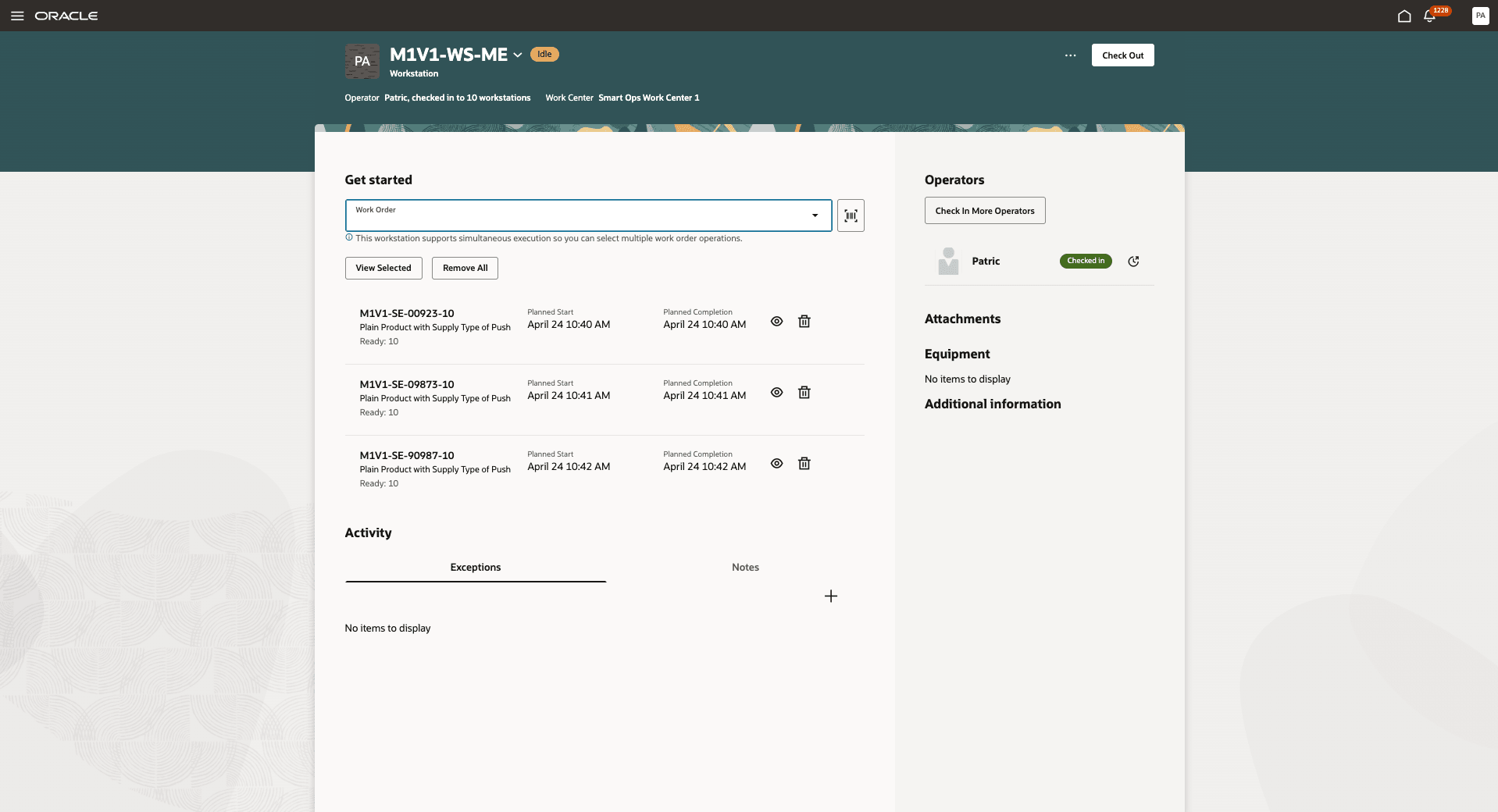
Select Multiple Operations on a Workstation Enabled for Simultaneous Execution
You can then view the operations selected for simultaneous execution at a workstation and click Start to begin execution for all selected operations.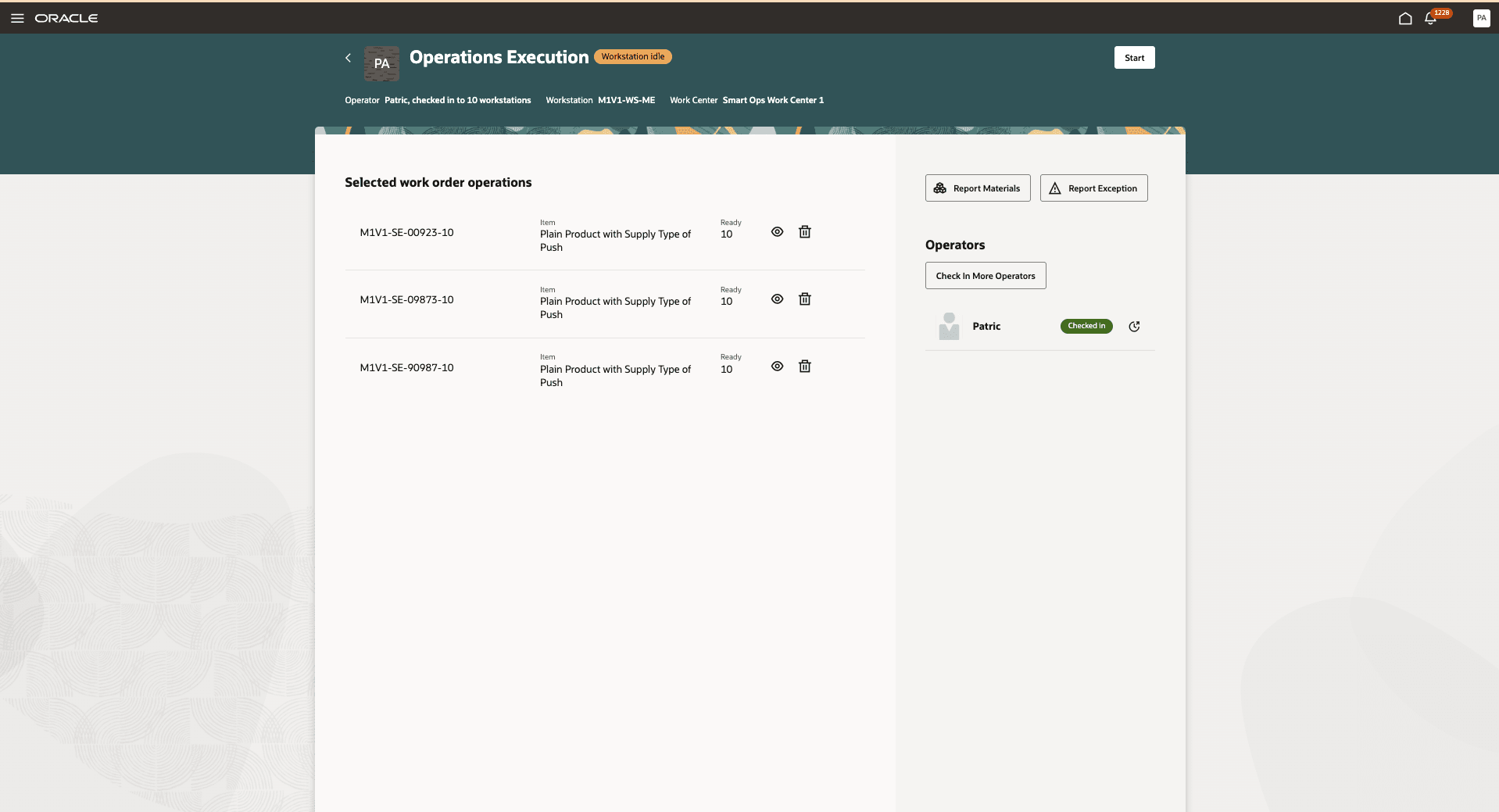
View Operations Selected for Simultaneous Execution
Execution starts for the selected operations at the workstation, as shown in the following screenshot:
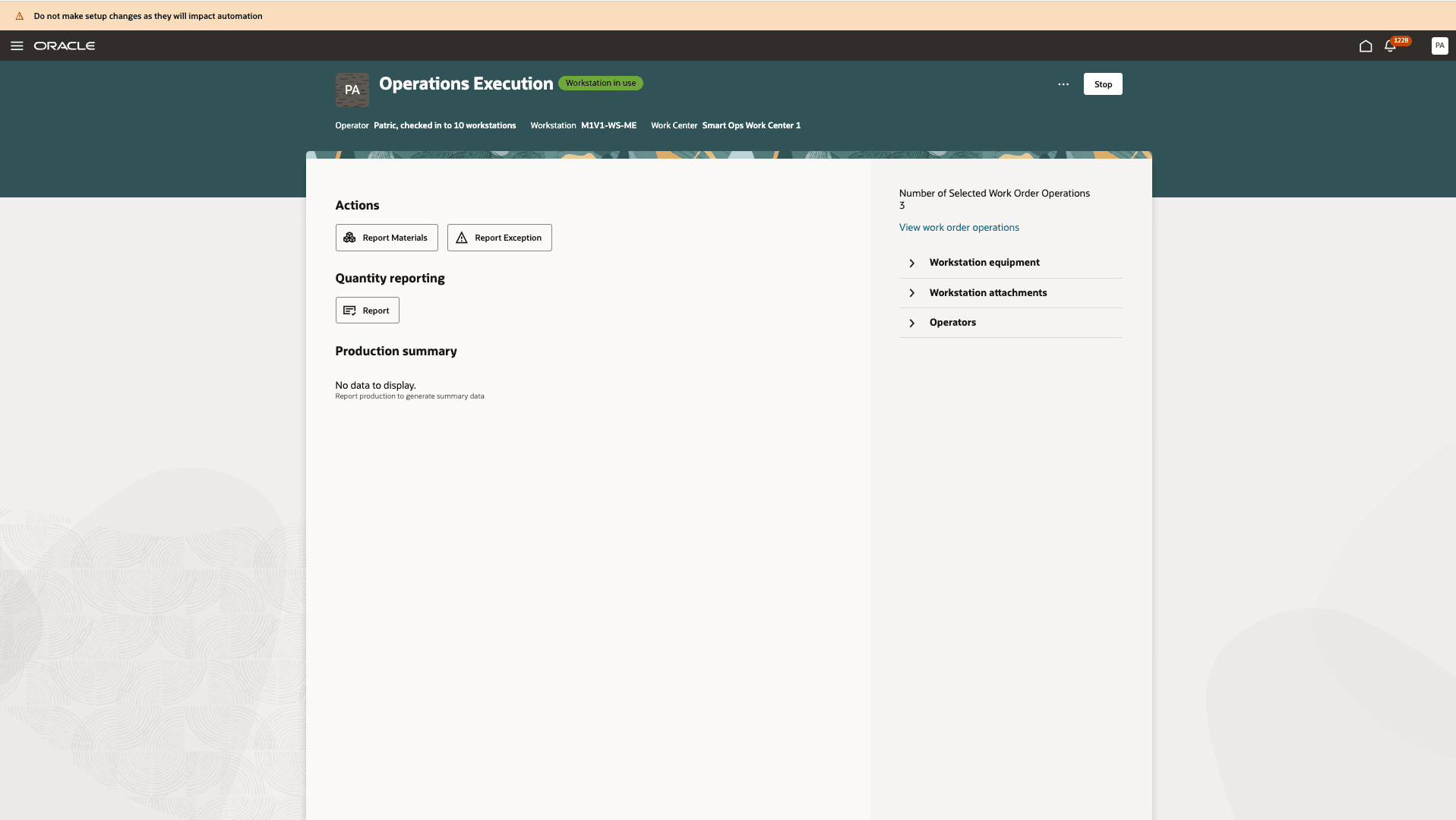
Execute Multiple Operations Simultaneously
You can then report quantities for multiple operations using a single Report Quantities page, as shown in the following screenshot:
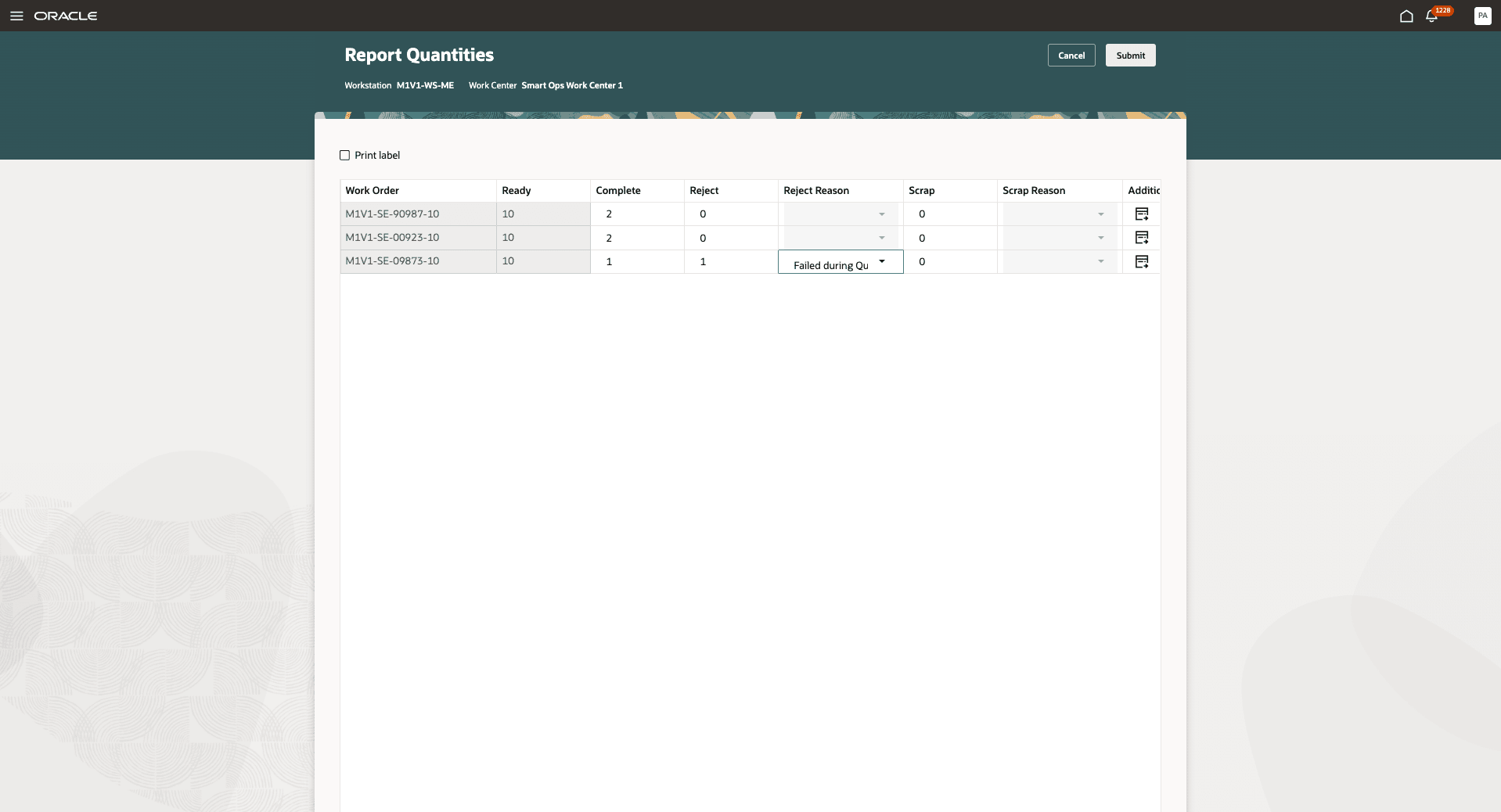
Report Quantities for Multiple Operations
Supervisors can view the list of operations running at a workstation enabled for simultaneous execution. They can also drill down into an operation to view detailed execution information.
The following screenshot shows the list of work order operations currently running at a workstation:
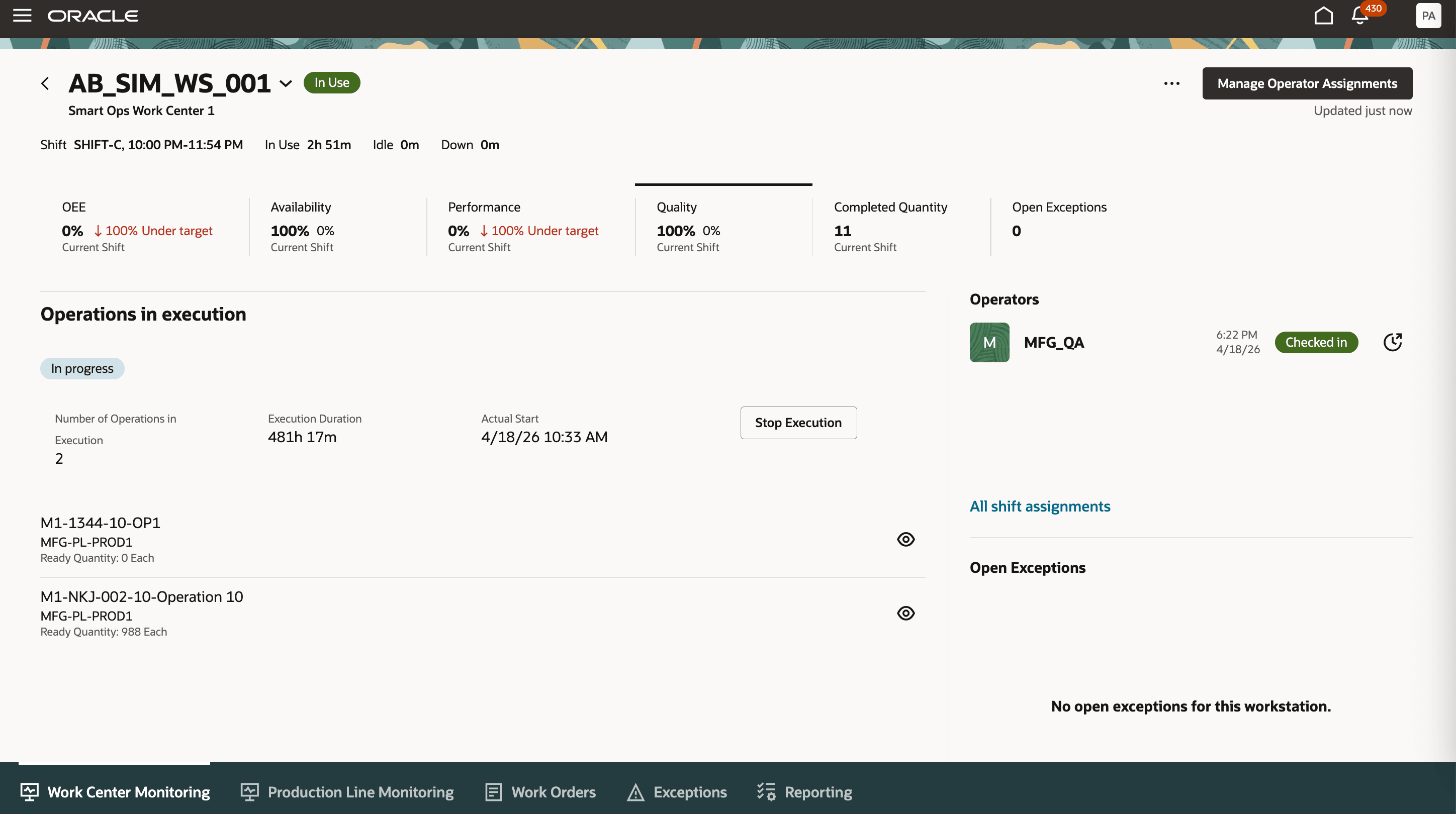
View Operations Running at a Workstation Enabled for Simultaneous Execution from Production Supervision
The following screenshot shows the execution details for one of the work order operations currently running at the workstation:
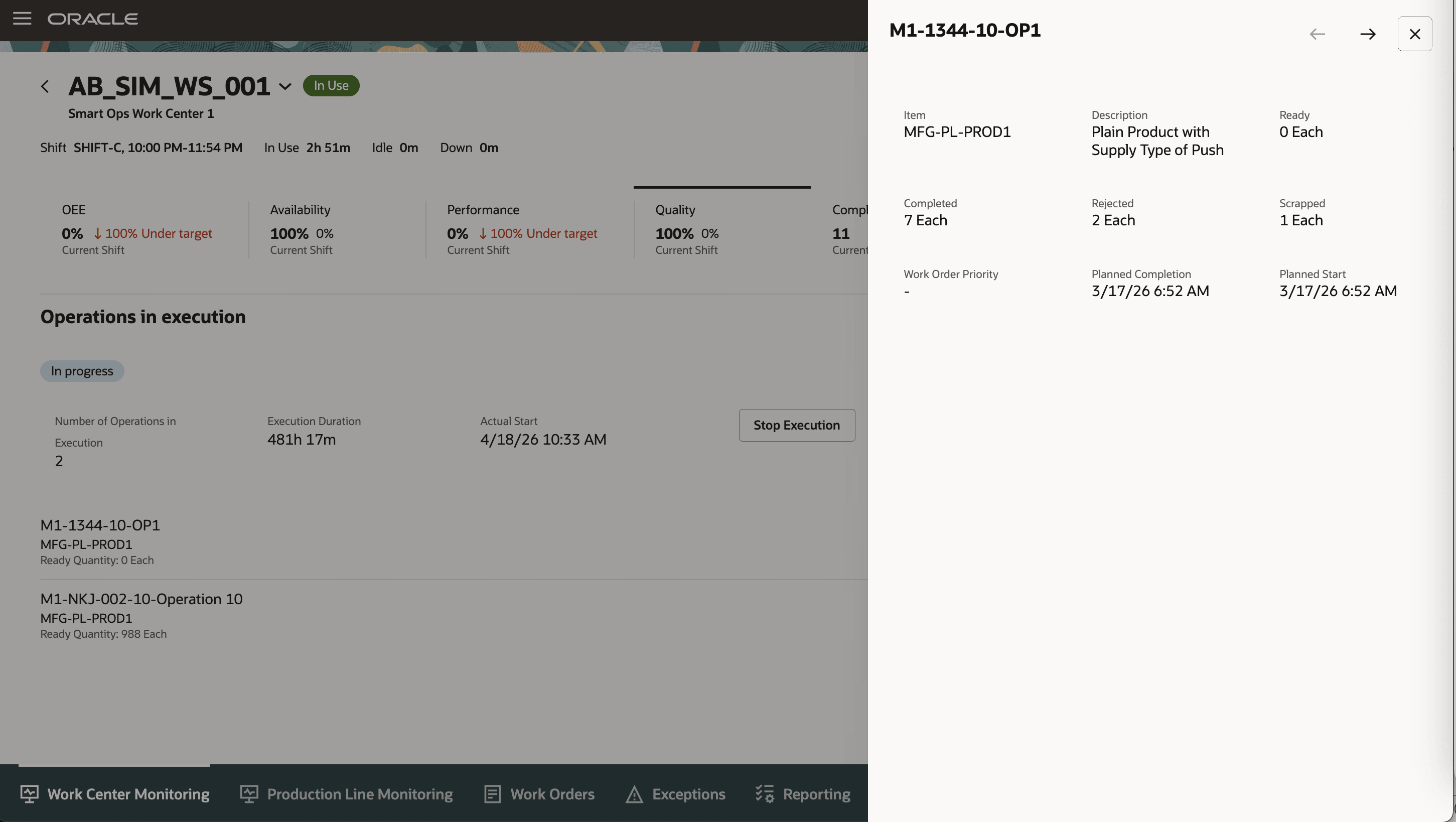
View Execution Details of a Work Order Operation
With this feature, production operators can perform and report multiple work order operations from a single workstation as one single execution, eliminating the need to repeatedly initiate and report each operation individually. This improves shop floor efficiency, supports accurate time and resource tracking across grouped operations, and provides supervisors with better visibility into the simultaneous execution progress.
Here's the demo of these capabilities:
Steps to enable and configure
To create a workstation enabled for simultaneous execution, navigate to Supply Chain Execution > Work Definition > Workstations, create a new workstation, and enable the Simultaneous Execution Enabled option for the workstation.
The following screenshot shows the Simultaneous Execution option when creating a workstation. A workstation enabled for simultaneous execution cannot be part of a production line.
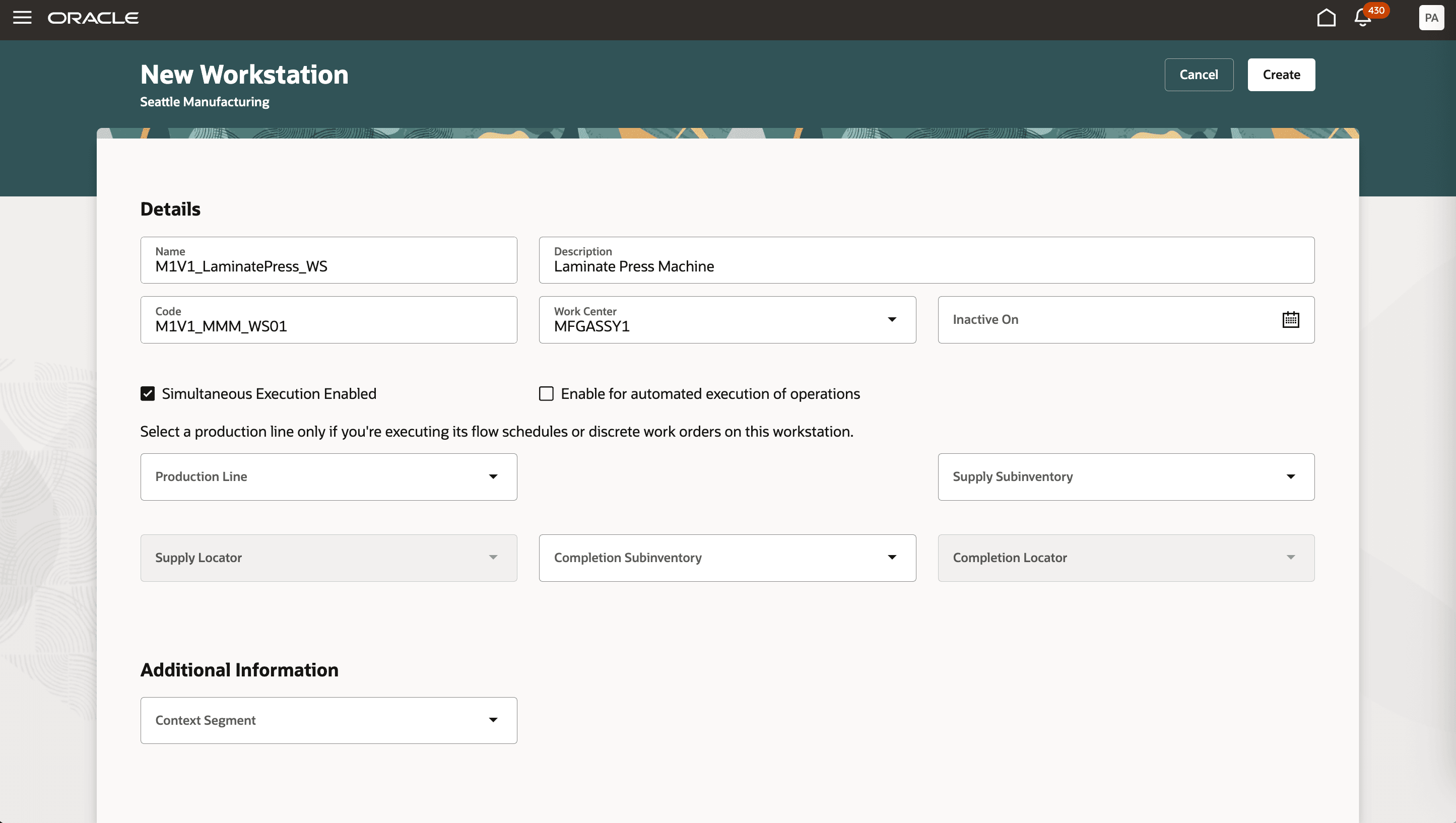
Create New Workstation with Simultaneous Execution Enabled
Tips and considerations
- This feature works only with the workstation mode of Production Execution.
- A workstation configured for simultaneous execution can't be assigned to a production line.
- Resource activities, digital work instructions, inspections, backflush of lot or serial controlled materials, and the complete with details option aren't supported for simultaneous execution.
- Serial-tracked execution is supported, and the feature applies to both discrete and process manufacturing.
- Plan Adherence Metrics isn't displayed for workstations enabled for simultaneous execution.
- This feature isn't supported for organisations enabled for Electronic Records and Electronic Signatures (ERES).
- Here are some guidelines for selecting operations for simultaneous execution:
- Supported operation selection criteria
- The work order operations are assigned to the same work center.
- All work order operations use the same work order quantity unit of measure (UoM).
- All selected operations use the same work method. The operations must all be either Discrete or Process manufacturing operations.
- Each selected operation has a ready quantity greater than zero.
- For process manufacturing, the operations use a process batch quantity type of either User Defined or Calculated.
- Serial-tracked production is consistent across the selection. Either all selected operations are serial-tracked or none are serial-tracked.
- Only one operation is selected from each work order.
- Only standard work order operations are selected.
- Qualified labor and equipment resource instances exist for the workstation.
- Unsupported operation selection scenarios
- Flow manufacturing work method.
- Work order types of Nonstandard, Rework, Transform, or contract manufacturing.
- Work order operations that are supplier operations, require inspections, enforce digital work instructions.
- Lot or serial controlled material that needs to be backflushed.
- Lot or serial controlled co-products or by-products that are automatically completed.
- Supported operation selection criteria
Key resources
- Watch the Execute Multiple Work Order Operations Simultaneously at a Workstation demo.
- Refer to the Oracle Fusion Cloud SCM: Using Manufacturing guide, available on the Oracle Help Center.
- Refer to the Oracle Fusion Cloud SCM: Implementing Manufacturing and Supply Chain Materials Management guide, available on the Oracle Help Center.
Access requirements
Users who are assigned a configured job role that contains the following privilege can access this feature:
- Supervise Production (WIP_SUPERVISE_PRODUCTION_PRIV)
- Execute Production at a Workstation (WIP_EXECUTE_WORKSTATION_PRIV)
These privileges were available prior to this update.