View a Summary of Reversal Transactions in the Shift Report
When operators reverse production transactions, such as reverse a completion, scrap, or reject transaction, these details were previously not included in the shift report. This made it difficult for supervisors to understand the true production output for a shift, and caused metrics like OEE, Plan Adherence, First Pass Yield, and Completed Quantity to appear inflated or inaccurate.
Production supervisors can now view reversal and disposition transactions performed at the work center for the current shift in the shift report in Production Supervision. This section provides a real-time, shift-level view of all reversal and disposition transactions performed during the current shift for a given work center, ensuring that production metrics accurately reflect the net impact of reversals.
The new Reversal and Disposition section appears below the existing forward transaction summaries such as completions, rejects, and scraps and captures all reversal transactions recorded during the current shift for the active work center. The Reversals section displays the following details for each reversal record:
- Transaction Types - Reject to Complete, Reject to Scrap, Reject to Ready, Scrap to Ready, or Complete to Ready
- Work Order and Operation
- Quantity with Unit of Measure
- Transaction Notes (if provided)
- Timestamp reflecting the actual time when the reversal was recorded (not the report generation time)
The Reversals section and its data are included in the PDF export of the Shift Report.
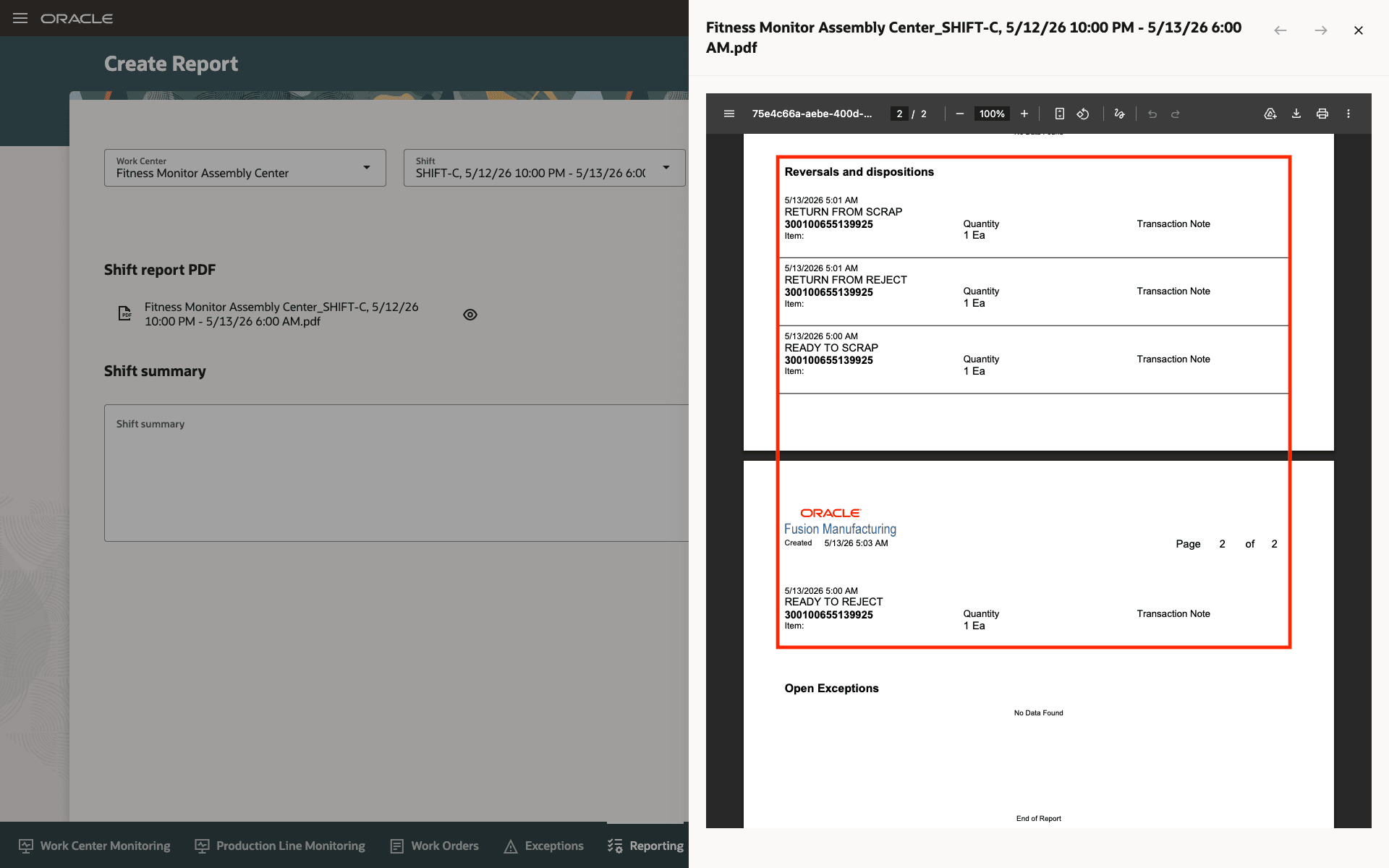
Reversal and Disposition Shift Report
Support for Workstation and Without Workstation modes
This feature applies to both the workstation-based and workstation-less execution modes.
- Reversals performed in the workstation mode are mapped to the work center linked to that workstation, and metrics are updated in the Workstation Monitoring view, the Work Center Monitoring view, and the shift report.
- Reversals performed in the workstation-less mode are associated with the default work center defined for the operator or work order, and metrics are updated in the Work Center Monitoring view and the shift report.
In both modes, recalculation is triggered in real time, ensuring that OEE, FPY, Plan Adherence, and Completed Quantity dashboards always reflect the current state of the shift.
How Metrics Are Impacted
When a reversal is submitted, the system immediately recalculates the following metrics for the current shift:
- Completed Quantity: Updated to reflect the net quantity after reversal.
- Plan Adherence: Recalculated based on the revised completed quantity.
- Overall Equipment Effectiveness (OEE): All three components (Availability, Performance, and Quality) are refreshed.
- First Pass Yield (FPY): Adjusted to reflect defect-related reversals.
This feature enables production supervisors to review reversal transactions directly within the shift summary so that they can accurately analyze production corrections, trace execution changes, and improve shift-level reporting visibility.
Steps to enable and configure
No steps are required to enable this feature.
Tips and considerations
- Reversal transactions are captured only for the active shift. If a reversal is submitted after the shift, it will not retroactively adjust metrics for the prior shift. Plan your reversal submissions before the shift window closes to ensure accurate shift-level reporting.
- While the Transaction Notes field is not mandatory, capturing the transaction note for each reversal significantly improves traceability and supports root cause analysis during shift reviews and audits.
Key resources
- Oracle Fusion Cloud SCM: Using Manufacturing guide, available on the Oracle Help Center.
- Oracle Fusion Cloud SCM: Implementing Manufacturing and Supply Chain Materials Management guide, available on the Oracle Help Center.
Access requirements
Users who are assigned a configured job role that contains the following privileges can use this feature:
- Supervise Production (WIP_SUPERVISE_PRODUCTION_PRIV)
- Report Shift Work (WIP_REPORT_SHIFT_WORK_PRIV)
- Generate Supervisor Report (WIP_GENERATE_SUPERVISOR_REPORT_PRIV)
- View Production Shift Details (WIP_GET_PROD_SHIFT_DETAILS_PRIV)
These privileges were available prior to this update.