Use the Work Order Operations View When Monitoring Production for Work Centers Without Workstations
Use the Work Order Operations view to drill down into operations and execution details. You can also view information about the operators working on these operations.
For work centers that don’t have workstations, supervisors can now use the Work Center Monitoring page to seamlessly navigate to the Work Order Operations page to review past-due, planned, and active operations for the current shift. The page provides comprehensive operational insights, including operation name and number, execution status, completion progress, quantities, and planned versus actual timing information. This enhanced visibility helps supervisors quickly identify delays, monitor shop floor performance, and improve operational decision-making.
Supervisors can further drill down into operation details to access execution session information, including operator details, execution status, actual start and completion times, actual duration, and quantities reported during the execution session. These capabilities enable better tracking of workforce productivity, faster issue resolution, and improved production oversight.
The following screenshot shows the Work Order Operations page accessed from the Work Center Monitoring page for a work center without workstations:
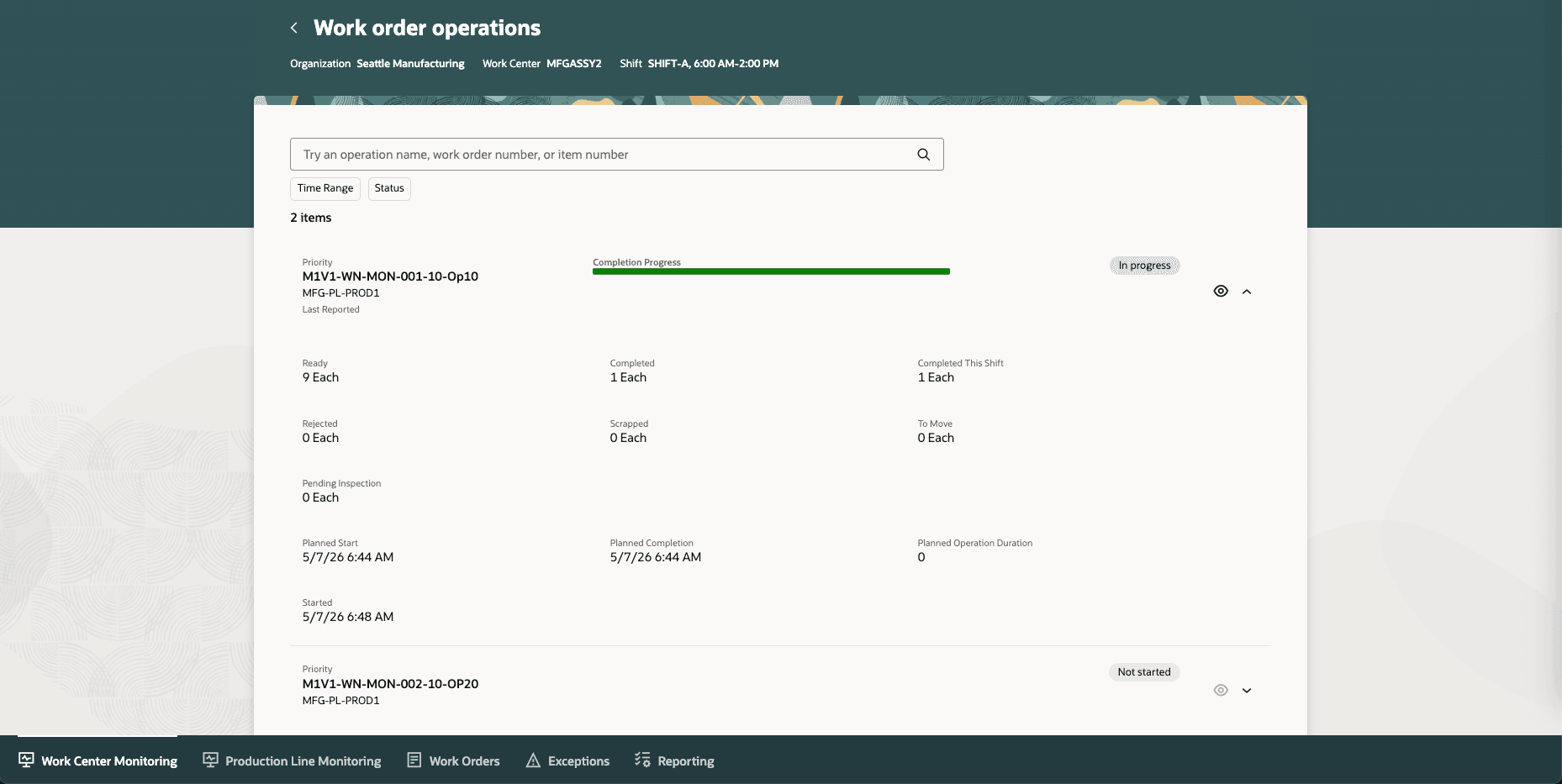
Work Order Operations View to Monitor a Work Center Without Workstations
The following screenshot shows the execution details for the selected work order operation:
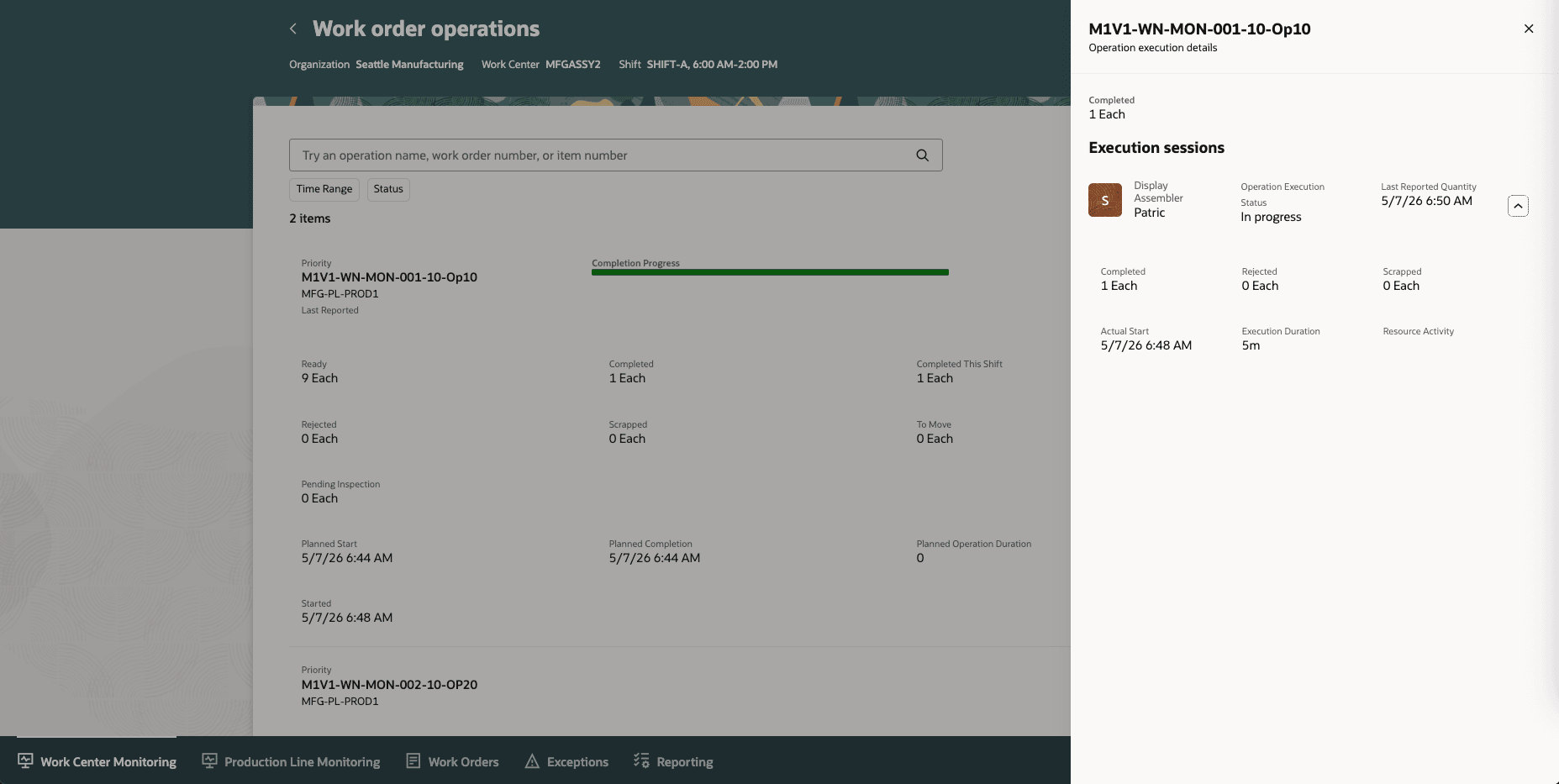
Operation Execution Details for an Operation
With this feature, supervisors get a more complete, real-time view of current shift operations and operator coverage, which helps them in identifying bottlenecks, monitoring shift capacity, and responding faster to delays or underperformance.
Here's the demo of these capabilities:
Steps to enable and configure
Use the Opt In UI to enable this feature. For instructions, refer to the Optional Uptake of New Features section of this document.
Offering: Manufacturing and Supply Chain Materials Management No Longer Optional From: Update 27A
No additional steps are required.
Tips and considerations
- The Current Shift Operations page includes operations planned for the current shift, operations currently in progress, and past-due operations, enabling supervisors to efficiently monitor production activities.
- This enhancement does not change existing metric calculations.
Key resources
- Watch the Use the Work Order Operations View When Monitoring Production for Work Centers Without Workstations demo.
- Refer to the Oracle Fusion Cloud SCM: Using Manufacturing guide, available on the Oracle Help Center.
- Refer to the Oracle Fusion Cloud SCM: Implementing Manufacturing and Supply Chain Materials Management guide, available on the Oracle Help Center.
Access requirements
Users who are assigned a configured job role that contains these privileges can access this feature:
- Supervise Production (WIP_SUPERVISE_PRODUCTION_PRIV)
- View Production Exceptions (WIP_VIEW_PRODUCTION_EXCEPTIONS_PRIV)
- View Production Shift Details (WIP_GET_PROD_SHIFT_DETAILS_PRIV)
- Report Shift Work (WIP_REPORT_SHIFT_WORK_PRIV)
- Generate Supervisor Report (WIP_GENERATE_SUPERVISOR_REPORT_PRIV)
- Configure Smart Operations Parameters (WIP_CONFIGURE_SMART_OP_PARAMETERS_PRIV)
These privileges were available prior to this update.