Use Additional Details When Moving Materials Between Staging Locations and Workstations
Use the enhanced support for providing additional details, such as project, task, secondary quantity, and descriptive flexfields when moving materials between the staging floor and workstations.
You can now capture additional transaction attributes when moving materials from staging locations on the factory floor to workstations. This enhancement extends the capabilities introduced in the 26B update for material movement between staging locations and workstations.
With this update, the material movement transaction flow supports the following additional attributes:
- Project and Task
- Secondary Quantity
- Descriptive Flexfields (DFFs)
- Country of Origin
You can enter and process these attributes as part of the material movement transaction, which improves the support for project-driven manufacturing, dual unit of measure tracking, compliance, and customer-specific reporting requirements.
You can capture project and task information for organizations enabled for project-driven supply chain processing, which enables better visibility and cost tracking for material movements associated with project manufacturing.
Secondary quantity support enables you to directly record material movement transactions for dual unit of measure items during shop floor execution.
You can also capture Descriptive Flexfields (DFFs) during material movement transactions to support additional business-specific attributes and reporting requirements configured by your organization.
You can record the country-of-origin information as part of the transaction to support inventory traceability and regulatory compliance processes.
The following screenshot shows the option to capture additional information while transferring materials from staging to the workstation supply subinventory:
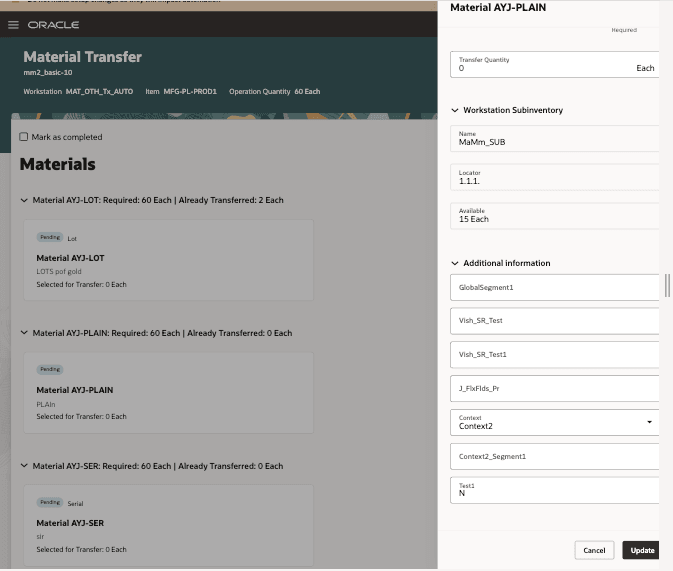
Provide Additional Information While Transferring Materials
This enhancement improves shop floor inventory management by allowing manufacturers to capture all required material movement attributes within a single transaction flow, reducing the need for additional manual updates or follow-up transactions.
Capture additional material movement transaction attributes directly during shop floor processing to improve operational efficiency, traceability, and data accuracy.
Steps to enable and configure
You don't need to do anything to enable this feature.
Tips and considerations
- Project and task attributes are available only for organizations enabled for project-driven supply chain.
- Secondary quantity is supported only for items enabled for dual unit of measure tracking.
- Descriptive Flexfields (DFFs) must be configured and deployed before they can be used in material movement transactions.
- Country-of-origin values must be defined and available for selection in the transaction flow.
- Existing material movement validations and inventory control rules continue to apply.
Key resources
- Refer to the Oracle Fusion Cloud SCM: Using Manufacturing guide, available on the Oracle Help Center.
- Refer to the Oracle Fusion Cloud SCM: Implementing Manufacturing and Supply Chain Materials Management guide, available on the Oracle Help Center.
Access requirements
Users who are assigned a configured job role that contains the following privileges can access this feature:
- View Workstations (WIS_VIEW_WORKSTATIONS_PRIV)
- Manage Workstations (WIS_MANAGE_WORKSTATIONS_PRIV)
- Move Materials for Workstations (WIP_MOVE_WORKSTATION_MATERIAL_PRIV)
- Execute Production at a Workstation (WIP_EXECUTE_WORKSTATION_PRIV)
- View Available Item Quantity by Web Service (INV_VIEW_AVAILABLE_ITEM_QUANTITY_WEB_SERVICE_PRIV)
- Review Completed Inventory Transaction Web Service(INV_REVIEW_COMPLETED_INVENTORY_TRANSACTION_WEB_SERVICE_PRIV)
- Manage Staged Inventory Transaction Web Service(INV_MANAGE_STAGED_INVENTORY_TRANSACTION_WEB_SERVICE_PRIV)
- View Inventory On-Hand Balance Web Service(INV_VIEW_INVENTORY_ONHAND_BALANCE_WEB_SERVICE_PRIV)
- Manage Item Lot and Item Serial by Web Service(INV_MANAGE_LOT_SERIAL_WEB_SERVICE_PRIV)
- View Country of Origin List of Values by Web Service(INV_VIEW_COUNTRY_ORIGIN_LOV_WEB_SERVICE_PRIV)
These privileges were available prior to this update.