Report Primary and Additional Products Using Connected Equipment at Workstations
Report all work order operation outputs and their quantities automatically when using connected equipment at workstations. Operators can now use connected equipment to report the primary product, co-products, and by-products. Any ad hoc outputs are also reported.
The connected equipment sends a dedicated "Product Report" (CA_PRODUCT_REPORT) event to report outputs that are configured for the manual completion type. The report can include the following outputs:
- Primary product (Process work orders)
- Co-products and by-products (Process and Discrete work orders, where applicable)
- Ad hoc outputs (treated as by-products)
Events include item-level identification to determine the product being reported. This is important when a work order has multiple co-products and by-products. Additional attributes, such as lot and serial numbers, License Plate Number (LPN), secondary quantity, and grade are supported. Depending on the item setup, the following product attributes can be conditionally included:
- Serial details: If the item is serial-controlled. One serial number allowed per event.
- Lot details: If the item is lot-controlled. Lot number, parent lot number, lot quantity, expiration date, and grade can be provided.
- Both lot and serial details: If the item is lot-serial controlled.
- LPN (License Plate Number): If the completion subinventory is LPN-enabled.
- Secondary Quantity: Secondary quantity, when configured.
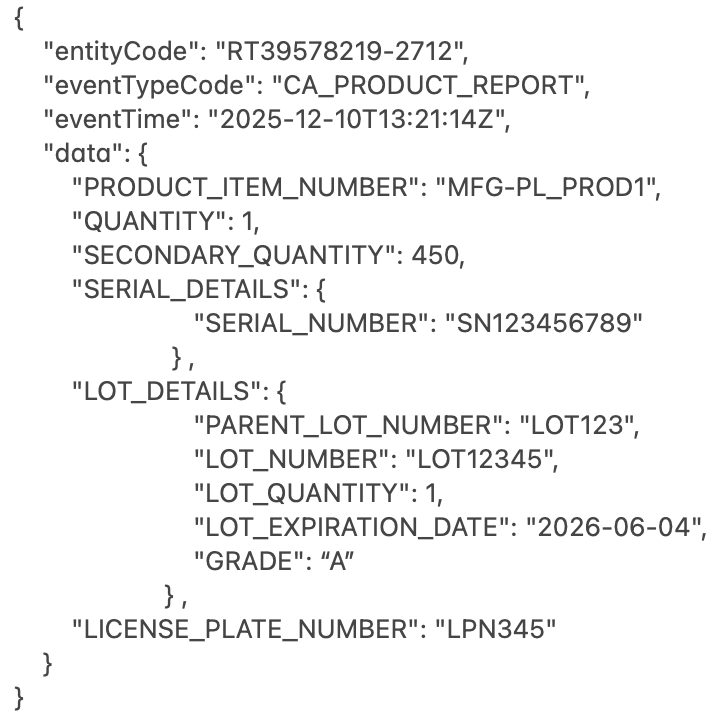
Sample Product Report Event
Supervisors can dispose events that are Invalid (missing required attributes like item/quantity) or In Error (missing required lot/serial/LPN details for controlled items). Failed and invalid events can be viewed under Operational Data.
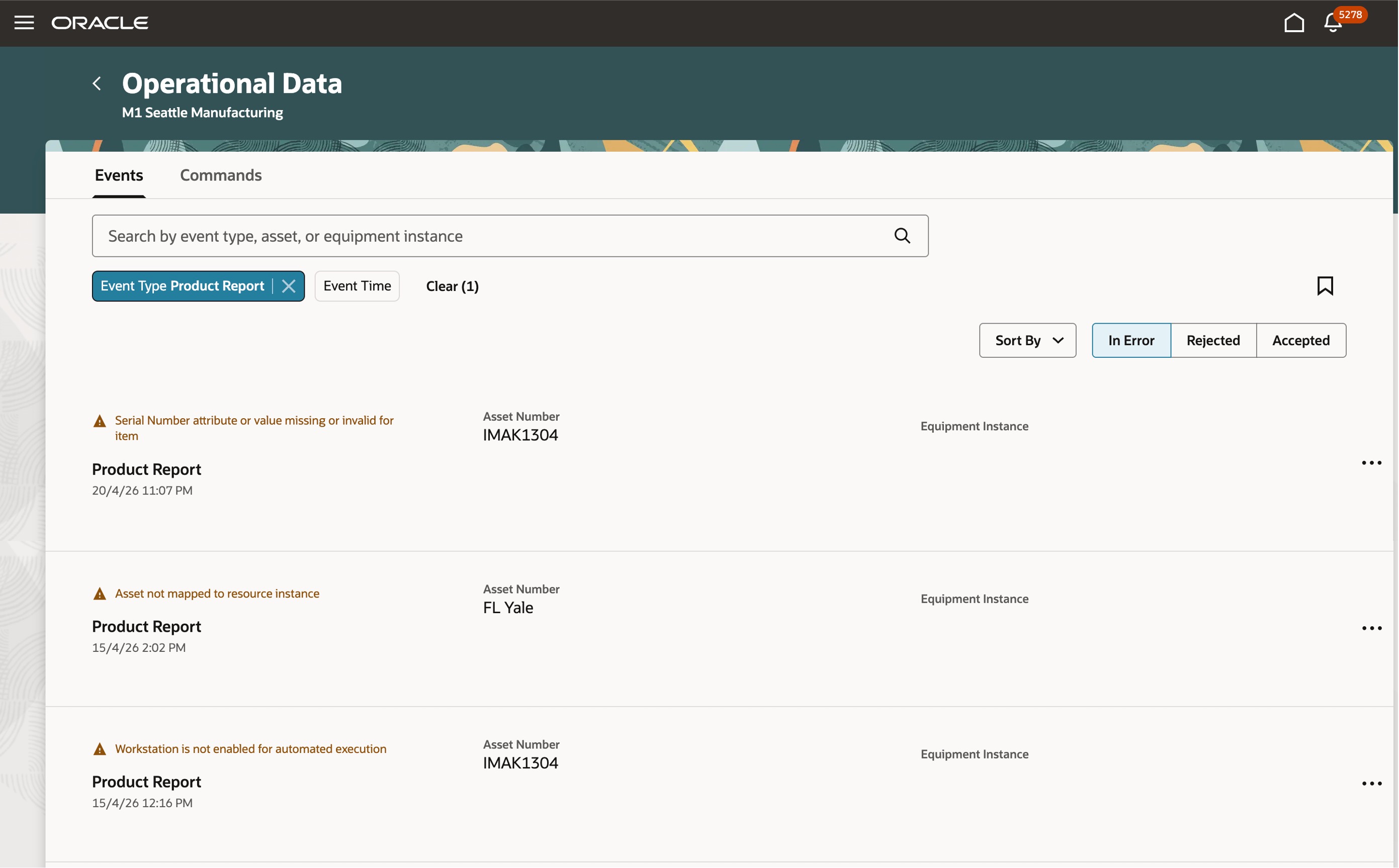
View Events Operational Data
Automated reporting of outputs improves accuracy, reduces manual entry and delays, improves traceability for controlled outputs, reduces operator workload, and provides higher shop floor efficiencies.
Here's the demo of these capabilities:
Steps to enable and configure
You don't need to do anything to enable this feature.
Tips and considerations
- Use the quantity report event for reporting additional attributes for the primary product for discrete work orders.
- The unit of measure for the product quantity is expected to be the same as defined in the work order outputs.
- For controlled items, send complete and consistent attribute data (serial, lot, parent lot, lot expiration, LPN, secondary quantity) based on the item and inventory setup.
- Monitor event dispositions regularly so that supervisors can quickly correct invalid payload patterns and prevent repeat failures.
- Quantity rules vary by the control type:
- Serialized scenarios enforce quantity as ‘1'.
- Lot-controlled scenarios require alignment between the transaction quantity and the lot quantity details.
- For lot-controlled items with user-enforced expiration, missing expiration data can cause failed processing.
- The workstation must be enabled for automated execution of work order operations.
- For automated execution, equipment resource instances must be associated with an asset configured in Oracle Fusion Maintenance Cloud. The asset's location organization must be the same as the equipment resource instance's manufacturing organization.
- Equipment instance signals received through industrial communication protocols need to be converted to a JSON payload that Fusion Manufacturing Cloud can ingest and take actions upon. You can receive events via HTTPS REST or through the MQTT mechanism.
- For HTTPS REST, the details and accepted payload specifications are documented here: REST API for Oracle Fusion Cloud SCM.
- For MQTT, you need to configure an integration of type MQTT in Smart Operation Configurations to receive events from the connected equipment. The payload specification is the same as mentioned in the REST API for Oracle Fusion Cloud SCM.
- Events received from an equipment can be viewed in the Events tab using the "Operational Data" task in the Work Execution work area.
Key resources
- Watch the feature demo for Report Primary and Additional Products Using Connected Equipment at Workstations.
- Oracle Fusion Cloud SCM: Refer to the Using Manufacturing guide, available on the Oracle Help Center.
- Oracle Fusion Cloud SCM: Refer to the Implementing Manufacturing and Supply Chain Materials Management guide, available on the Oracle Help Center.
Access requirements
Users who are assigned a configured job role that contains the following privileges, to manage integrations for events and view events, can access this feature:
- Manage Smart Operations Integrations (SMO_MANAGE_SMART_OPERATIONS_INTEGRATIONS_PRIV)
- Manage Smart Operations Integrations (ORA_DR_SMO_MANAGE_SMART_OPERATIONS_INTEGRATIONS_DUTY)
- Application Deployment Administration (ORA_DR_ASM_APPLICATION_DEPLOYER_DUTY)
- View Smart Operations Integrations (SMO_VIEW_SMART_OPERATIONS_INTEGRATIONS_PRIV)
- View Smart Operations Integration Connectivity Status (ORA_DR_SMO_VIEW_SMART_OPERATIONS_INTEGRATION_STATUS_DUTY)
- View Smart Operations Integrations (ORA_DR_SMO_VIEW_SMART_OPERATIONS_INTEGRATIONS_DUTY)
- View Operational Events (SMO_VIEW_EVENT_LOGS_PRIV)
- View Operational Events (ORA_DR_SMO_VIEW_OPERATIONAL_EVENTS_MFG_DUTY)
These privileges were available prior to this update.