AI Agentic App: Production Shift Operations Workspace - Use Enhanced Advisors
Production Shift Operations Workspace is an AI-powered agentic application that enables production supervisors to efficiently manage shop floor activities for the shift. The application consolidates operational insights, highlights exceptions, and provides intelligent recommendations to improve decision-making and execution. In this update, enhancements have been made to the Production Shift Operations Workspace AI agentic app to further streamline and expand the information presented by the existing advisors. These updates help production supervisors quickly identify risks, review operational trends, and take recommended actions to keep production on track.
Work Order Advisor
The Work Order Advisor has been enhanced to improve prioritization, visibility, and recommended actions for work order operations.
Risk-Based Sorting:
Work order operations are now sorted by production risk, enabling users to quickly identify and prioritize operations that require attention.
The sorting order is:
- Critical: Expedited work order operations that are already delayed.
- High: Regular work order operations that are already delayed and expedited work order operations with issues, such as missing workstation assignments.
- Medium: Regular work order operations that are not delayed but have issues, such as missing workstation assignments.
- No Risk: On-track and completed work order operations. These operations appear at the bottom of the list with on-track operations shown first.
New Columns and Expanded Risk Details:
The panel now displays the assigned workstation in addition to the in-progress workstation for work order operations.
Production risk evaluation has also been expanded to include work orders awaiting execution. Risks are categorized, and a new Reason column explains and quantifies the identified risk.
An additional column now displays high and critical exceptions logged for a work order operation.
Additional Recommendations in the Expanded View:
In the expanded view, the Recommended Work Order Operation Assignments panel now recommends assigning work order operations to workstations for additional scenarios, such as:
- Unassigned operations.
- Reassignment when a workstation goes down.
These capabilities add to the existing capability to assign expedited work order operations to workstations.
The Recommended Work Order Operation Rescheduling panel now displays actions to reschedule work order operations that are behind plan.
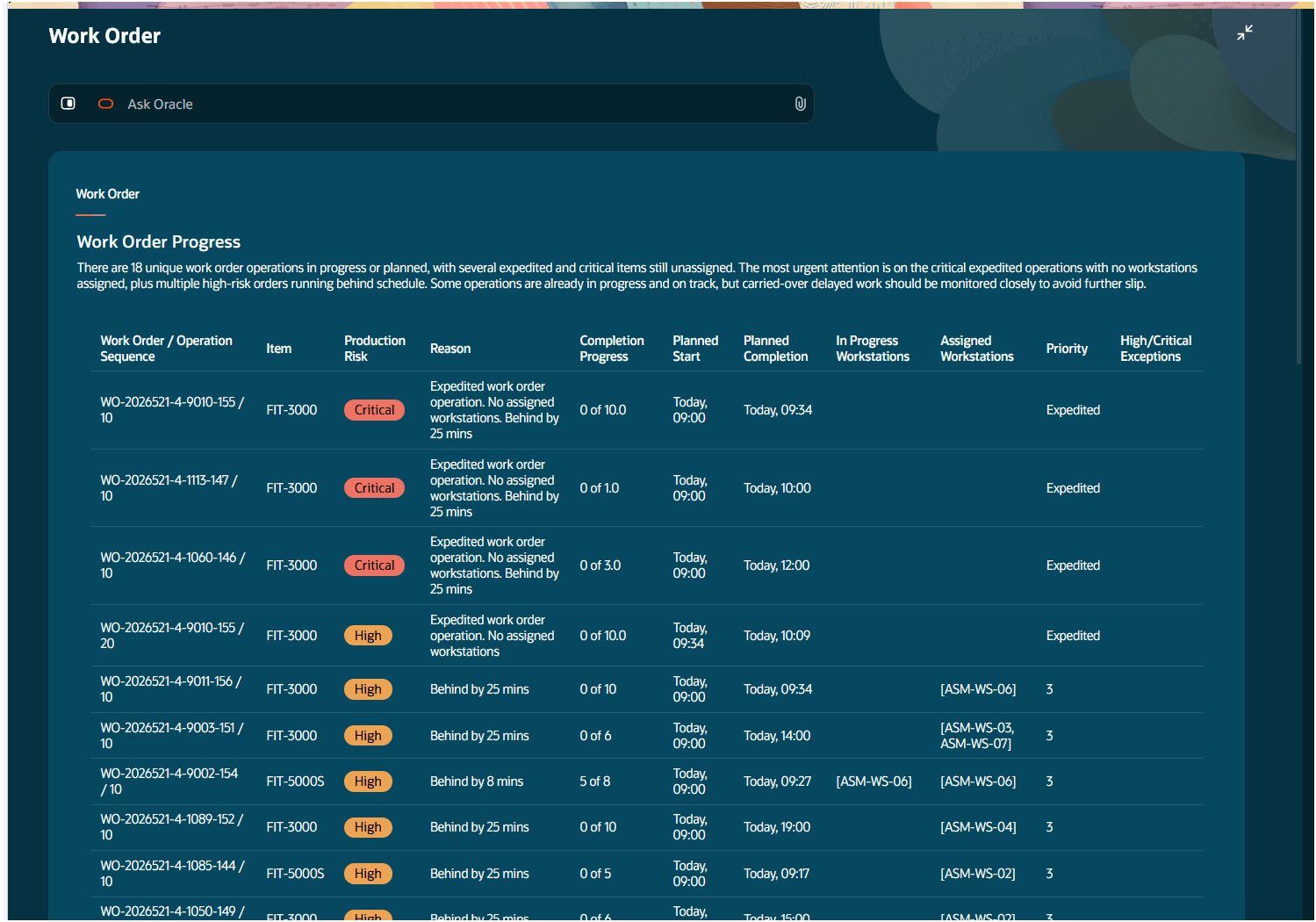
Work Order Advisor - Expanded View
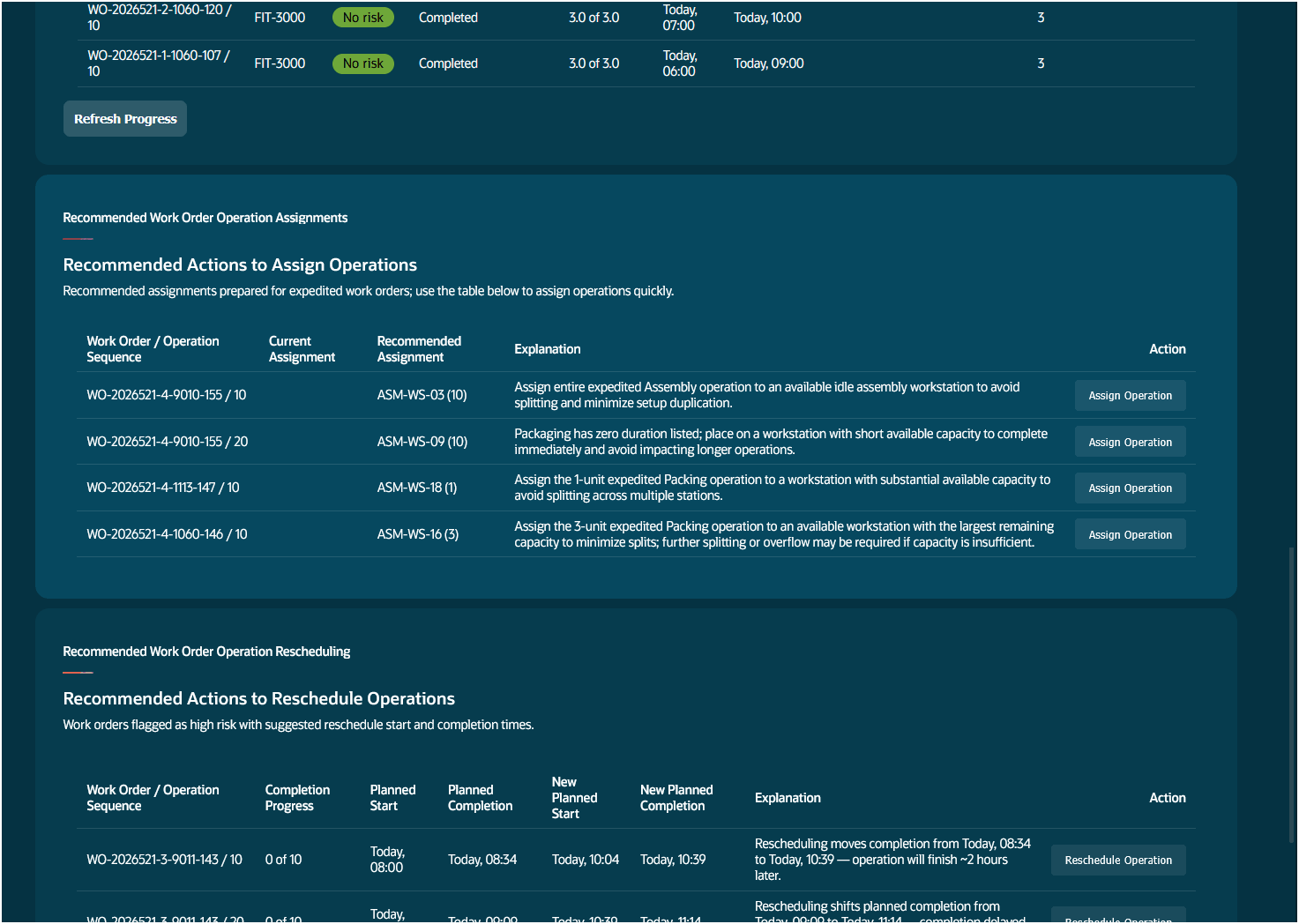
Work Order Advisor - Recommended Actions to Assign and Reschedule Operations
Production Health Advisor
The expanded view of the Production Health Advisor now includes additional panels with production health metric trends and analysis.
Percentage Metrics Trend:
Shows percentage-based metric trends over the past shifts, including:
- Plan Adherence
- Overall Equipment Effectiveness, or OEE
- Performance
- Availability
- Quality
- Downtime
Quantity Metrics Trend:
Shows quantity-based metric trends over the past shifts, including:
- Planned Quantity
- Completed Quantity
- Scrapped Quantity
- Rejected Quantity
Top Drivers of OEE Loss:
Shows the top three reasons contributing to loss in Overall Equipment Effectiveness (OEE).
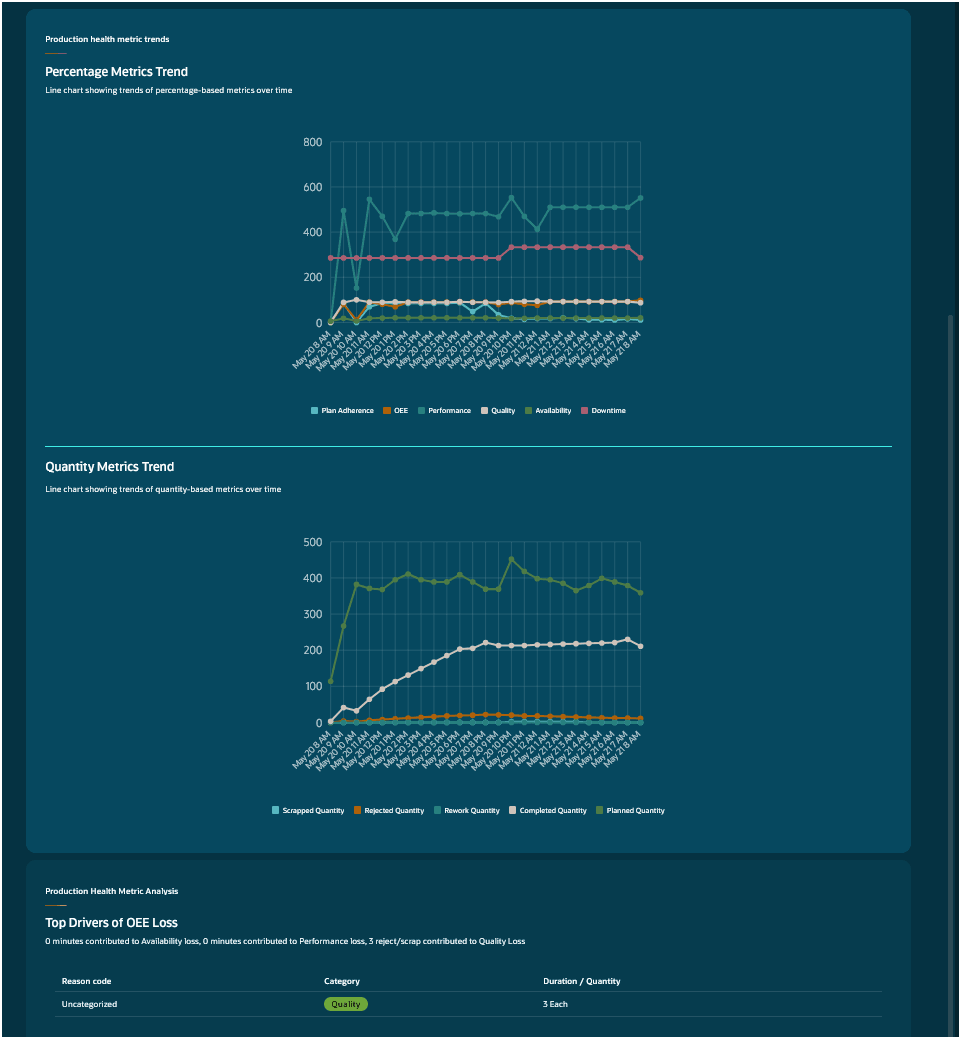
Production Health Advisor - Additional Panels
Assigned Operator Advisor
Qualification checks have been added to the Assigned Operator Advisor. Work order operations for which the assigned operator is not qualified are now highlighted.
Additional enhancements have also been made to the headline summary to provide greater insights into operator activity at the workstation.
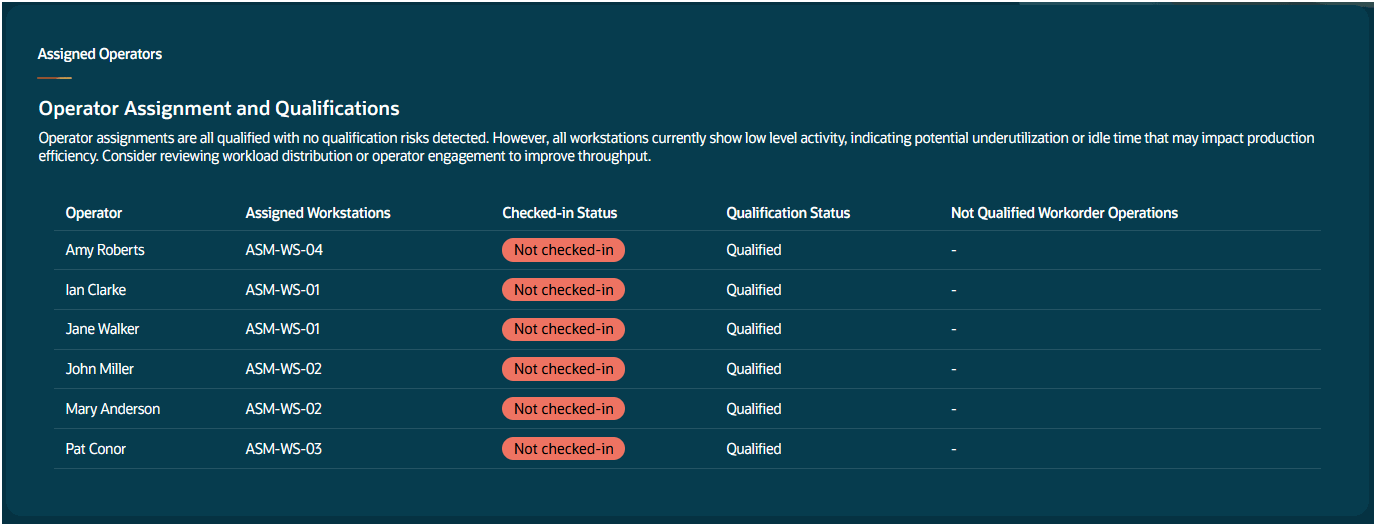
Assigned Operators Advisor
Exceptions Advisor
The Exceptions Advisor has been enhanced to support resolution of resource type exceptions, such as:
- Marking a workstation as down.
- Creating a maintenance work order.
The advisor also provides visibility into the status of maintenance work orders that were created from exceptions.
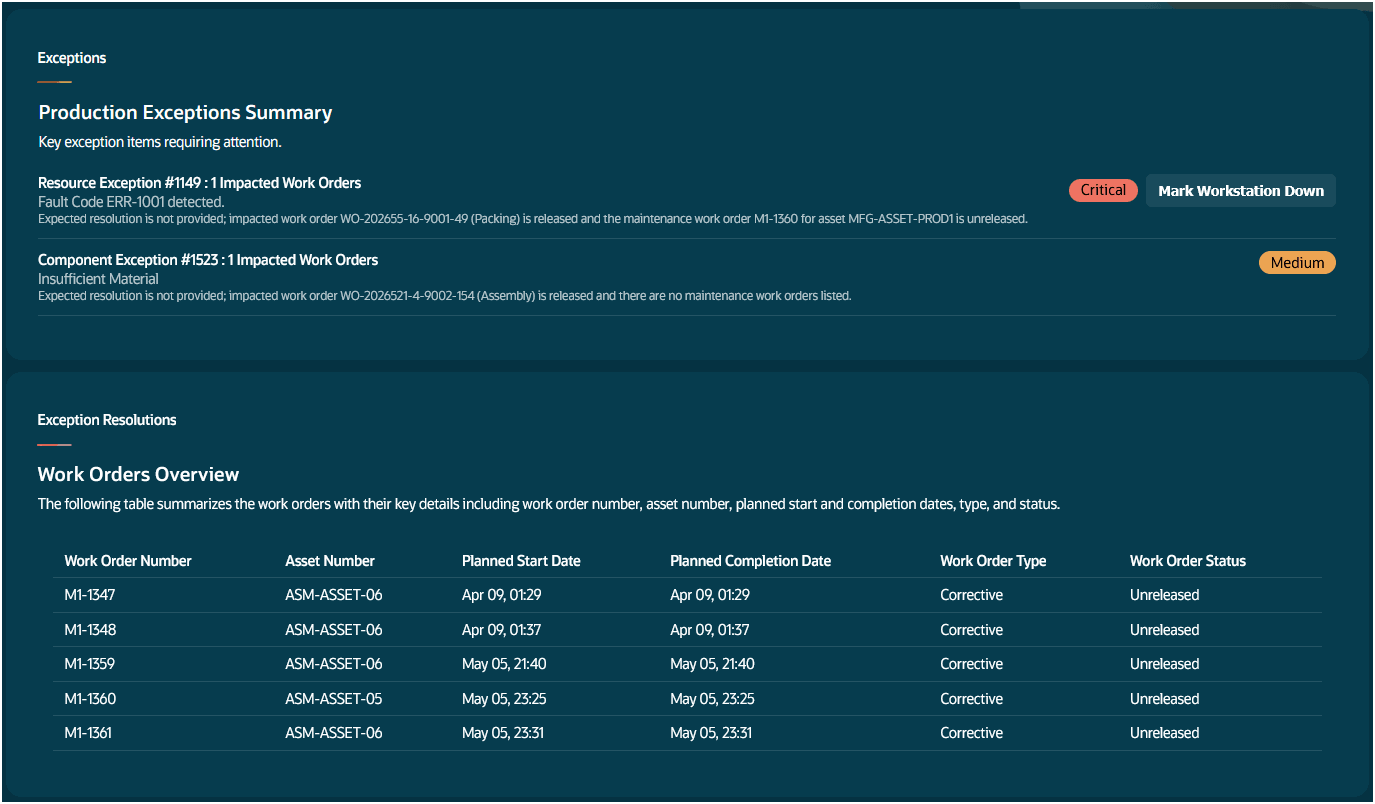
Exceptions Advisor - Additional Panel
The Production Shift Operations Workspace AI agentic app provides a unified, intelligent workspace that consolidates operational data, simplifies decision-making, and enables faster response to production issues during the current shift. This update enhances the production supervisors' ability to proactively manage shop floor operations by delivering risk-based prioritization, deeper operational insights, qualification validation, and guided corrective actions, enabling faster issue resolution and improved production performance.
Here's the demo of these capabilities:
Steps to enable and configure
If you are already using the seeded Production Shift Operations Workspace in the prior release, no additional setup tasks are required.
If you are enabling this for the first time, set up the profile option as follows:
- In the Setup and Maintenance work area, search for and select the Manage Administrator Profile Values task.
- On the Manage Administrator Profile Values page, search for and select the ORA_WIE_PRODUCTION_SHIFT_OPERATIONS_WORKSPACE_AGENTIC_APP_ENABLED profile option code.
- In the Profile Values section, set the Site level to Yes.
- Click Save and Close. Changes in the profile value will affect users the next time they sign in.
Tips and considerations
Review AI recommended priority actions for accuracy before applying. Always validate AI suggestions against your business priority.
Key resources
- Review the What's New of the 26B AI Agentic App: Production Shift Operations Workspace
- Oracle Fusion Cloud SCM: Using Manufacturing guide, available on the Oracle Help Center.
- Oracle Fusion Cloud SCM: Implementing Manufacturing and Supply Chain Materials Management guide, available on the Oracle Help Center.
Access requirements
Users who are assigned a configured job role that contains these privileges can access this feature:
-
Access Production Shift Operations Workspace (WIP_ACCESS_PRODUCTION_SHIFT_OPERATIONS_WORKSPACE)
- Supervise Production (WIP_SUPERVISE_PRODUCTION_PRIV)
- Manage Workstation Queue (WIP_MANAGE_WORKSTATION_QUEUE_PRIV)
- Manage Assignment of Operators to Workstation (WIP_MANAGE_WORKSTATION_OPERATORS_PRIV)
- View Production Exceptions (WIP_VIEW_PRODUCTION_EXCEPTIONS_PRIV)
- View Production Shift Details (WIP_GET_PROD_SHIFT_DETAILS_PRIV)