Schedule PTO Kits at Any Level of a PTO Model's Configuration
You can include PTO kits at all levels beneath PTO models during check availability, auto-schedule, and schedule sales order operations. You can also review supply availability information for all configure-to-order item components within the item structure. This capability improves order promising accuracy for customers that sell complex products by aligning supply calculations with the full, multi-level structure of nested PTO Kit component
This enhancement enables promising orders for complex Pick-to-Order (PTO) structures, where PTO kits function as lower-level components of a PTO model. Examples of such complex structures include the following:
- A PTO kit can be single level or have a multi-level (nested) structure.
- A PTO kit can be ordered individually or as part of a PTO model.
- A PTO kit can exist at any level within a PTO model
The Redwood Check Availability page and the Manage Order Promising Demands (MOPD) page have also been enhanced to display the hierarchical structure of such orders.
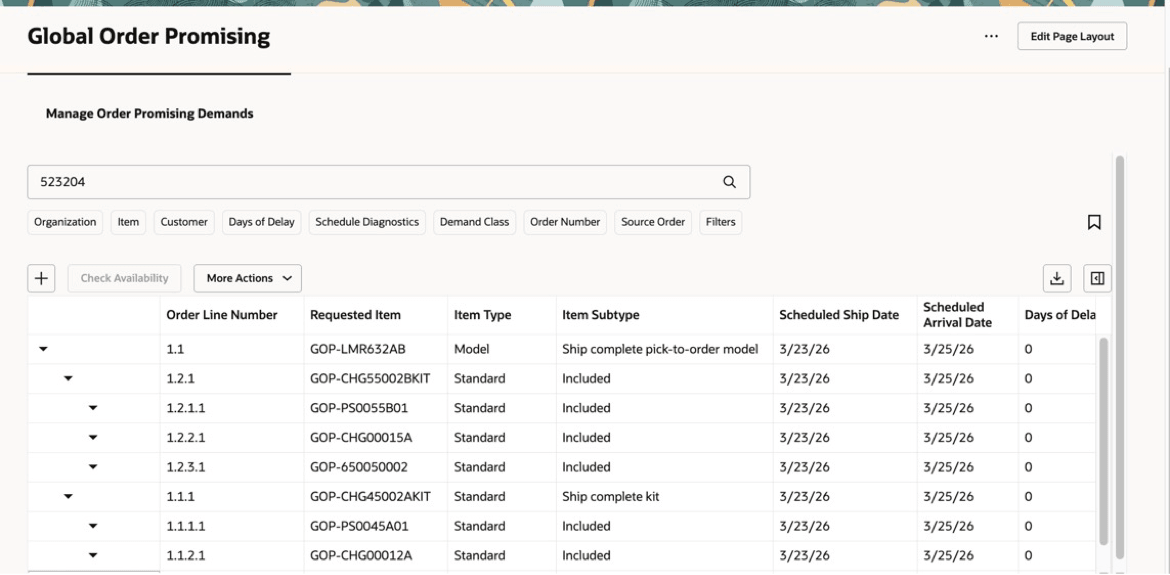
Manage Order Promising Demands Page With PTO Kit Within a PTO Model
Global Order Promising extends support for PTO kits at any level of the PTO model across all scheduling REST services, including Auto Schedule, Check Availability, and Schedule Sales Order.
Collected sales orders for PTO kits at any level of the PTO model are processed by Oracle Global Order Promising to ensure consistent promise dates for previously scheduled orders.
Examples
Example 1: Multi-level PTO kit within a PTO model
Consider the following PTO model order:
PTO Model Order
| Item | Item Type |
|---|---|
| BJ-KITCHEN_APPLIANCE_MODEL | PTO Model |
| --BJ-VIK_STV_STD_KIT1 | PTO Kit |
| -----BJ-BURNER-GRID | Standard Item |
| ------BJ-VIK_STV_STD_KIT2 | PTO Kit |
| --------BJ-SS_FINISH_STD | Standard Item |
| ---------BJ-VIK_STV_STD_KIT3 | PTO Kit |
| -----------BJ-SWITCH_STD | Standard Item |
| -----------BJ-BURNER_STD | Standard Item |
| -----------BJ-FUEL_STD | Standard Item |
| --BJ-BURNER_LAYOUT_OC | Option Class |
| ----BJ-ROD_STD |
Standard Item |
The complete structure of this order is available on the Check Availability and MOPD pages.
Structure in MOPD and Check Availability Pages
| Item | Item Type | Expected/Schedule Ship Date |
|---|---|---|
| BJ-KITCHEN_APPLIANCE_MODEL | PTO Model | Day 10 |
| --BJ-VIK_STV_STD_KIT1 | PTO Kit | Day 10 |
| -----BJ-BURNER-GRID | Standard Item | Day 10 |
| ------BJ-VIK_STV_STD_KIT2 | PTO Kit | Day 10 |
| --------BJ-SS_FINISH_STD | Standard Item | Day 10 |
| ---------BJ-VIK_STV_STD_KIT3 | PTO Kit | Day 10 |
| -----------BJ-SWITCH_STD | Standard Item | Day 10 |
| -----------BJ-BURNER_STD | Standard Item | Day 10 |
| -----------BJ-FUEL_STD | Standard Item | Day 10 |
| --BJ-BURNER_LAYOUT_OC | Option Class | Day 10 |
| ----BJ-ROD_STD |
Standard Item |
Day 10 |
Example 2: Multi-level PTO kit
Consider the following PTO kit order:
PTO Kit Order
| Item | Item Type |
|---|---|
| --BJ-VIK_STV_STD_KIT1 | PTO Kit |
| -----BJ-BURNER-GRID | Standard Item |
| ------BJ-VIK_STV_STD_KIT2 | PTO Kit |
| --------BJ-SS_FINISH_STD | Standard Item |
| ---------BJ-VIK_STV_STD_KIT3 | PTO Kit |
| -----------BJ-SWITCH_STD | Standard Item |
| -----------BJ-BURNER_STD | Standard Item |
| -----------BJ-FUEL_STD | Standard Item |
The complete structure of this order is available on the Check Availability and MOPD pages.
Structure in MOPD and Check Availability Pages
| Item | Item Type | Expected/Schedule Ship Date |
|---|---|---|
| --BJ-VIK_STV_STD_KIT1 | PTO Kit | Day 10 |
| -----BJ-BURNER-GRID | Standard Item | Day 10 |
| ------BJ-VIK_STV_STD_KIT2 | PTO Kit | Day 10 |
| --------BJ-SS_FINISH_STD | Standard Item | Day 10 |
| ---------BJ-VIK_STV_STD_KIT3 | PTO Kit | Day 10 |
| -----------BJ-SWITCH_STD | Standard Item | Day 10 |
| -----------BJ-BURNER_STD | Standard Item | Day 10 |
| -----------BJ-FUEL_STD | Standard Item | Day 10 |
Steps to enable and configure
This feature is disabled by default. To enable, set the following Order Management profile option:
Profile Option:
ORA_FOM_SEND_KIT_STRUCTURE
Value:
Yes
If the profile option is left blank, then this feature is considered disabled.
Tips and considerations
- Once the feature is enabled, ensure that all the items forming the PTO structure, including PTO Kit items at all levels are collected and assigned an ATP rule
Key resources
- Fusion Order Management feature ‘Redwood: Manage Pick-to-Order Configured Items with Kits on Sales Orders’
- Backlog Management feature ‘Schedule PTO Kits at Any Level of a PTO model Configuration in Backlog Management’
Access requirements
Users who are assigned a configured job role that contains these privileges can access this feature:
- View Planning Supply Availability (MSP_VIEW_PLANNING_SUPPLY_AVAILABILITY_PRIV)
- Schedule Fulfillment Line (MSP_SCHEDULE_ORCHESTRATION_ORDER_FULFILLMENT_LINE_PRIV)
- Schedule Orchestration Order Fulfillment Line (DOO_MANAGE_ORCHESTRATION_ORDER_FULFILLMENT_LINE_SCHEDULING_SCHEDULE_PRIV)
These privileges were available prior to this update.