Generate Bills of Resources Incrementally for New Assembly Items
This capability enables planners to generate bills of resources (BOR) incrementally by processing only newly added or removed assembly items from a catalog, rather than performing a full BOR refresh across the entire dataset. By leveraging net-change identification of new and removed assemblies by category and organization since the last full run, planning structures remain current while significantly reducing processing time and system workload during peak operating periods.
The incremental approach enhances planning responsiveness by ensuring the new products are quickly available for aggregate planning and global order promising. It also enables organizations to defer full BOR refreshes to scheduled maintenance windows, such as weekends. As a result, planners benefit from faster execution, improved system performance, and more efficient use of computing resources while maintaining accurate planning data.
Use the Create Bills of Resources scheduled process to create bills of resources for order promising or to plan assembly items in a sales and operations plan. The scheduled process now includes a scope option to control which items are processed.
- Scope = All assembly items (default): Creates bills of resources for all assembly items.
- Scope = New and removed assembly items only: Creates bills of resources for items newly added to catalog categories and deletes bills of resources from the output simulation set for items removed from catalog categories since the previous job run.
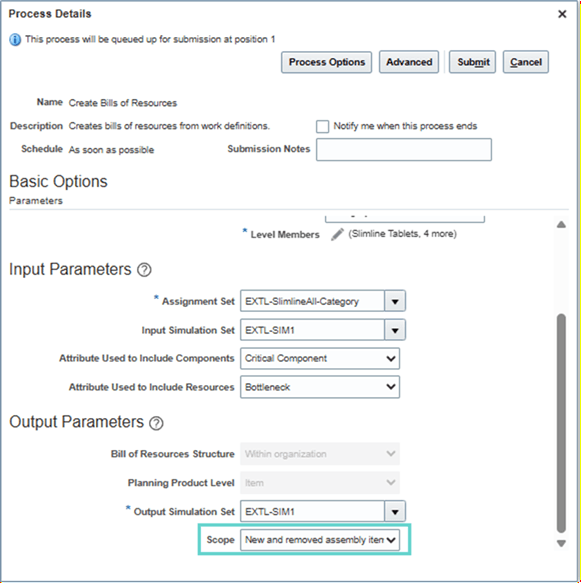
Create Bills of Resources Incrementally for Sales and Operations Planning
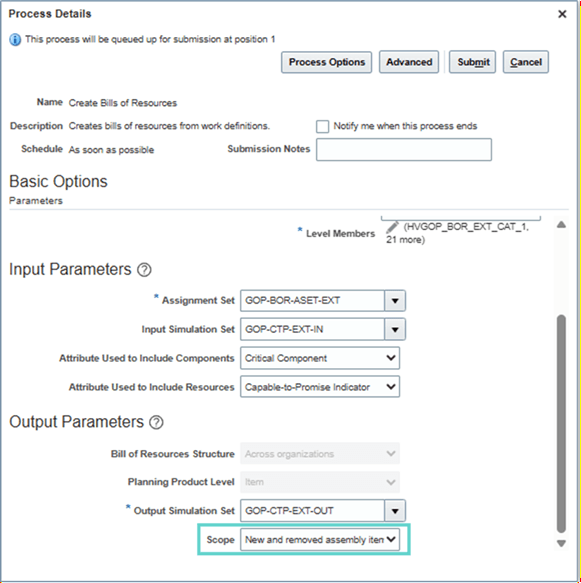
Create Bills of Resources Incrementally for Order Promising
For example, when the Create Bills of Resources scheduled process was run for all assembly items, the Fitness Accessories item category had items FAC10000 through FAC12480.
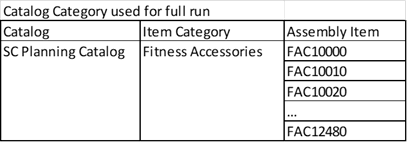
Items in the Fitness Accessories Item Category Used in a Full Run
In the subsequent run, the scheduled process scope is set to create bills of resources for new and removed assembly items only. In this scenario, assembly items FAC11361 and FAC11370 have been added to the Fitness Accessories item category, while item FAC11360 has been removed.
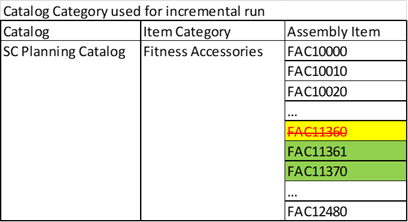
Items in the Fitness Accessories Item Category Used in an Incremental Run
The scheduled process updates the Aggregate Bill of Resource table in the output simulation set by removing records associated with assembly item FAC11360 and adding records for assembly items FAC11361 and FAC11370. All other assembly items in the Fitness Accessories item category, such as FAC10000, remain unchanged in the table. The Last Updated Date column can be used to determine when each record was last modified.
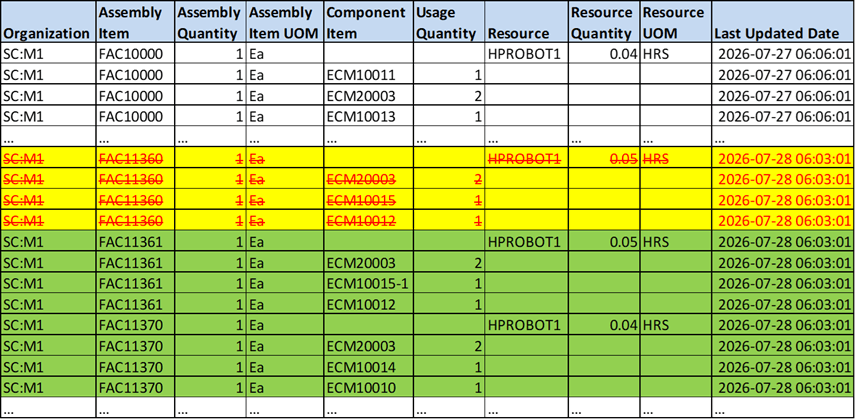
Aggregate Bill of Resource Table Updates for an Incremental Run
Generate bills of resources incrementally to reduce planning cycle time and streamline your supply chain planning processes. For example, instead of running a full process for all assembly items on a daily basis, schedule it on a weekly cadence. In parallel, run a daily process configured to generate bills of resources only for new and removed assembly items.
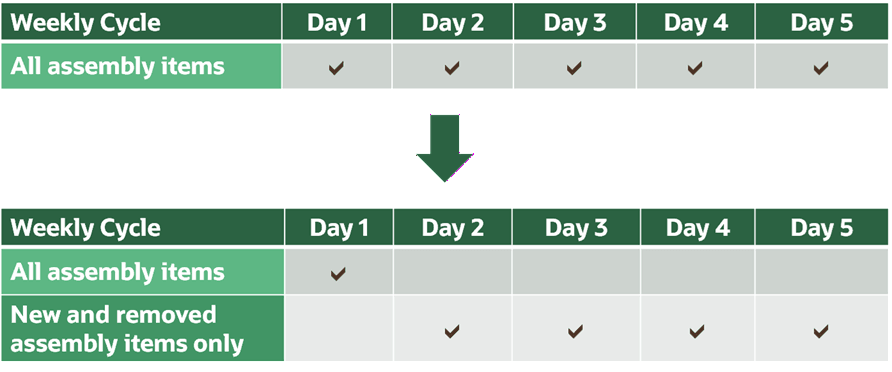
Reduce Cycle Time to Create Bills of Resources
Steps to enable and configure
You don't need to do anything to enable this feature.
Tips and considerations
- A full run for all assembly items must be completed successfully before running the Create Bills of Resources job for new and removed assembly items only. For example, if the Aggregate Bill of Resource table is empty in the output simulation set, the incremental run won’t proceed.
- A full run for all assembly items is required to incorporate changes to work definitions, bills of material, or sourcing for existing assembly items.
- When adding new organization or category level members, a full run is required to process the associated assembly items.
- Incremental processing assumes that the number of new assembly items is relatively small compared to the total number of existing assembly items in the Aggregate Bill of Resource table. For large datasets, a full run is recommended if new assembly items exceed 1% of the total.
- Check the job log after the scheduled process completes.
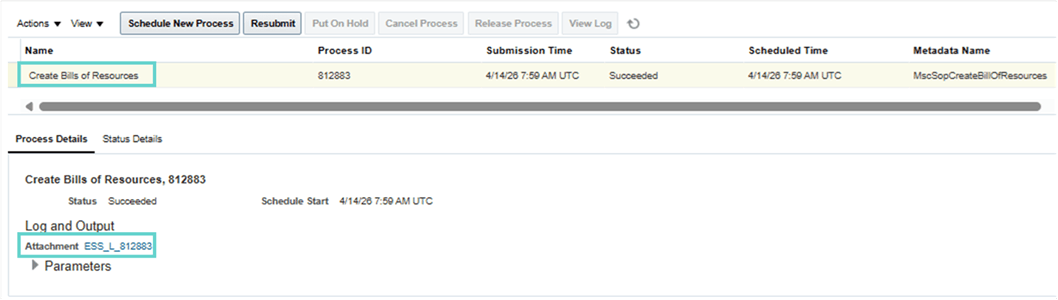
Create Bills of Resources Job Log
Example log excerpt:
- Count of new assembly items in the output simulation set: 8
- Count of removed assembly items from the output simulation set: 2
- When using Oracle Order Promising, the following setups are mandatory before running the Create Bills of Resources scheduled process:
- Define an ATP rule for each new assembly item. The rule must use the Supply Chain Search mode and have the Search Components and Resources enabled.
- Create a Make At sourcing rule for the new assembly item and assign it to an assignment set.
- Enable the Critical Component attribute in the Items table to mark a new assembly in your manufacturing organizations.
- When using Oracle Sales and Operations Planning, the following setups are mandatory before running the Create Bills of Resources scheduled process:
- Create a Make At sourcing rule for the new assembly item and assign it to an assignment set.
- Enable the Critical Component attribute in the Items table to mark a new assembly in your manufacturing organizations.
Key resources
- Refer to Scheduled Processes for SCM content for the Create Bills of Resources scheduled process.
- Refer to Using Order Promising content to Create a Bill of Resources.
- Refer to Using Sales and Operations Planning content to Automatically Generate Bills of Resources.
Access requirements
Users who are assigned a configured job role that contains these privileges can access this feature:
- Edit Bills of Resources (MSC_EDIT_BILLS_OF_RESOURCES_PRIV)
- View Bills of Resources (MSC_VIEW_BILLS_OF_RESOURCES_PRIV)
- Schedule Fulfillment Line (MSP_SCHEDULE_ORCHESTRATION_ORDER_FULFILLMENT_LINE_PRIV)
These privileges were available prior to this update.