Redwood: Manage Business Event Trigger Points
You can now use the Redwood pages to manage event trigger points much faster and more efficiently the you could in previous releases. Prior to this release, you could only manage trigger points on the classic pages in the Setup and Maintenance work area.
Get these benefits
- Use a modern, intuitive Redwood interface for managing business event trigger points.
- Easily enable or disable supported seeded business events.
- Manage the configurations of business events and how they are delivered to upstream or downstream systems, such as through the Oracle Integration Cloud (OIC) service or via email notifications.
- Get support for key order and fulfillment event scenarios, including order header status update, order attribute update, fulfillment line status update, fulfillment line closed, hold applied, split order line, cancel back order, and change order compensation complete.
- Subscribe to the Release Hold business event, which once enabled, raises an event whenever a hold is either released on a sales order or sales order line. You can also optionally enable an email notification whenever a hold is released.
Here's how it works
This example shows how you enable the trigger points for the business events.
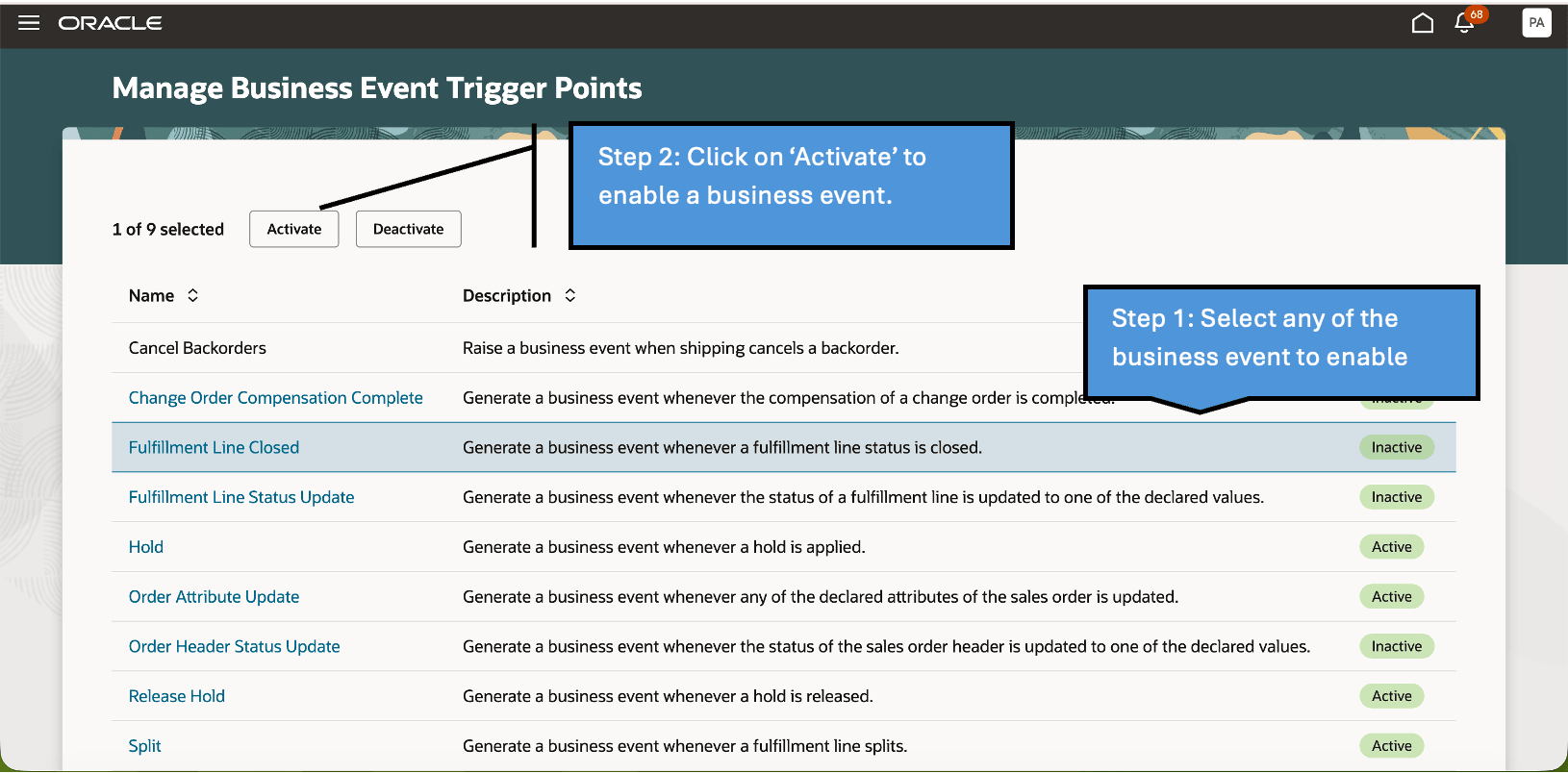
For upgrade customers, business event configurations will continue to be shown on the classic page, helping preserve continuity unless you have explicitly setup the profile to upgrade to the Redwood experience. For new customers, the Redwood page would be the default.
Steps to enable and configure
- Navigate to Setup and Maintenance and open the task - Manage Administrator Profile Values.
- Search for the profile option code ORA_FOM_RW_MANAGE_BUSINESS_EVENTS.
- Set the profile value to Yes at the site level.
- Click Save and Close.
Once enabled, users accessing the Manage Business Event Trigger Points task will be redirected to the Redwood page.
Tips and considerations
- Connector usage and recommended Integration approach:
- You can associate a connector (a logical representation of a web service endpoint) to a business event. When the event is triggered, the business event payload is sent directly to the assigned connector. This capability continues to be supported in the Redwood experience.
- Recommended approach: Oracle strongly recommends using Oracle Integration Cloud (OIC) to subscribe to and route business events, instead of attaching connectors directly to events. This provides greater flexibility, centralized orchestration, and easier maintenance of integrations.
- Controlled availability of connector assignment: If no business events in your environment currently have connectors assigned, the option to associate connectors will not be displayed in both the Classic and Redwood page. If at least one business event already has a connector assigned, the option will remain available for all events, ensuring continuity for existing implementations.
- Environment-specific behavior: Connector assignment ability is evaluated per environment, for example, test versus production. If connectors are configured only in test environments but not in production, the option to assign connectors will not appear in production.
- Jeopardy event is no longer supported and can't be enabled as an event.
- Upgrading to the Redwood experience does not hamper your existing configurations. So, if you had enabled or setup your business events on the classic page, you would continue to see them as enabled or disabled as is the case on the redwood page.
- Email notifications are sent only when the corresponding business event is enabled.
- For Order Status Update events, email notifications can be configured only for statuses explicitly enabled such as submitted, closed, or canceled.
- Some events may not have additional configuration options and will appear without hyperlinks. These events can only be enabled or disabled.
Key resources
For more detail on business event trigger points, see Overview of Business Events
Access requirements
You would need Order Management setup privileges in Fusion Setup and Maintenance to access and configure Manage Business Event Trigger Points.