Redwood: Generate Price Books That Have Coverages and Promotions
You can now include coverages and promotions when you generate a price book.
Get these benefits:
- Flat rate coverage pricing is included in the price book and available for runtime pricing
- Coverage pricing that’s based on the value of the item’s price is included in the price book as a placeholder. The values aren’t used in pricing at runtime but can be published.
- Promotions that don’t rely on order data are included in price book data.
- Volume pricing through line-based and document-based tiers is now fully supported through price books.
- Discounts placed on models are also supported through price books.
This update completes the ability to generate price books containing all available features of pricing. Limitations continue to include dependencies on data that are only available at the time that the order is placed. Added in this update are the following:
- Promotions that don’t contain eligibility rules or additional buy items rules
- Coverage items
- Discounts on models without rollup calculations
- Completion of tier calculations, including line-level amount and document-level tiers
Here are some examples:
Spring Savings Promotions on Item Categories
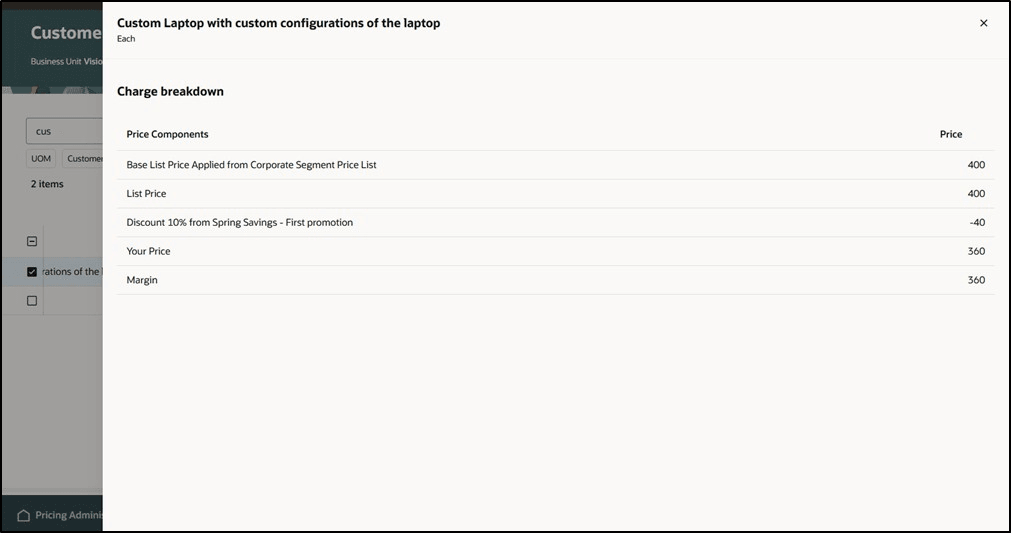
Price Book Promotion Discount
Explanation: Promotion benefit provides 10% discount for Computers and Accessories categories.
Filter Chip for Item Type: Coverage Within the List of Price Book Items
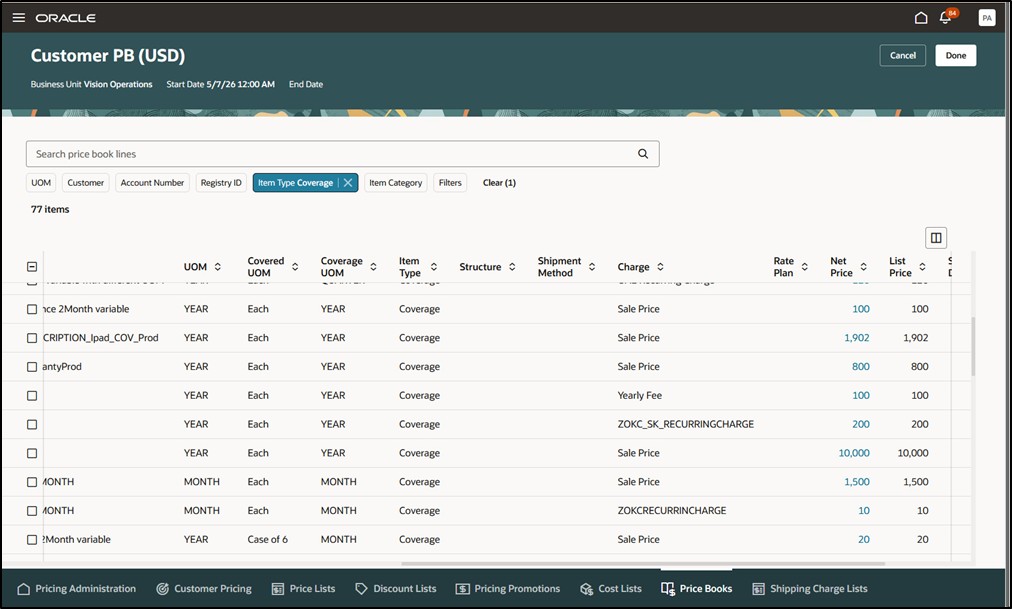
Price Book Coverage Items
Explanation: Partial list of coverage items in price book includes several types of charges. Prices can be discounted. Note that if coverage price is based on covered item price, then the price is presented as a placeholder that will be calculated at runtime rather than used from the price book.
Steps to enable and configure
Setup Required
If you want to use the Redwood: Use Price Books to Price Coverages and Promotions feature, then you must opt in to another feature: Redwood: Create Price Books to Price Sales Orders. If you’ve already opted in to this other feature, then you don’t have to opt in again.
Tips and considerations
- You can create a price book only on the redesigned Pricing pages.
- You can't include these items or pricing on a price book in update 26C:
- Configured item with discount pricing for pricing rollups. Discounts are taken for components.
- Coverage pricing based on item prices. These prices will appear as placeholder values in the price book for communication but won’t be used for pricing at runtime.
- Promotions that contain eligibility rules or additional buy item rules.
Key resources
Access requirements
Users who are assigned a configured job role that contains these privileges can access this feature:
PRICING:
- Manage Pricing Rules (QP_MANAGE_PRICING_RULES)
- View Price Lists (QP_VIEW_PRICE_LISTS_PRIV)
- Manage Price Lists (QP_MANAGE_PRICE_LISTS_PRIV)
- Manage In-Progress Price Lists (QP_MANAGE_IN_PROGRESS_PRICE_LISTS_PRIV)
- Generate Price Book (QP_GENERATE_PRICE_BOOK_PRIV) Generate a price book from user-selected parameters.
- View Price Books (QP_VIEW_PRICE_BOOKS_PRIV) Allows viewing of price books.
- Manage Price Books (QP_MANAGE_PRICE_BOOKS_PRIV) Allows creation, update, deletion, and viewing of price books.
- Delete Price Books (QP_DELETE_PRICE_BOOKS_PRIV) Allows deletion of price books.
- Publish Price Books (QP_PUBLISH_PRICE_BOOK_PRIV) Publish a price book that was previously generated.
These privileges were available before this update.