Redwood: Create and Manage Pricing Process Assignments
Use the redesigned Redwood Pricing Process Assignments page to create, update, and delete pricing process assignments with the same underlying functionality as the existing ADF page.
The redesign preserves the existing pricing process assignment behaviour, so you continue to manage the same operation-to-process mapping in a more modern Redwood experience.
Get these benefits:
- Search for assignments by pricing operation or process name from a single search field.
- Filter the list using Pricing Operation and Process Name.
- Review predefined assignments and their process descriptions in one Redwood page.
- Open the create side panel directly from Create.
- Select the pricing operation and process name, then review the process description before creating the assignment.
- Create the assignment without leaving the main Redwood experience and confirm it in the list.
- Edit or delete assignments directly from the Actions column.
You can more quickly review and maintain the mapping between pricing operations and pricing algorithms in a modern interface, which helps reduce setup effort and supports consistent pricing execution.
Oracle Pricing now provides a redesigned Redwood Pricing Process Assignments page for managing the assignments that map pricing operations to pricing algorithms.
The page includes a single search field for pricing operation or process name, filter chips for Pricing Operation and Process Name, a table that displays the pricing operation, process name, and process description, and row actions to edit or delete an assignment.
Start on the redesigned Pricing Process Assignments page, where you can review predefined assignments, search for an existing mapping, apply filters, or click Create to add a new assignment:
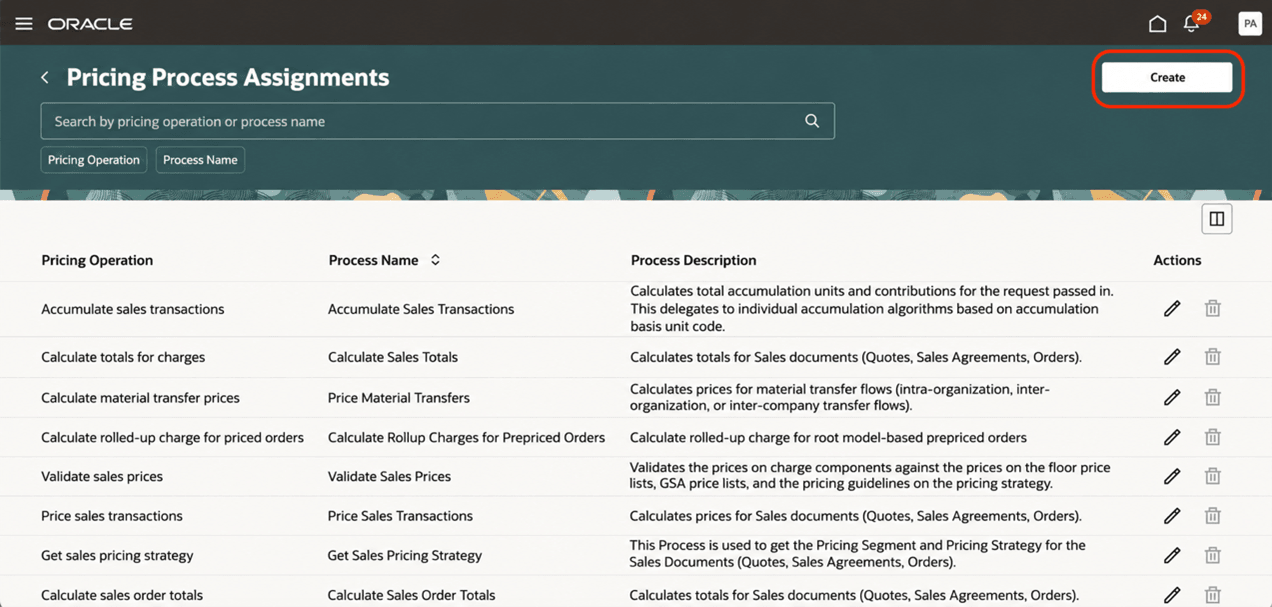
Create New Pricing Process Assignment
When you click Create, Redwood opens a side panel where you can select the pricing operation and process name, then review the process description before you create the assignment:
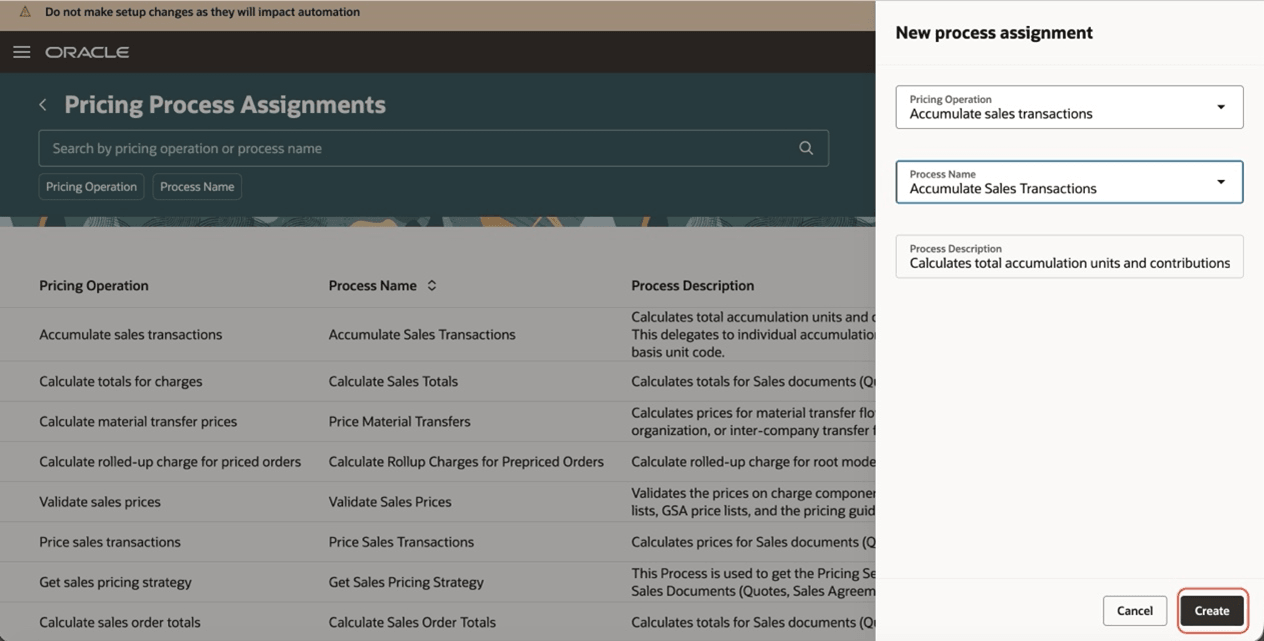
New Pricing Process Assignment Page With All Required Fields
After you click Create, the assignment is added to the list so you can immediately confirm the new mapping on the main page:
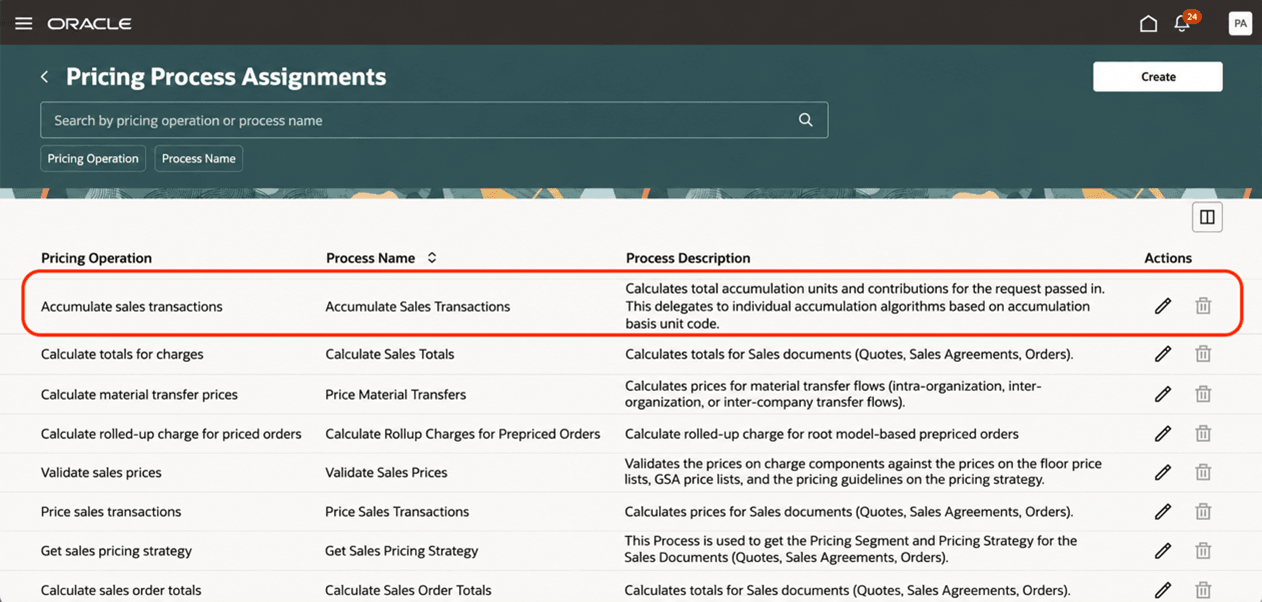
Pricing Process Assignment Page with Newly Created Process Assignment
Steps to enable and configure
You must enable the ORA_QP_PRICING_PROCESS_ASSIGNMENTS_REDWOOD_ENABLED (Redwood Page for Pricing Process Assignments Enabled)
Follow these steps to enable this feature:
- In the Setup and Maintenance work area, select the Tasks panel. Select Search, and then search for and select the Manage Administrator Profile Values task.
- On the Manage Administrator Profile Values page, search for and select ORA_QP_PRICING_PROCESS_ASSIGNMENTS_REDWOOD_ENABLED profile option code.
- In the Profile Values section, set the Site level to Yes.
- Yes = enables the feature
- No = disables the feature
- Click Save and Close. Changes in the profile value will affect users the next time they sign in.
Tips and considerations
- The redesigned page doesn’t change the underlying pricing process assignment functionality.
- To reduce maintenance, use a predefined pricing process assignment, when possible, instead of creating a new one.
- Pricing uses the pricing process assignment to identify the pricing algorithm to run for the pricing operation at runtime.
- When you create an assignment, make sure that the pricing operation and process name combination matches your business requirement before you click Create.
- Review the process description in the side panel to confirm that the selected process supports the pricing operation you want to map.
- Review the existing assignments first to determine whether a predefined mapping already meets your needs.
Key resources
Access requirements
Users who are assigned a configured job role that contains these privileges can access this feature:
- Manage Pricing Process Assignments (QP_MANAGE_PRICING_PROCESS_ASSIGNMENTS_PRIV)
- View Pricing Process Assignments (QP_VIEW_PRICING_PROCESS_ASSIGNMENTS_PRIV)
These privileges were available before this update.