Configure Actions for Items and Workflows
You can now configure actions for items and workflows. These actions can launch analytics, reports, URLs, Application Composer object functions, global functions, or object links. You can organize actions into groups, control their visibility using expressions, reorder or disable them, and configure parameterized URLs with variable mapping and trust token support.
To create actions, navigate to Product Management > Settings > select the object (Item or Workflow) > Toolbar Actions > Create. The Create Toolbar Action drawer appears.
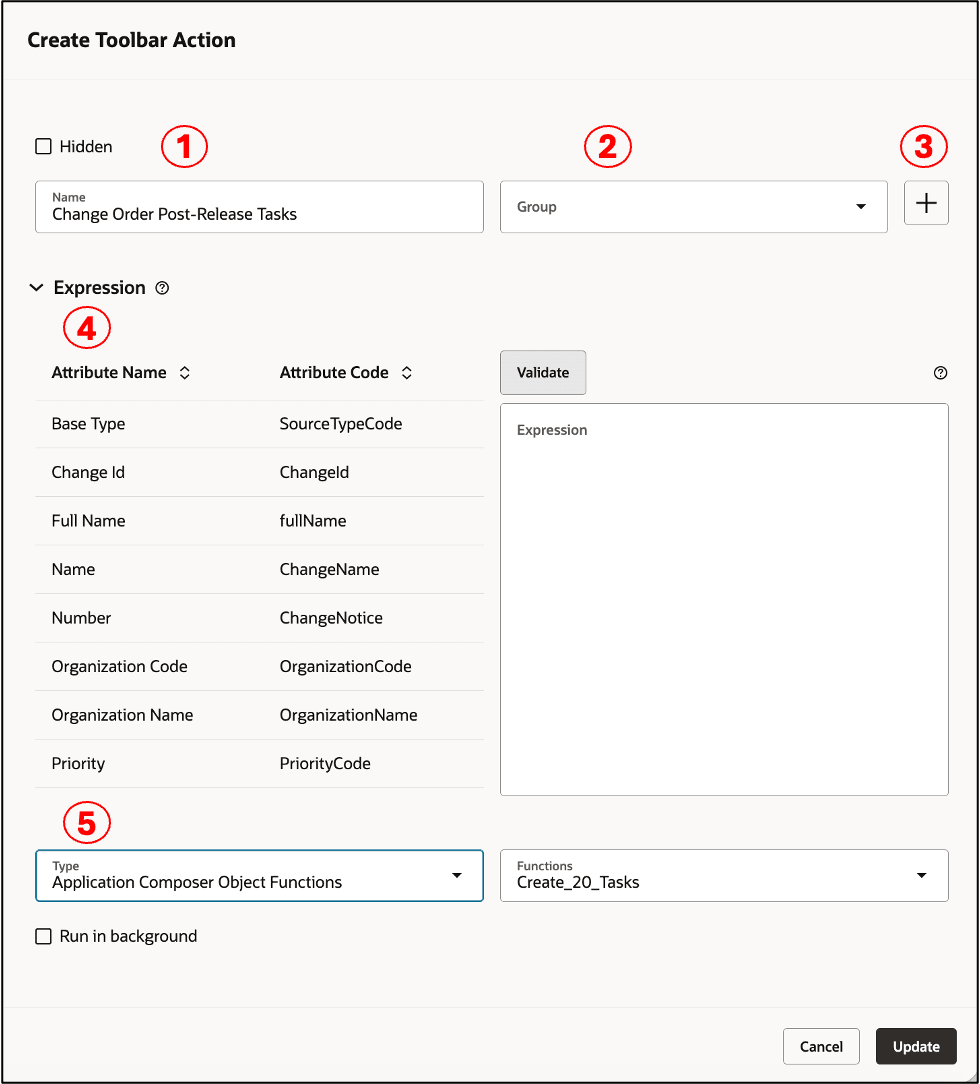
Details of a Workflow Action in the Create Toolbar Action Drawer
Enter the following details in the Create Toolbar Action drawer:
-
Name: Enter a name for the action. This name appears in the Actions drop-down list for the item or workflow.
-
Group: Select a group to organize related actions in the Actions list. Existing groups are available for selection.
-
Create (+): Click the plus (+) icon to create a group. Enter a name for the group. After you create the group, it becomes available in the Group list.
-
Expression: Define the conditions that control the availability of an action on an item or workflow. Use the expression builder to select object or user attributes, specify attribute values, and click Validate to verify the expression.
Examples of expressions
|
Workflow Type is Engineering Change Order |
(variable_SourceTypeCode == "ENG_CO") |
|
Roles: Product Manager OR Product Data Steward |
((variable_roles == "ORA_EGP_PRODUCT_MANAGER_JOB") || (variable_roles == "ORA_EGP_PRODUCT_DATA_STEWARD_JOB")) |
-
Action Type
You can configure the following action types:
-
Analytics: Link to an Oracle Transactional Business Intelligence (OTBI) analysis.
-
Application Composer Global Functions: Invoke a global function configured in Application Composer.
-
Application Composer Object Functions: Invoke an object function configured in Application Composer. You can also pass parameters to the function.
-
Application Composer Object Links: Invoke an object link configured in Application Composer.
-
Report: Link to an Oracle Analytics Publisher report.
-
URL: Link to an internal or external URL. URL actions support JSON Web Tokens (JWT) for secure authentication.
When you select Analytics, Report, or URL, the URL field is displayed. Enter the target URL using {HOST_NAME} as the relative host path and #{VARIABLE_NAME} to reference values from the object. You can map object parameters to each variable that you specify in the URL.
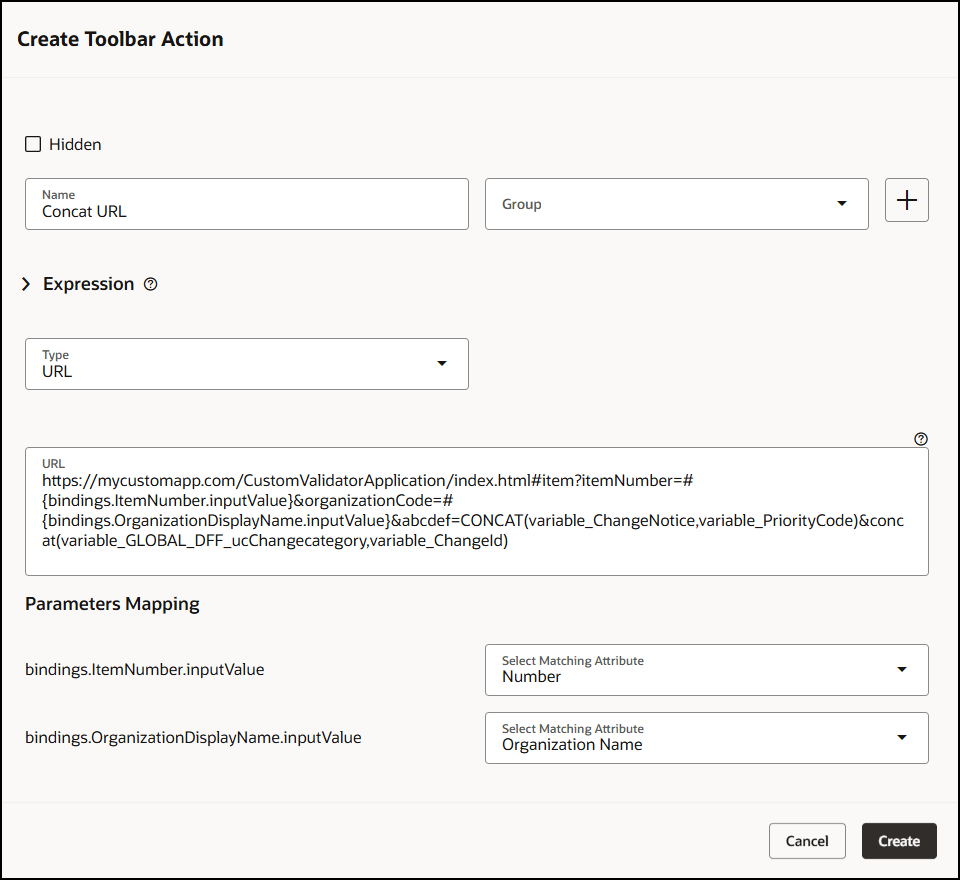
Example of Using the Concat Function in a URL
External links that use JSON Web Tokens can reference any supported variable, such as mytoken, instead of being limited to JSON Web Token variables.
To append a trust token to the URL, use the expression #{applCoreSecuredToken.trustToken}. At runtime, the application resolves the expression to the actual trust token. No parameter mapping is required.
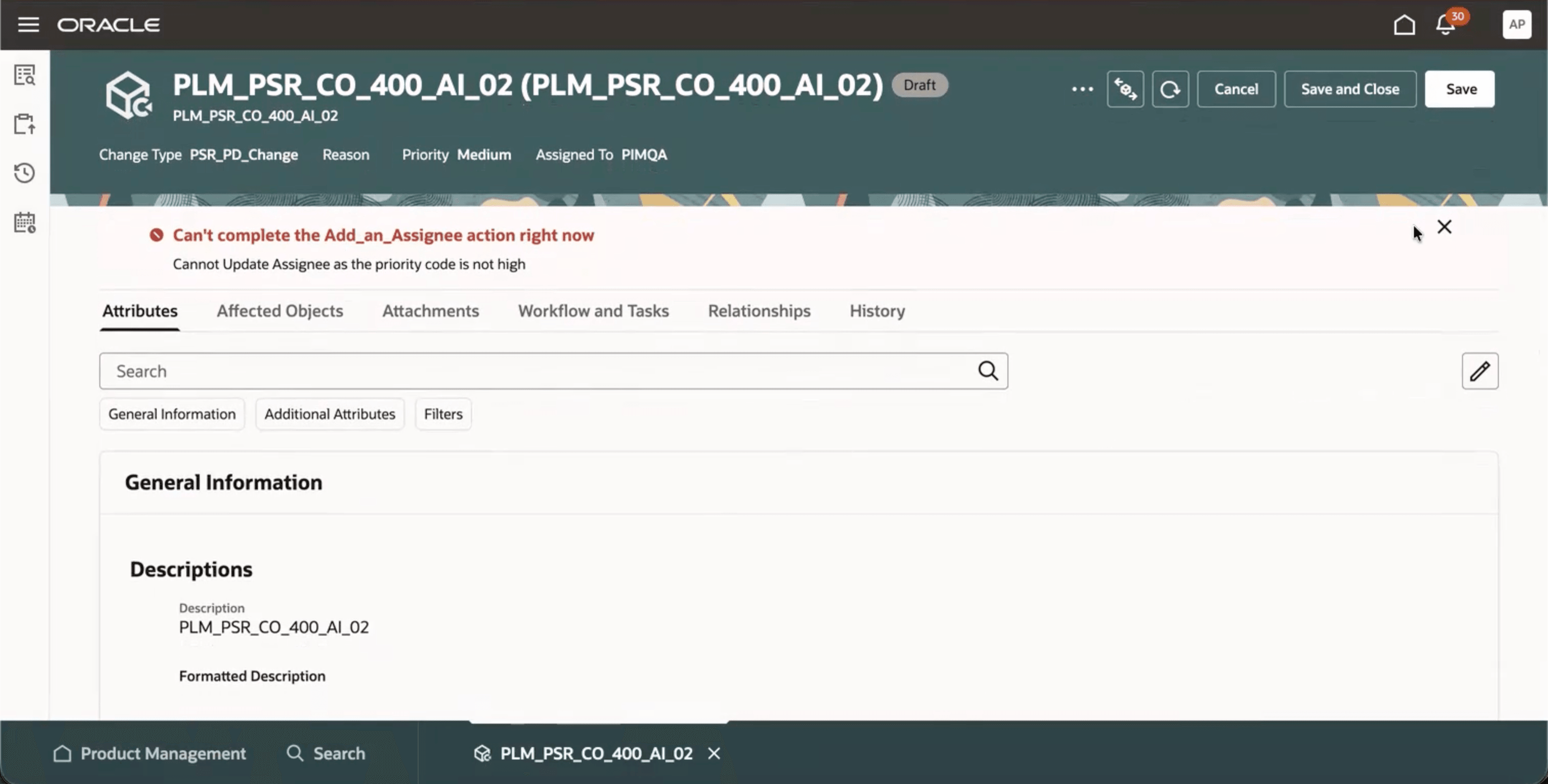
Banner Message Configured for a Change Order
When you select Application Composer Global Functions, Application Composer Object Functions, or Application Composer Object Links, the list displays the functions or object links configured for the change order in Application Composer for workflows. For items, the list displays the global functions associated through item rules.
When you enter concat and open a bracket, the application displays a list of basic and object attributes that you can select to build the expression.
Examples of parameterized URLs:
-
Analytics
Parameterized URL: {HOST_NAME}/analytics/saw.dll?Go&Path=%2Fshared%2FCustom%2FSupply%20Chain%20Management%2FChangeOrderDetails&Action=Navigate&P0=1&P1=eq&P2=%22Change%20Order%20Details%22.%22Change%20Order%20Name%22&P3=#{Number}
Sample URL: https://myhost.com/analytics/saw.dll?Go&Path=%2Fshared%2FCustom%2FSupply%20Chain%20Management%2FChangeOrderDetails&Action=Navigate&P0=1&P1=eq&P2=%22Change%20Order%20Details%22.%22Change%20Order%20Name%22&P3=CCO1 -
Report
Parameterized URL: {HOST_NAME}/xmlpserver/Custom/Supply%20Chain%20Management/ChangeOrderDetails.xdo?_xpt=0&_xf=html&name=#{CHANGE_NAME}
Sample URL: https://myhost.com/xmlpserver/Custom/Supply%20Chain%20Management/ChangeOrderDetails.xdo?_xpt=0&_xf=html&name=ECO11 -
URL
Parameterized URL: {HOST_NAME}/tickets/#{BUG_NUMBER}
Sample URL: https://support.example.com/tickets/#{BUG_NUMBER} -
URL with concat function
Parameterized URL: {HOST_NAME}/CustomValidatorApplication/index.html#item?itemNumber=#{bindings.ItemNumber.inputValue}&abc=concat(variable_ChangeNotice,variable_ChangeName,variable_GLOBAL_DFF_biattribute26)
Sample URL: https://mycustomapp.com/CustomValidatorApplication/index.html#item?itemNumber=Laptop1&abc=concat(CO1,ECO1,Europe) -
URL with JWT token
Parameterized URL: {HOST_NAME}/index.html#bulkprocess?itemNumber=#{Item Name}&jwt=#{applCoreSecuredToken.trustToken}
Sample URL: https://myapp.com/index.html#bulkprocess?itemNumber=LaptopPro&jwt=TrustTokenSample
OR
Parameterized URL: {HOST_NAME}/index.html#bulkprocess?itemNumber=#{Item Name}&CustomToken=#{applCoreSecuredToken.trustToken}
Sample URL: https://myapp.com/index.html#bulkprocess?itemNumber=LaptopPro1&CustomToken=TrustToken2
This feature provides the following business benefits:
-
Increases user productivity by enabling users to launch frequently used reports, analytics, external applications, and business functions directly from Item and Workflow pages.
-
Improves process compliance by displaying actions only to the appropriate users when the configured business conditions are met using configurable expressions.
-
Reduces implementation and maintenance effort by enabling administrators to manage configured actions without requiring application configuration or code changes.
-
Simplifies integration with enterprise applications through secure, parameterized actions that seamlessly pass business context to external applications and services.
Steps to enable and configure
Enable the profile option Enable custom actions on Product Management objects (ORA_EGP_RW_ENABLE_CUSTOM_ACTION).
Tips and considerations
-
You can disable configured actions that you don't want to display in the Product Management interface. Disabled actions aren't visible to users until you enable them.
-
You can reorder configured actions that appear in the Actions menu, including actions within the same group.
-
You can use the concat function in the Expression Builder to combine multiple parameters and dynamically construct URLs.
-
Messages returned by object functions are displayed as banner messages.
-
You can configure up to 250 Application Composer global functions and object functions as actions.
-
If you don't select Run in Background, the application displays a loading screen and blocks user interaction until the action completes. If you select Run in Background, you can continue using the application while the action runs.
Key resources
-
Oracle Fusion Cloud SCM Using Product Development Guide, available on the Oracle Help Center.
-
Oracle Fusion Cloud SCM Using Product Master Data Management Guide, available on the Oracle Help Center.
-
Oracle Fusion Cloud SCM Implementing Product Management Guide, available on the Oracle Help Center.
Access requirements
Users who are assigned a configured job role that contains these privileges can access this feature.
This privilege is new in this update.
To manage configured actions:
-
Manage Redwood Product Management Custom Actions (EGP_MANAGE_RW_PM_CUSTOM_ACTIONS_PRIV)
These privileges were available prior to this update.
To navigate to the Redwood Settings:
-
Get Redwood Settings REST (EGP_GET_REDWOOD_SETTINGS_REST_PRIV)
-
Manage Redwood Settings REST (EGP_MANAGE_REDWOOD_SETTINGS_REST_PRIV)
-
Manage Redwood Product Management Settings (EGP_MANAGE_REDWOOD_PM_SETTINGS_PRIV)
To view configured actions in the Redwood interface:
-
Manage Landing Page Layout (EGP_MANAGE_LANDING_PAGE_LAYOUT_PRIV)
-
Access HCM Common Components (HRC_ACCESS_HCM_COMMON_COMPONENT)
-
Manage Search Consumer Applications Rest (EGP_MANAGE_SEARCH_CONS_REST_PRIV)
-
Use REST Service - Identity Integration (ASE_REST_SERVICE_ACCESS_IDENTITY_INTEGRATION_PRIV)
-
Run Scheduled Processes (HEY_RUN_SCHEDULED_PROCESSES_PRIV)
-
Manage Scheduled Processes (FND_MANAGE_SCHEDULED_PROCESSES_PRIV)
-
Access Product Management Landing Page (EGP_ACCESS_LANDING_PAGE_PRIV)
-
Access Users (EGP_ACCESS_USERS_PRIV)
-
Manage Item Redwood Items (EGP_MANAGE_REDWOOD_ITEM_PRIV)
-
View product management search (EGP_VIEW_PRODUCT_MGT_SEARCH_PRIV)
-
Get Item Attribute Control REST (EGP_ITEM_ATTRIBUTE_CONTROL_READ_PRIV)
-
Get Item Class Rest (EGP_GET_ITEM_CLASS_REST_PRIV)
-
View Item (EGP_VIEW_ITEM_PRIV)
-
View Feature States Value by Web Service (RCS_VIEW_FEATURE_STATES_WEB_SERVICE_PRIV)
-
Item Management (ORA_EGP_ITEM_MANAGEMENT_DUTY)
-
Manage Change Orders (ACA_MANAGE_CHANGE_ORDERS_PRIV)
-
Employee (ORA_PER_EMPLOYEE_ABSTRACT)
-
Landing Page (ORA_EGP_LANDING_PAGE_DUTY)
Additionally, add the following roles to provide the Application Composer privileges required to manage actions created in Application Composer:
-
Application Implementation Consultant (ORA_ASM_APPLICATION_IMPLEMENTATION_CONSULTANT_JOB)
-
Custom Objects Administration (ORA_CRM_EXTN_ROLE)