Optimized Security for Reference Organization Items
Organizations can centrally govern item security using the definition organization while automatically extending the same access model to associated reference organizations. This feature simplifies administration, improves data consistency, reduces redundant security maintenance, and provides a more scalable approach for managing security across shared product data. It applies across Product Management user interfaces, search, structures, relationships, categories, integrations, and reporting.
Security Inheritance for Reference Organization Items
A centralized security inheritance model for reference organization items is introduced. Instead of maintaining separate security grants for items in each reference organization, you can manage access at the definition organization-level and automatically extend that access to all associated reference organizations.
When enabled, users who have access to an item in the definition organization automatically inherit access to the corresponding item in associated reference organizations. Similarly, users who don’t have access to the definition organization item can’t access the associated reference organization item.
The feature is applicable across Product Management services and interfaces, including:
- Item management
- Structures and where used
- Categories
- Relationships
- Item picker and search
- Publication processes
- REST and SOAP services
- OTBI subject areas and reporting
- Import and bulk processing
Users who can access structures, categories, and relationships in the definition organization automatically inherit access to the same information in associated reference organizations.
Search and Indexing Improvements
Here are the improvements for Redwood search experience and lean indexing framework:
- Secure indexing of reference organization items
- Inheritance of definition organization security during search operation
Item Picker and User Interaction Enhancements
Users can only search and select items they are authorized to access through the associated definition organization.
OTBI and Reporting Alignment
Users with access to definition organization item data automatically inherit access to corresponding reference organization item data in OTBI subject areas. This is controlled using the Upgrade Product Management Data scheduled process. In the Process Details window, specify the following details:
- Upgrade Process: Analysis or Execution
- Functional Area: Item reference organization assignments
- Feature: Item reference organization security consolidation
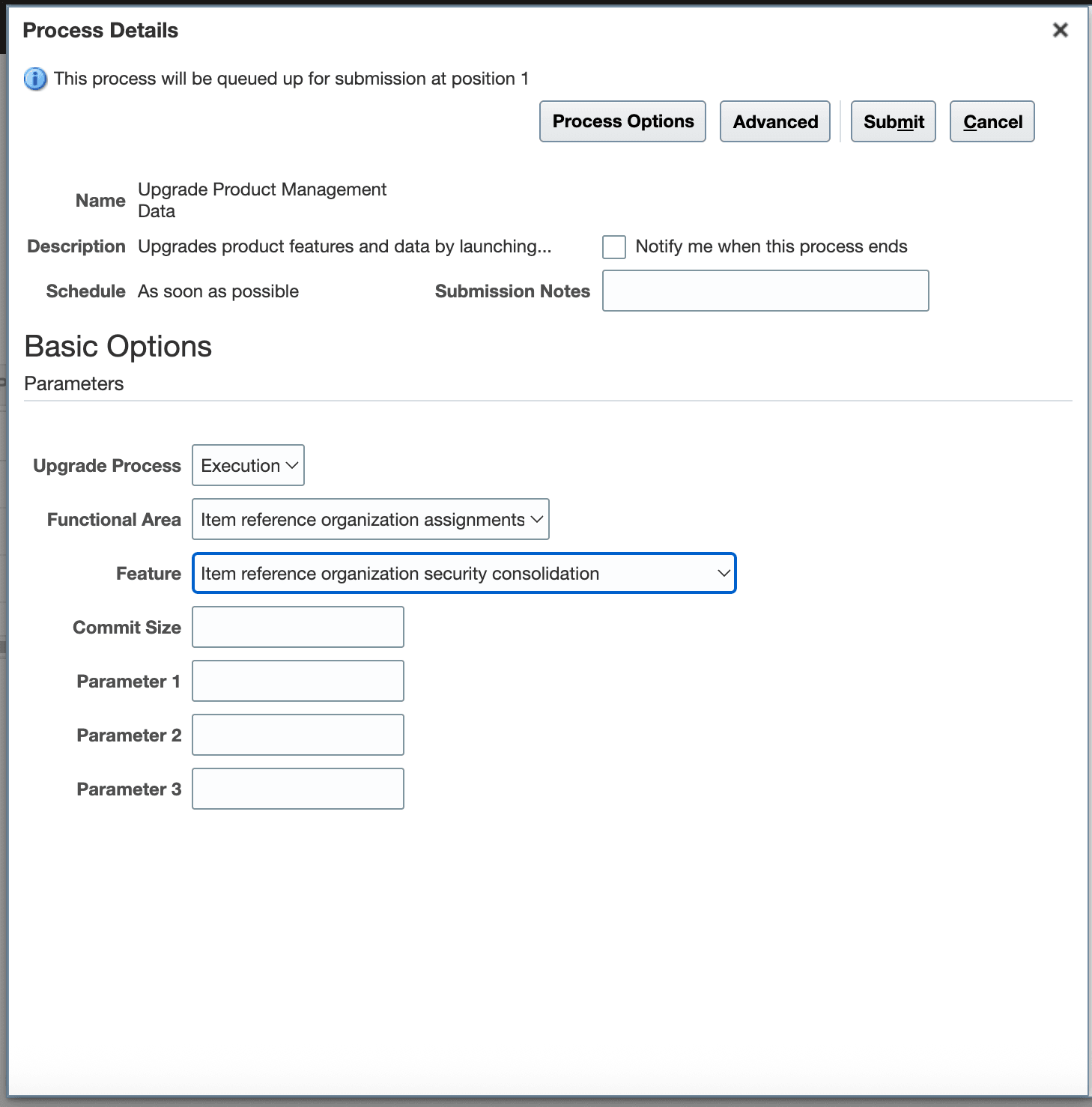
Upgrade Product Management Data Scheduled Process
When the consolidation process is run:
- Inherited security is enabled
- Required indexing profiles are automatically updated
- Reference organization security management pages are hidden where applicable
- Security grants for reference organizations are centrally governed through the definition organization
After the upgrade:
- Reference organization items inherit definition organization security.
- Security is consistently applied across Product Management services and interfaces.
- Search indexing behavior is updated to support inherited security.
Rollback Support
Users can undo the item reference organization security consolidation feature if needed. Run the same scheduled process with the Feature option set to Undo item reference organization security consolidation.
Rollback operations:
- Restores previous access behavior
- Rebuilds indexes
- Resets associated indexing profiles
This feature benefits your business in the following ways:
- Simplifies security administration by centralizing access management in the definition organization
- Reduces redundant security grants and administrative overhead
- Provides consistent user access across definition and reference organizations
- Improves governance and compliance for shared product data
- Enhances search accuracy and secure visibility of reference organization items
- Ensures consistent security behavior across UI, integrations, reporting, and workflows
Steps to enable and configure
You don't need to do anything to enable this feature.
Tips and considerations
- Review existing custom security configurations before using this feature.
- Validate user access behavior in a test environment prior to production rollout.
- Reference organization item security is inherited from the definition organization item.
- Users without access to the definition organization item won’t have access to the related reference organization item.
- Existing indexing and search processes may require a rebuild.
- Security management pages for reference organization items may no longer be available after consolidation.
- OTBI and reporting visibility will follow the inherited security model.
Key resources
- Oracle Fusion Cloud SCM: Implementing Product Management guide, available on the Oracle Help Center.
- Optimized Management of Reference Organization Items What’s New
- Redwood: View Scheduled Processes in the Navigator What’s New
Access requirements
Users who are assigned a configured job role that contains these privileges can access this feature:
- Manage File Import and Export (FND_MANAGE_FILE_IMPORT_AND_EXPORT_PRIV)
- Manage Item (EGP_MANAGE_ITEM_PRIV)
These privileges were available prior to this update.