Redwood: Use Item Relationships to Specify Coverage and Subscriptions
Coverage and subscription components within model structures are defined through related item relationships, using the corresponding relationship types of Coverages and Subscriptions:
- Coverages are components associated with a model that represent service or protection offerings. These are items whose Sales Product Type is one of the following:
- Extended Warranty
- Preventative Maintenance
- Software Maintenance
- Service Level Agreement (SLA)
A coverage may be associated with one or more items
- Subscriptions are components associated with a model that represent recurring or time-based offerings. These are items whose Sales Product Type is set to Subscription.
When editing a coverage or subscription item, create a related item relationship, select the item that the coverage or subscription applies to, and choose the Subscription or Coverage as the related item type.
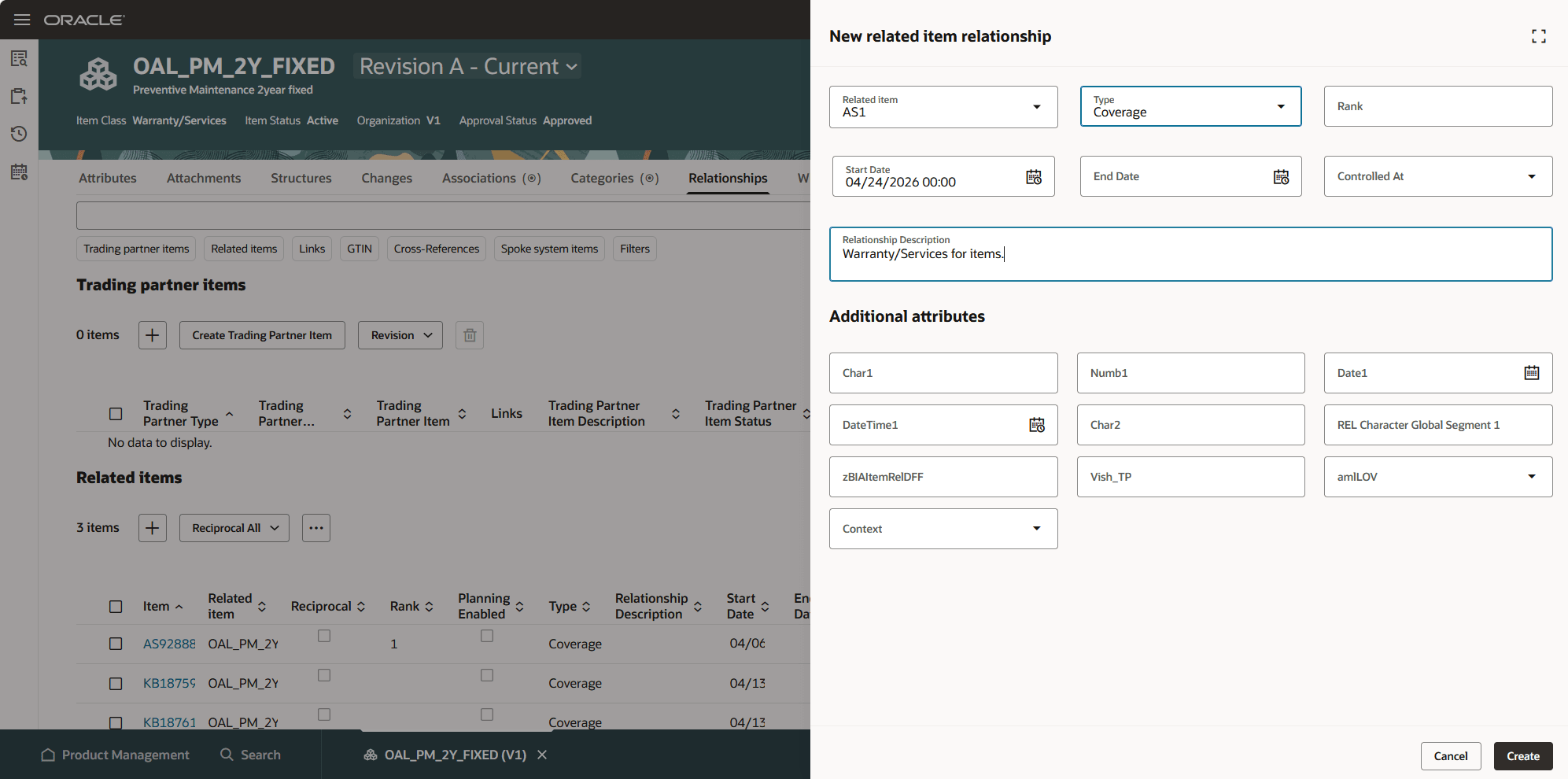
Create Related Item Relationship for a Coverage
You can query the related item relationships using the Related Item Relationships REST service.
This feature benefits your business by the following:
- Streamlined operations through a unified data model: By defining coverage and subscription relationships in a single source of truth, businesses reduce data fragmentation, improve accuracy, and simplify maintenance across systems.
- Improved selling and configuration experiences: Consistent, complete relationship data ensures CPQ and ordering processes have the right information at the right time, reducing errors and enabling faster, more reliable deal configuration.
- Enhanced cross-system visibility and alignment: Unified exposure across CPQ, Order, and Subscription Management creates end-to-end transparency, helping teams make better decisions and reducing operational silos.
- Faster product and service bundling: Catalog managers can easily link products with warranties, maintenance plans, and subscriptions, accelerating time-to-market for bundled offerings and increasing revenue opportunities.
- Better lifecycle tracking and customer coverage clarity: Clearly defined relationships make it easier to track which items are covered by subscriptions or warranties, improving customer support, renewals, and overall service management.
Steps to enable and configure
You don't need to do anything to enable this feature.
Tips and considerations
A coverage item can be defined for multiple components in a Model structure and used in multiple Model structures.
Key resources
Oracle Supply Chain Management Cloud: Implementing Product Management guide, available on the Oracle Help Center.
Access requirements
Related Item Relationships are created and maintained at the item level. The user will need access to both items and related item relationships.
Users who are assigned a configured job role that contains these duty roles can access this feature:
- Manage Item Redwood (ORA_EGP_REDWOOD_MANAGE_ITEM_DUTY)
- Manage Item Redwood (ORA_EGP_REDWOOD_MANAGE_ITEM_DUTY_CRM)
These duties were available prior to this release.
A data policy for the user configured job role must be created in the Security Console for the HZ_PARTIES resource to return the data to the Relationships tab:
- Sign in to Security Console.
- Search for the configured role on which you want to configure the data security policy. Select Actions> Edit Role.
- On the Edit Role page, select Data Security Policies.
- Select Create Data Security Policy. On the Create Data Security Policy dialog box, enter the following:
- Policy Name: <unique name>
- Data Resource: Search for and add the resource named EGO_HZ_PARTIES.
- Data Set: Select All Values.
- Actions: Select all the actions
- Select OK and select Next.