Redwood: Use Improved Exclusion Operator in Conditions and Deselect Basic Attributes in Manage Permissions
You can now benefit from the following improvements in Access Control List:
-
Exclusion (Is Not) support for Item and Workflow - You can now create conditions using the exclusion (Is Not) operator for the item class attribute on items and the type attribute on workflows, with support for hierarchical exclusion.
-
Deselect Basic Attributes while giving manage permission on an object - You can now deselect basic attributes in the access-to-attribute list when creating a condition for managing permissions, thereby granting only implicit read permission on basic attributes.
-
Condition Name in Object Instance Report- You can now see the condition name in the object instance report.
Exclusion (Is Not) support for Item and Workflow
When using an ‘Is’ condition for Item Class or Workflow Type, users are granted access only to the selected value along with its hierarchy.
You can now create a condition using the ‘Is Not’ operator to exclude an item, an item class hierarchy, or a workflow type hierarchy.
For example, let's say you've an item class hierarchy as follows:
-
Root Item Class
-
Electronics
-
Laptop
-
Desktop
-
-
Hardware
-
Server
-
Storage Device
-
-
For the condition “Item Class Is Not Electronics,” access isn’t granted to Electronics or its subordinate classes, such as Laptop and Desktop, but is granted to other item classes, such as Root Item Class, Hardware, Server, and Storage Device.
Similarly let's say you've workflow types as follows:
-
Engineering
-
Processor Upgrade Change
-
Firmware Revision Change
-
-
-
Corrective Action
-
8D Corrective Action
-
Root Cause Corrective Action
-
For the condition "Workflow type Is Not Processor Upgrade Change ", the grants wouldn't be provided to Processor Upgrade Change and the classes underneath it like Firmware Revision Change, but would be granted to other workflow types like Engineering, Corrective Action, 8D Corrective Action and Root Cause Corrective Action.
Deselect Basic Attributes while giving manage permission on an object
Previously, when granting Manage permission, selection of Basic Attributes in the “Access To” selection was mandatory.
Now, selecting basic attributes is no longer mandatory, and users can deselect them in the "Access To" list. If Basic Attributes aren't selected for Manage permission, the Basic Attributes tab becomes read-only, and users will not be able to edit basic attributes.
Additionally, if a user doesn't select any “Access to” attribute group in the Select attribute groups drawer, they can't save their changes. You must select at least one “Access To” group to proceed with building the permission set.
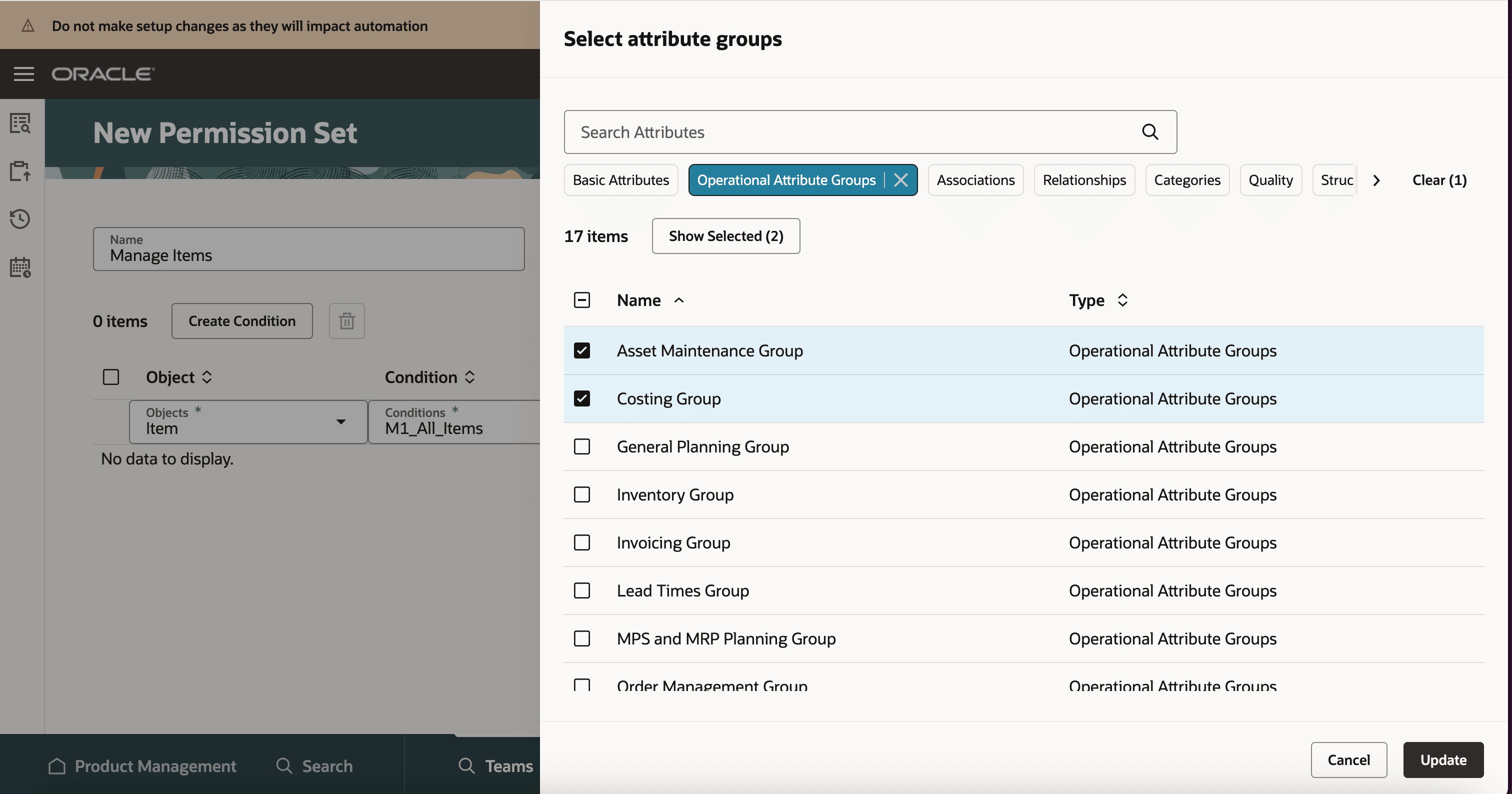
Deselect Basic Attributes in Manage Permission
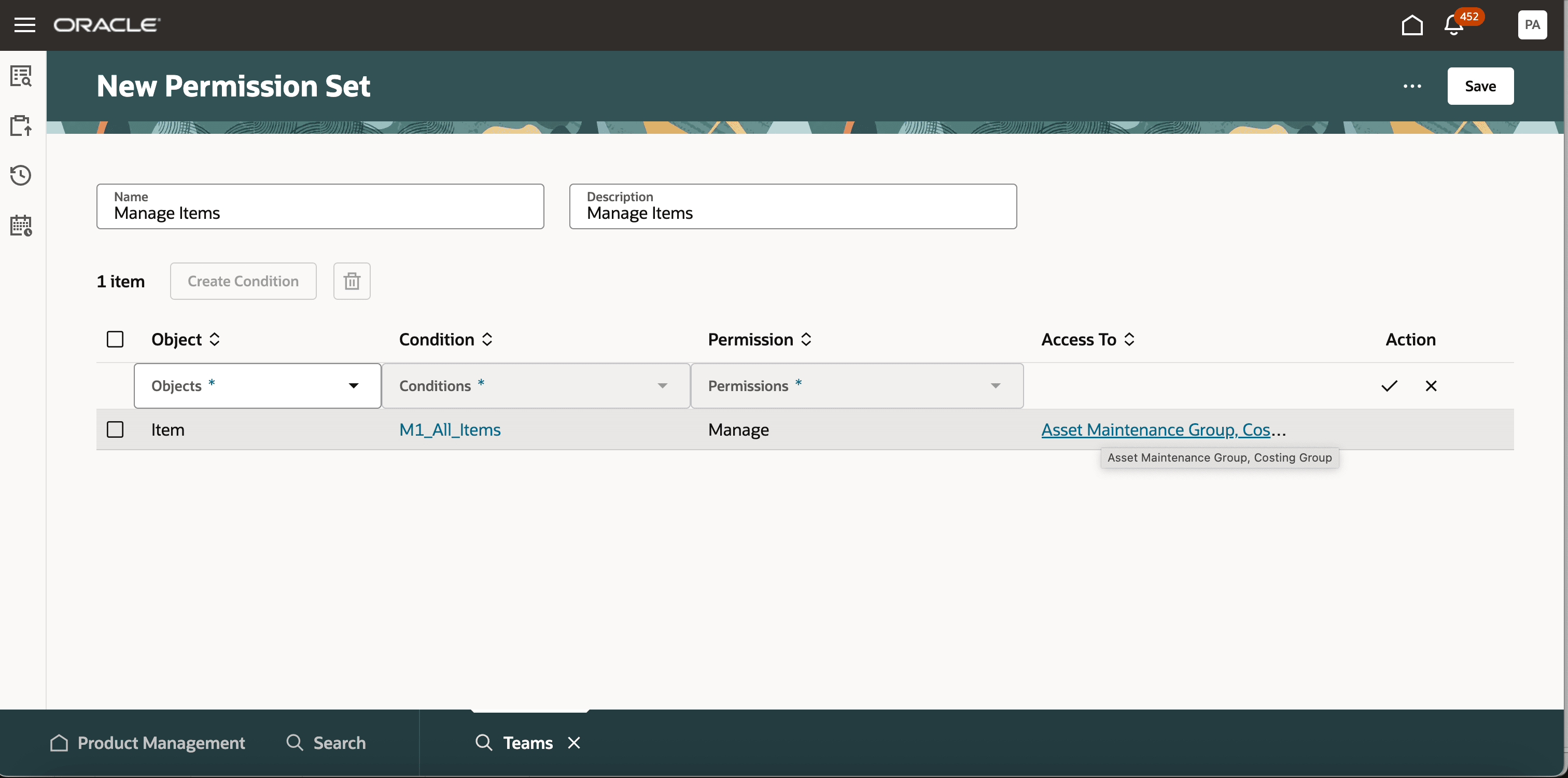
Permission Set for Manage Without Basic Attributes
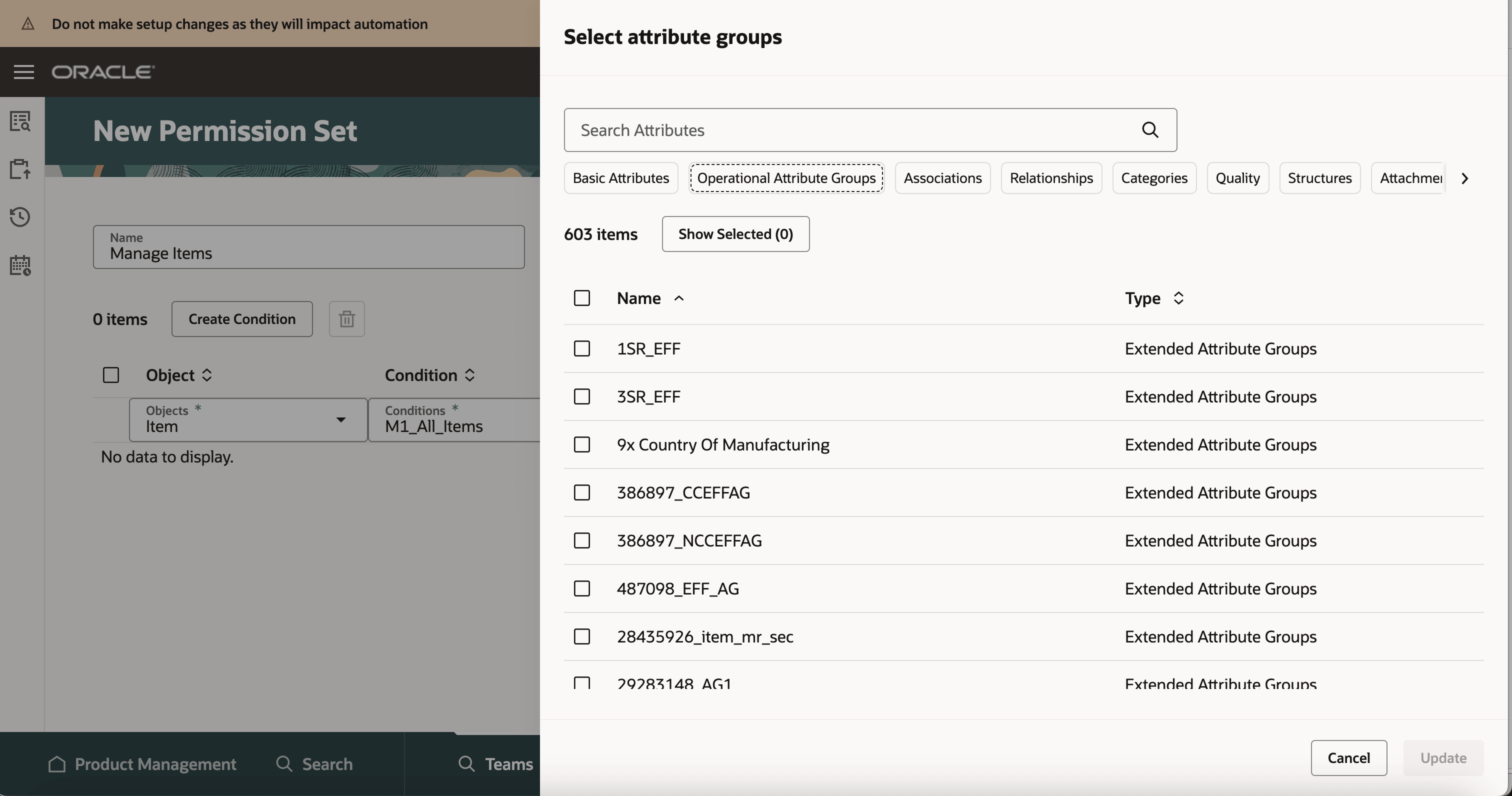
User Needs to Select Atleast One Attribute Group to Update Changes
Condition Name in Object Instance Report
You can now view the condition name in the object instance report.
To see the steps to generate object instance report refer to Redwood: Secure Items Using Access Control Lists.

Team Item Instance Report with Condition Name
This feature benefits your business in the following ways:
-
Grant access to item classes or workflow types more efficiently by using the exclusion (“Is Not”) operator. This condition excludes access to the selected item class or workflow type and its hierarchy, while automatically granting access to all other item classes and workflow types.
-
Keep basic attributes read-only for users who need to modify only selected attribute groups, providing greater flexibility and control over object access.
Steps to enable and configure
-
To use criteria-based access control for items, enable the Enable Access Control List for Items profile option. By default, the profile option is set to No.
-
To use criteria-based access control for workflows, enable the Enable Access Control List for Workflows profile option. By default, the profile option is set to No.
-
After enabling these profile options, the items and workflow continue to honor the existing security settings until you create a permission set and add it to an active team that impacts at least one item or workflow.
Note: Once the profile option is enabled and a permission is created for an item, all items in the application will become private, regardless of their current public or private settings. You must manually assign user permissions to these items.
Tips and considerations
-
Criteria-based access control for items or workflows is supported only on Redwood pages. Classic pages continue to use their existing security configurations: item class or individual item security for items, and data security policies or individual workflow security for workflows. Avoid using Redwood and Classic pages together after enabling criteria-based access control, as concurrent use with existing security can lead to inconsistent access.
-
Use the ‘Is Not’ operator to exclude specific item classes or workflow types, enabling more efficient access management.
-
Basic attributes are given view-only access when a user deselects them for a manage permission.
-
Users can deselect basic attributes for manage permission on all objects that provide the option to select “Access To” attributes.
Key resources
Oracle Fusion Cloud SCM Using Product Development Guide, available on the Oracle Help Center.
Oracle Fusion Cloud SCM Using Product Master Data Management Guide, available on the Oracle Help Center.
Oracle Fusion Cloud SCM Implementing Product Management Guide, available on the Oracle Help Center.
Access requirements
Users who are assigned a configured job role that contains these privileges can access this feature:
To configure conditions for items or workflows using a filtered list:
-
Use REST Service - Identity Integration (ASE_REST_SERVICE_ACCESS_IDENTITY_INTEGRATION_PRIV)
-
Use Atom Feed - Employees Workspace (PER_ATOM_WORKSPACE_ACCESS_EMPLOYEES_PRIV)
-
Manage HCM Lists (HRC_MANAGE_HCM_LISTS_PRIV)
-
Human Capital Management Application Administrator (ORA_HRC_HUMAN_CAPITAL_MANAGEMENT_APPLICATION_ADMINISTRATOR_JOB)
To configure teams, permission sets, and conditions:
-
Manage Landing Page Layout (EGP_MANAGE_LANDING_PAGE_LAYOUT_PRIV)
-
Access Clipboard (ACA_ACCESS_CLIPBOARD_PRIV)
-
Access HCM Common Components (HRC_ACCESS_HCM_COMMON_COMPONENT)
-
Manage Search Consumer Applications Rest (EGP_MANAGE_SEARCH_CONS_REST_PRIV)
-
Monitor Product Development (ACA_MONITOR_PRODUCT_DEVELOPMENT_PRIV)
-
Configure Access Control Teams, Permission Sets, and Conditions (EGP_ACCESS_CONTROL_TEAMS_PRIV)
-
Use REST Service - Identity Integration (ASE_REST_SERVICE_ACCESS_IDENTITY_INTEGRATION_PRIV)
-
Use Atom Feed - Employees Workspace (PER_ATOM_WORKSPACE_ACCESS_EMPLOYEES_PRIV)
-
Manage HCM Lists (HRC_MANAGE_HCM_LISTS_PRIV)
-
Manage HCM Rules (HRC_MANAGE_HCM_RULES_PRIV)
-
Run Scheduled Processes (HEY_RUN_SCHEDULED_PROCESSES_PRIV)
-
Manage Scheduled Processes (FND_MANAGE_SCHEDULED_PROCESSES_PRIV)
-
Access Product Management Landing Page (EGP_ACCESS_LANDING_PAGE_PRIV)
-
Manage Scheduled Job Definition (FND_MANAGE_SCHEDULED_JOB_DEFINITION_PRIV)
-
Access Users (EGP_ACCESS_USERS_PRIV)
-
Manage Item Redwood Items (EGP_MANAGE_REDWOOD_ITEM_PRIV)
-
View Product Management Search (EGP_VIEW_PRODUCT_MGT_SEARCH_PRIV)
-
Get Item Attribute Control REST (EGP_ITEM_ATTRIBUTE_CONTROL_READ_PRIV)
-
Get Item Lifecycle Phases Read Rest (EGP_ITEM_LIFECYCLE_PHASES_READ_REST_PRIV)
-
Get Item Status REST (EGP_ITEM_STATUSES_READ_PRIV)
-
Get Template REST (EGP_TEMPLATE_READ_PRIV)
-
View Global Inventory Organizations List of Values by Web Service (RCS_GLOBAL_VIEW_INV_ORG_LOV_WEB_SERVICE_PRIV)
-
View Units Of Measure List of Values by Web Service (RCS_VIEW_UNITS_OF_MEASURE_LOV_WEB_SERVICE_PRIV)
-
Get Item Class Rest (EGP_GET_ITEM_CLASS_REST_PRIV)
-
View Item (EGP_VIEW_ITEM_PRIV)
-
View Feature States Value by Web Service (RCS_VIEW_FEATURE_STATES_WEB_SERVICE_PRIV)
-
Use REST Service - Users and Roles Lists of Values (PER_REST_SERVICE_ACCESS_USERS_AND_ROLES_LOVS_PRIV)
-
Access Change Types Using a REST Service (EGO_GET_CHANGE_TYPES_REST_PRIV)
-
Manage Item Change Order Type (EGO_MANAGE_ITEM_CHANGE_ORDER_TYPE_PRIV)
-
Manage Item Change Order Status (EGO_MANAGE_ITEM_CHANGE_ORDER_STATUS_PRIV)
To access the secured items, users must be assigned the relevant item privilege along with the following:
-
View Feature States Value by Web Service (RCS_VIEW_FEATURE_STATES_WEB_SERVICE_PRIV)
To view or edit workflows on the workflow pages, or to access notifications, you should have the following privileges:
For change orders:
-
View Change Order (ACA_VIEW_CHANGE_ORDERS_PRIV) or
-
Manage Change Orders (ACA_MANAGE_CHANGE_ORDERS_PRIV)
For change requests:
-
View Change Request (ACA_VIEW_CHANGE_REQUESTS_PRIV) or
-
Manage Change Requests (ACA_MANAGE_CHANGE_REQUESTS_PRIV)
For problem reports:
-
View Problem Report (ACA_VIEW_PROBLEM_REPORTS_PRIV) or
-
Manage Problem Report (ACA_MANAGE_PROBLEM_REPORT_PRIV)
For corrective and preventive actions:
-
View Corrective Action (ACA_VIEW_CORRECTIVE_ACTIONS_PRIV) or
-
Manage Corrective Action (ACA_MANAGE_CORRECTIVE_ACTION_PRIV)
To access journeys setup and configure the roles in role hierarchy:
-
Manage Journey (ORA_PER_MANAGE_JOURNEY_TEMPLATE)
-
Manage Guided Journeys (ORA_PER_MANAGE_GUIDED_JOURNEYS)
-
Use REST Service - Guided Journeys Read Only (ORA_PER_REST_SERVICE_ACCESS_GUIDED_JOURNEYS_RO)
-
Use REST Service - Journey Categories List of Values (ORA_PER_REST_SERVICE_ACCESS_JOURNEY_CATEGORIES_LOV)
To access business rules:
-
Administer Sandbox (FND_ADMINISTER_SANDBOX_PRIV)
Additionally, add the following to access an object report:
-
Product Catalog Transaction Analysis Duty (FBI_PRODUCT_CATALOG_TRANSACTION_ANALYSIS_DUTY)
-
Product Transaction Analysis Duty (FBI_PRODUCT_TRANSACTION_ANALYSIS_DUTY)
-
BI Consumer Role (BIConsumer)