Redwood: Use Extensible Flexfields for Advanced Trading Partner Items
You can use extensible flexfields with advanced trading partner items to define and manage additional trading partner-specific attributes and rules. You can define reusable attribute groups, configure extensible attributes, and associate them with trading partner item classes to support richer and more flexible trading partner data management.
Administrators can use the existing extensible flexfield setup to create and manage attribute groups, attributes, value sets, and values for trading partner items. You can associate attribute groups with supported child trading partner item classes such as Manufacturer, Supplier, Customer, and Competitor item classes. These attribute group associations support hierarchical inheritance, enabling child trading partner item classes to inherit configurations from parent trading partner item classes while maintaining consistency across trading partner classifications.
In the Redwood user experience, extensible attributes are displayed directly in the Trading Partner Item Attributes tab alongside basic attributes. Attribute groups appear as organized sections similar to item extensible flexfields, making it easier for users to view and maintain trading partner-specific information. Users can also search and filter trading partner items using extensible attributes through suggested filters and search capabilities integrated into the Redwood experience.
The Trading Partner Item Clipboard functionality further improves productivity by enabling users to select, pin, and drag-and-drop trading partner items to other supported areas of the application. Users can pin frequently used trading partner items for quick access, filter the clipboard to display only pinned items, or toggle between clipboard trading partner items and other search results. Visual indicators, represented by three ellipses, provide quick navigation to specific trading partner item tabs such as Attributes, Attachments, and Relationships without leaving the current screen. These capabilities streamline navigation and simplify multi-item management tasks.
This feature supports extensible attributes consistently across multiple interfaces, including the Redwood UI, REST services, import processes, audit, and access control frameworks. Business rules such as defaulting and read-only behavior can also be applied to trading partner item extensible attributes, providing parity with item extensible flexfield behavior.
The following screenshot shows the Attribute Groups page, where you can create attributes and attribute groups.
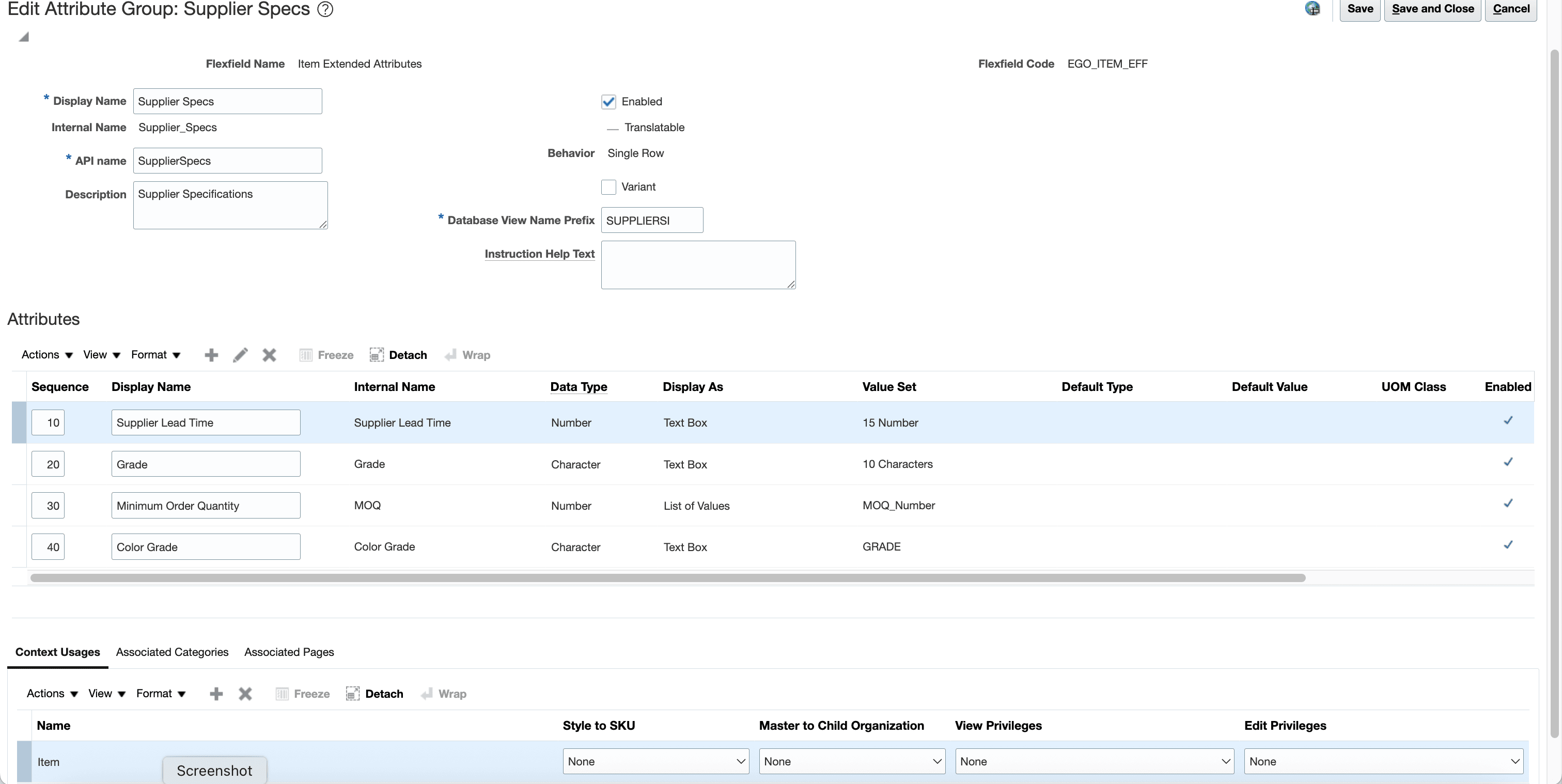
Edit Attribute Group and Attribute
The following screenshot shows the association of the trading partner item class and the attribute groups.
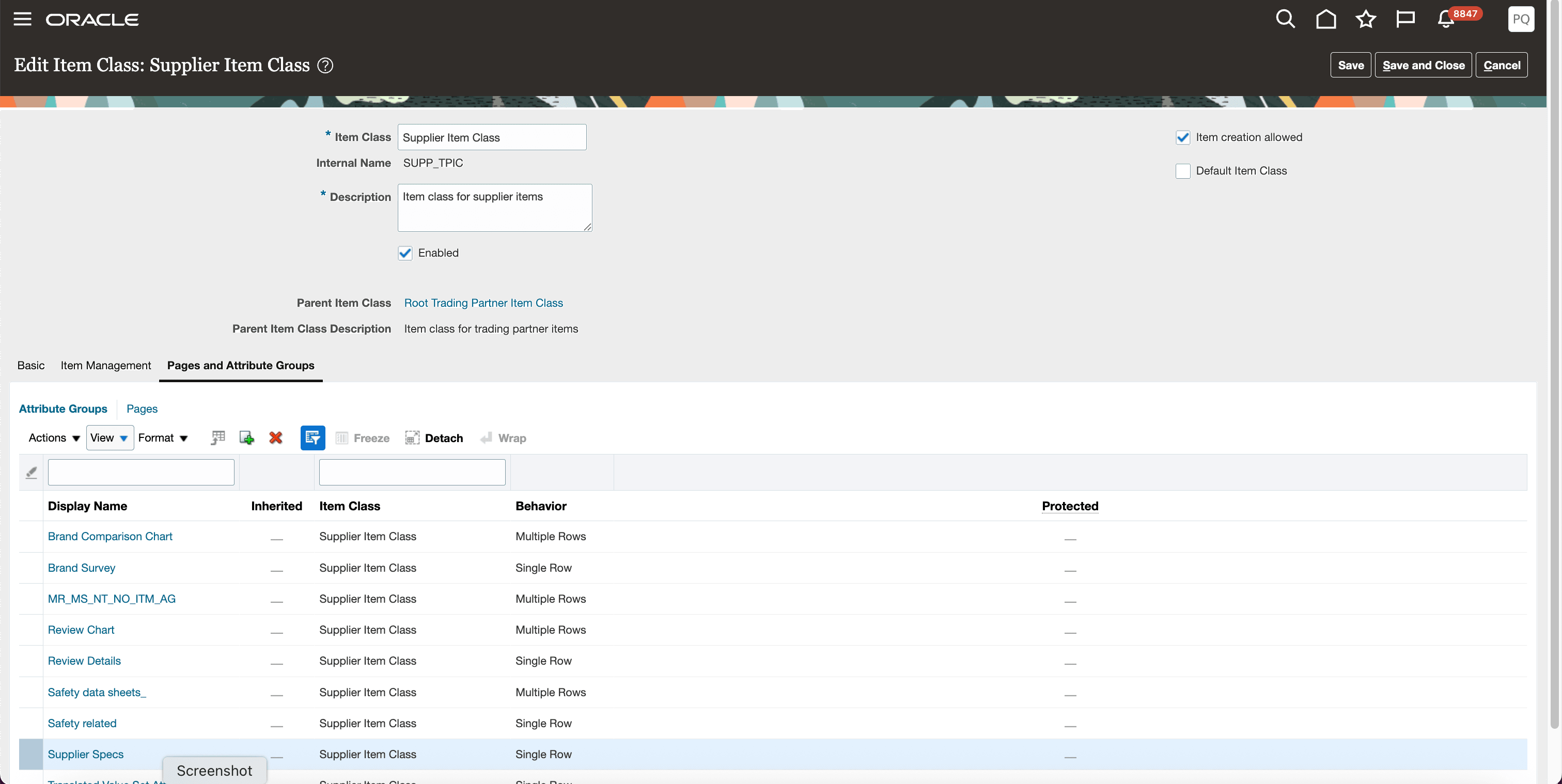
Trading Partner Item Class with Pages and Attribute Groups
The following screenshot shows the trading partner item page with the attributes.
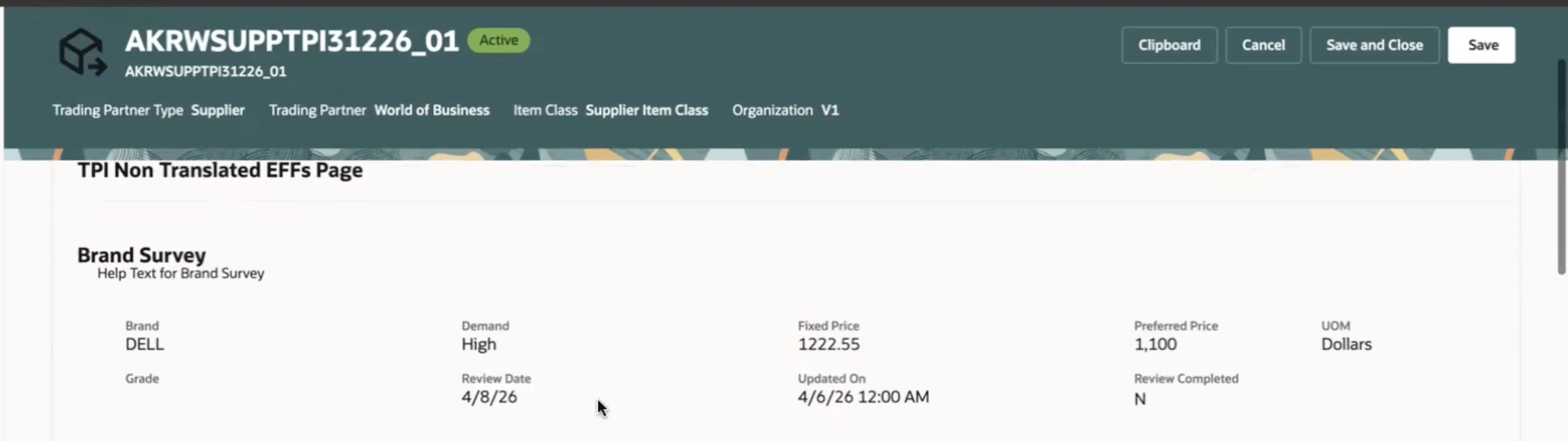
Trading Partner Item with Attributes
The following screenshot shows the trading partner item page with the suggested filters enabled.
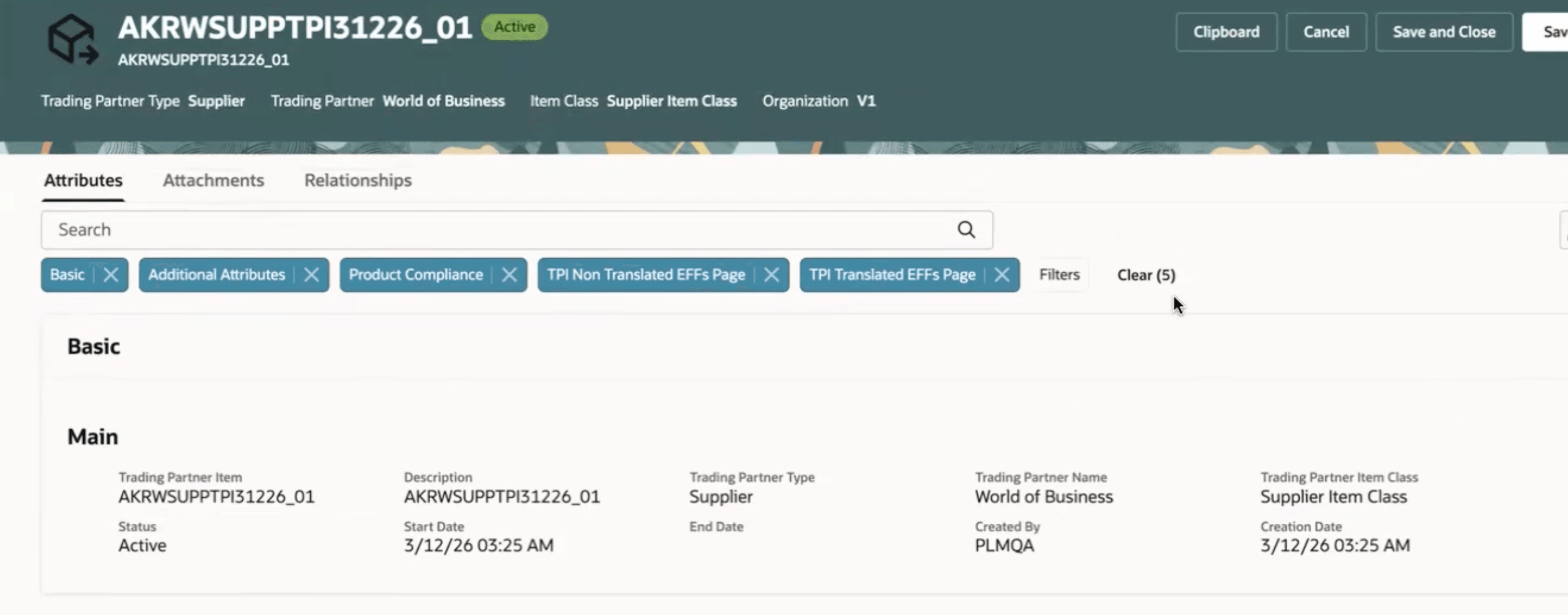
Trading Partner Item with Suggested Filters
The following screenshot shows the Trading Partner Item page with the attributes in the edit mode.
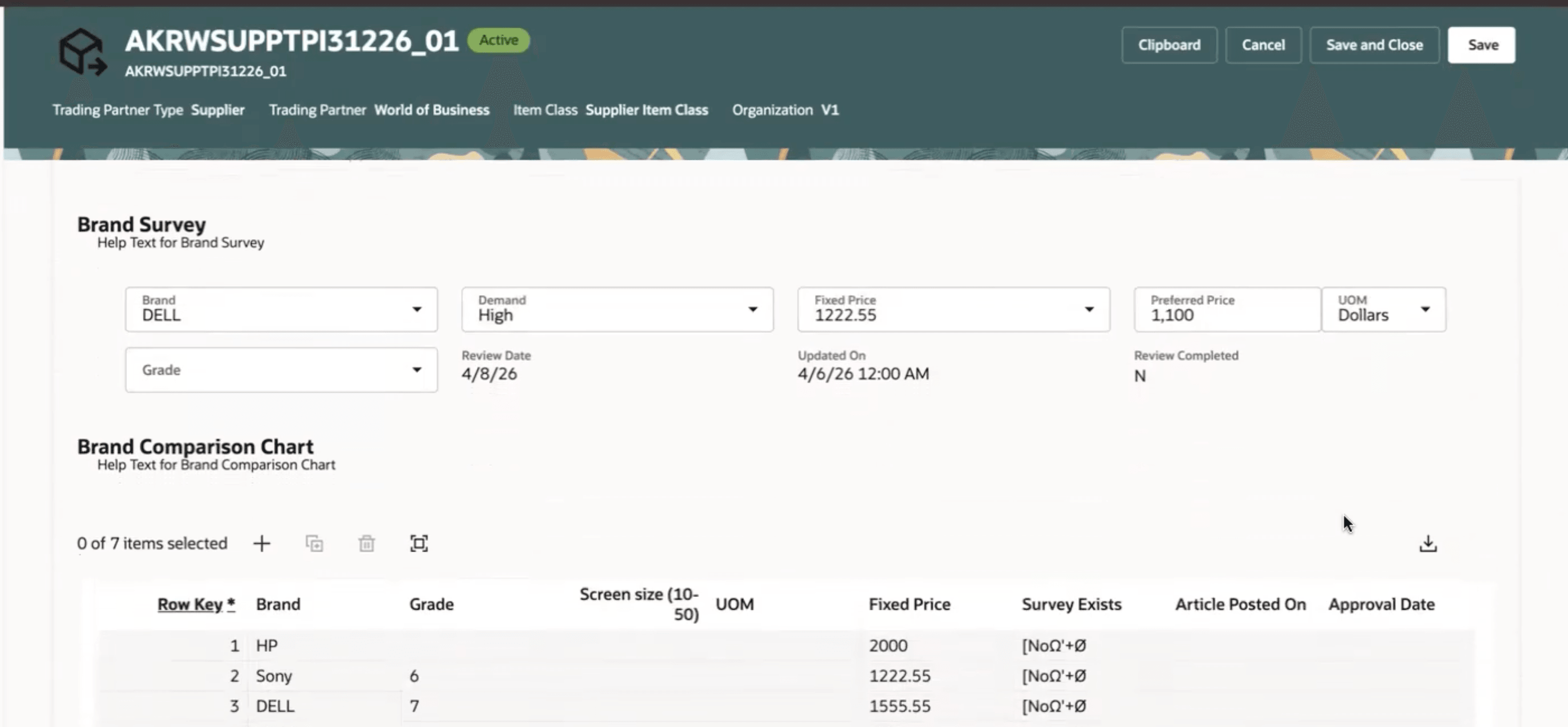
Trading Partner Item Edit Attributes
This feature benefits your business in the following ways:
- Extends advanced trading partner items with configurable extensible attributes to support evolving business and partner-specific requirements.
- Improves data standardization and governance by enabling reusable attribute groups and hierarchical inheritance across trading partner item classes.
- Reduces administrative effort by reusing existing item extensible flexfield setup flows, value sets, and business rules.
- Enhances user productivity with integrated search, filtering, and attribute management capabilities in the Redwood user experience.
- Provides a consistent extensibility framework across UI, REST services, imports, audit, and access control processes.
- Helps organizations adapt more quickly to supplier, manufacturer, customer, and competitor data management needs without customizations
Steps to enable and configure
Use the Opt In UI to enable this feature. For instructions, refer to the Optional Uptake of New Features section of this document.
Offering: Product Management
Tips and considerations
- Before enabling this feature, run the Upgrade Product Management Data scheduled process and ensure the Advanced Trading Partner Items Enabled profile option is set to Yes. If you've already run the scheduled process, then you don't need to run the scheduled process again.
- You must enable both the Advanced Trading Partner Items profile option and the Use Extensible Flexfields for Advanced Trading Partner Items opt in feature to use trading partner item extensible attributes and rules.
- Reuse existing item attribute groups, attributes, and value sets to maintain consistency across item and trading partner item data models.
- You can associate the attribute groups with child trading partner item classes. However, association to the Root trading partner item class isn’t supported in the Manage Item Classes UI.
- Variant and multirow attribute groups aren’t supported for trading partner item class associations.
- You can’t modify or delete inherited attribute groups in child trading partner item classes.
- Trading partner item extensible attributes are available in the Redwood UI with search and filter support similar to item extensible attributes.
- REST services and import processes validate both the profile prerequisite and opt in configuration before processing trading partner item extensible attribute data.
- Existing item security and access control models govern access to trading partner item extensible attributes; no separate privileges are required.
Key resources
Refer to the following guide available in on the Oracle Help Center:
- Oracle Fusion Cloud SCM: Implementing Product Management
- Oracle Fusion Cloud SCM: Using Product Master Data Management
- Oracle Fusion Cloud SCM: REST API for Oracle Fusion Cloud SCM
- Oracle Fusion Cloud SCM: File-Based Data Import (FBDI) for SCM
Access requirements
Users who are assigned a configured job role that contains these duties and privileges can access this feature:
- View Advanced Trading Partner Item Search (EGP_VIEW_ADV_TPI_SEARCH_PRIV)
- Product Search (ORA_EGI_PRODUCT_SEARCH_DUTY):
- View Advanced Trading Partner Item Search (EGP_VIEW_ADV_TPI_SEARCH_PRIV)
- View Product Management Trading Partner Item Search (EGP_VIEW_PRODUCT_MGT_TPI_SEARCH_PRIV)
- Get Search View REST (EGP_GET_SEARCH_VIEW_REST_PRIV)
- Get Product Management Index REST (EGP_GET_PM_INDEX_REST_PRIV)
- Manage Search View REST (EGP_MANAGE_SEARCH_VIEW_REST_PRIV)
- Get Item Index Available Attributes REST (EGP_GET_PM_ITEM_AVAIL_REST_PRIV)
- Manage System Searches (HRC_MANAGE_SYSTEM_SEARCHES_PRIV)
- Use REST Service - Saved Searches (HRC_REST_SERVICE_ACCESS_SAVED_SEARCHES_PRIV)
These privileges were available prior to this update.
- Redwood Trading Partner Item Duty (ORA_EGP_REDWOOD_TPI):
- View Product Management Trading Partner Item Search (EGP_VIEW_PRODUCT_MGT_TPI_SEARCH_PRIV)
- View Redwood Trading Partner Item (EGP_VIEW_REDWOOD_TPI_ITEM_PRIV)
- View Trading Partner Item Attachment (EGP_VIEW_REDWOOD_TPI_ATTACHMENT_PRIV)
- View Redwood Trading Partner Item Relationship (EGP_VIEW_REDWOOD_TPI_RELATIONSHIP_PRIV)
- Manage Redwood Trading Partner Item (EGP_MANAGE_REDWOOD_TPI_ITEM_PRIV)
- Manage Redwood Trading Partner Item Attachment (EGP_MANAGE_REDWOOD_TPI_ATTACHMENT_PRIV)
- Manage Redwood Trading Partner Item Relationship (EGP_MANAGE_REDWOOD_TPI_RELATIONSHIP_PRIV)
These duties and privileges are new in this update.
- View Trading Partner Item Extensible Flexfields (EGP_VIEW_REDWOOD_TPI_ITEM_EFF_PRIV)
- Manage Trading Partner Item Extensible Flexfields (EGP_MANAGE_REDWOOD_TPI_ITEM_EFF_PRIV)
These privileges are new in this update.