Redwood: Manage Seller Auctions
Seller auctions help your organization liquidate excess inventory, sell retired assets, or sell other items through a competitive auction process. Unlike reverse auctions, where buyers typically seek the lowest supplier price for goods or services they want to procure, seller auctions use a forward auction model where potential buyers compete by increasing their bids over time. The seller can monitor bidding activity in real time and award to the highest or best bidder.
With this update, you can create and manage seller auctions using the Redwood experience. This includes a dedicated workbench and improved pages for creating, viewing, managing lifecycle actions, monitoring bidding activity, reviewing bids, and awarding seller auctions.
Access the Redwood experience from the Seller Negotiations (New) quick action under Procurement or from the Sourcing (New) Redwood landing page.
The key capabilities available to category managers across the seller negotiation lifecycle are highlighted in these sections:
Seller negotiations workbench
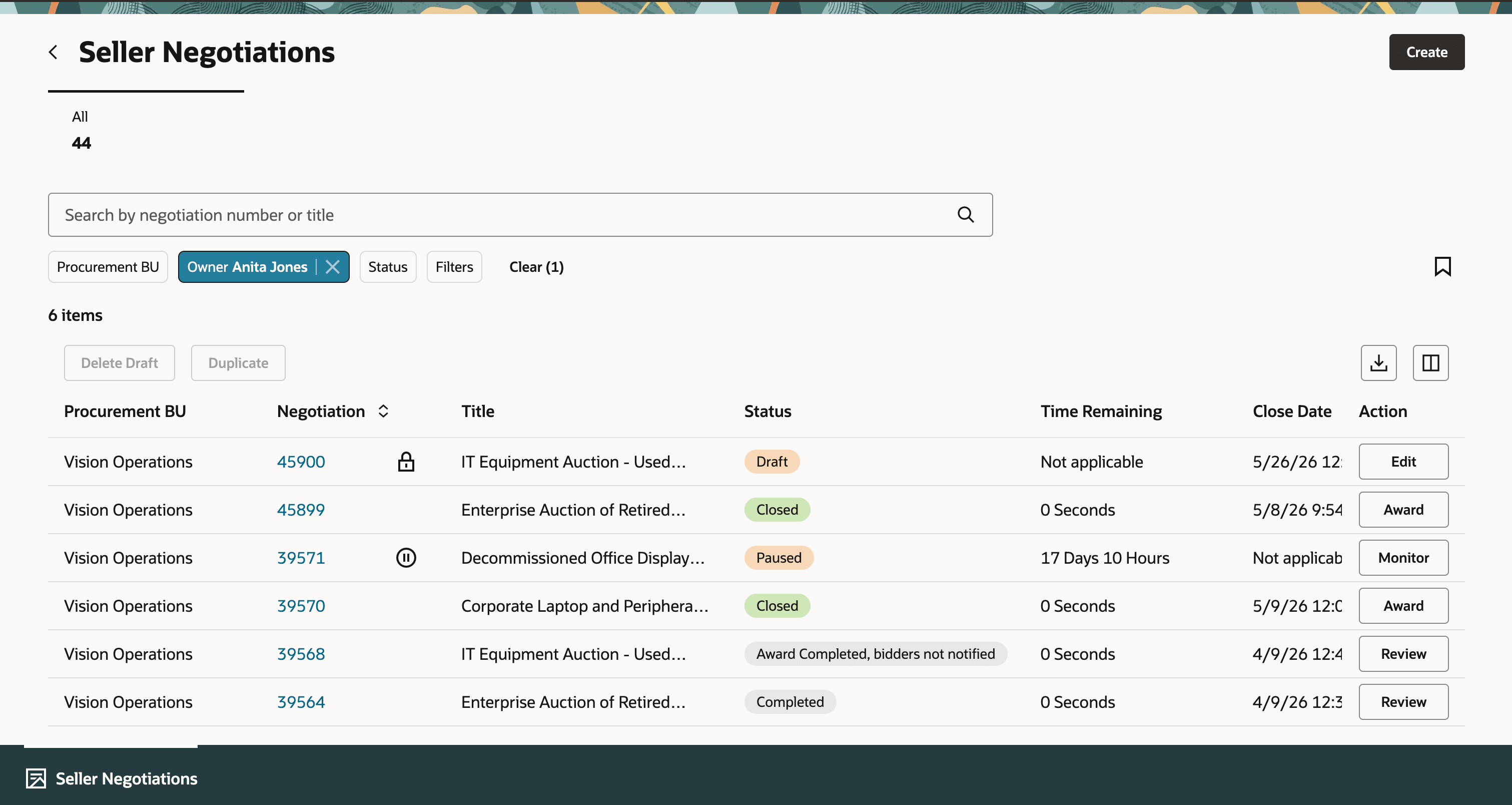
Seller Negotiations Workbench with Search, Filters, Results, and Actions
Use the Seller Negotiations search page to find auctions by number or title, or by selecting filters such as Procurement BU, Owner, or Status. By default, the workbench shows auctions where you are the owner and suggests the next action to take based on status. You can edit draft auctions, monitor active or paused auctions, award closed auctions, and review award after completion.
Create seller negotiations
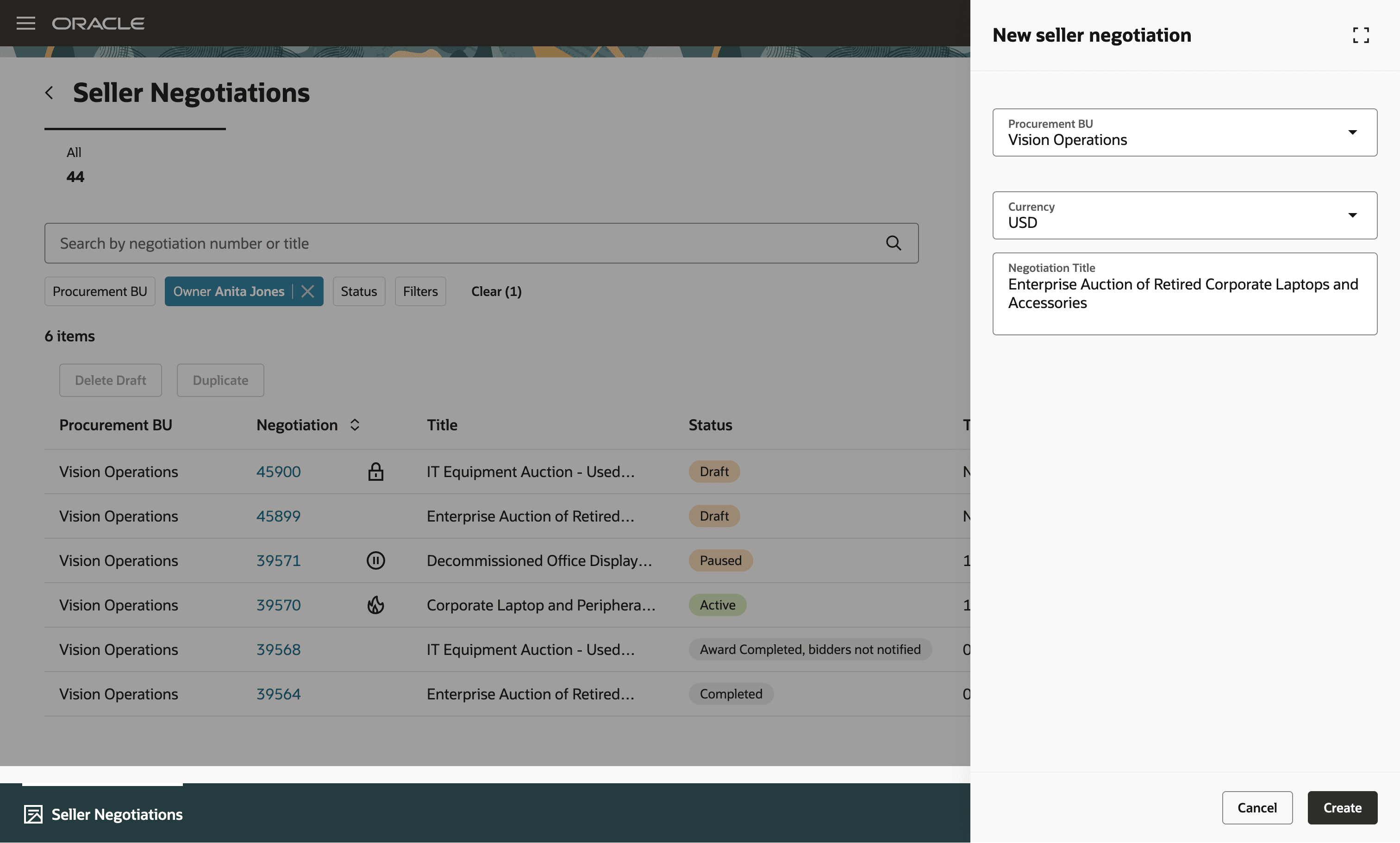
Create Seller Negotiation
Create the seller auction in a one page experience to set auction controls, add lines, suppliers and attachments, then publish it to notify supplier bidders.
Unlike the Classic application, which uses separate Overview, Lines, and Bidders tabs, Redwood presents the auction content on a single edit page with expandable sections. You can add and review auction details without moving between tabs.
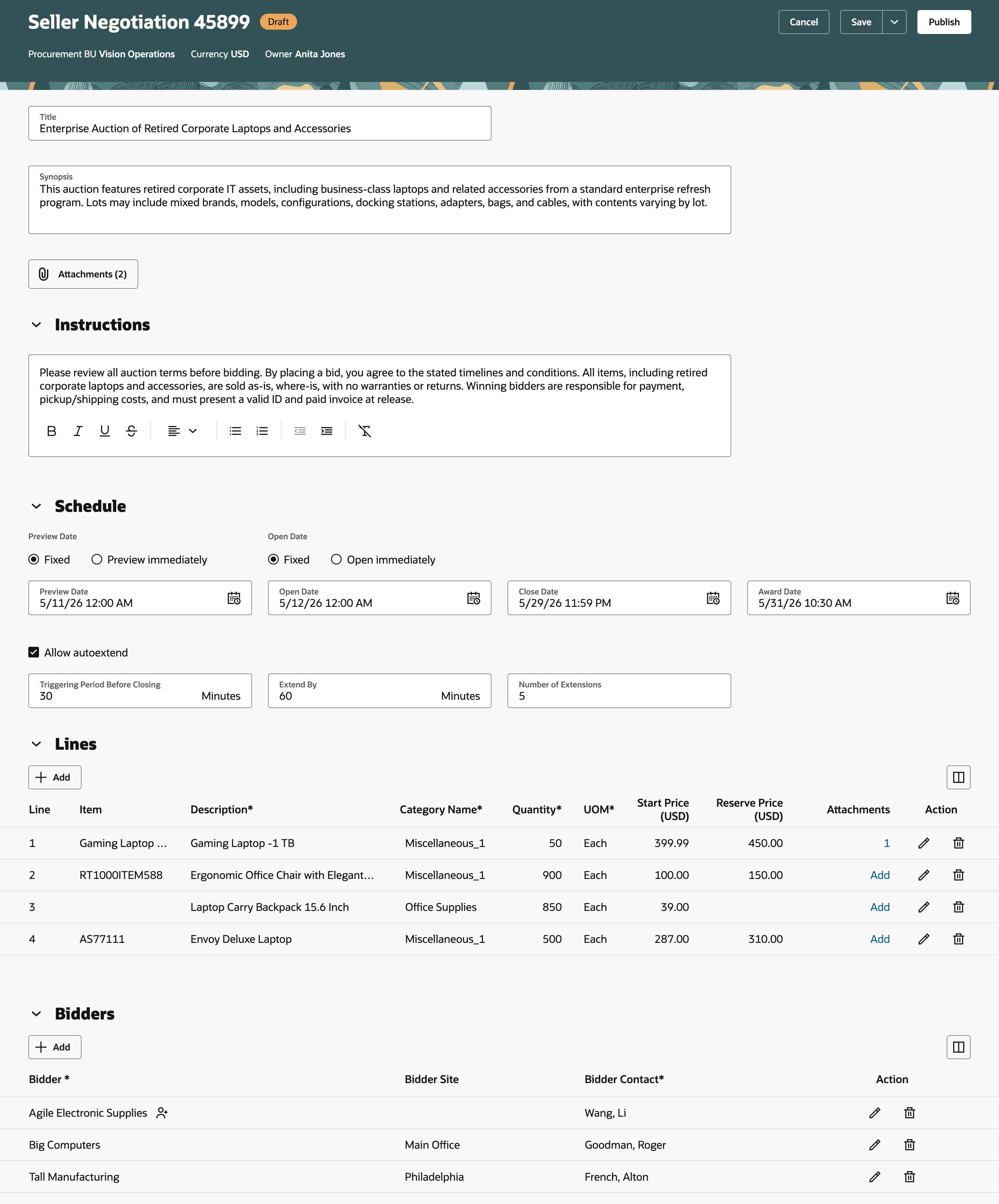
Edit and Publish a Draft Seller Negotiation
While creating a seller auction, you can use these capabilities:
- Define autoextend settings so the winning bid can extend all lines from the auction close date, based on the number of extensions, triggering period, and extension length you define.
- Set a reserve price for a line, which is the lowest acceptable price at which you’re obligated to sell the line item. Bidders don’t see the reserve price, but they can see whether it’s met during bidding.
- Define a price increment to guide bid revisions by requiring each new bid to increase by the specified amount.
- Allow partial quantity bidding for a line, or require bidders to bid for the full quantity.
View and act on seller auctions
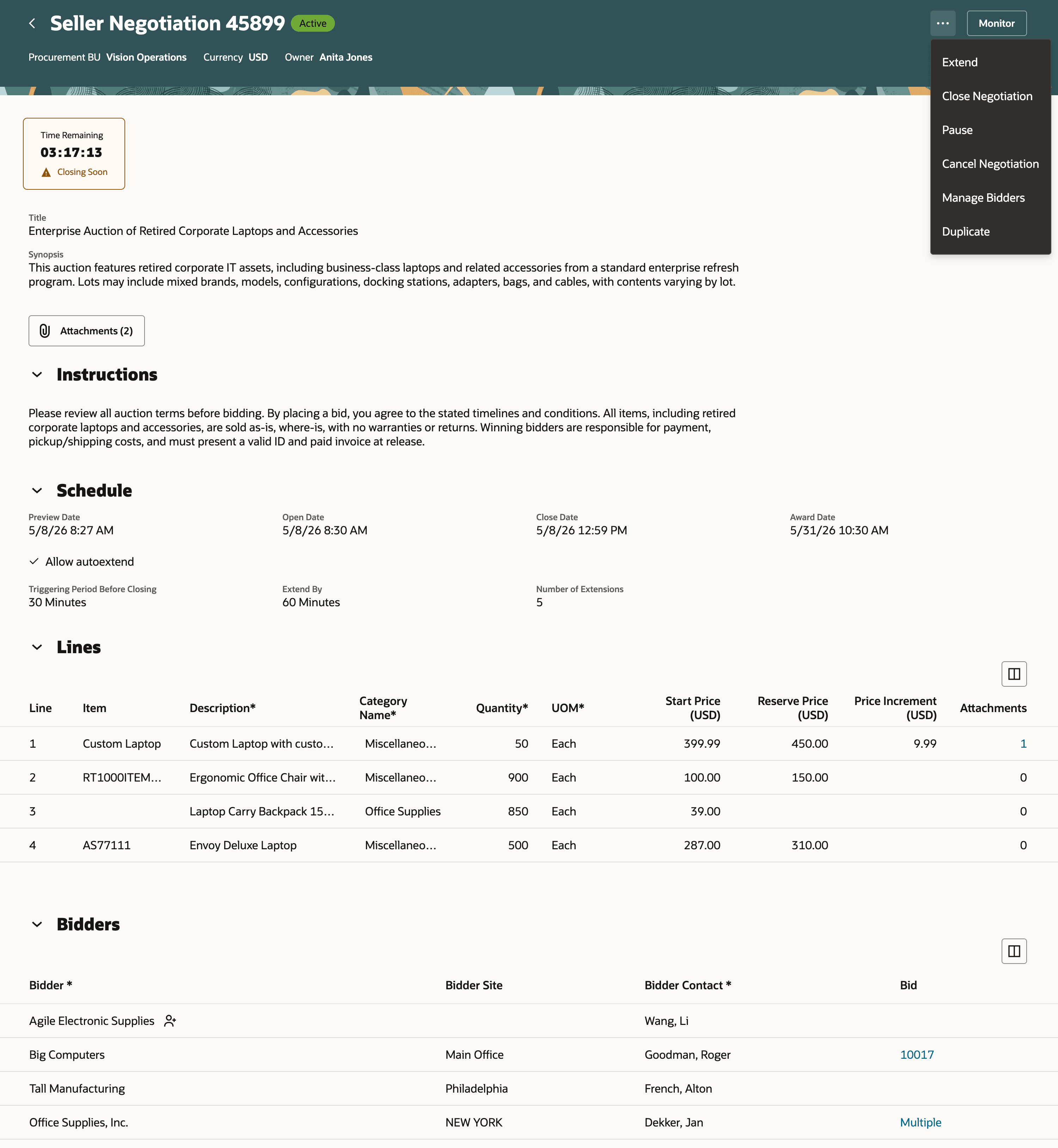
View Seller Negotiation Details and Actions
Use the seller auction details page to review the auction and take the next applicable action, such as editing, duplicating, managing bidders, monitoring, analyzing, awarding, or managing the auction lifecycle. As bidding activity changes, you can update the auction schedule or participation to help maximize revenue. For example, you can close the auction early, extend it, cancel it, invite additional bidders, pause bidding, or resume the auction later.
The page keeps auction details, bidder activity, and actions together, so you can move through the seller auction lifecycle with fewer navigation steps compared with the Classic application.
Monitor seller auctions
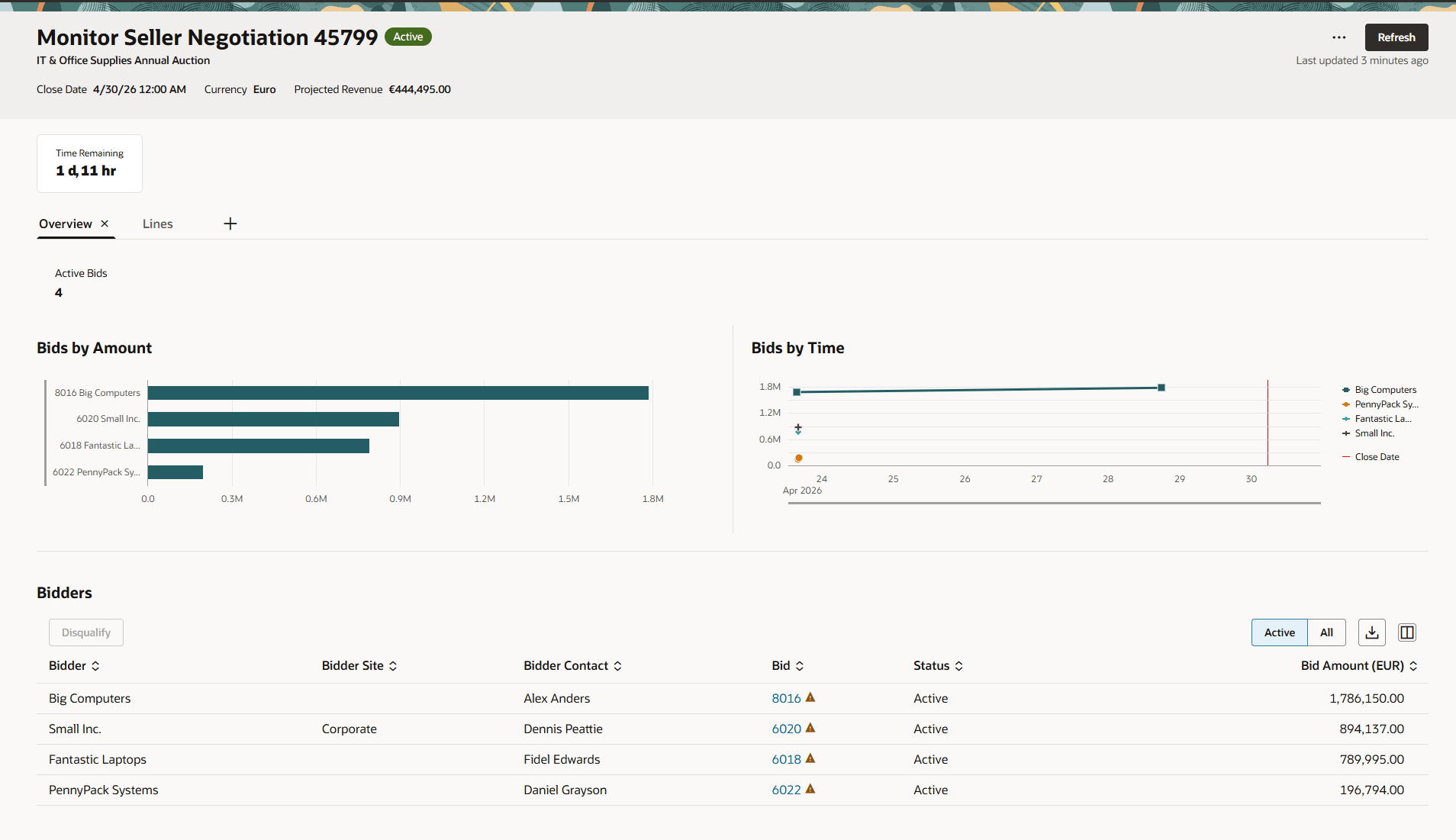
Monitor Seller Auction
Once the negotiation is active, you can monitor the incoming bids using Bidders and Lines tabs on the Monitor negotiation page. The key capabilities are:
- Automatic refresh with real-time bidding updates - You don't need to set a refresh interval. The page automatically detects new or revised responses during active negotiations and refreshes instantly to keep you up to date.
- New line search capability - Quickly find a line in the Lines tab by searching with a keyword that matches either the item, description or category. You can also filter a set of lines by specifying from and to line numbers.
- Flexible page layout control - Administrators can configure the page layout for all users, while end users can further personalize their own view by swapping charts and visualizations to suit their analysis needs.
View and disqualify bids
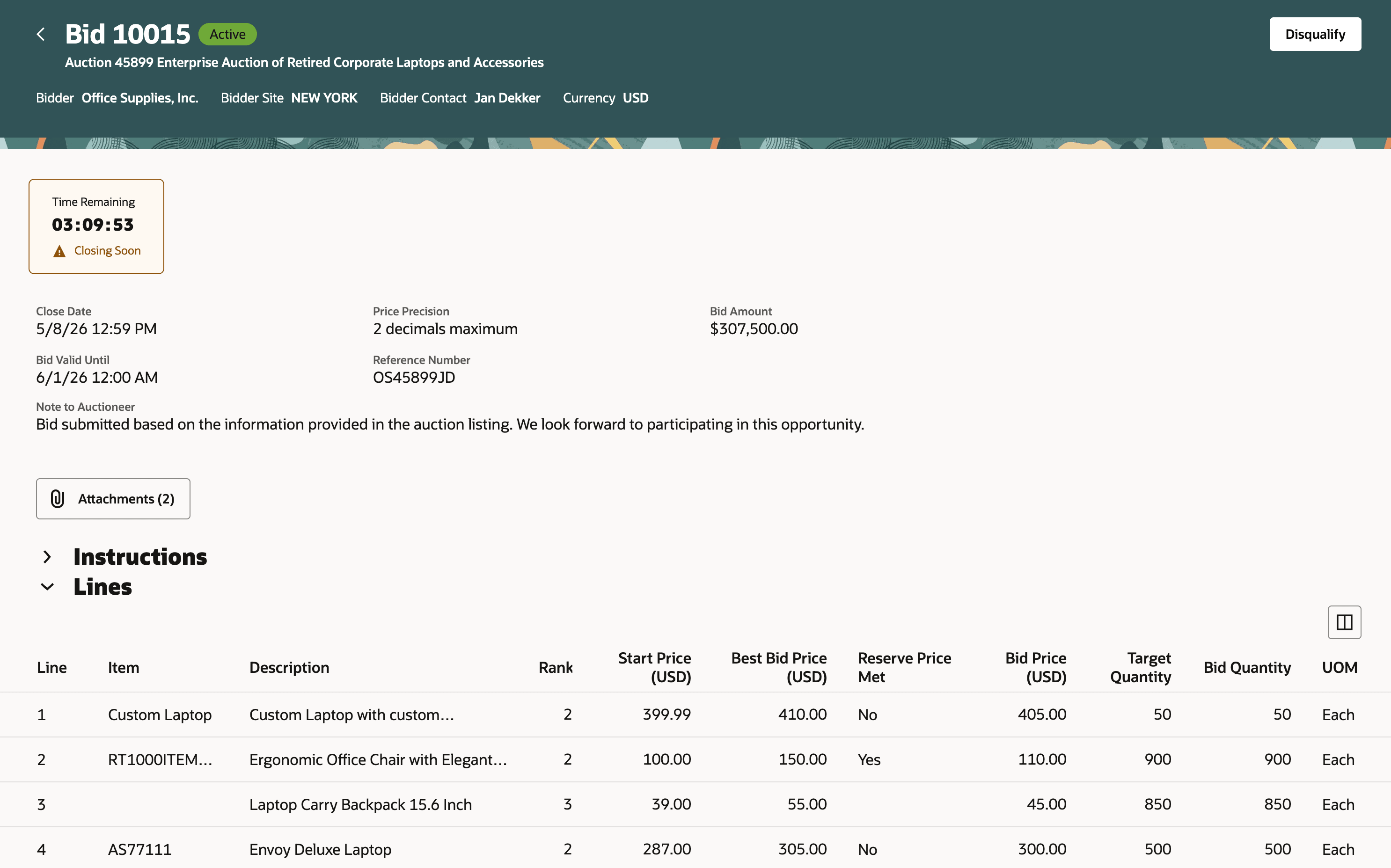
View Bid Details
Open a bid to understand its position in the seller auction, including the bidder response, bid details, and notes sent to the auctioneer.
If a bid appears incorrect, noncompliant, or suspicious, you can disqualify the active bid from the View Bid page or Monitor page when applicable. After disqualification, the bid status updates and ranking is adjusted for the remaining bids.
Award seller auctions
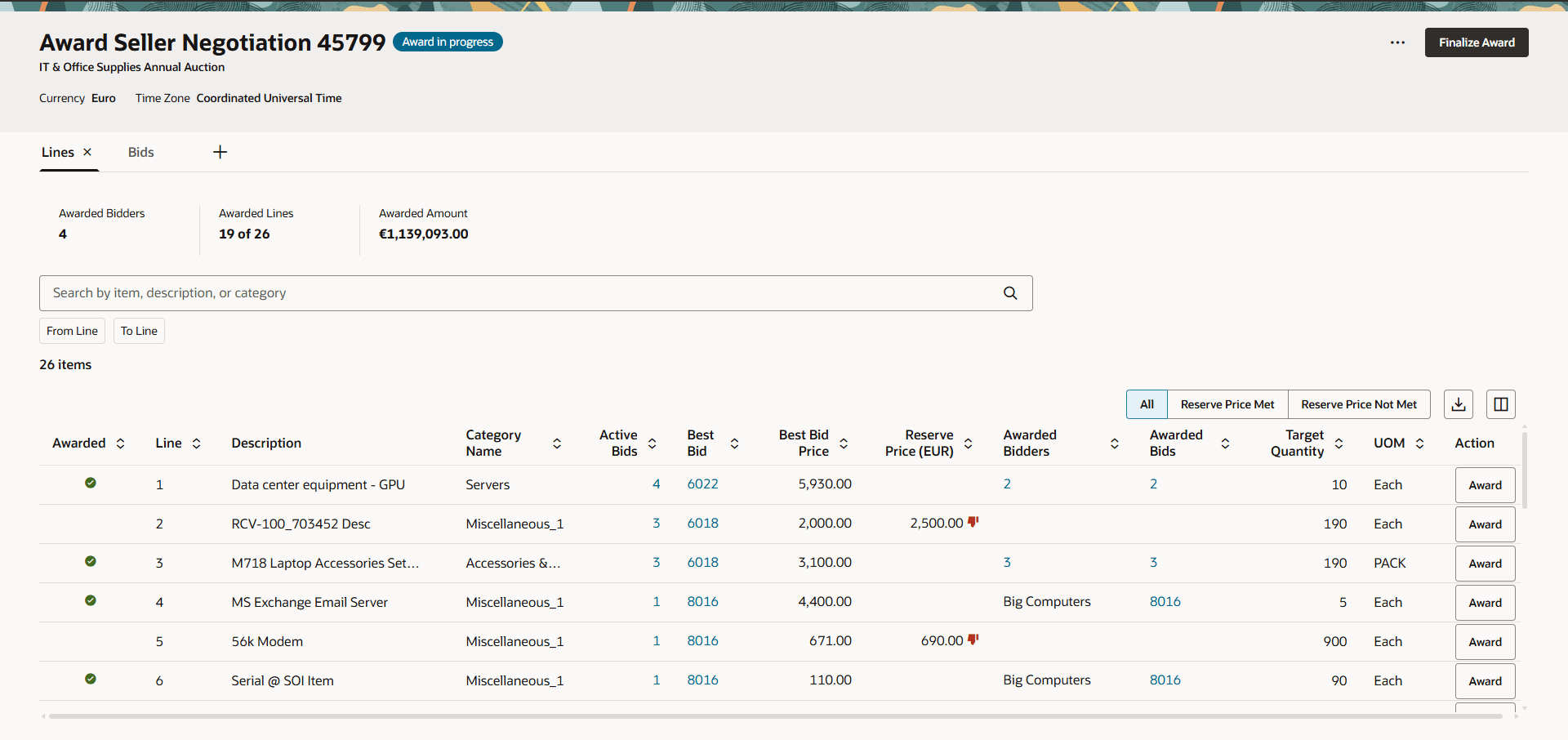
Award Seller Auction
After the auction is closed, you can analyze or award it depending on your privileges using the relevant actions. Here are some enhancements in redwood over the classic application:
- Default award - The application applies a default award to maximize the revenue by means of line-level awards for you to quickly complete the award process. If the specified reserve price is not met for any line, the line is not awarded. You can edit the default award decision. You can award each line or award all lines to a single bidder using the award action on lines or bids respectively.
- Finalize award, notify bidders, and export - You can finalize the award decision and notify bidders of the same immediately or later. The finalized award decision can be exported to an excel sheet for downstream communication.
- Flexible page layout control - Administrators can configure the page layout for all users, while end users can further personalize their own view by adding visual charts to suit their analysis needs. The charts available in the library are Bids by Amount, Bids by Time, Award Amount by Bidder, Award Amount by Line.
This Redwood experience helps category managers manage seller auctions more efficiently by reducing navigation and keeping key actions close to the auction or bid context.
Category managers get better visibility into the next applicable action, faster access to lifecycle tasks, and a more centralized way to review auction details, monitor bidding activity, review bids, and complete awards.
Steps to enable and configure
To use this feature, you must set the following:
- Opt in to the Sourcing feature Manage Seller Negotiations. If this was already opted-in in a prior release, you don't need to do it again.
- Enable the Redwood Page to Seller Negotiations Enabled (ORA_PON_SELLER_AUCTIONS_REDWOOD_ENABLED).
For instructions on enabling a profile option, refer to the Set Profile Option Values topic
Tips and considerations
Unlocking draft seller auctions is integrated into the Edit and Delete Draft actions. If a draft seller auction is locked by another user and you have permission to unlock drafts owned by others, the application warns you before unlocking the draft and continuing with the selected action.
Key resources
- For information about using Oracle Visual Builder Studio to extend your Redwood application pages, see Oracle Fusion Cloud HCM and SCM: Extending Redwood Applications for HCM and SCM Using Visual Builder Studio.
- Refer to Overview of Guided Journeys in the Oracle Fusion Cloud Human Resources: Implementing and Using Journeys guide, available on the Oracle Help Center.
- For details about how to add your own key performance indicators (KPIs) and visualizations to your page, see: Flexible Reporting in Redwood Dashboards.
Access requirements
Users who are assigned a configured job role that contains these privileges can drill down to pages or perform actions:
- Search Seller Negotiation (PON_SEARCH_SELLER_NEGOTIATION) to access seller negotiation workbench.
- Create Seller Negotiation (PON_CREATE_SELLER_NEGOTIATION_PRIV) to create or duplicate a seller negotiation.
- Edit Seller Negotiation (ON_EDIT_SELLER_NEGOTIATION_PRIV) to edit a seller negotiation.
- Unlock Seller Negotiation Draft Owned by Others (PON_UNLOCK_SELLER_NEGOTIATION_DRAFT_OWNED_BY_OTHERS) to unlock a draft seller negotiation owned by another worker.
- Submit Seller Negotiation (PON_SUBMIT_SELLER_NEGOTIATION_PRIV) to publish a seller negotiation.
- Delete Draft Seller Negotiation (PON_DELETE_DRAFT_SELLER_NEGOTIATION_PRIV) to delete a draft seller negotiation.
- View Seller Negotiation (PON_VIEW_SELLER_NEGOTIATION_PRIV) ro review a seller negotiation.
- Manage Seller Negotiation Bidder Invitation (PON_MANAGE_SELLER_NEGOTIATION_BIDDER_INVITATION_PRIV) to invite additional bidders.
- Cancel Seller Negotiation (PON_CANCEL_SELLER_NEGOTIATION_PRIV) to cancel a seller negotiation.
- Pause Seller Negotiation (PON_PAUSE_SELLER_NEGOTIATION_PRIV) to pause or resume a seller negotiation.
- Close Seller Negotiation (PON_CLOSE_SELLER_NEGOTIATION_PRIV) to extend or close a seller negotiation.
- View Seller Negotiation Response (PON_VIEW_SELLER_NEGOTIATION_RESPONSE) to view a bid.
- Disqualify Seller Negotiation Response (PON_DISQUALIFY_SELLER_NEGOTIATION_RESPONSE_PRIV) to disqualify a bid.
- Monitor Seller Negotiation (PON_MONITOR_SELLER_NEGOTIATION_PRIV) to monitor a seller negotiation.
- Analyze Seller Negotiation Response (PON_ANALYZE_SELLER_NEGOTIATION_RESPONSE_PRIV) to analyze a seller negotiation.
- Award Seller Negotiation (PON_AWARD_SELLER_NEGOTIATION) to award a seller negotiation.
- Complete Seller Negotiation Award (PON_COMPLETE_SELLER_NEGOTIATION_AWARD) to finalize an award or notify bidders.
These privileges were available prior to this update.
Users who are assigned a configured job role that contains this privilege can edit the page layout to add custom KPI and visualizations.
- Edit Page Layout of the Sourcing Page (PON_EDIT_SOURCING_LANDING_PAGE_LAYOUT_PRIV)
This privilege was available prior to this update.