Redwood: Review B2B Account Number on Purchasing Documents
Review the B2B account number associated with a supplier on purchasing documents using Redwood purchasing pages.
Use the supplier information drawer to review the B2B account number when viewing a purchasing document.
These screenshots illustrate the feature.
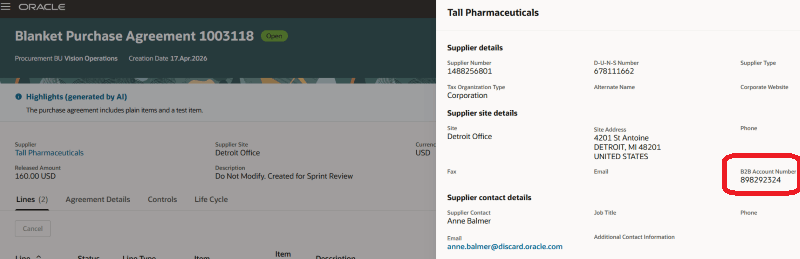
B2B Account Number on Supplier Information Drawer on the View Agreement Page
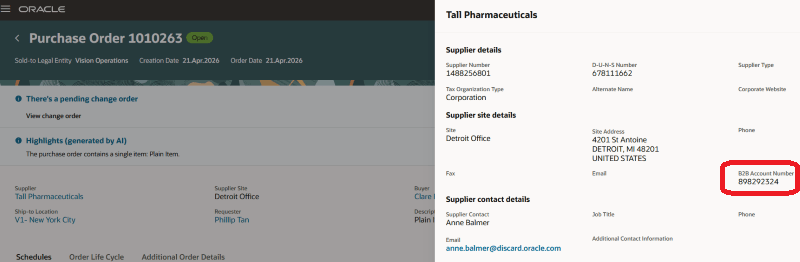
B2B Account Number on Supplier Information Drawer on the View Purchase Order Page
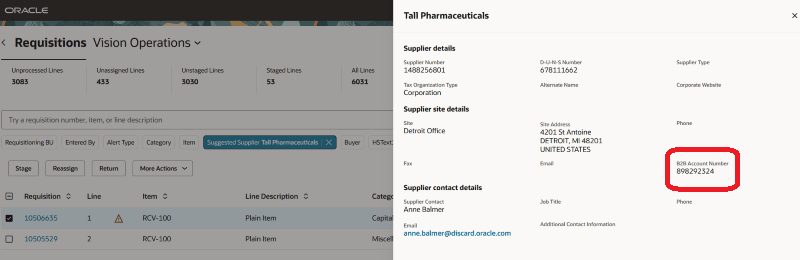
B2B Account Number on Suggested Supplier Information Drawer on the Process Requisitions Page
Steps to enable and configure
If you haven't enabled Redwood for Purchasing, see the Getting Started with Redwood in Purchasing topic on the SCM Resource Center in Customer Connect.
Tips and considerations
The supplier information drawer isn't available when you edit a purchase order or a purchase agreement.
Key resources
For details on how to create B2B account numbers, refer to the Create B2B Account Numbers topic.
Access requirements
No specific privileges are needed to view B2B account number on purchasing documents.