Redwood: Cancel an Approved Work Confirmation as a Buyer
Cancel approved work confirmations as a buyer. Before this update, you couldn't cancel approved work confirmations. With this update, you can cancel an approved work confirmation and automatically reverse the received quantity or amount.
These screenshots illustrate the feature.
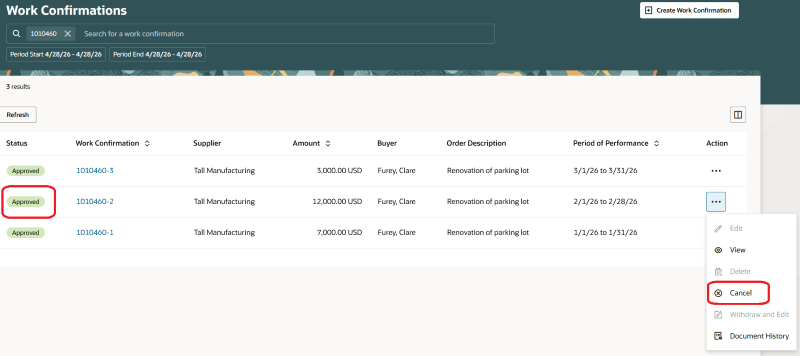
Cancel Action on an Approved Work Confirmation
The work confirmation document history is updated when an approved work confirmation is canceled.
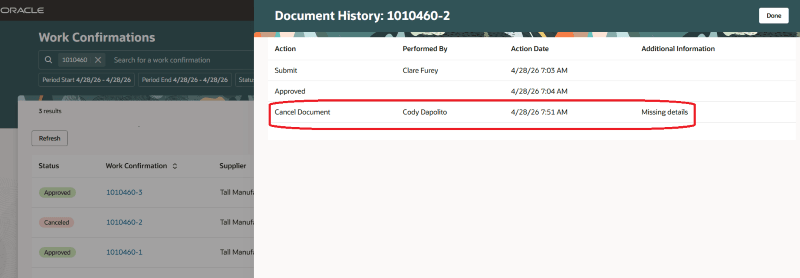
Document History of a Canceled Work Confirmation
When an approved work confirmation is canceled, the previously approved work is deducted from all subsequent approved work confirmations. Here is an example illustrating this behavior:
Two work confirmations are approved for a complex work purchase order. Work Confirmation-1 is approved before Work Confirmation-2.
- Work Confirmation-1 is approved for 5,000 USD
- Work Confirmation-2 is approved for 10,000 USD
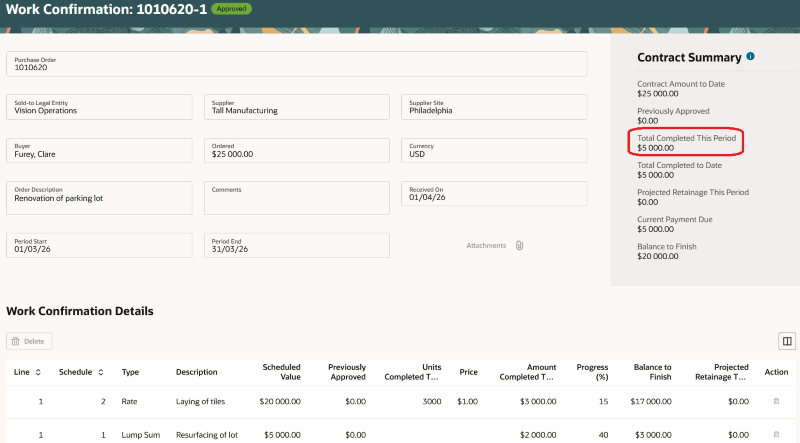
Total Amount of Work Completed on Work Confirmation-1
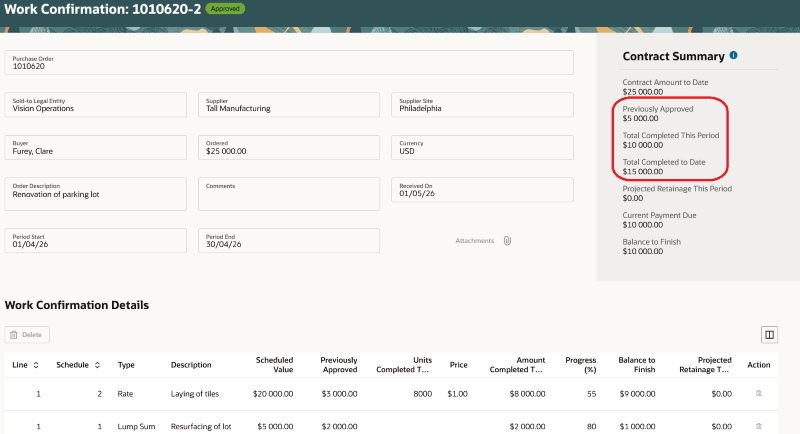
Total Amount of Work Completed on Work Confirmation-2
After Work Confirmation-1 is canceled, these attributes on work confirmation-2 are updated:
- Contract Summary - Previously Approved, Total Completed to Date, and Balance to Finish
- Work Confirmation Details - Previously Approved, Progress (%), Total Completed to Date, and Balance to Finish
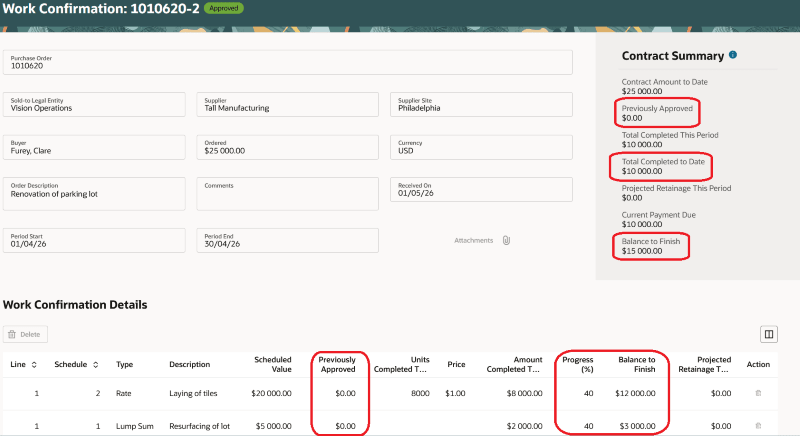
Contract Summary on Work Confirmation-2 After Cancellation of Work Confirmation-1
Steps to enable and configure
If you haven't enabled Redwood for Purchasing, see the Getting Started with Redwood in Purchasing topic on the SCM Resource Center in Customer Connect.
Tips and considerations
- Requesters and suppliers can't cancel approved work confirmations.
- Canceling a work confirmation doesn't require approval.
- An approved work confirmation can't be canceled if another work confirmation for the same purchase order is pending approval.
- Canceling individual work confirmation lines isn't supported.
- The purchase order life cycle displays only approved work confirmations. If an approved work confirmation is canceled, it's no longer displayed in the purchase order life cycle.
- Use the Receipt Corrections Prevented Based on Invoices (ORA_RCV_PREVENT_CORRECTIONS_FOR_INVOICES) profile option to prevent buyers from canceling approved work confirmations when associated progress payment schedules or receipts are matched to invoices.
Key resources
- For details on creating work confirmations, refer to the Create Work Confirmations for Purchase Orders with Progress Payment Schedules feature, available in Oracle Fusion Cloud Procurement What's New, update 22B.
- For details on preventing receipt cancellation below the invoiced amount, refer to the Prevent Receipt Corrections or Returns Below the Invoiced Amount feature, available in Oracle Fusion Cloud Inventory Management What's New, update 25A.
Access requirements
Users who are assigned a configured job role that contains this new privilege can access this feature:
- Cancel Work Confirmation (PO_CANCEL_WORK_CONFIRMATION_PRIV)