AI Agentic App: Supplier Qualification Workspace
The Supplier Qualification Workspace agentic app leverages AI to monitor supplier compliance, identify suppliers with adverse qualification outcomes or missing critical qualifications, and prioritize follow-up actions. Based on your supplier segmentation strategy, the AI extracts key suppliers and prioritizes qualification tasks for your most important supplier relationships. By managing qualification activities directly within the agentic app, qualification managers can make faster decisions, improve qualification coverage, and enforce policy compliance.
The key capabilities include:
- Review an AI-generated summary of supplier qualification compliance, priority issues, and policy-based alerts.
- Identify suppliers with missing qualifications or adverse qualification outcomes that require follow-up.
- Create and launch qualification initiatives for missing qualification areas directly from the workspace.
- Place supplier sites on hold for new purchasing documents when qualification risks require transaction controls.
- Send reminders to questionnaire responders directly from the workspace.
To open the Supplier Qualification Workspace, go to Procurement > Quick Actions > Show More > Supplier Qualification > Supplier Qualification Workspace. You can also open it from the Supplier Qualification Management landing page by selecting Actions > View all actions > Supplier Qualification Workspace.
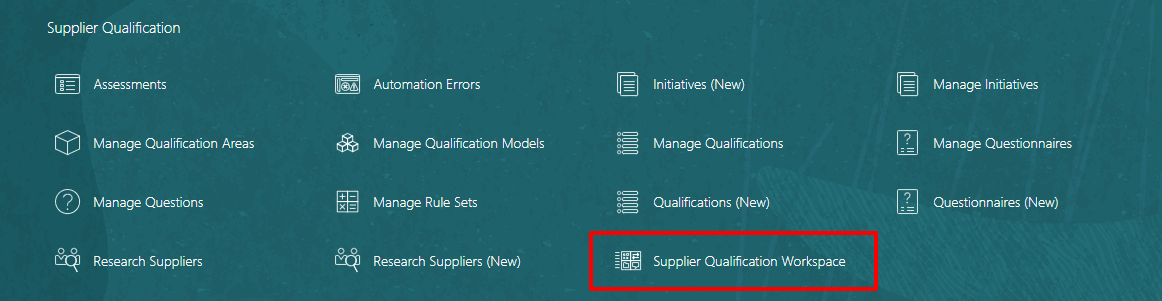
Quick action for Supplier Qualification Workspace
The workspace summary gives qualification managers a quick view of supplier qualification priorities. It includes an AI-generated summary of supplier compliance coverage across your supplier segmentation strategy. It also displays alerts from external websites configured in your supplier qualification policy document. The agentic app can monitor these websites for relevant information, such as regulatory policy updates or industry news, and notify you when follow-up may be needed.
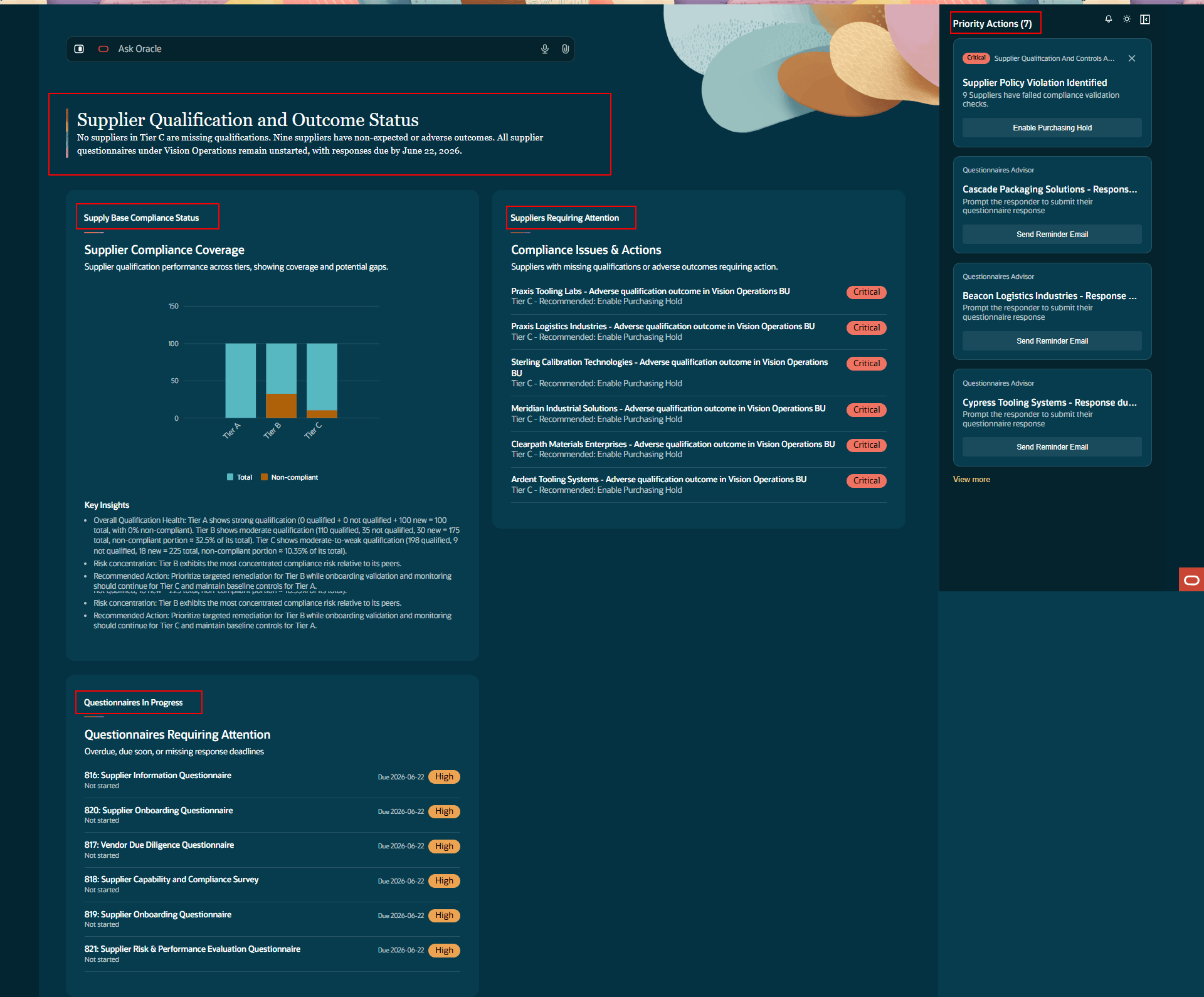
Supplier Qualification Workspace
The Supply Base Compliance Status displays your supplier compliance by supplier segmentation, helping you assess qualification coverage for your most critical suppliers. Based on the qualification requirements and expected outcomes defined in your policy document, the agentic app identifies compliant suppliers and displays them as a percentage of the total suppliers in each supplier segment.
The workspace also provides key insights to help qualification managers interpret the data and take action. These insights focus on overall qualification health, areas where qualification risk is concentrated, and recommended actions to improve supplier compliance coverage.
The Suppliers Requiring Attention panel helps qualification managers focus on suppliers that need immediate follow-up. The panel lists suppliers with missing qualifications or adverse qualification outcomes.
You can take corrective action directly in the workspace from the Priority Actions list. Create and launch a qualification initiative for the selected supplier’s missing qualification areas. You can also place supplier sites on hold for new purchasing documents to help prevent new transactions with suppliers that don’t meet qualification requirements. This prioritized list helps you improve qualification coverage, reduce manual monitoring, prioritize supplier follow-up, and reduce the risk of transacting with non-compliant suppliers.
The Questionnaires in Progress panel helps qualification managers track supplier and internal questionnaires that need follow-up before evaluations can be completed. You can send reminder emails directly from the workspace to help keep qualification evaluations on schedule.
Steps to enable and configure
To use this feature,
1. The following profile option is required and is enabled by default: Supplier Qualification Workspace Application (ORA_POQ_SUPPLIER_QUALIFICATION_AGENTIC_APP_ENABLED)
2. Upload the list of suppliers you want to monitor and the policy document that defines the qualification requirements for each supplier segment. See the Customer Connect post Configuring Policy Documents for the Supplier Qualification Workspace Agentic Application for a sample policy document, a sample supplier list, and instructions for configuring them.
Tips and considerations
- Users will see only the data that they have access to as an owner, team member, or Procurement Agent with access to view other agents' documents. They will be able to take priority actions if they have the necessary security privileges to perform those tasks.
- Review AI recommended priority actions for accuracy before applying. Always validate AI suggestions against your business priority.
- The uploaded supplier list can contain up to 500 of your most strategic suppliers split across three tiers. The ability to monitor and segment the entire supply base is planned for a future release.
Key resources
- For information on using the AI Agent Studio, see How do I use AI Agent Studio?
Access requirements
Users who are assigned a configured job role that contains the following existing privilege and new duty role can access this feature:
- Access Supplier Qualification Workspace Application (POQ_ACCESS_SUPPLIER_QUALIFICATION_WORKSPACE_APP_PRIV) - Grants access to the agentic application link under quick actions.
- Access Supplier Qualification Workspace Duty (ORA_DR_POQ_SUPPLIER_QUALIFICATION_WORKSPACE_APP_DUTY) - Grants access to the agentic application and its panels.
Users’ configured job roles must contain the privileges required to access the pages where the agentic apps are enabled.
See Access Requirements for AI Agent Studio (for administrators) and How can I give users access to AI agents (for end-users) for more information.