 Schedule PTO Kits at Any Level of a PTO Model Configuration in Backlog Management
You can now simulate scheduling for Pick-to-Order (PTO) kits that are defined as PTO model options, as well as PTO kits included at any level within the model structure in backlog management plans. Additionally, you can review key constraint analysis attributes, including constraint rank, planned date without item, item availability date, and improvement potential without item in days. You can also enable scheduling diagnosis to better understand and analyze the sources of delay. This update improves order promising accuracy for customers that sell complex products, by aligning supply calculations with the detailed structure of nested PTO Kit components.
This enhancement supports order promising for complex Pick-to-Order (PTO) structures in which PTO Kits function as lower-level components within a PTO model.
Examples of such complex structures include:
- PTO kits that are either single level or multi-level (nested)
- PTO kits that can be ordered individually or as part of a PTO model
- PTO kits that can exist at any hierarchical level within a PTO model
Example: PTO kit under a PTO model
This example illustrates a PTO model order structure (order line 1.1) that includes a PTO kit in multiple roles:
- As an option item (order line number 1.1.1.1)
- As a mandatory component (order line 1.4.1.1
- As a nested PTO kit within another kit (order line 1.4.1.1.1)
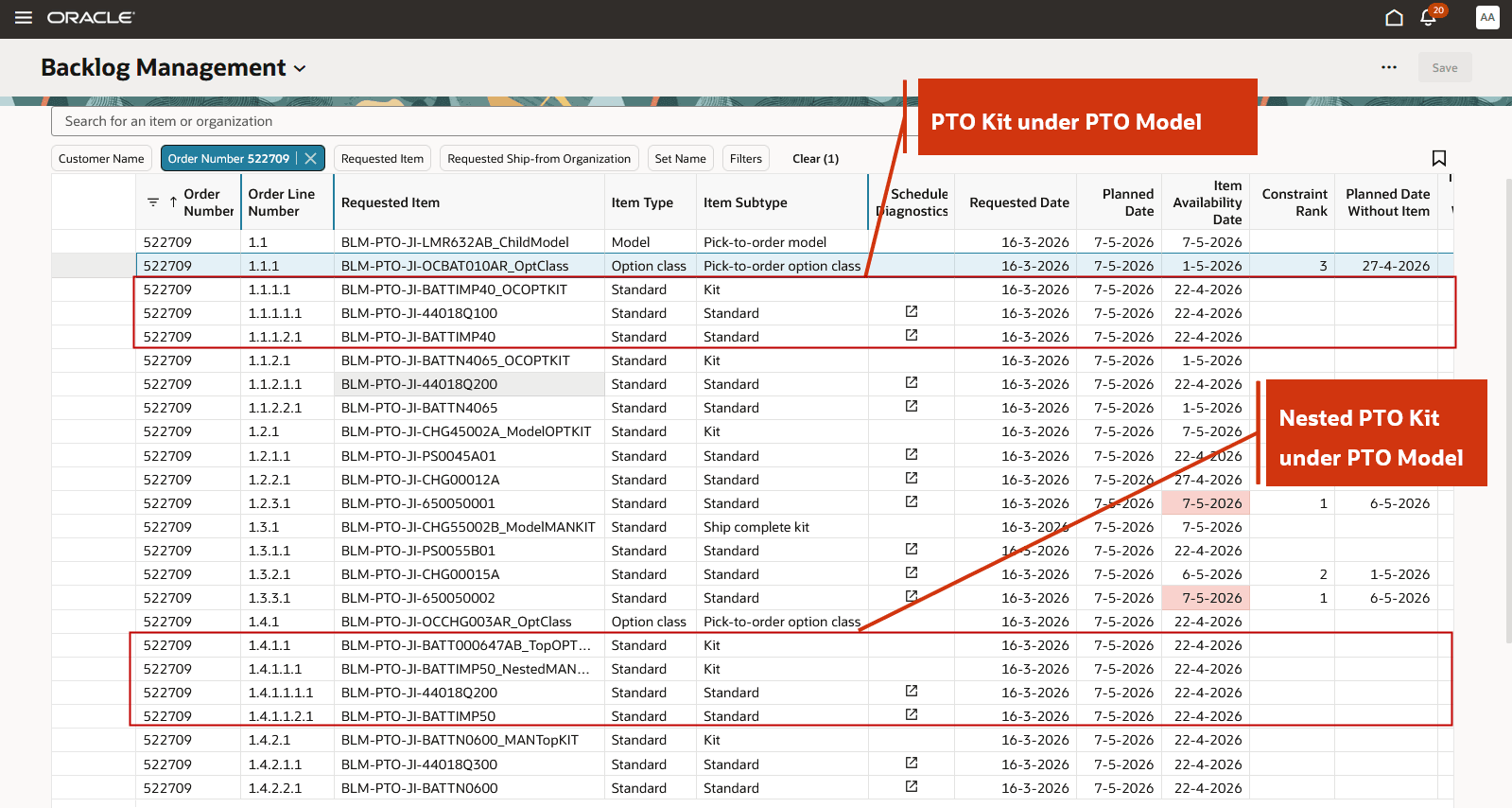
PTO Kit under a PTO Model
The PTO model is rescheduled with a delay to 7th May, 2026. To identify the causes of this delay, you can use a combination of classic constraint analysis and the enhanced scheduling diagnostics.
The classic constraint analysis shows the constraining lines that contribute to the rescheduling delay. For example, the kit component at order line 1.2.3.1 is identified as the primary constraint, with a Constraint Rank of 1 and an Item Availability Date of May 7th, 2026.
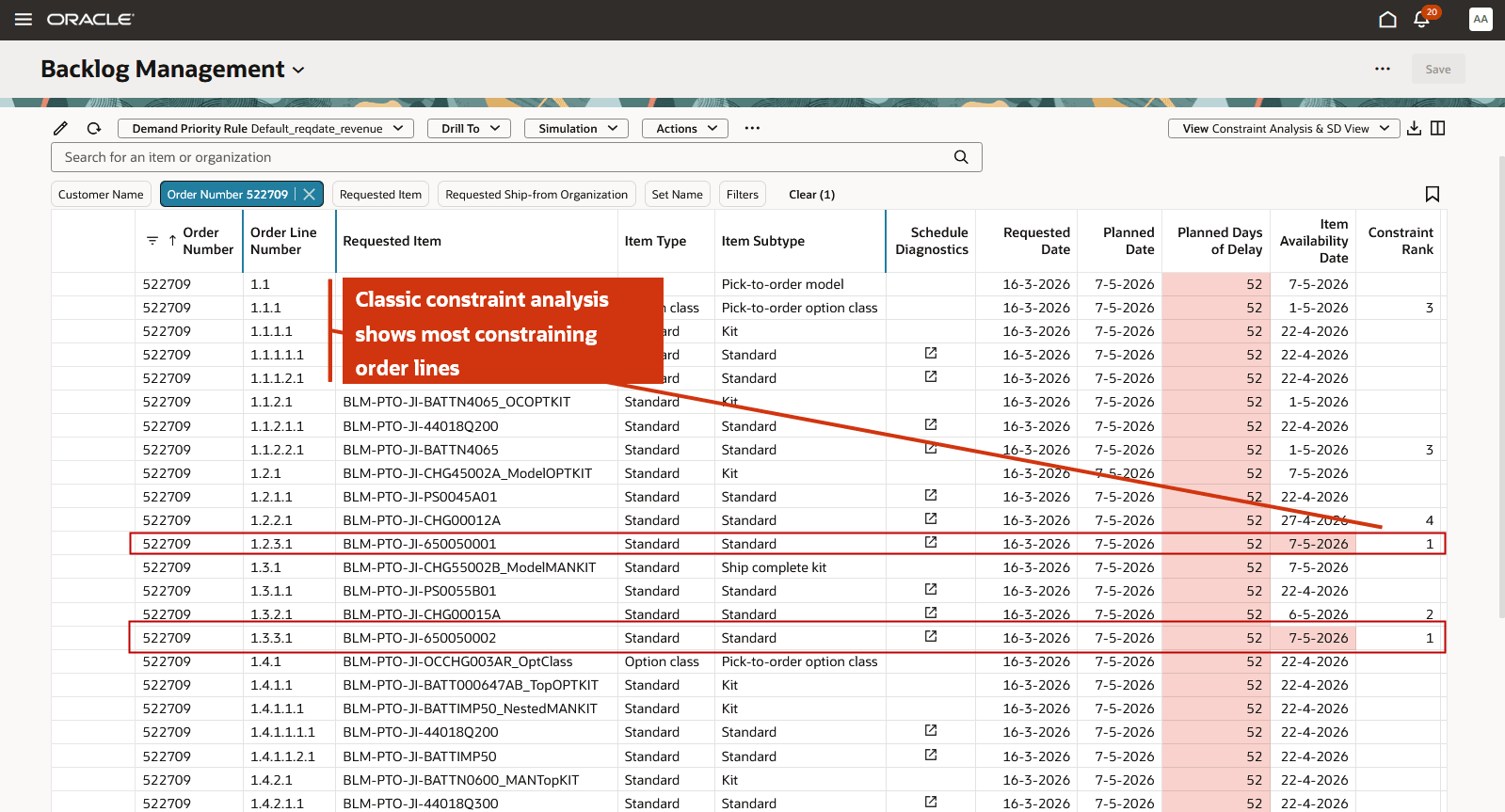
Classic Constraint Analysis Showing Constrained Order Lines
You can also view the scheduling diagnostics for the kit component line. For example, select the scheduling diagnostics icon for the order line 1.2.3.1 to view the detailed information.
The diagnostics indicate that no Available-to-Promise (ATP) supply exists for the kit component at the ship-from organization. Instead, the component is sourced through transfer from an upstream organization M2, where ATP supply is available with a delay of 52 days.
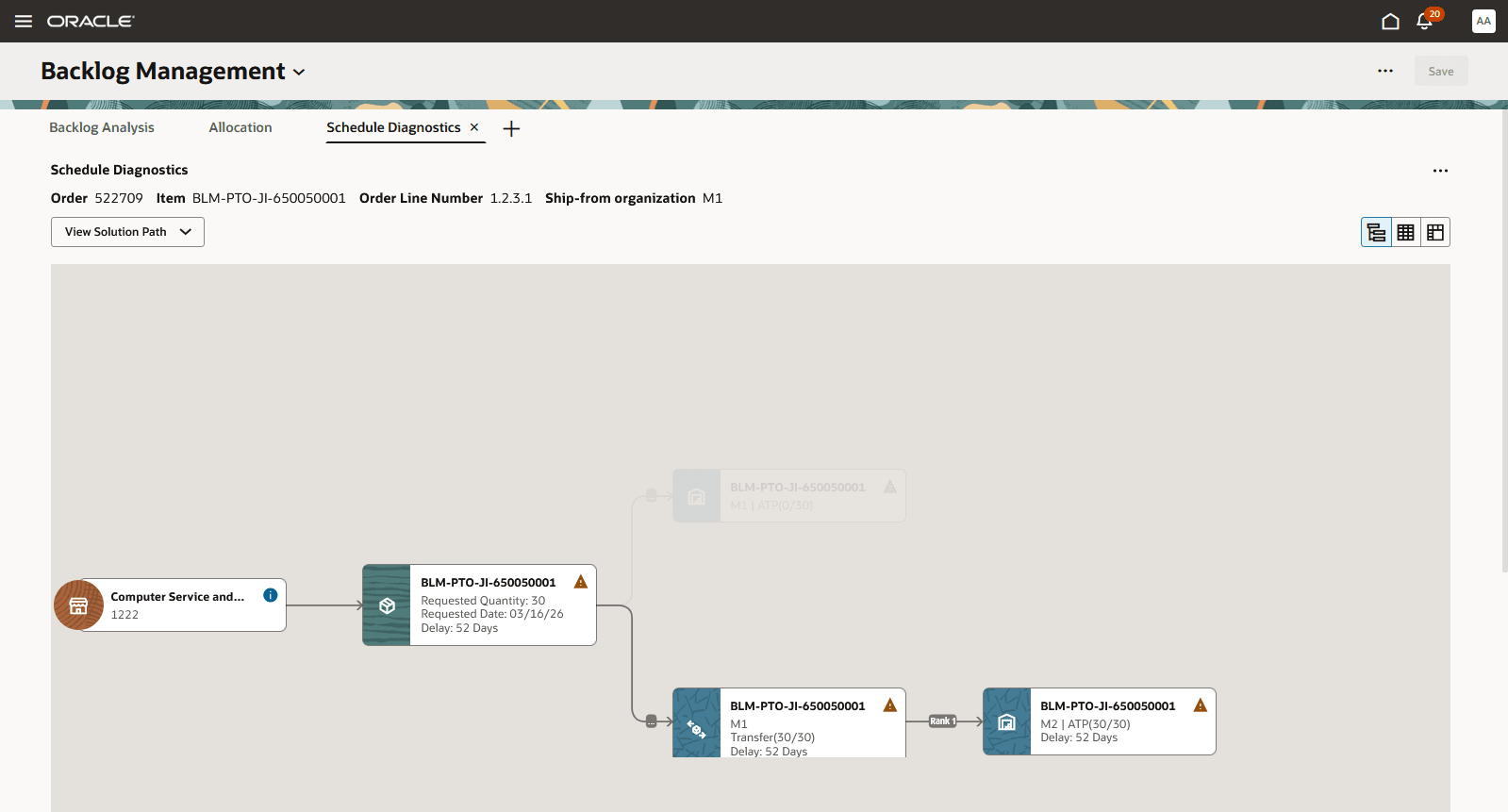
Scheduling Diagnostics for Most Constraining Kit Component Line
Steps to enable and configure
Use the Opt In UI to enable this feature. For instructions, refer to the Optional Uptake of New Features section of this document.
Offering: Supply Chain Planning
Tips and considerations
If you want to use the Schedule PTO Kits at Any Level of a PTO Model Configuration in Backlog Management feature, then you must opt in to its parent feature: Oracle Order Backlog Management. If you’ve already opted in to this parent feature, then you don’t have to opt in again.
Additional Tips and Considerations:
- Rescheduling of PTO kits within a PTO model is supported only in the Redwood user experience.
- PTO kits within a PTO model can be rescheduled for both Fusion and external source data
- Scheduling diagnostics for PTO kits within a PTO model are available at the mandatory component, option item, and kit component level
- For PTO kits within a PTO model, the following classic constraint analysis attributes are available on Backlog Analysis page: Constraint Rank, Planned Date without Item, Item Availability Date, and Improvement Potential without Item in Days
- All lines in the PTO kit structure within a PTO model order - including the kit header and kit components - are released to the order management system.
- Splitting order lines is not supported for PTO kits within a PTO model or nested PTO kits.
Key resources
- Fusion Order Management Release 26C feature ‘Redwood: Manage Pick-to-Order Configured Items with Kits on Sales Orders’
- Global Order Promising Release 26C feature ‘Schedule PTO Kits at Any Level of a PTO Model Configuration’
Access requirements
Users who are assigned a configured job role that contains these privileges can access this feature:
- Monitor Backlog Management Work Area (MSC_MONITOR_BACKLOG_MANAGEMENT_WORK_AREA_PRIV) (enables access to work area and enables 'Backlog Management' in the plan switcher)
- Create Backlog Plan (MSC_CREATE_BACKLOG_PLAN_PRIV)
The following site-level profile should be enabled:
- Redwood Backlog Management Pages Enabled (ORA_MSC_BACKLOG_MANAGEMENT_REDWOOD_ENABLED)
These privileges were available prior to this update.