Redwood: Enable Wildcard Search
You can now use the asterisk (*) wildcard in searches to accelerate discovery of content across key areas: pages, page groups, visualizations (including the content library), and measures in Edit Properties and Build Plan. You can enter patterns such as starts-with, ends-with, contains, and mixed-patterns, for searches across the content. The searches are case-insensitive. If no wildcard is entered, the system defaults to a contains search. This update focuses on usability and parity across search entry points commonly used by planners.
Wildcard search improves efficiency and flexibility in the planning process. You can use wildcard searches to find relevant pages, visualizations, and measures without entering an exact name. This reduces navigation time and helps planners locate key planning objects more quickly, even in large or complex planning environments.
You can use wildcard search in the following locations:
- When searching for pages, page groups, and visualizations
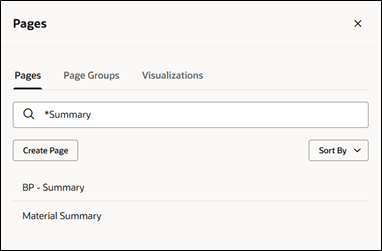
Example of Using a Wildcard to Search for a Page
- When searching for visualizations in the Content library
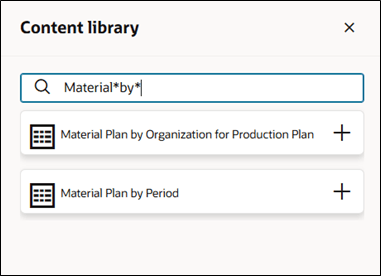
Example of Using Wildcards to Search in the Content Library
- When searching for measures while editing visualization properties
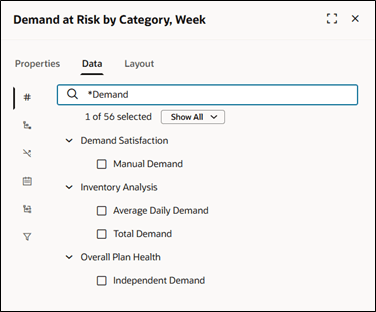
Example of Using a Wildcard to Search for a Measure
- When searching for measures in Build Plan, including from the Edit View action
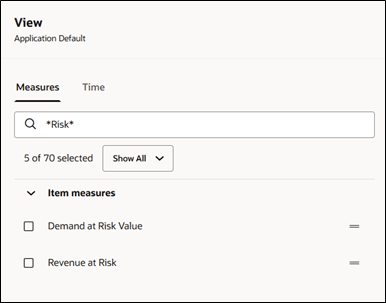
Example of Using Wildcards to Search for a Measure in Build Plan
Steps to enable and configure
You don't need to do anything to enable this feature.
Tips and considerations
Default behavior: If you don’t enter an asterisk (*), the search defaults to a case-insensitive contains search.
Wildcard interpretation: The asterisk (*) functions as a wildcard regardless of its position in the search string.
- abc* returns objects that start with abc.
- *abc returns objects that end with abc.
- *abc* returns objects that contain abc.
- abc also returns objects that contain abc.
- abc*1 returns objects that start with abc and end with 1.
Special characters: In search fields that support wildcard search, an asterisk (*) is treated as a wildcard character, not as a literal character.
Access requirements
Users who are assigned a configured job role that contains these privileges can access this feature for the specific locations:
- Pages and Page Groups
- Manage Planning Pages (MSC_MANAGE_PLANNING_PAGES_PRIV)
- Visualizations
- Edit Planning Analytics Configuration (MSC_EDIT_PLANNING_ANALYTICS_CONFIGURATION_PRIV)
- Build Plan
- Monitor Supply Planning Work Area (MSC_MONITOR_SUPPLY_PLANNING_WORK_AREA_PRIV)
These privileges were available prior to this update.