Enable Buyer Planning for Supply Planning
Many enterprises work with suppliers to group planned replenishments in ways that can reduce delivery costs and create opportunities for cost savings through price breaks. This helps organizations maintain service levels while lowering costs by grouping and consolidation of planned replenishments.
This capability provides a summary page that displays planned buy order counts by supplier, supplier site, and organization along with a breakdown by release status. This page supports sorting, keyword search, and filter chips to facilitate efficient navigation and analysis.
You can drill down to a planned buy order details page, which supports inline editing of attributes such as group, firm status, firm date, and firm quantity regardless of release status. You can mark or unmark orders for release and perform mass editing to assign groups and optionally change dock dates for multiple planned buy orders.
Additional capabilities include drill to actions from both summary and details pages to related items, supplies and demands, and suppliers. Read-only panel drawers display contextual insights, including related item attributes and group summaries. You also get visibility to price breaks on planned buy orders.
This capability improves overall operational efficiency by delivering enhanced planning visibility and control over planned buy orders. Inline and mass editing capabilities streamline order adjustments and accelerate decision-making. Real-time visibility into price breaks improves cost accuracy and supports better cost management.
Display planned buy order counts by supplier, supplier site, and organization with release status breakdown in a summary page that supports sorting, keyword search, and filter chips. A drill down to planned buy order details page supports inline editing of group, firm status, firm date, and firm quantity regardless of release status. You can mark or unmark orders for release and perform mass editing to assign groups and optionally change dock dates for multiple planned buy orders.
This feature helps supply planners evaluate and act on planned buy orders more efficiently by integrating Buyer Planning capabilities into the Redwood Supply Chain Planning experience. The Buyer Planning Summary visualization groups planned buy orders by supplier, supplier site, and organization, and displays counts by release status.
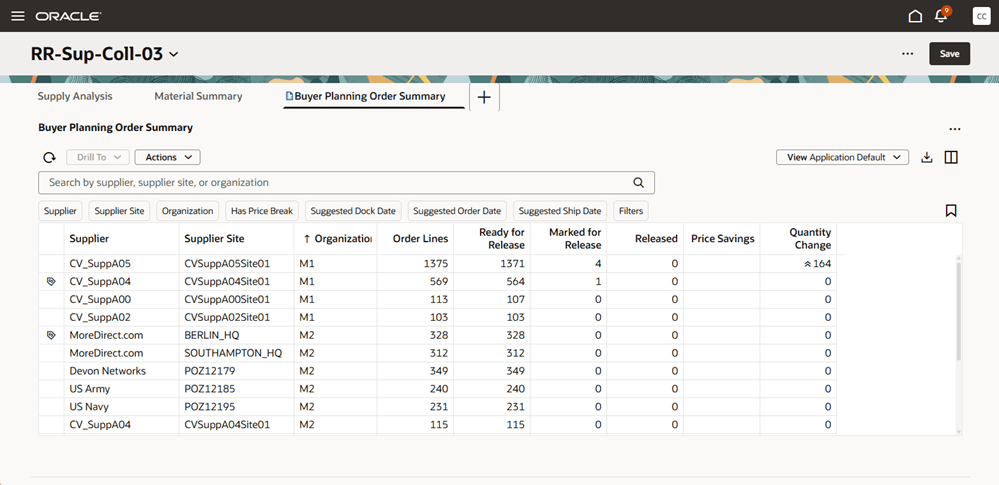
Buyer Planning Summary Visualization
From the summary, planners can drill down to the Buyer Planning Details visualization to review individual planned orders, mark or unmark them for release, update key attributes, assign groups, and access related information such as item attributes and group summaries. Seeded drill actions are also available for related pages, such as Items, Suppliers, and Supplies and Demands.
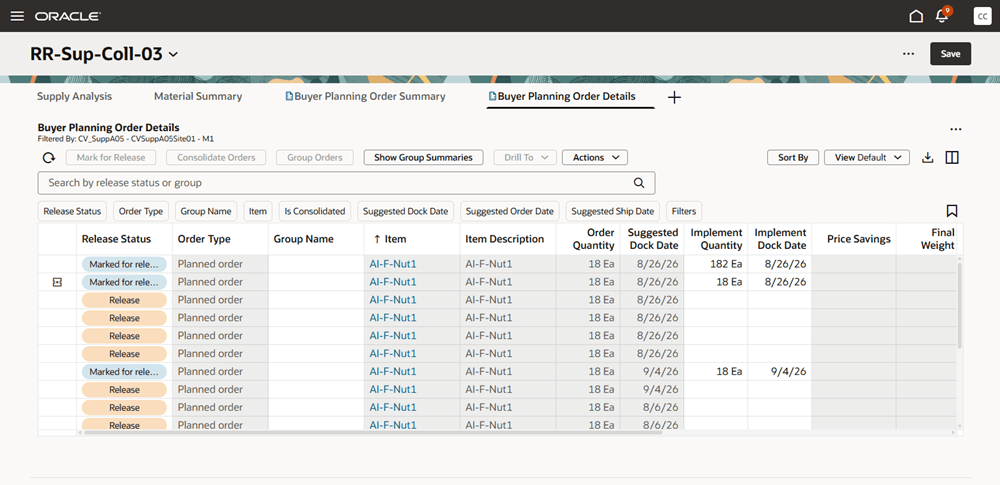
Buyer Planning Details Visualization
Buyer Planning enables planners to evaluate savings and inventory trade-offs before releasing recommendations. Planners can review the Planned Orders with Price Breaks and Price Savings view to identify orders with price break opportunities and potential savings. They can also use inventory analysis views, including the Supply Planning Inventory Analysis Graph and Inventory Analysis Details table, to review the time-phased impact of order changes on projected inventory balances. This capability supports both cost-focused and inventory-focused decision-making across different plan types.
Buyer Planning also supports grouping eligible planned orders to improve load building, reduce delivery costs, and minimize the number of deliveries. Upon plan release, grouped orders are consolidated into a single purchase order.
Additionally, you can use the Planned Orders with Price Breaks and Price Savings view to identify planned orders that qualify for price break opportunities and associated savings before release.
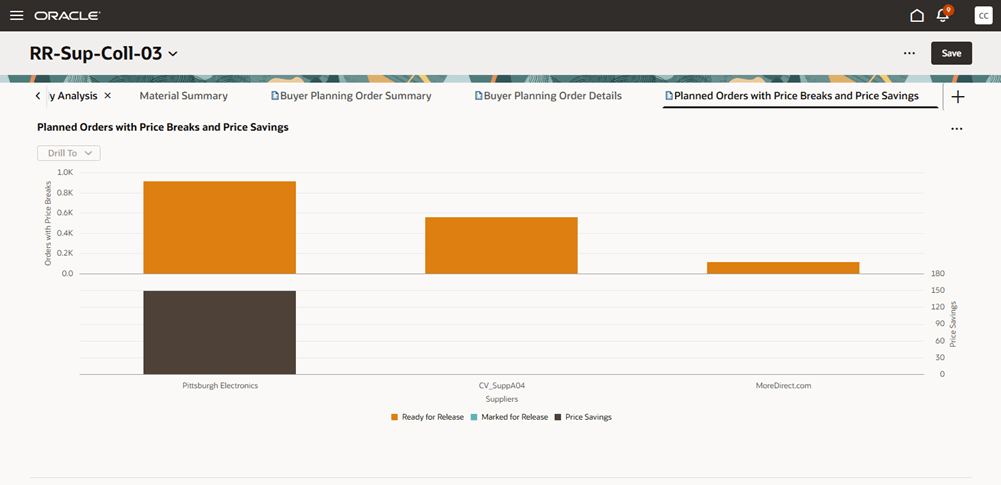
Planned Orders with Price Breaks and Price Savings
After making updates in Buyer Planning, you can evaluate the impact of changes to quantity or date on projected inventory balances before releasing recommendations.
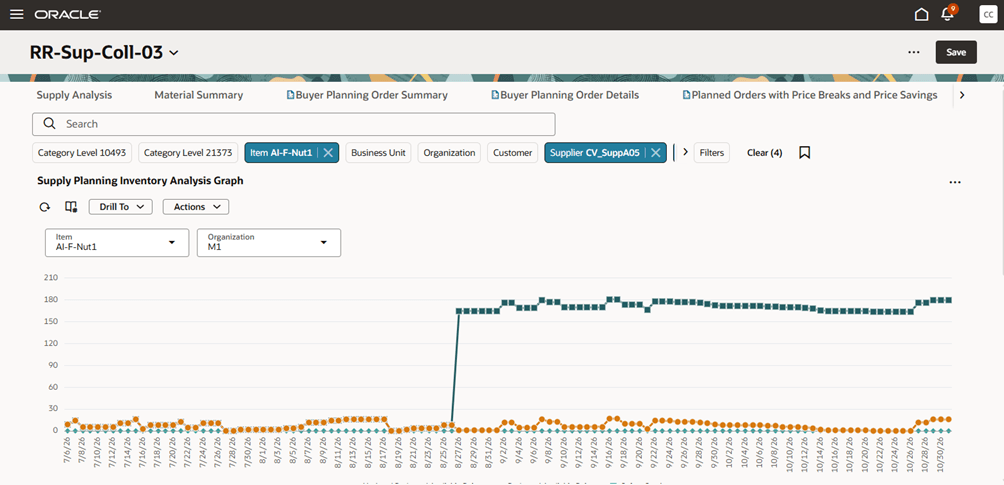
Supply Planning Inventory Analysis Graph
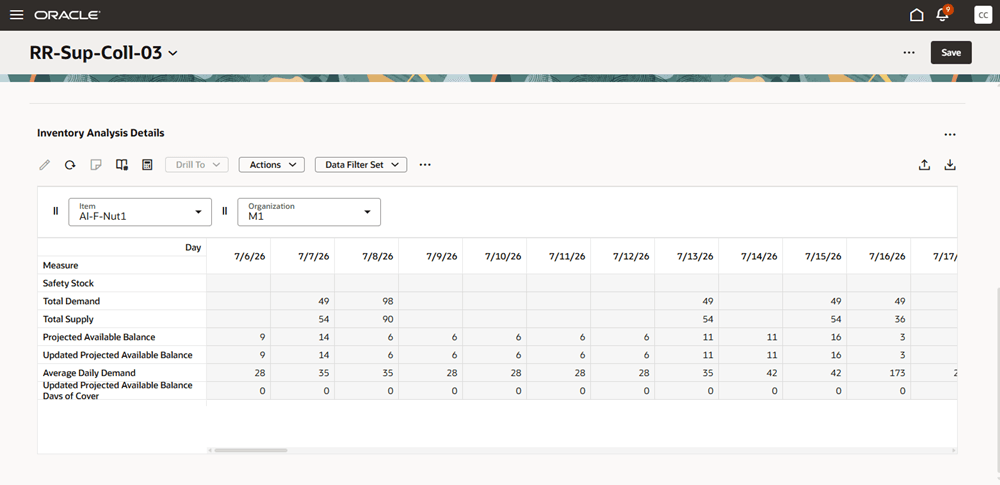
Inventory Analysis Details
Steps to enable and configure
Access is controlled by the ORA_MSC_BUYER_PLANNING profile option, which defaults to ‘No’.
Tips and considerations
- When upgrading to 26C, existing Replenishment Planning users are not automatically switched to the new Buyer Planning experience. Access is controlled by the ORA_MSC_BUYER_PLANNING profile option, which defaults to ‘No’.
- Buyer Planning is available in the Redwood UI shell for supply plans, demand and supply plans, and replenishment plans.
- This new version of Buyer Planning shows order recommendations for all suppliers. It doesn't restrict results based on participating suppliers.
- The Buyer Planning Summary visualization depends on the Supplies and Demands search index. If the index isn’t ready, the summary page displays an empty state message.
- The Buyer Planning Details visualization retrieves data directly from the database, so it remains available even when the summary visualization can't display data.
- Users can access the Buyer Planning Details visualization either by drilling from the Buyer Planning Summary or from the Supplies and Demands visualizations.
- The details visualization uses explicit save. Users must select Save in the Redwood UI shell to commit changes. This differs from the implicit save behavior used in previous releases of the Buyer Planning Details page.
- In the Buyer Planning Details visualization, users can edit the group value inline. Implement fields can be edited only when the order has been marked for release.
- Users can mark and unmark orders for release using existing Buyer Planning and Supplies and Demands validation logic.
- Supply plans and replenishment plans have specific graphical and tabular visualizations, including the Supply Planning Inventory Analysis Graph and Replenishment Planning Inventory Analysis Graph, to help planners review projected balances and the impact of planned order changes.
- After making material updates to plan recommendations, such as changes to implement quantities or implement dock dates, run Calculate Inventory Balances for Oracle Buyer Planning scheduled process to refresh the updated projected available balance values.
Key resources
- Refer to the Buyer Planning section of the Using Replenishment Planning guide, available on the Oracle Help Center.
- Refer to the Cloud Applications Readiness content for the following Replenishment Planning What's New features for more information on buyer planning:
- 23B: Make Effective Purchasing Decisions Using Buyer Planning
- 24A: Respect Orders Planned at Subinventory Level in Buyer Planning
- 24A: View and Release Rescheduled Purchase Orders from Buyer Planning
- 24B: Display Price Break Information in Primary Unit of Measure in Buyer Planning
Access requirements
Users who are assigned a configured job role that contains these privileges can access this feature:
- Monitor Buyer Planning Work Area (MSC_MONITOR_BUYER_PLANNING_WORK_AREA_PRIV)
- Edit Supplies in Buyer Planning (MSC_EDIT_SUPPLIES_BUYER_PLANNING_PRIV)
These privileges were available prior to this update.