Use Safety Stock from an Inventory Optimization Plan in Supply Planning
Many enterprises use inventory optimization to minimize total inventory holding costs while improving service levels across their supply chain networks. By treating the entire network wholistically rather than as individual locations (such as plant, warehouse, and store), inventory optimization reduces redundant safety stocks, lowers operating costs, and increases resilience to variability to demand and supply.
Safety stock recommendations from Oracle Inventory Optimization Planning are fed into Oracle Supply Planning to enhance tactical supply chain decisions. The integration matches safety stock quantities by item, organization, and date, overriding the calculations done in a supply plan when the safety stock planning method is set to user-defined safety stock.
Aggregation and disaggregation of safety stock quantities occur based on differing planning buckets and calendars, ensuring accurate alignment between inventory optimization plans and supply plans.
- Imported safety stock quantities replace supply planning calculations unless the method is set to don’t plan safety stock, which removes imported values.
- When multiple safety stock quantities exist for a supply planning bucket, the latest safety stock value in the bucket is selected.
- The integration respects existing overrides by ignoring time-phased safety stock quantities and item attributes but applies any safety stock quantity overrides.
You can use the calculated, time-phased safety stock targets for items and organizations across all supply chain echelons from an inventory optimization plan as a demand schedule in a supply plan or a demand and supply plan. This demand schedule can be used to drive tactical supply chain planning decisions.
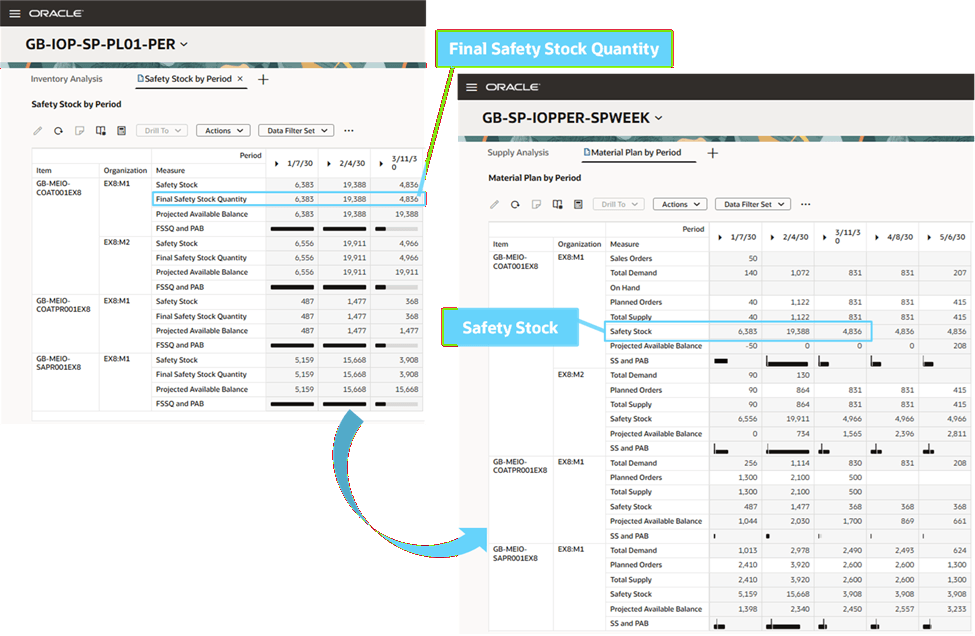
Demand Schedule Copies Final Safety Stock Quantity from an Inventory Optimization Plan to Safety Stock in a Supply Plan
Add Demand Schedule to a Supply Plan
You can add an inventory optimization plan as a demand schedule to use its time-phased safety stock targets for planning supply and inventory in a supply plan or a demand and supply plan.
To add a demand schedule to a supply plan:
- Select a supply plan from the list of values in the Supply Chain Planning work area plan selector.
- Select More Actions > Edit Plan Options.
- In the Supply step, select Demand Schedules.
- Select Add and then select an inventory optimization plan in the demand schedule drawer.
- Select Add to associate the demand schedule with the plan and close the drawer.
- (Optional) Add another inventory optimization plan as a demand schedule.
- Select Submit to save the plan options.
You must run the supply plan and refresh with current data to use the Final Safety Stock Quantity measure from an inventory optimization plan as the Safety Stock measure in the supply plan. The Safety Stock measure is used as input to plan inventory levels that are reported by the Projected Available Balance measure.
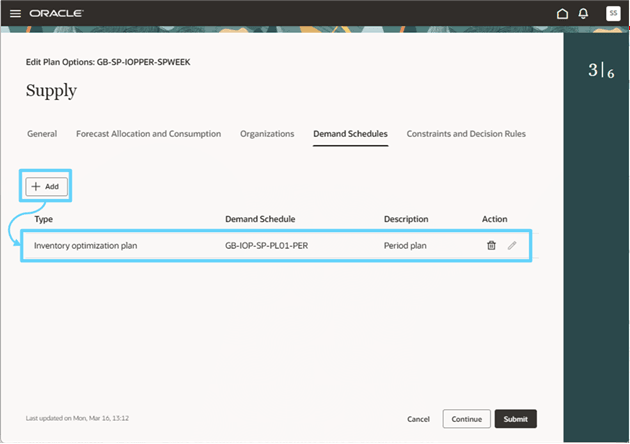
Add Demand Schedule in the Supply Step of Supply Plan Options
You can remove a demand schedule by selecting the Delete icon.
Safety Stock Planning Method in a Supply Plan
The safety stock planning method must be considered when using time-phased safety stock targets from an inventory optimization plan for planning in a supply plan or a demand and supply plan.
If Safety Stock Planning Method is set to:
- User-specified values for all items - This is the recommended setting. The safety stock quantities loaded from an inventory plan override user-specified safety stock values in a supply plan. However, supply planning uses user-specified safety stock quantities for items that weren’t loaded from the inventory plan.
- Statistical safety stock for end items, none for all others - The safety stock quantities loaded from an inventory plan take precedence over safety stock calculations in a supply plan. However, supply planning calculates safety stock quantities for items that weren’t loaded from the inventory plan using the selected method of safety stock calculation and other specified attributes.
- Statistical for end items, user-specified for all others - The safety stock quantities loaded from an inventory plan to a supply plan take precedence over safety stock calculations in a supply plan. However, supply planning calculates safety stock quantities for all other items that weren’t loaded from the inventory plan using the selected method of safety stock calculation and other specified attributes.
- Do not plan safety stock - The safety stock quantities from an inventory plan demand schedule aren't used in the supply plan. There's no Safety Stock measure data in plan output.
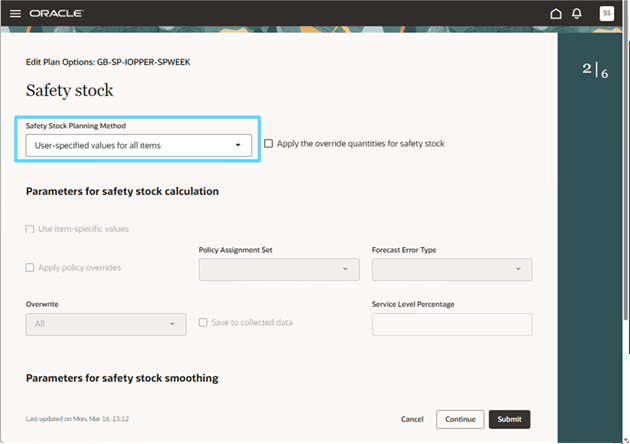
Safety Stock Planning Method in the Safety Stock Step of Supply Plan Options
Handling Calendar and Time Level Differences Between Inventory Optimization Plans and Supply Plans
An inventory optimization plan can use a different calendar or planning time level than the one used in a supply plan or a demand and supply plan. For example, an inventory optimization plan uses a manufacturing calendar with period time buckets or the Gregorian calendar with monthly buckets but a supply plan uses weekly buckets.
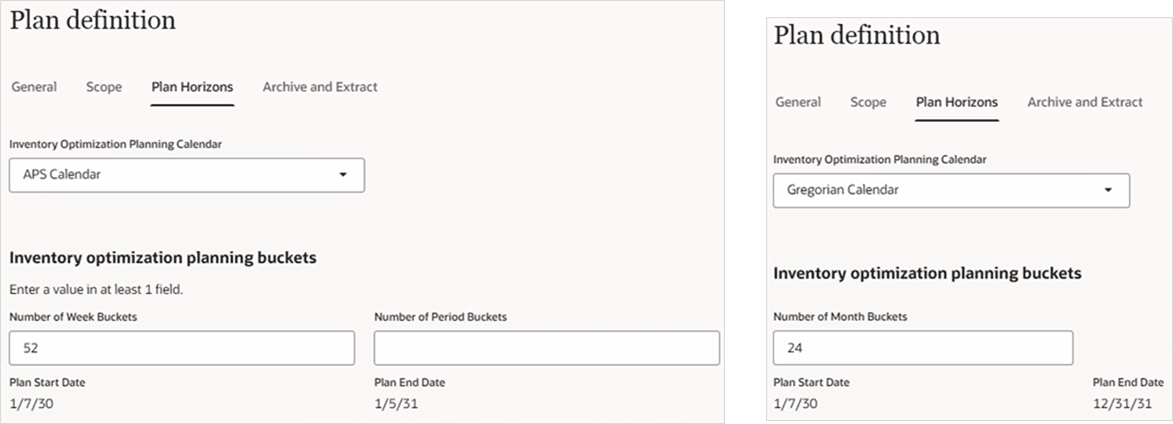
Inventory Optimization Plan Horizons with Week and Period, or Month Time Buckets
The rule to map time buckets between plans uses the latest week, period, or month start date from the inventory optimization plan that falls within a supply plan time bucket.
In the following examples, an inventory optimization plan is used as a demand schedule in a supply plan.
1. Inventory Optimization Plan Week Bucket to Supply Plan Day Bucket
- Supply Planning Safety Stock Planning Method: User-specified values for all items.
- Inventory optimization plan horizon is Week 1 to Week 3.
- Supply plan horizon is Day 1 to Day 19.
- Both plans use a manufacturing calendar with 5 working days and 2 nonworking days on Saturday and Sunday.
- The inventory optimization plan’s safety stock overrides the user-defined safety stock in the supply plan.
- Week 1 starts on Day 1 and ends on Day 5. The inventory optimization plan’s final safety stock quantity equal to 50 from Week 1 is passed as a snapshot to Day 1 through Day 5 in the supply plan.
- Week 2 starts on Day 8 and ends on Day 12. The inventory optimization plan’s final safety stock quantity equal to 60 from Week 2 is passed as a snapshot to Day 8 through Day 12 in the supply plan.
- Week 3 starts on Day 15 and ends on Day 19. The inventory optimization plan’s final safety stock quantity equal to 45 from Week 3 is passed as a snapshot to Day 15 through Day 19 in the supply plan.

Inventory Optimization Plan Weeks to Supply Plan Days
2. Inventory Optimization Plan Month Bucket to Supply Plan Day Bucket
- Supply Planning Safety Stock Planning Method: User-specified values for all items.
- Inventory optimization plan horizon is the month of October.
- Supply plan horizon is October 1 to 31.
- Supply plan safety stock is user-specified and equal to 0 for October 1, 2, 22, and 23.
- The inventory optimization plan’s safety stock overrides the user-defined safety stock in the supply plan.
- The inventory optimization plan’s final safety stock quantity equal to 45 from October is passed as a snapshot to October 1 through 31 in the supply plan.

Inventory Optimization Plan Month to Supply Plan Days
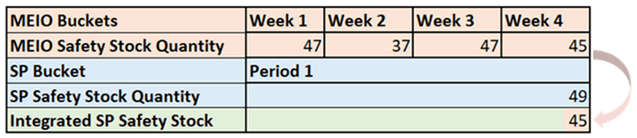
3. Inventory Optimization Plan Week Bucket to Supply Plan Period Bucket
- Supply Planning Safety Stock Planning Method: User-specified values for all items.
- Inventory optimization plan horizon is Week 1 to Week 4.
- Supply plan horizon is Period 1, which contains Week 1 to Week 4 used in the inventory optimization plan.
- The inventory optimization plan’s safety stock overrides the user-defined safety stock in the supply plan.
- Week 4 is the latest week in Period 1 and the inventory optimization plan’s final safety stock quantity equal to 45 in Week 4 is used as the safety stock in the supply plan’s Period 1.
Inventory Optimization Plan Weeks to Supply Plan Periods
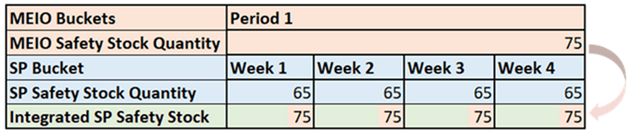
4. Inventory Optimization Plan Period Bucket to Supply Plan Week Bucket
- Supply Planning Safety Stock Planning Method: User-specified values for all items.
- Inventory optimization plan horizon is Period 1, which contains Week 1 to Week 4 used in the supply plan.
- Supply plan horizon is Week 1 to Week 4.
- The inventory optimization plan’s safety stock overrides the user-defined safety stock in the supply plan.
- The inventory optimization plan’s final safety stock quantity equal to 75 in Period 1 is used as the safety stock in the supply plan’s Week 1 through Week 4.
Inventory Optimization Plan Periods to Supply Plan Weeks
5. Inventory Optimization Plan Week Bucket to Supply Plan Day Bucket – Different Manufacturing Calendars
- Supply Planning Safety Stock Planning Method: User-specified values for all items.
- Working days and nonworking days of the inventory optimization plan and supply plan don’t match.
- Inventory optimization plan has week buckets, and the plan horizon is 3 weeks that correspond to Day 1 through Day 19 of its manufacturing calendar. There are 5 working days and 2 nonworking days on Saturday and Sunday.
- Supply plan has day buckets, and the plan horizon is from Day 4 through Day 22 of its manufacturing calendar. There are 6 working days and 1 nonworking day on Thursday.
- The inventory optimization plan’s safety stock overrides the user-defined safety stock in the supply plan.
- The inventory optimization plan’s final safety stock quantity equal to 48 in Week 1 is used as the safety stock in the supply plan’s Day 4 through Day 6 in Week 1.
- The inventory optimization plan’s final safety stock quantity equal to 60 in Week 2 is used as the safety stock in the supply plan’s Day 8 through Day 13 in Week 2.
- The inventory optimization plan’s final safety stock quantity equal to 56 in Week 3 is used as the safety stock in the supply plan’s Day 15 through Day 20 in Week 3.

Inventory Optimization Plan Weeks to Supply Plan Days – Different Manufacturing Calendars
Differences Between Inventory Optimization and Supply Plan Horizons
An inventory optimization plan can have a time horizon that partially overlaps with a supply plan or a demand and supply plan. For example:
- An inventory optimization plan starts after the supply plan starts. In this case, the Final Safety Stock Quantity measure value in the first bucket of the inventory optimization plan is used to backfill prior time buckets for the Safety Stock measure in the supply plan.
- An inventory optimization plan ends before the supply plan ends. In this case, the Final Safety Stock Quantity measure value in the last bucket of the inventory optimization plan is used for the Safety Stock measure to the end of the supply plan horizon.
Multiple Inventory Optimization Plans used by a Supply Plan
You can add more than one inventory optimization plan as a demand schedule to use for time-phased safety stock targets in a supply plan or a demand and supply plan. Here are examples where there’s overlapping data from inventory optimization:
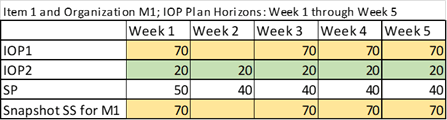
- There are multiple inventory optimization plans named IOP1 and IOP2 used in a supply plan named SP. Safety Stock Planning Method in the supply plan equals User-specified values for all items. The Item 1 and Organization M1 combination has final safety stock quantities in both IOP1 and IOP2. When running the supply plan with data refresh, the inventory optimization plan names used as demand schedules are processed in an alphabetical order. Therefore, the first record from IOP1 is used as the safety stock for this combination in the supply plan because IOP1 is processed alphabetically before IOP2.
Multiple Inventory Optimization Plans Used in a Supply Plan for an Organization
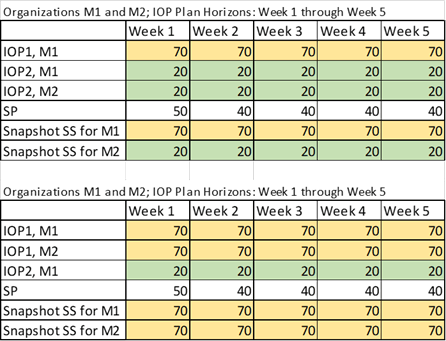
- There are multiple inventory optimization plans named IOP1 and IOP2 used in a supply plan named SP. Safety Stock Planning Method in the supply plan equals User-specified values for all items. Organizations M1 and M2 have final safety stock quantities in IOP1 and IOP2 for an item.
- In the first table, IOP1 has data for organization M1 and IOP 2 has data for organizations M1 and M2. Therefore, the first record from IOP1 is used as the safety stock for M1 in the supply plan because IOP1 is processed alphabetically before IOP2. IOP2 is used as the safety stock in the supply plan for M2 where there’s no overlap.
- In the second table, IOP1 has data for organizations M1 and M2 and IOP2 has data for organization M1. Therefore, the first record from IOP1 is used as the safety stock in the supply plan for M1 where there’s overlap because IOP1 is processed alphabetically before IOP2. IOP1 is also used as the safety stock in the supply plan for M2 where there’s no overlap.
Multiple Inventory Optimization Plans Used in a Supply Plan for Multiple Organizations
Steps to enable and configure
You don't need to do anything to enable this feature.
Tips and considerations
- Demand schedules use the Final Safety Stock Quantity measure from an inventory optimization plan to copy values to the Safety Stock measure in a supply plan or a demand and supply plan.
- If multiple demand schedules that use inventory optimization plans are added and have the same item and organization combination, supply planning uses the first demand schedule with that combination, not both.
- Run a supply plan or a demand and supply plan with data refresh after adding a demand schedule.
- Safety Stock is an inventory type measure that uses the latest value to aggregate in the time dimension.
- Planning exceptions:
- Use the Items Below Safety Stock exception to identify item and organization combinations where the Projected Available Balance measure value is less than the Safety Stock measure.
- Use the Items with Excess Inventory exception to identify item and organization combinations where the Projected Available Balance measure value is more than the Safety Stock measure for more days than the threshold value.
- Consider adding an inventory optimization plan’s segment group to the supply plan’s dimension catalog to compare safety stock quantities at an aggregate level.
- Use data bars for measure comparison in a supply plan table.
- You can add measure comparisons in a table by selecting the Measures icon in the toolbar.
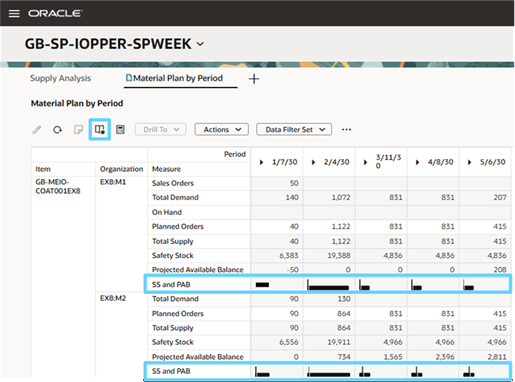
Data Bars That Compare Inventory Measures in a Supply Plan Table
Key resources
- Refer to the Cloud Applications Readiness content for the following Inventory Optimization Planning What's New 26C feature for more information on data bars for measure comparison in a table:
- Manage Plan Analytics for Inventory Optimization Plans
- Refer to the Cloud Applications Readiness content for the following Supply Planning What's New 26B feature for more information on configuring exceptions:
- Redwood: Configure Exceptions Using a New User Experience
- Refer to the Cloud Applications Readiness content for the following Supply Planning What's New 26A feature for more information on configuring exception sets:
- Redwood: Configure Exceptions Sets Using a New User Experience
Access requirements
Users who are assigned a configured job role that contains these privileges can access this feature:
- Edit Plan Options (MSC_EDIT_PLAN_OPTIONS_PRIV)
- Run Plan with Snapshot (MSC_RUN_PLAN_WITH_SNAPSHOT_PRIV)
These privileges were available prior to this update.