Use Firm Supplies Before Creating Planned Orders
In most environments, it is imperative to make the best use of existing inventory before creating orders for new supplies. You can now configure Supply Planning to use firm supplies within a configurable time window before creating new planned orders. This update improves planning accuracy by fully using committed supplies, such as work orders and purchase orders, reducing unnecessary planned orders. It also ensures optimal inventory levels by minimizing excess inventory and aligning supply with actual availability.
Prior to this update, when the firm supply occurred after the demand due date, Supply Planning created a planned order earlier than the firm supply to ensure the demand was met on time. In some cases, this may lead to excess inventory.
With this update, Supply Planning process ensures that all firm supplies are fully utilized within a configurable time window before creating any new planned orders.
Couple of new plan options Use All Firm Supplies before Creating Planned Order and Firm Supply Allocation Window Days are introduced in Supply Chain Planning -> Plan Options -> Supply -> General tab.
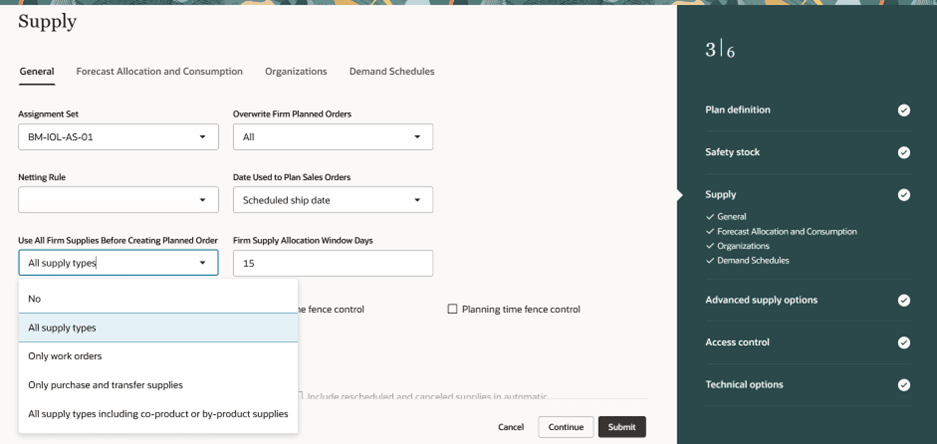
New Plan Options
If the plan option, Use All Firm Supplies before Creating Planned Order is set to:
- No: Supply Planning creates planned orders without using the firm supplies in future in order to satisfy the demand on time. This was the behavior prior to this update. This plan option value is the default value.
- All supply types: Uses all types of firm supplies before creating new planned orders. This includes work orders, non-standard work orders, purchase orders, transfer supplies, and firm planned orders. This option includes all firm supplies except byproduct and co-product supplies.
- Only work orders: Only future firm work orders are considered before creating new planned orders. This includes all types of work orders including discrete, process and flow. Firm supplies of other order types aren’t considered if this option is selected.
- Only purchase and transfer supplies: Only firm purchased, and transfer supplies are considered before creating new planned orders.
- All Supply Types Including Co-product/By-product Supplies: All firm supplies (including byproduct and co-product supplies) are used before creating planned orders. Supply Planning doesn’t reschedule byproduct and co-product supplies. They follow the scheduling of the supply that generates them. This choice allows these supplies to be netted for earlier demands. This may cause late demands but may reduce overall inventory.
You can specify the number of days in which you want to consider the firm supplies in the plan option Firm Supply Allocation Window Days. Supply plan considers the firm supplies starting from plan start date till the number of days specified in this option. If the firm supplies are beyond this window, then Supply Planning can create planned orders to satisfy the demand on time. If you don’t provide any value in the plan option Firm Supply Allocation Window Days, then the firm supplies are considered throughout the planning horizon.
The above two plan options are also provided for each planned organization. The values provided at organization level are more granular and plan will respect the organization level parameters if they are different from the plan level parameters. If there are no value provided at organization level parameters, then plan level value is considered.
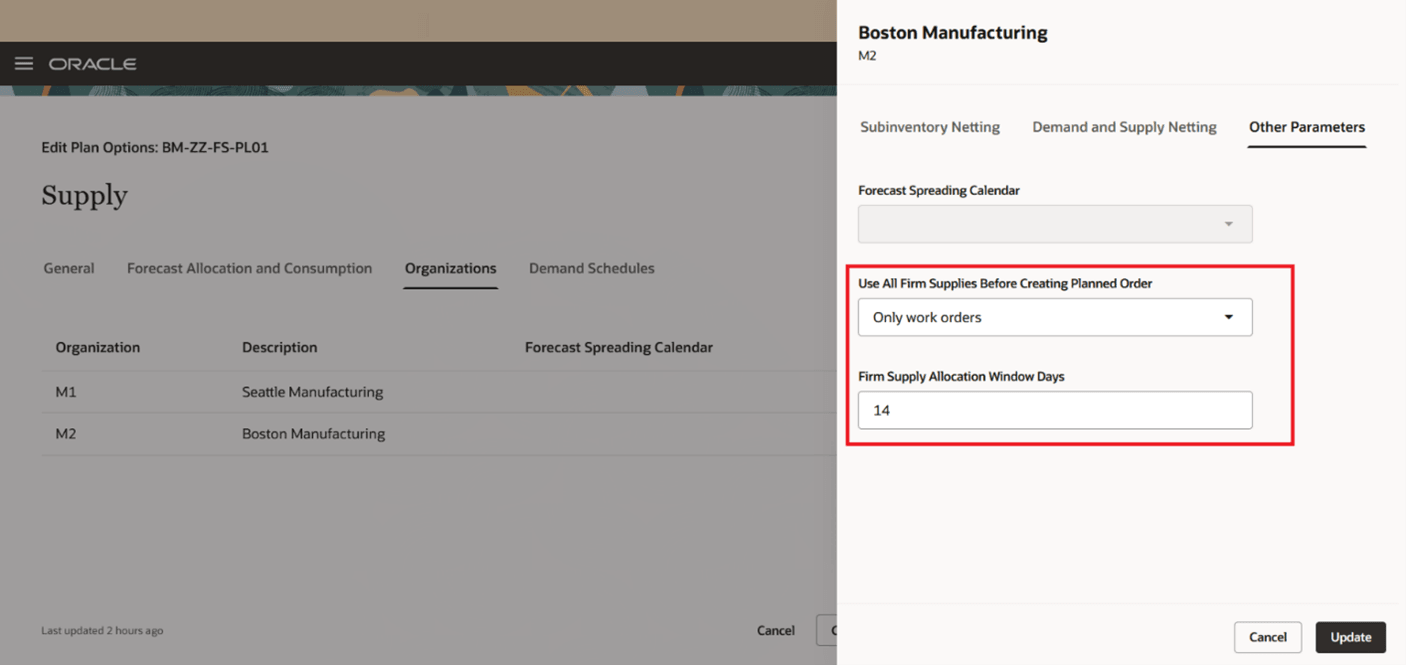
New Plan Options for Organizations
For example, consider that the plan level option Use All Firm Supplies before Creating Planned Order is selected as All supply types, and none of the values is selected at Organization parameters for this option. Then, Supply Planning respects the plan level option and all firm supplies in the Firm Supply Allocation Window Days are considered before creating planned orders. Now for organization M2, if you select the option Use All Firm Supplies before Creating Planned Order as Only work orders and Firm Supply Allocation Window Days as 14, then for this organization, only firm work orders within 14 days from plan start date are considered. For organization M2, the plan level options are ignored.
Let’s look into some use cases.
Use Case 1:
In this use case, item RA_COMP is the component of assembly item RA_ASSY. Manufacturing organization (MFG) is supplying the component to distribution organization (DIST), MFG -> DIST.
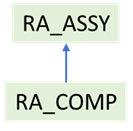
Item Structure
Following is the supply demand picture. In this case, the firm supply for RA_COMP in MFG organization has been moved by the planner from Day 2 to Day 6 to reflect a real delay in the system.
The behavior prior to this update was:
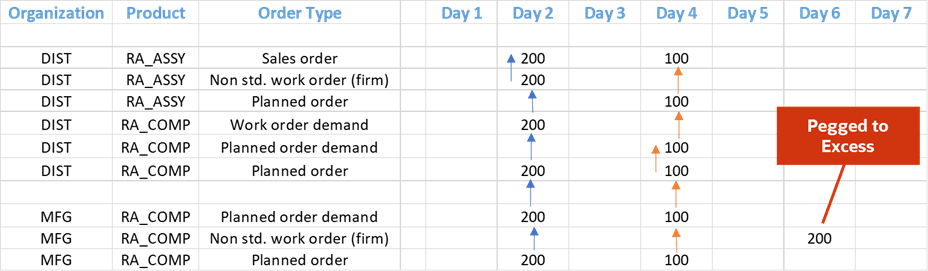
Prior behavior
Supply Planning has created the planned orders on day 2 and day 4 to satisfy the demand on time. The non-standard work order which was moved out due to real business reasons is pegged to excess as it is firm and later than the demand due dates.
With this update, the behavior has changed to:
The plan option Use All Firm Supplies before Creating Planned Order is set to All supply types and Firm Supply Allocation Window Days is set to 7.
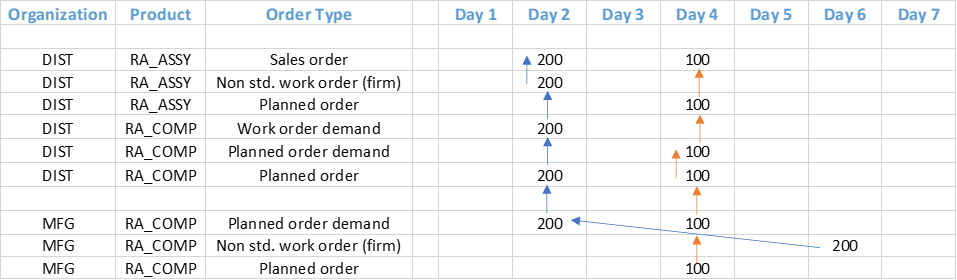
New behavior
In this case for the planned order demand on day 2 for item RA_COMP in organization MFG, unconstrained supply plan will search for firm supplies in next 7 days starting from the plan start date. There is a non-standard work order on day 6. Non-standard work orders are considered as firm in Supply Planning. The plan uses this supply to satisfy the planned order demand on day 2. For the demands on day 4, it creates the planned orders to satisfy the demands.
Use Case 2:
Following is the supply/demand picture of item RA_ASSY in the organization DIST. There are sales order on different days in the planning horizon. There are firm supplies on day 6 and day 8, and there is a non-firm work order on day 4. There are no lead times for this item.

Plan Inputs
After this update, following is the result of the supply plan:
The plan option Use All Firm Supplies before Creating Planned Order is set to All supply types and Firm Supply Allocation Window Days is set to 7.

Plan output with new behavior
To satisfy the demand on day 2 on time, the supply plan has rescheduled in the non-firm work order from day 4 to day 2. Supply Planning has satisfied the demands on day 4 and day 5 by using the firm supply on day 6 as it is within the firm supply allocation window. For the demand on day 7, the plan has created the planned order to satisfy the demand on time as it couldn’t use the firm supply on day 8 as it is outside the firm supply allocation window. The firm supply on day 8 is used to satisfy the demand on day 9.
Steps to enable and configure
You don't need to do anything to enable this feature.
Tips and considerations
- This feature is only supported for unconstrained supply plans.
- This feature is supported for both Supply plan and Demand and Supply plan types.
- By default, the value of plan option Use All Firm Supplies before Creating Planned Order is set to No and Firm Supply Allocation Window Days are disabled.
- Each organization can have different values of new plan options. For example, organization M1 can have Use All Firm Supplies before Creating Planned Order as Only purchase and transfer supplies, while organization M2 can have it as Only work orders. The values provided at organization level are more granular and the plan respects them if provided and ignore values at plan level for these new plan options.
Access requirements
Users who are assigned a configured job role that contains these privileges can access this feature:
- Monitor Supply Planning Work Area (MSC_MONITOR_SUPPLY_PLANNING_WORK_AREA_PRIV)
- Run Plan with Snapshot (MSC_RUN_PLAN_WITH_SNAPSHOT_PRIV)
- Edit Plans (MSC_EDIT_PLANS_PRIV)
These privileges were available prior to this update.