Business Growth Planning Workspace
You can use the new AI agentic application named Business Growth Planning Workspace to support the introduction of new products within a selected plan. You can review a prioritized list of new end items, see product descriptions and categories, and exclude products that you don’t want to include in demand planning. For planning the launches of new products, you can create product combinations and optionally copy measure data, such as demand history and demand forecasts. The workspace supports one or more new products that are based on one or more existing source products. You can use the AI-powered recommendations to identify similar new products and source products on the basis of descriptions for products and parent hierarchy members. The workspace can map new products to source products and include copy factor percentages.
You can further use the Growth Performance Assistant to review active requests for new product introductions that were created within the last 6 months, compare archived demand forecasts with actual demand history, generate a large language model (LLM)-based AI forecast from demand history, and accept that forecast into an editable forecast measure.
With this feature, you can accelerate new product introduction planning, improve forecast quality for products with limited history, and reduce manual analysis of source products, copy factors, and postlaunch performance.
More about the Business Growth Planning Workspace
To open the workspace, in the Supply Chain Planning work area, under Quick Actions, select Show More. The link to the workspace will be available under the Demand Management section.
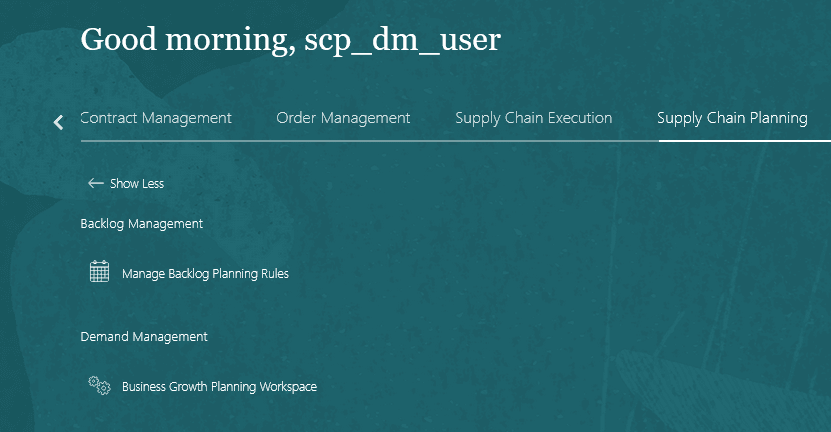
Navigation to Business Growth Planning Workspace
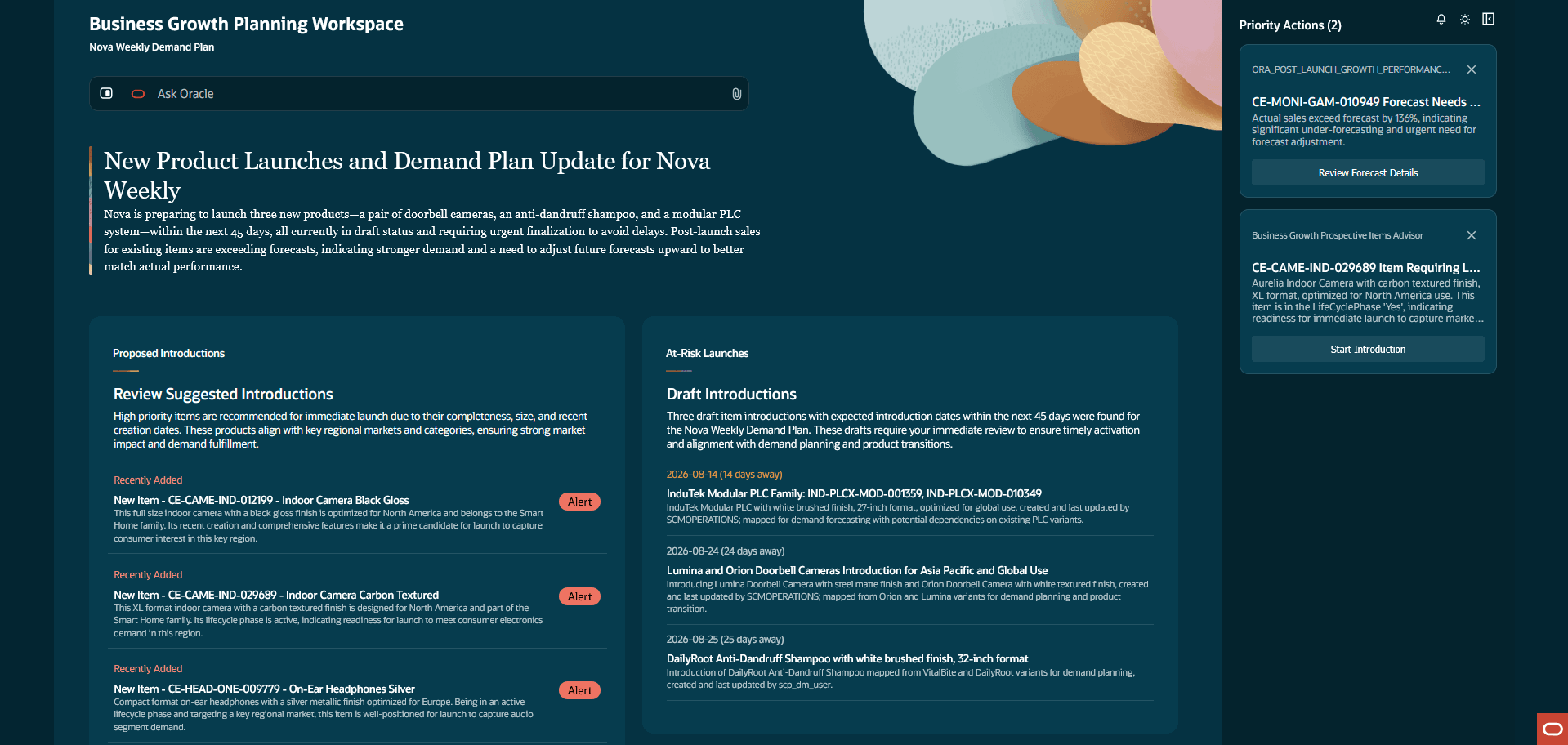
Business Growth Planning Workspace
Use Ask Oracle to set the plan name for the workspace. For example, use this prompt: “Set Plan Name to Nova Weekly Demand Plan.”
The workspace provides a guided, AI-assisted flow for introducing new products into a demand or demand and supply plan. Planners can review prioritized introductions, use Ask Oracle to identify a specific product, and review AI-suggested similar products and source products before submitting the introduction request. The workspace also proposes source-to-target mappings and copy factors for transferring demand history, forecasts, and other measures from existing products to new products. The workspace identifies product launches that require attention in a demand or demand and supply plan.
The Proposed Introductions panel lists five new products prioritized by creation date for the selected demand or demand and supply plan (for example, Nova Weekly Demand Plan). If the required item isn’t displayed in the panel, search for the item in the search bar. For example, you can enter the following: “I want to launch CE-MONI-OFF-001409.”
To introduce an item (for example, CE-CAME-IND-012199 - Indoor Camera Black Gloss), select it.
The AI agentic application suggests one or more new products that are similar to the product you are introducing. The recommendations are based on product descriptions and immediate parents for the Item level in the hierarchy for the Product dimension in the dimension catalog for the plan. The similar new products are displayed for your selection only when they can’t be automatically selected by the workspace because the confidence level is below the specified threshold in the profile option code named ORA_MSC_NMI_SIMILAR_NEW_PRODUCT_THRESHOLD.
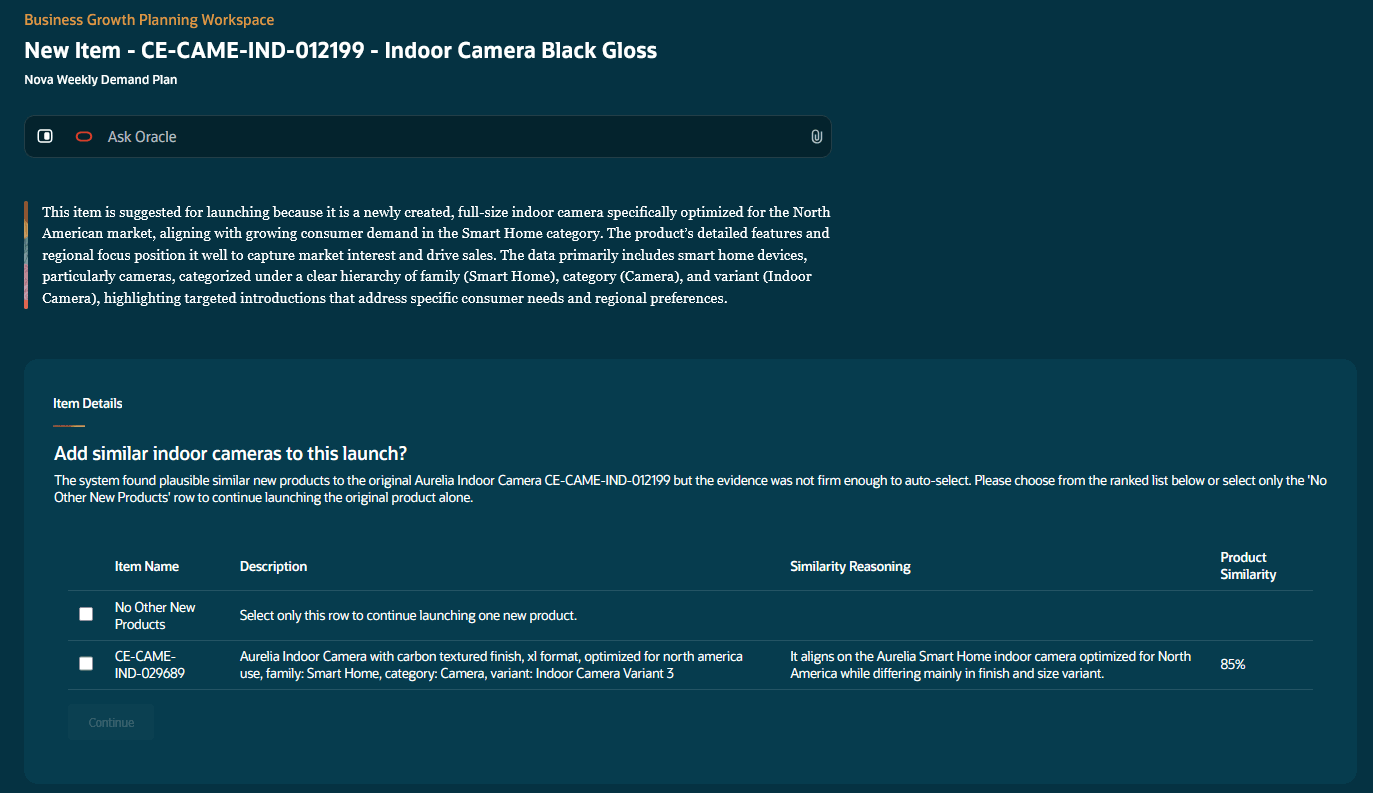
AI recommendations for selected item
You can select the checkboxes for the suggested new products or the No Other New Products checkbox, and select Continue. In the preceding screenshot, the item named CE-CAME-IND-029689 was added to the introduction.
Next, the AI agentic application can automatically add one or more source products to the introduction that are similar to the selected new products when the confidence is above the threshold specified in the profile option code named ORA_MSC_NMI_SIMILAR_SOURCE_PRODUCT_THRESHOLD. If the AI agentic application can’t automatically select the source products, they’re suggested for your selection.
The workspace suggests a copy factor for copying measure data from the source product combinations to the new product combinations.
The Introduction Date field defaults to 60 days from the current date.
The AI agentic application gets source-to-target measure mappings from the template specified in the profile option code named ORA_MSC_NMI_NPI_LAUNCH_TEMPLATE. If the specified template doesn’t exist or include source-to-target measure mappings, the introduction request is created without measure-mapping details.
Select Submit Introduction to create the introduction in the Draft status.
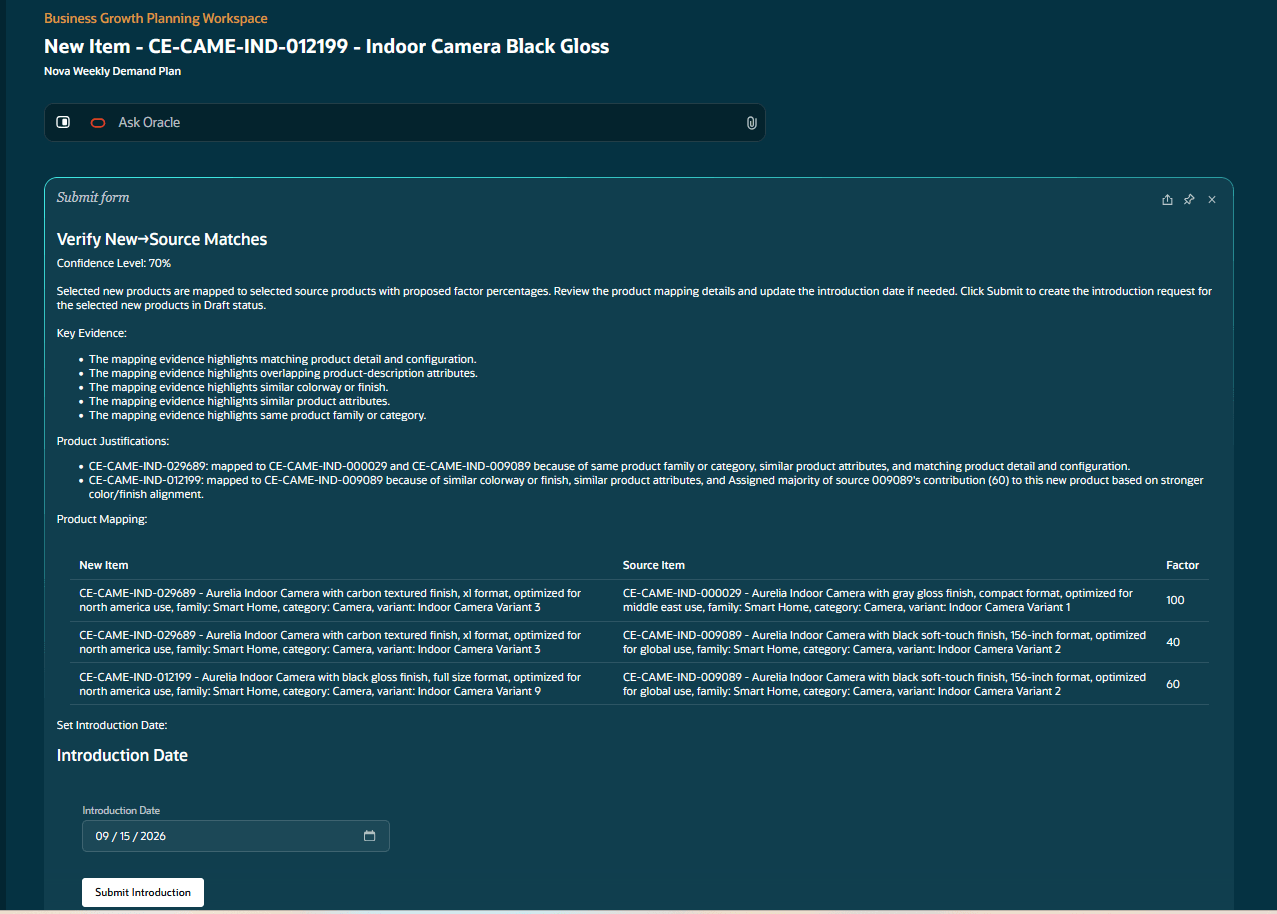
AI-generated source-product mappings and copy factors
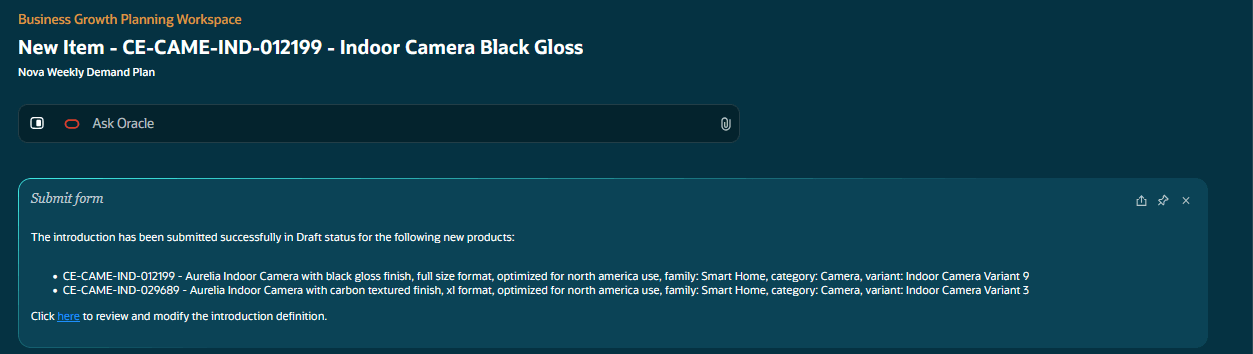
Confirmation page for introduction
In the confirmation page, select the provided deep link to open the introduction on the Redwood page named Introductions. The Introductions page will be filtered to the name and status of the plan. Further changes to the introduction definition, such as changing source products or mapping factors, can be made only in the guided process for introductions.
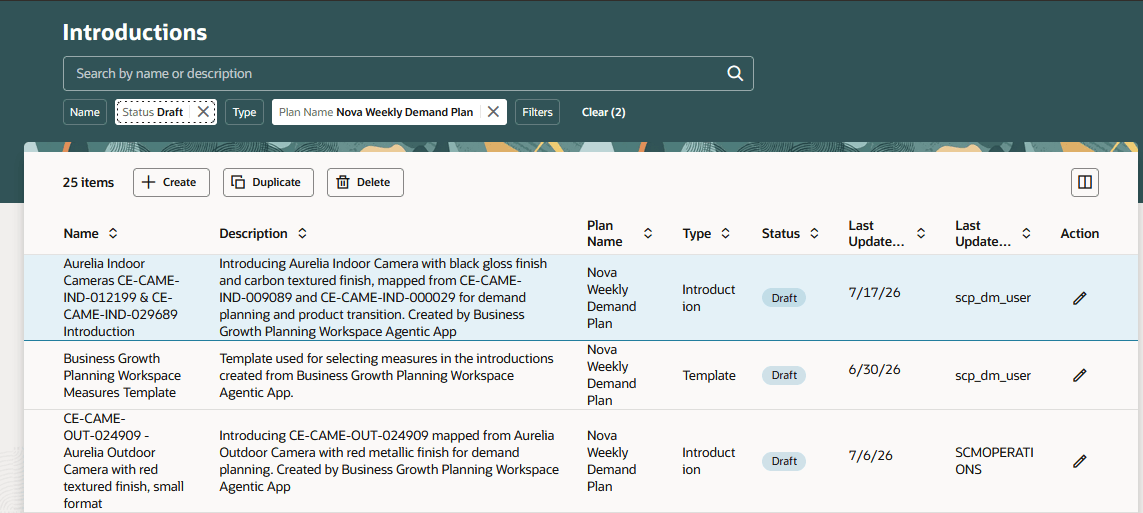
Introductions page
Open the guided process for the introduction, and select Submit to change the status to Active. Combinations will be created and measure data copied for the new products.
Postlaunch performance analysis
The Growth Performance Assistant helps you monitor recently launched products by comparing forecasts with actual demand history. The assistant identifies products with significant forecast deviations and recommends AI-generated forecasts that are according to historical demand patterns. You can review the forecast comparisons and accept the recommendations directly into an editable forecast measure.
The Growth Performance Assistant lists the new products with high forecast errors using the pivot table specified in the profile option code named ORA_MSC_NMI_NPI_LAUNCH_TRACKING_TABLE.
You can review the forecast recommended by AI for an item by selecting the corresponding row.
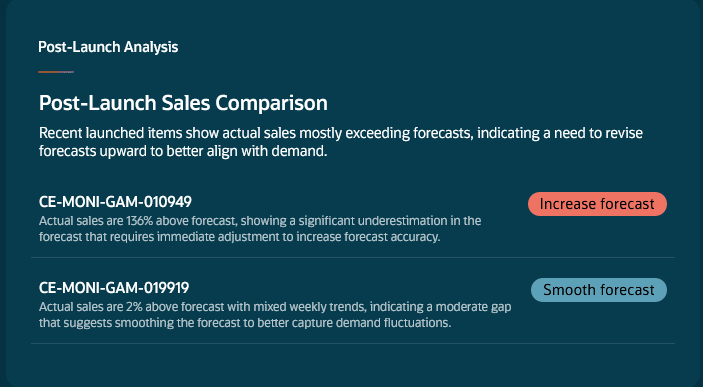
Post-launch sales comparison
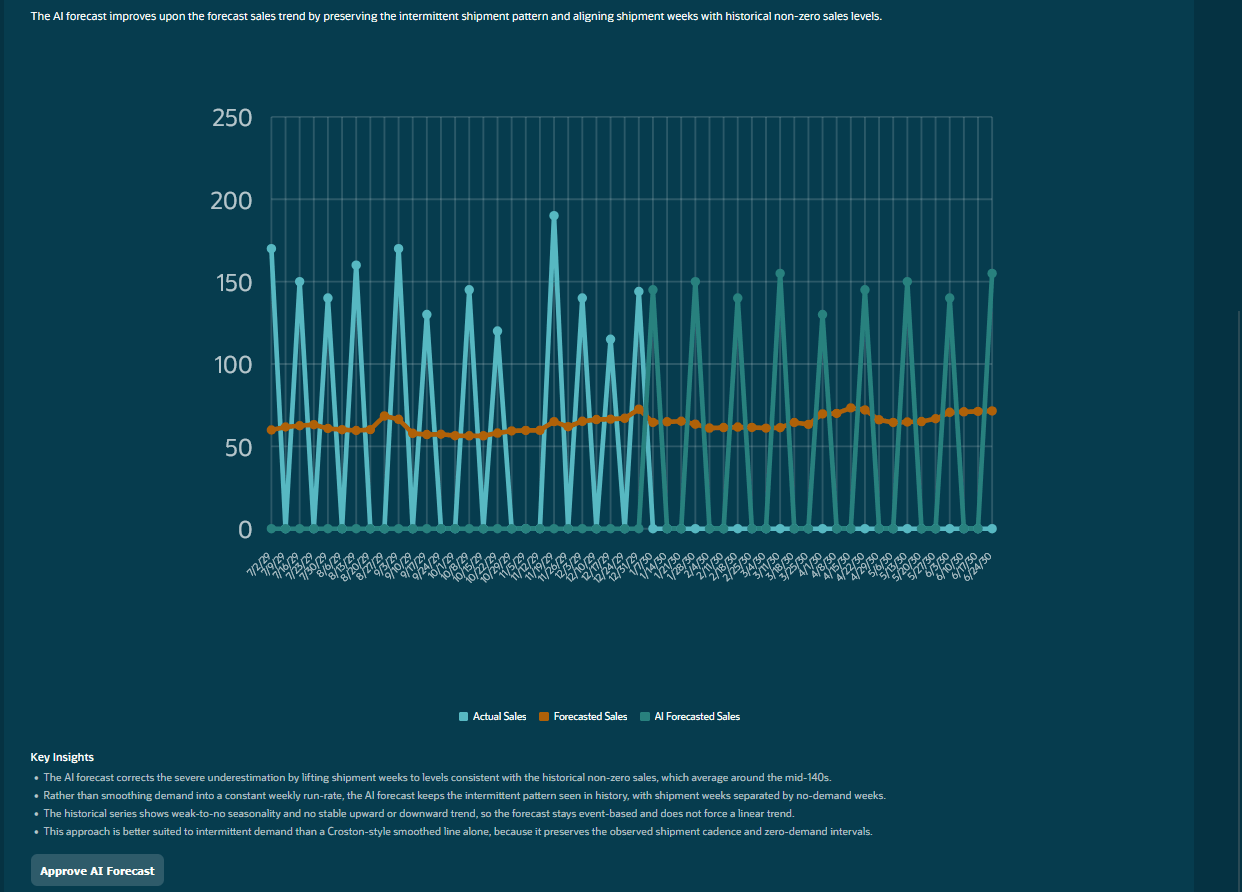
AI-generated forecast for selected item
Select Approve AI Forecast to write the AI-generated forecast to the editable measure included in the pivot table.
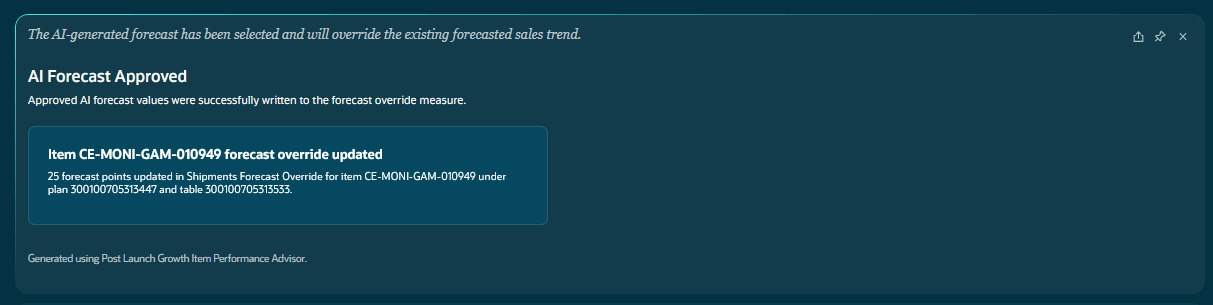
Confirmation message for approved AI-generated forecast
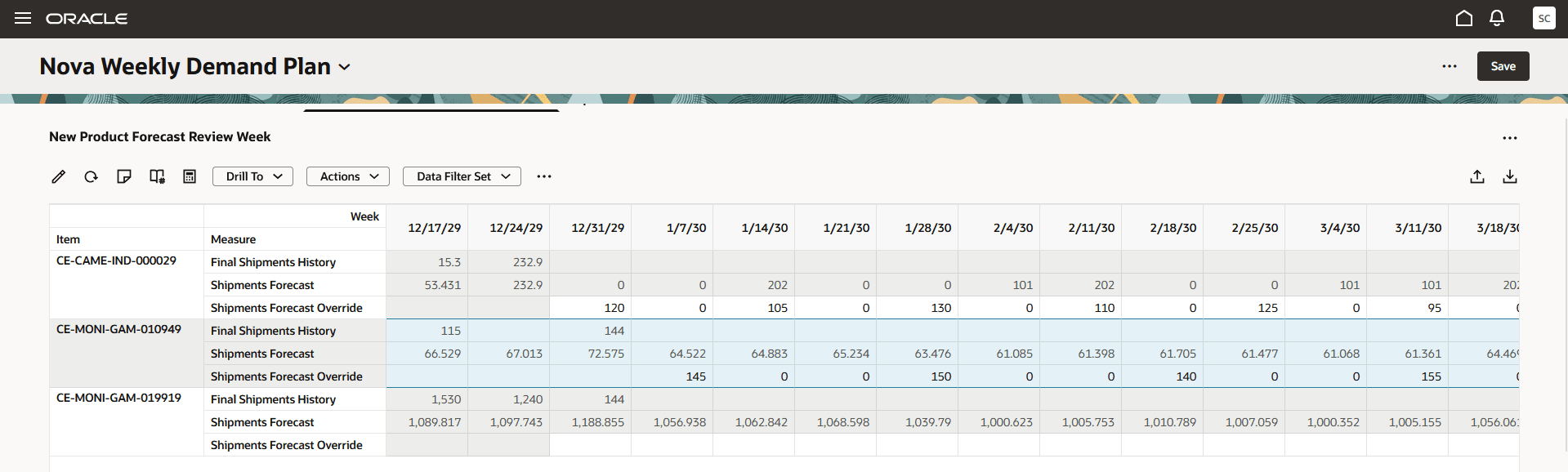
Pivot table with AI-generated forecast
Product launches at risk
The At-Risk Launches panel highlights draft introductions whose launch dates are within the next 45 days. This panel helps you identify pending introductions, resolve missing details, and complete approvals before the planned launch date.
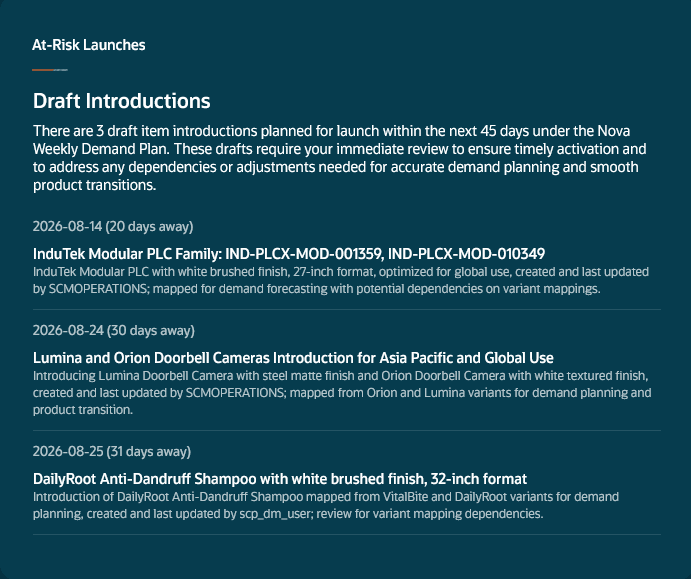
At-Risk Launches panel
Steps to enable and configure
- Ensure that you have the new duty role and new and existing privileges.
- For the Business Growth Planning Workspace to be available, ensure that the profile option code named ORA_MSC_DEMAND_MANAGEMENT_REDWOOD_ENABLED is set to Yes.
- For the Product dimension, define the default hierarchy while setting up the dimension catalog, or select the hierarchy on the Scope tab in the Plan definition step in the guided process for creating or editing the plan. The AI agentic application uses the parent of the Item level within the selected hierarchy as the search radius to identify similar new and source products.
- Configure the following profile option codes for the Business Growth Planning Workspace:
- ORA_MSC_NMI_NPI_LAUNCH_TEMPLATE: The value is the name of the introduction template that’s defined with measures.
- ORA_MSC_NMI_NPI_LAUNCH_TRACKING_TABLE
- ORA_MSC_NMI_SIMILAR_NEW_PRODUCT_THRESHOLD (The default value is 90, and only numeric values are accepted.)
- ORA_MSC_NMI_SIMILAR_SOURCE_PRODUCT_THRESHOLD (The default value is 90, and only numeric values are accepted.)
- Configure the pivot table for the profile option code named ORA_MSC_NMI_NPI_LAUNCH_TRACKING_TABLE as follows:
- Preferably, the time level of the pivot table should match the following:
- The planning time level or forecasting time level of the demand plan if it doesn't use a hybrid time hierarchy
- The forecasting time level of the demand and supply plan
- The forecasting time level of the demand plan if it uses a hybrid time hierarchy
- The pivot table should have only these measures that are filtered according to the new products for the last 6 months:
- The input measure (for example, Final Bookings History or Final Shipments History) for the forecasting profile of the plan
- The output measure (for example, Bookings Forecast or Shipments Forecast) for the forecasting profile, final forecast measure (for example, Final Bookings Forecast or Final Shipments Forecast), or archived forecast measure
- An editable measure with the same granularity as the output measure, final forecast measure, or archived forecast measure. This measure will accept the forecast from the AI agentic application.
- Preferably, the time level of the pivot table should match the following:
Oracle recommends using a new, editable measure for the forecast from the AI agentic application. If you use a predefined, editable measure (for example, Adjusted Bookings Forecast or Adjusted Shipments Forecast), any adjustments you make will be overwritten.
Tips and considerations
- This feature is applicable to demand and demand and supply plans.
- New product introduction requests are created in the Draft status and must be approved before product combinations are created, and measure data is copied.
Key resources
Refer to the Cloud Applications Readiness content for the following:
Visit https://redwood.oracle.com/ for more information about the Redwood experience.
Access requirements
Users must be assigned the Demand Planner job role.
If you’re using user-defined job roles, then you need to add the privileges identified as new in this update as well as validate that you have the existing privileges that are listed:
| Privilege status | Privilege name and code |
|---|---|
| Existing | Edit Data in Planning Tables MSC_EDIT_DATA_IN_PLANNING_TABLES_PRIV |
| New | Edit Introductions of Members MSC_EDIT_INTRODUCTIONS_OF_MEMBERS_PRIV |
| Existing | Monitor Demand Management Work Area MSC_MONITOR_DEMAND_MANAGEMENT_WORK_AREA_PRIV |
| New | View Introductions of Members MSC_VIEW_INTRODUCTIONS_OF_MEMBERS_PRIV |
| Existing | View Planning Tables MSC_VIEW_PLANNING_TABLES_PRIV |
| Existing | View Plans MSC_VIEW_PLANS_PRIV |
If you’re using custom job roles, then you need to add the duty role identified as new in this update:
| Duty role status | Duty role name and code |
|---|---|
| New | Business Growth Planning Workspace ORA_MSC_BUSINESS_GROWTH_PLANNING_WORKSPACE_DUTY |