Support date measures during export and import
You can now use the existing Redwood tables to export and import editable, date-type measures. You can export a table that contains date-type measures to a Microsoft Excel-compatible file, update the date values in Microsoft Excel, and import the updated file back into the application. Date-type measures, such as Adjusted Launch Date and Adjusted Discontinuation Date, are exported in the date format, and their values are recognized as dates when the exported file is opened in Microsoft Excel. When you import the updated file, the import process recognizes values for date measures and updates them.
This capability improves maintenance of editable, date-type measures and makes their updates more consistent with those for number measures.
In the following screenshot, you can see the values for the Adjusted Launch Date and Adjusted Discontinuation Date measures for four items in a pivot table before it’s exported to a Microsoft Excel file.
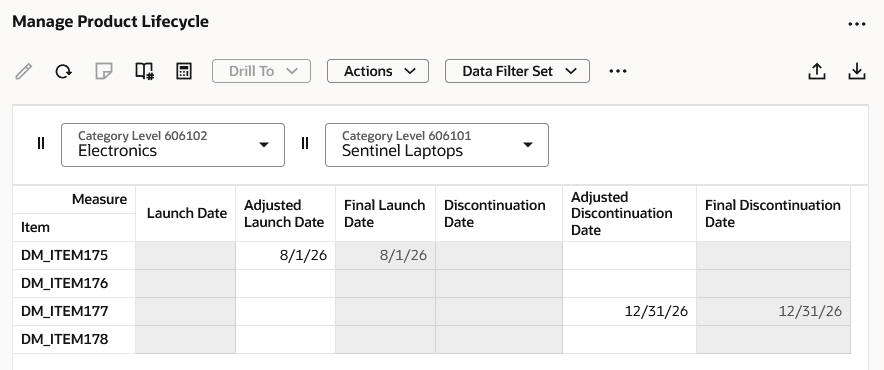
Pivot table before export
In the following screenshot, you can see that the values for the Adjusted Launch Date and Adjusted Discontinuation Date measures for the four items have been changed in Microsoft Excel.

Edited values for measures in Microsoft Excel
In the following screenshot, you can see that the updated measure values for the four items are reflected in the pivot table after the import of the Microsoft Excel file.
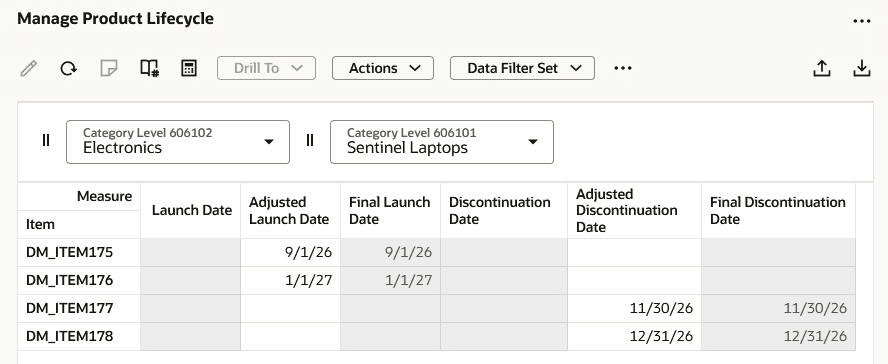
Pivot table after import
Steps to enable and configure
Use the Opt In UI to enable this feature. For instructions, refer to the Optional Uptake of New Features section of this document.
Offering: Supply Chain Planning
Tips and considerations
If you want to use the Redwood: Support Date Measures During Export and Import feature, then you must opt in to its parent feature: Replenishment Planning. If you’ve already opted in to this parent feature, then you don’t have to opt in again.
Key resources
Visit https://redwood.oracle.com/ for more information about the Redwood experience.
Access requirements
Users who can currently export data from and import data to pivot tables can use this functionality.
If you’re using user-defined job roles, then you need to add the privileges identified as new in this update as well as validate that you have the existing privileges that are listed.
| Privilege status | Privilege name and code |
|---|---|
| Existing |
Edit Data in Planning Tables MSC_EDIT_DATA_IN_PLANNING_TABLES_PRIV |
| Existing |
Export Planning Data MSC_EXPORT_PLANNING_DATA_PRIV |