Specify override values for policy parameters and target values in decimals
You can now use decimals for target service levels, policy parameters, and policy overrides in replenishment planning.
You can also view values in decimals while comparing policy values or simulating changes to policy parameters and override values. Furthermore, measures for quantities, days, the reorder point (ROP), the economic order quantity (EOQ), and safety stock may be computed and displayed in decimals.
This functionality helps improve planning precision by enabling you to model target service levels, policy parameters, and policy overrides with decimals. You can enable decimals by segments to avoid upgrade impacts.
These segment-level policy parameters now can be specified in decimals:
- EOQ override
- Extrapolation percentage
- Maximum override
- Minimum override
- Maximum quantity days of cover
- Order quantity override
- ROP override
- Safety stock days of cover
- Safety stock override
- Target service-level percentage
These item-location level policy overrides now can be specified in decimals.
- EOQ override
- Maximum override
- Minimum override
- Order quantity override
- ROP override
- Safety stock override
The values for these policy measures now can be entered or computed in decimals:
- Adjusted EOQ
- Adjusted Maximum Days
- Adjusted Maximum Quantity
- Adjusted Minimum Days
- Adjusted Minimum Quantity
- Adjusted ROP Days
- Adjusted ROP Quantity
- EOQ
- Final EOQ
- Final Maximum Days
- Final Maximum Quantity
- Final Minimum Days
- Final Minimum Quantity
- Final ROP Days
- Final ROP Quantity
- Item Order Quantity
- Maximum Days
- Maximum Quantity
- Minimum Days
- Minimum Quantity
- Previous Maximum Days
- Previous Maximum Quantity
- Previous Minimum Days
- Previous Minimum Quantity
- Previous ROP Days
- Previous ROP Quantity
- ROP Days
- ROP Quantity
- Safety Stock
- Safety Stock Days
- Suggested Average Daily Demand
- Suggested EOQ
- Suggested Maximum Days
- Suggested Maximum Quantity
- Suggested Minimum Days
- Suggested Minimum Quantity
- Suggested Order Quantity
- Suggested ROP Days
- Suggested ROP Quantity
- Suggested Safety Stock
- Suggested Safety Stock Days
Steps to enable and configure
Use the Opt In UI to enable this feature. For instructions, refer to the Optional Uptake of New Features section of this document.
Offering: Supply Chain Planning
To control the number of decimal places to be displayed on the UI, use the profile option code named MSC_QUANTITY_DECIMAL_PRECISION. You can specify a maximum of four decimal places.
To compute policy values in decimals, select the Enable policy values in decimals checkbox on the Policy Parameters tab in the drawer for the policy parameters for a segment in a policy assignment set.
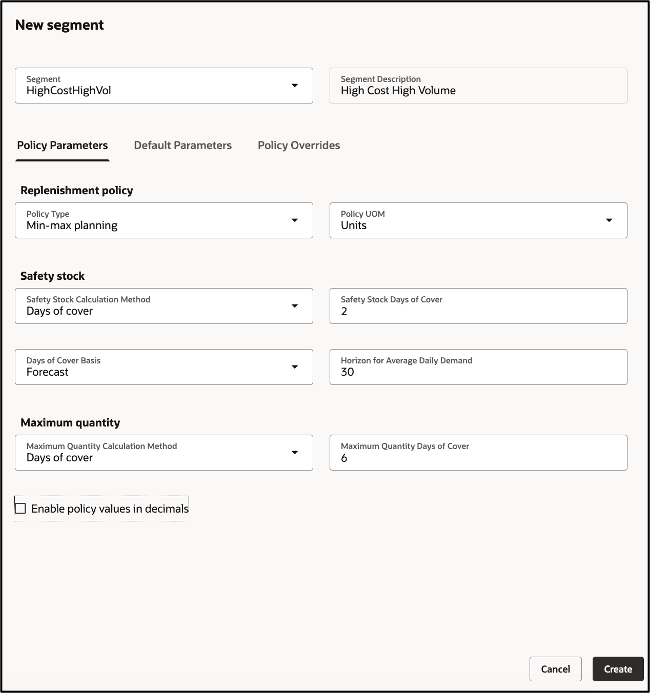
Checkbox for enabling policy values in decimals
Tips and considerations
If you want to use the feature, then you must opt in to its parent feature: Replenishment Planning. If you've already opted in to this parent feature, then you don't have to opt in again.
Key resources
- Introduction to Replenishment Planning Cloud (Update 19D) in the readiness training
- Replenishment Planning Training on Oracle Cloud Customer Connect
Visit https://redwood.oracle.com/ for more information about the Redwood experience.
Access requirements
If you’re using user-defined job roles, then you need to add the privileges identified as new in this update as well as validate that you have the existing privileges that are listed.
| Privilege status | Privilege name and code |
|---|---|
| Existing |
Manage Segments |
| Existing |
Monitor Replenishment Planning Work Area |