Capture and process service fiscal documents
Capture Brazil service fiscal documents from standardized XML files or through manual entry in Fiscal Document Capture, and process them through Receiving, Receipt Accounting, and Payables invoice creation.
The Standard Service fiscal flow supports service fiscal documents for services purchased from a service provider, including the NFS-e Service Fiscal Document, NFSe-62 Communication, and NFSe_66 Electricity models.
Fiscal Document Capture captures service fiscal document attributes from NFSe XML, including service codes, supplier and buyer details, service tax attributes, and Brazil tax reform fields supplied in supported XML files. Service fiscal documents can be matched to eligible purchase orders and receipts, including quantity-based and amount-based service lines, before supplier accruals and payables invoices are generated.
This enhancement helps organizations to:
- Automate service fiscal document capture and reduce manual invoice entry.
- Improve control by deriving service items from configured service code and fiscal classification associations.
- Connect service fiscal documents to downstream Receiving and Payables processing for end-to-end traceability.
Steps to enable and configure
- You don't need to opt in to use this feature.
- Configure or confirm the Standard Service fiscal flow for Brazil service fiscal documents.
- The ORA_NFSe model for Service Fiscal Documents is enabled by default.
- For other models, such as NFSe-62 Communication and NFSe-66 Electricity, define the applicable values using the Manage Standard Lookups task before using the models.
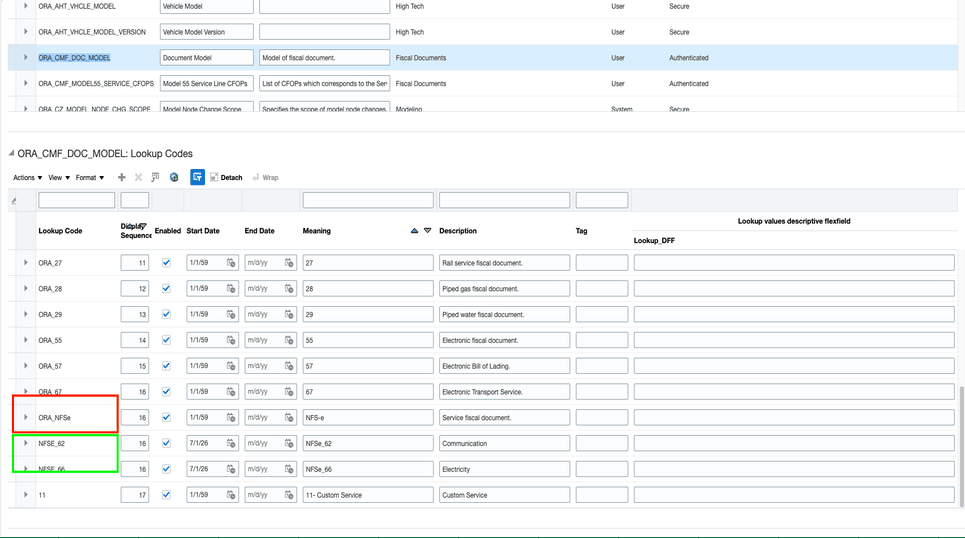
Fiscal document model configuration in manage standard lookups page.
- Configure service items and associate them with the item category codes used for service item derivation, such as LACLS_NCM_SERVICE_CODE and LACLS_BR_NBS_CODE, where applicable.
- Use XML import or manual entry to capture service fiscal documents. Review Interface Exceptions and correct any errors before matching the fiscal documents and creating invoices.
Tips and considerations
- If item derivation from the XML can't identify a valid item, identifies an invalid catalog association, or derives multiple possible items, the fiscal document remains in Interface Exceptions until the issue is corrected.
- For fiscal documents imported through XML, fiscal document lines initially use the Quantity line type. If required, you can change the line type to Amount in Interface Exceptions.
- For service lines where a unit of measure (UOM) isn't provided, the line quantity defaults to 1.
- Fiscal flow derivation isn't dependent on the CFOP.
- If no eligible purchase order is derived, the fiscal document is processed as a No Source document.
- Tax attributes captured from the service fiscal document are available for downstream receipt and Payables invoice processing.
Key resources
- Oracle Fusion Cloud SCM: Using Fiscal Document Capture, available on the Oracle Help Center.
- Oracle Fusion Cloud SCM: Implementing Manufacturing and Supply Chain Management - Fiscal Document Capture, available on the Oracle Help Center.
Access requirements
| Existing or New | Privilege Code and Title |
|---|---|
| Existing | Capture Fiscal Document (CMF_ENTER_FISCAL_DOCUMENT) |
| Existing | Process Electronic Fiscal Documents (CMF_PROCESS_E_FISCAL_DOCUMENTS) |
| Existing | Record Incoming Fiscal Documents using a Web Service (CMF_ENTER_FISCAL_DOCUMENT_WEB_SERVICE) |