Support destination warehouses in parts search
The Parts Search program now supports supply chain transit times to destination inventory locations. To allow specific field stocking locations and technicians to have different parts sourcing rules than others in the same shipping zone, the Service Logistics Parts Search program now checks if the destination inventory location has source/origin stocking locations set up in the Manage Transit Times UI. If it does, the Parts Search will only use these transit times when looking for the required parts. If none of these source stocking locations have the required parts, the Parts Search program does NOT use the shipping zone of the ship-to address to look of the required parts.
This functionality is available when sourcing parts for service work orders, third party work orders, field stocking location replenishment, and field service technician trunk stock replenishment.
This feature gives service providers the flexibility to set up unique parts source rules for different lines of business within the same geographic area, helping them meet evolving legal and logistics requirements.
Steps to enable and configure
The Parts Search program, which uses transit times to find stocking locations that can supply the required parts, now supports transit times setup for destination stocking locations. Stocking Locations (Inventory Organizations and Sub-inventories) are assigned Internal Locations in the Manage Locations UI.
To enable this feature, create transit times from source stocking locations to the Internal locations of your destination stocking locations.
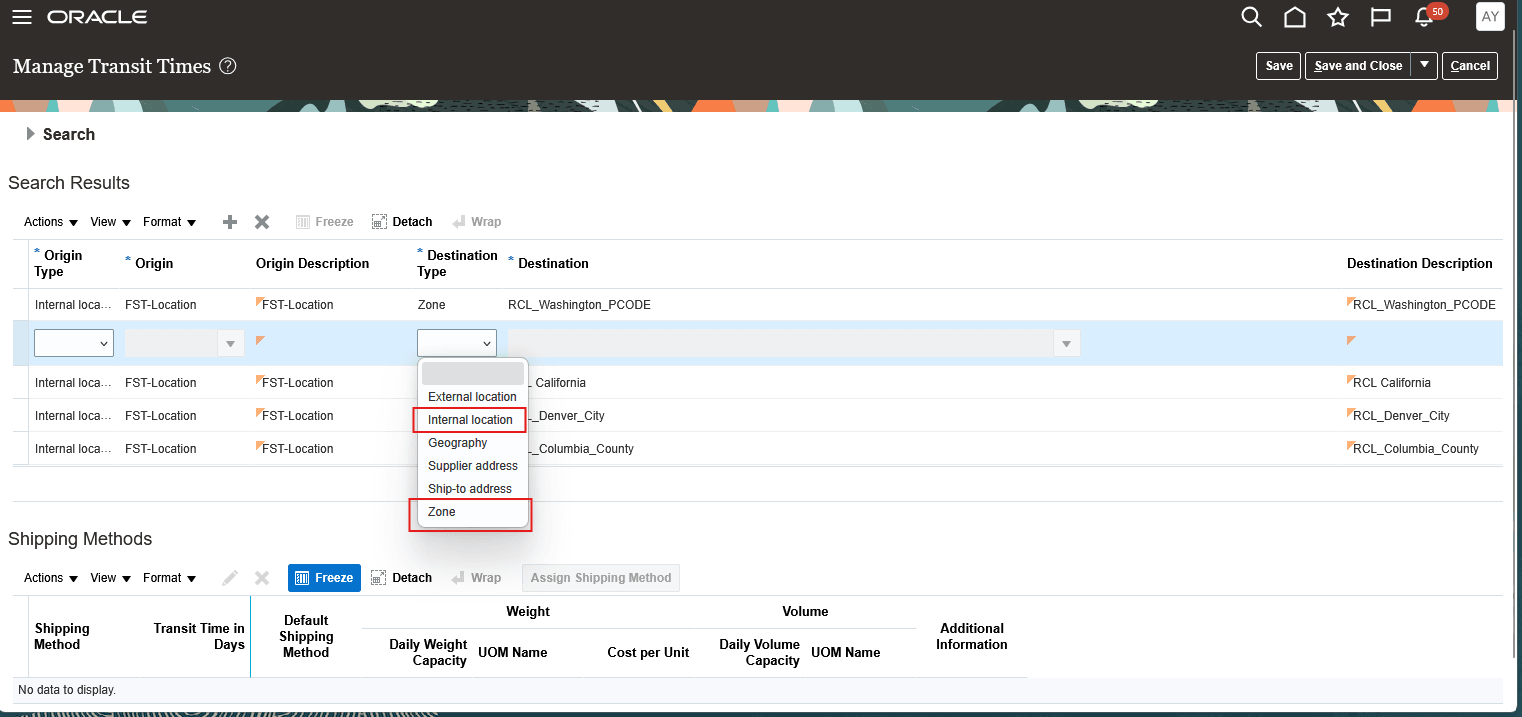
Transit Times Destination Type LOV
Access requirements
Users need all these privileges to access this feature:
access requirements
| Privilege status | Privilege name and code |
|---|---|
| Previously delivered | Access Standalone Parts Ordering Page (RCL_PARTS_ACCESS_STANDALONE_PAGE) |
| Previously delivered | View Requirement Lines (RCL_PARTS_REQ_VIEW) |